当前位置:网站首页>C# 启动一个外部exe文件,并传入参数
C# 启动一个外部exe文件,并传入参数
2022-06-11 15:55:00 【熊思雨】
在我们常用的一些软件中,经常有些软件,双击之后根本打不开,这是因为启动时做了限制,我们需要传入一些参数才能打开,在工作中,这个需求也可以用在软件的自动更新上,在Unity里,有XLua,ILruntime 等框架进行热更新,在Winform中,由于Windows的机制,打开软件后,不能做文件替换工作,我们可以利用一个软件启动器,更新本地软件的文件,然后再启动软件,就达到了自动更新的目的,当然,软件本地也不能直接双击打开。
新建一个winform 项目,界面如下,用来做一个软件启动器
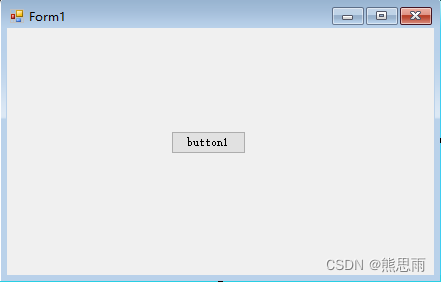
只需要添加一个按钮,给按钮添加点击事件,代码如下:
using System;
using System.Collections.Generic;
using System.ComponentModel;
using System.Data;
using System.Diagnostics;
using System.Drawing;
using System.Linq;
using System.Text;
using System.Threading.Tasks;
using System.Windows.Forms;

namespace 启动器
{
    public partial class Form1 : Form
    {
        public Form1()
        {
            InitializeComponent();
        }

        private void button1_Click(object sender, EventArgs e)
        {
            string path = "E:\\CSharp Project\\Test\\Test\\bin\\Debug\\Test.exe";
            string[] parameter = {"启动器参数1", "启动器参数2", "启动器参数3", "启动器参数4" };
            bool startResult = StartProcess(path, parameter);
            if (startResult)
                System.Environment.Exit(0);
        }

        /// <summary>
        /// 启动一个软件,并传入参数
        /// </summary>
        /// <param name="runFilePath"></param>
        /// <param name="args"></param>
        /// <returns></returns>
        public bool StartProcess(string runFilePath, params string[] args)
        {
            string s = "";
            foreach (string arg in args)
            {
                s = s + arg + " ";
            }
            s = s.Trim();
            Process process = new Process();//创建进程对象
            ProcessStartInfo startInfo = new ProcessStartInfo(runFilePath, s); // 括号里是(程序名,参数)
            process.StartInfo = startInfo;
            process.Start();
            return true;
        }

    }
}
下面新建第二个项目,用来做软件的本体
新建一个winform项目,里面什么都不用加,先设置软件的输出类型为控制台

然后打开启动脚本 Program.cs ,添加参数的打印,由于软件刚启动时,控制台也刚打开,立马打印会看不见日志,于是我这里加了异步延时操作。
using System;
using System.Collections.Generic;
using System.Linq;
using System.Threading.Tasks;
using System.Windows.Forms;

namespace Test
{
    static class Program
    {
        /// <summary>
        /// 应用程序的主入口点。
        /// </summary>
        [STAThread]
        static void Main(string[] args)
        {
            Task.Run(async () =>
            {
                await Task.Delay(TimeSpan.FromSeconds(5));
                if (args.Length > 0)
                {
                    for (int i = 0; i < args.Length; i++)
                    {
                        Console.WriteLine("参数是:" + args[i]);
                    }
                }
                else
                    Console.WriteLine("args参数是0");
            });

            Application.EnableVisualStyles();
            Application.SetCompatibleTextRenderingDefault(false);
            Application.Run(new Form1());
        }
    }
}
现在开始测试,打开软件启动器,点击按钮,5秒后,然后就可以看到控制台的输出

这里就可以对参数做一个限制了,如果参数不正确,直接return,用户就不能直接打开软件了
end
边栏推荐
- Elk enterprise log analysis system
- Why are bugs changing more and more?
- rf中安装的第四步:安装 robotframework-selenium2library报错
- [LeetCode每日一题] |686.重复叠加字符串匹配
- Tianjin Port coke wharf hand in hand map flapping software to visually unlock the smart coke port
- PostgreSQL startup process
- Take you in-depth understanding of AGC cloud database
- Opengauss database flashback function verification
- What if you can't access the desktop after the computer is turned on
- Deep separable convolution
猜你喜欢

Project workspace creation steps - Zezhong ar automated test tool

Data enhancement

DHCP protocol instantiation analysis
Opengauss enterprise installation

如何优化 Compose 的性能?通过「底层原理」寻找答案 | 开发者说·DTalk

AI tool for cutting-edge technology exploration: analog detection
再聊数据中心网络

Maui introductory tutorial series (1. framework introduction)

收藏 |彻底搞懂感受野的含义与计算

Opengauss database flashback function verification
随机推荐
Factory calibrated gravity: working principle and installation position of carbon monoxide sensor, calibration standard description
Nielseniq announces appointment of Tracey Massey as chief operating officer
Overview and example analysis of opengauss database performance tuning
完整的测试流程【杭州多测师】【杭州多测师_王sir】
MAUI 入门教程系列(1.框架简介)
书籍《阅读的方法》读后感
【sql语句基础】——删(delete) /改(update)
Opengauss database ODBC environment connection configuration (Windows)
GO語言-值類型和引用類型
DHCP protocol instantiation analysis
MSDN download win11 method, simple and easy to operate
问题 AC: 中国象棋中的跳马问题
收藏 |彻底搞懂感受野的含义与计算
Yiwenjiaohui your database system tuning
Go Language - value type and Reference Type
selenium--显示等待(中)--详解篇
再聊数据中心网络
Db4ai: database driven AI
3000 words to teach you how to use mot
Memory optimization table mot management