当前位置:网站首页>DHCP protocol instantiation analysis
DHCP protocol instantiation analysis
2022-06-11 16:05:00 【jasonj33】
use wireshark Grab DHCP Client and DHCP Dynamic allocation between servers IP Address and configuration parameters , As shown in the figure below :

Analysis of the whole process
- message 1
This is a message sent by the client DHCP Discover news .DHCP Discover The message is that all hosts pass DHCP Protocol configuration IP Address and parameters , The first message sent . Its purpose is to discover DHCP The server , And request parameters . Because the client has not been allocated IP Address , So source IP The address is 0.0.0.0. Because the client doesn't know DHCP Server's IP Address , But it needs to be sent to the server in the LAN , So we can only broadcast DHCP Discover The message goes out , Purpose IP The address is 255.255.255.255.DHCP It's the application layer protocol , Must be based on transport layer protocol , The transport layer protocol is either TCP、 Or UDP. Broadcast mode can only be used UDP agreement , therefore ,DHCP Discover Messages must use UDP Protocol transfer . The message is Transaction ID yes 0xe9afd0f3, It is actually DHCP Agreement field xid, Business ID, This is the number randomly selected by the client , Use it to correlate all subsequent events triggered by this message DHCP news , That is to say, the follow-up messages are sent by the client DHCP news , It was sent by the server DHCP news , This Transaction ID It's all the same
- message 2、3、4
These are three identical broadcasts ARP Request message , Request host 119 Of MAC Address , The host sending these three messages is 188. It can be seen from the following message ,119 yes DHCP Assigned by the server to the client IP Address ,188 yes DHCP Server's IP Address . So in other words ,DHCP Server to the 119 request MAC Address , But at this time 119 Not assigned to client , Then why do you want to 119 request MAC The address? ? We know ARP To ask except explicitly MAC Address , It can also implicitly check whether there is a target in the broadcast domain IP Address . As long as there is ARP Respond to , That means there is a goal IP Address , No, ARP Respond to , Indicates that there is no target IP Address . therefore , Here is DHCP The server is receiving DHCP Discover After the news , First, you need to confirm the... Assigned to the client IP Whether the address has been used by other hosts in the subnet , Three messages were sent ARP Request message , Spy on this IP Address usage . stay rfc 2131 Description , Here is the use of ICMP Echo Request Message detection . It's fine too , But it must be broadcast
- message 5
This is also sent by the client DHCP Discover news , From its Transaction ID 0xc7e5f40b See , It's another DHCP Discover news . Then why does the client send another message ? Generally, the retransmission is due to timeout , The time interval between the two messages differs 3 Seconds or more , It must be because of the previous DHCP Discover The message was not received DHCP offer Timed out in response to the message , So I resend one DHCP Discover news
- message 6
This is sent by the server DHCP offer news , From its Transaction ID by 0xe9afd0f3 You know , It is the first message sent to the client DHCP Discover Response to the message . Because the client has not IP Address , So the server must broadcast DHCP offer The message was sent , So that the client can receive . therefore DHCP offer Purpose IP The address is a restricted broadcast address , The source address is the server IP Address , It's a UDP message .DHCP offer The message is that the server tells the client what configuration parameters it can provide
- message 7
This is also sent by the server DHCP offer news . From its Transaction ID by 0xc7e5f40b See , It is retransmitted to the client DHCP Discover Response to the message . From that , No matter how many repeated messages the client sends DHCP Discover,DHCP The server will respond
- message 8、9
message 8 It was sent by the client to the server DHCP Request news , Or by broadcasting . As you can see from here , Although the previous server sent DHCP offer Has brought the server's IP Address , But the client did not try to get this IP After the address , Send by unicast DHCP Request. The guess here is that the client may receive DHCP offer When the news , The target is compared only at the network layer IP Address , Then send the data to the upper layer , application layer DHCP The obtained data does not contain the source IP, That is to say DHCP Server's IP Address . adopt DHCP Request News Transaction ID by 0xc7e5f40b You know , Although the client received the first message DHCP Discover The response message to the message DHCP offer, But did not send their associated DHCP Request news . In fact, it's easy to understand , From the client's point of view , The first thing it sends DHCP Discover The message has timed out , Then this line has become invalid , Even if a timeout message is received later DHCP Discover The response message to the message DHCP offer, It will not continue to deal with this line .DHCP Request The message is that the client requests the server to allocate IP Address and parameter request messages , It is also an implicit choice of servers
message 9 Is received by the server DHCP Request The response message to the message DHCP Ack, It is also the broadcasting mode used .DHCP Ack The message is officially provided by the selected server IP Address and assign configuration parameters to the client
- message 10、11
Does the client receive DHCP Ack The message is immediately configured IP The address ? It's not . If you have studied for free ARP, You should know that the host network card is set IP Before the address , Need to send free ARP, Make sure this IP Whether the address is used by other hosts in the subnet . So the client network card is set IP Before the address , Will send ARP Probe message , Make sure there are no conflicts , To set this IP Address . Set the IP After the address , And send ARP Announcement message , Further confirm the set IP Is there a conflict of address
- message 12、13
message 12 Yes IP Address client , Sent to server ARP request , message 13 The server replied ARP Respond to . The client does not need to send messages to the server , Why send ARP Request message to request the server's MAC The address? ? I guess I can think about it from another angle , This ARP The request is actually what the client wants to tell the server : I have configured your assigned IP Address . This will lead to the message 17 The server queries the client
- message 17、18
message 17 The server sends to the client ARP request , message 18 It is replied by the client ARP Respond to . As it says , message 12 Maybe the client wants to tell the server : I have configured your assigned IP Address . Then the server sends a message ARP Request to client , The purpose is to ask the client if you are sure that it has been configured ? When received from client ARP After response , The server knows that it is indeed configured
Specific message analysis
The following picture only captures DHCP Protocol layer fields
- DHCP Discover

There are several important fields :
- Message type
This field represents DHCP The type of message , It has two values ,1 yes Boot Request,2 yes Boot Reply
But ,DHCP There are many message types , such as Discover、Offer、Request、Ack wait . How to distinguish so many messages with these two values ? We know DHCP The agreement adopts C/S Pattern , One question and one answer , The client request message is Boot Request, The server's response message is Boot Reply, Then the specific message types will be shown in the following options Field , Like here DHCP Discover news options The field carries a Option(53)DHCP Message Type(Discover)
- Transaction ID
This is the client in DHCP A randomly selected number at the beginning of communication , All subsequent to this communication DHCP news , All use this number
- Bootp flags
This field has two byte, highest bit Bit is the broadcast flag bit ,1 Show broadcast , therefore ,0x8000 Show broadcast
- Your(client) IP address
This is what the server provides to the client IP Address , Sent by the client itself DHCP This field in the message is 0
- Next server IP address
This server's IP Address , Provided by the server , So the client sends DHCP This field in the message is 0
- Client MAC address
This is the client's MAC Address , You'll find that Discover、Offer、Request、Ack These messages , This field is filled in by the client MAC Address
- Server host name
Server host name , You'll find that Discover、Offer、Request、Ack These messages , This field is not filled in
- options
Analyze and compare these items DHCP news , You'll find that : be-all DHCP In the news options Field , It's all about Option(53) Start ,Option(255) end
Option(53) Express DHCP Message type , The type identifier is this option A byte under

1 Express Discover,2 Express Offer,3 Express Request,5 Express Ack
Option(255) Is the terminator , Of course, if DHCP Length does not meet , There may be a lot of padding bits behind

DHCP Discover The message also has a parameter request list Option(55), As a request for configuration parameters of the server

- DHCP Offer


This is a piece. DHCP The response message sent by the server , therefore Message type The fields are 2
Server received Discover After that, I need to provide what I can IP The address and configuration parameters are sent to the client , The client makes the choice , This is a DHCP Offer The role of the message , So it's provided IP The address is on Your(client) IP address Field
The server also puts its own IP The address is on Next server IP address Field
The configuration parameter information provided by the server is placed in options Field , The details are as follows :


- DHCP Request
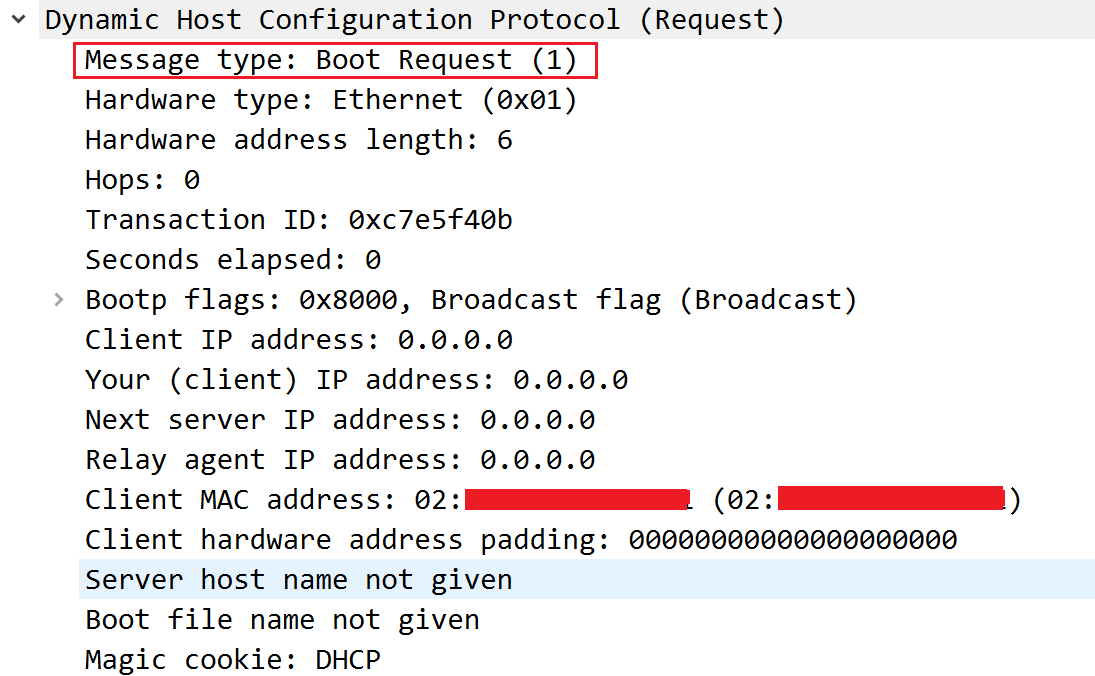

This message is sent by the client according to multiple servers ( There is only one in this example ) It's from DHCP offer The information provided IP Address and configuration parameters , Choose the right server , A formal request made
So this message needs to have the requested IP Address , Requested configuration parameters , And the identifier of the selected server , So the selected server can respond according to this identifier
- DHCP Ack


Finally, the server passes DHCP Ack Messages provide IP Address and configuration parameters , According to the received DHCP Ack Message set them
Recommend one last DHCP Server Tools :tftp64
边栏推荐
- Data enhancement
- AI tool for cutting-edge technology exploration: analog detection
- 使用Cloud DB构建APP 快速入门-快游戏篇
- Maui introductory tutorial series (1. framework introduction)
- Princeton Dengjia student's personal account: must I have a doctorate? No, I can also be an applied scientist in a large factory as an undergraduate
- 无心剑英汉双语诗001. 《春游》
- 前沿科技探究之AI功能:慢SQL发现
- Go Language - value type and Reference Type
- After nine years of testing, the salary for interviewing Huawei is 10000. Huawei employees: the company doesn't have such a low salary position
- 前沿科技探究DeepSQL:库内AI算法
猜你喜欢

带你深度了解AGC云数据库

Zero foundation self-study software test, I spent 7 days sorting out a set of learning routes, hoping to help you

Hands on, how should selenium deal with pseudo elements?

GO语言-数组Array

无心剑英汉双语诗001. 《春游》

三千字教你使用MOT

Code farming essential SQL tuning (Part 1)

数据库资源负载管理(下篇)
How does the taskbar under the computer display open programs

鼻孔插灯,智商上升,风靡硅谷,3万就成
随机推荐
What happened to the frequent disconnection of the computer at home
Analysis of breadcrumb usage scenarios on websites
The third generation Pentium B70 won the C-NCAP five-star safety performance again
NielsenIQ宣布任命Tracey Massey为首席运营官
openGauss AI能力升级,打造全新的AI-Native数据库
[Yugong series] June 2022 Net architecture class 076- execution principle of distributed middleware schedulemaster
Database resource load management (Part 1)
Frontier technology exploration deepsql: in Library AI algorithm
Data enhancement
Factory calibrated gravity: working principle and installation position of carbon monoxide sensor, calibration standard description
[Yugong series] June 2022 Net architecture class 079 cluster principle of distributed middleware schedulemaster
数据库资源负载管理(上篇)
Open the door of the hybrid cloud market, Lenovo xcloud's way to break the situation
电脑下面的任务栏怎么显示打开的程序
Ai4db: AI slow SQL root cause analysis
This "invisible" robot may be your future colleague
AutoRunner自动化测试工具如何创建项目-Alltesting|泽众云测试
openGauss 3.0.0版本正式发布,立即体验社区首个轻量版本
Aaai2022 latest "time series data processing" report, 127 pages of PPT describing time series data processing and medical application progress
Collection | can explain the development and common methods of machine learning!