当前位置:网站首页>halcon知识:dyn_threshold的用法(划痕检测)
halcon知识:dyn_threshold的用法(划痕检测)
2022-06-23 11:53:00 【无水先生】
一、dyn_threshold算子说明
dyn_threshold(OrigImage, ThresholdImage : RegionDynThresh : Offset, LightDark : )
- dyn_threshold 从输入的两幅图像中选择像素满足阈值条件的区域。
- 令 g_{o} = g_{OrigImage} 和 g_{t} = g_{ThresholdImage}。
- 其中,g_{OrigImage}是原始图像,g_{ThresholdImage}是平滑后图像,充当阈值。
那么
1) LightDark = 'light' 的条件是:

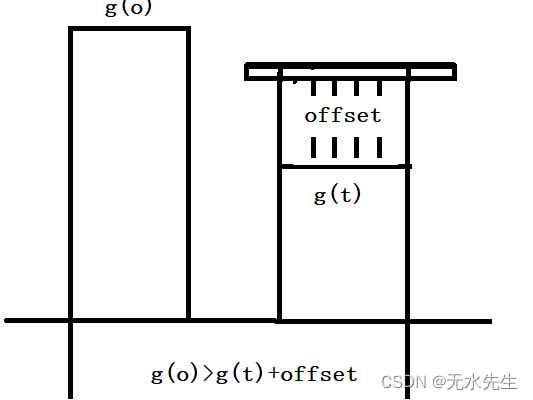
2)对于 LightDark = 'dark',条件是:

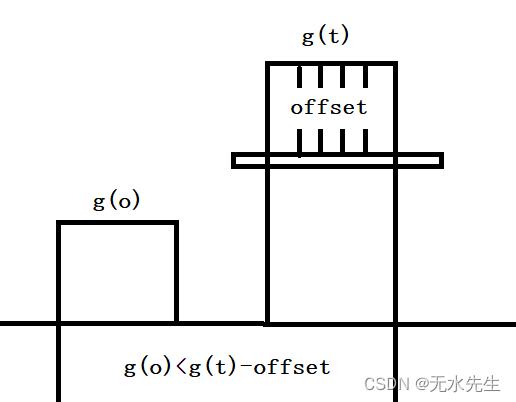
3)对于 LightDark = 'equal',条件是:

4)对于 LightDark = 'not_equal',条件是:

通常,阈值图像是原始图像的平滑版本(例如,通过应用 mean_image、binomial_filter、gauss_filter 等)。那么 dyn_threshold 的效果类似于将阈值应用于原始图像的高通滤波版本(参见 highpass_image)。
二、针对问题:
2.1 原始图片
如下图中,将划痕部分检出来。
read_image (Image, 'surface_scratch')
- 原始图的表面灰度图(看不出明显的划痕)。
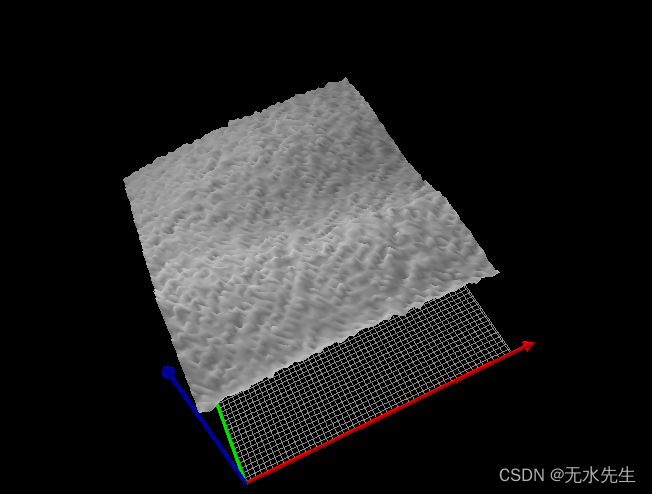
2.2 平滑后的图片
mean_image (Image, ImageMean, 7, 7)平滑图片灰度图(划痕明显):

2.3 观察结果
可以断定,平滑图片中,能够将被噪声湮灭的细长划痕的信号给暴露出来。
三、代码部分
* This programm shows the extraction of surface scratches via
* local thresholding and morphological post-processing
*
dev_update_off ()
dev_close_window ()
*
* Step 1: Acquire image
*
read_image (Image, 'surface_scratch')
get_image_size (Image, Width, Height)
dev_open_window_fit_image (Image, 0, 0, Width, Width, WindowID)
set_display_font (WindowID, 16, 'mono', 'true', 'false')
dev_set_draw ('margin')
dev_set_line_width (4)
dev_display (Image)
Message := 'This program shows the extraction of'
Message[1] := 'surface scratches via local thresholding'
Message[2] := 'and morphological post-processing'
disp_message (WindowID, Message, 'window', 12, 12, 'black', 'true')
disp_continue_message (WindowID, 'black', 'true')
stop ()
*
* Step 2: Segment image
*
* Using a local threshold
mean_image (Image, ImageMean, 7, 7)
dyn_threshold (Image, ImageMean, DarkPixels, 5, 'dark')
*
* Extract connected components
connection (DarkPixels, ConnectedRegions)
dev_set_colored (12)
dev_display (Image)
dev_display (ConnectedRegions)
Message := 'Connected components after image segmentation'
Message[1] := 'using a local threshold.'
disp_message (WindowID, Message, 'window', 12, 12, 'black', 'true')
disp_continue_message (WindowID, 'black', 'true')
stop ()
*
* Step 3: Process regions
*
* Select large regions
select_shape (ConnectedRegions, SelectedRegions, 'area', 'and', 10, 1000)
dev_display (Image)
dev_display (SelectedRegions)
disp_message (WindowID, 'Large Regions', 'window', 12, 12, 'black', 'true')
disp_continue_message (WindowID, 'black', 'true')
stop ()
*
* Visualize fractioned scratch
open_zoom_window (0, round(Width / 2), 2, 303, 137, 496, 3, WindowHandleZoom)
dev_set_color ('blue')
dev_display (Image)
dev_display (SelectedRegions)
set_display_font (WindowHandleZoom, 16, 'mono', 'true', 'false')
disp_message (WindowHandleZoom, 'Fractioned scratches', 'window', 12, 12, 'black', 'true')
disp_continue_message (WindowHandleZoom, 'black', 'true')
stop ()
*
* Merge fractioned scratches via morphology
union1 (SelectedRegions, RegionUnion)
dilation_circle (RegionUnion, RegionDilation, 3.5)
dev_display (Image)
dev_display (RegionDilation)
Message := 'Region of the scratches after dilation'
disp_message (WindowHandleZoom, Message, 'window', 12, 12, 'black', 'true')
disp_continue_message (WindowHandleZoom, 'black', 'true')
stop ()
skeleton (RegionDilation, Skeleton)
connection (Skeleton, Errors)
dev_set_colored (12)
dev_display (Image)
dev_display (Errors)
Message := 'Fractioned scratches merged via morphology'
disp_message (WindowHandleZoom, Message, 'window', 12, 12, 'black', 'true')
disp_continue_message (WindowHandleZoom, 'black', 'true')
stop ()
*
* Distinguish small and large scratches
close_zoom_window (WindowHandleZoom, Width, Height)
select_shape (Errors, Scratches, 'area', 'and', 50, 10000)
select_shape (Errors, Dots, 'area', 'and', 1, 50)
dev_display (Image)
dev_set_color ('red')
dev_display (Scratches)
dev_set_color ('blue')
dev_display (Dots)
Message := 'Extracted surface scratches'
Message[1] := 'Not categorized as scratches'
disp_message (WindowID, Message, 'window', 440, 310, ['red','blue'], 'true')
检查结果:
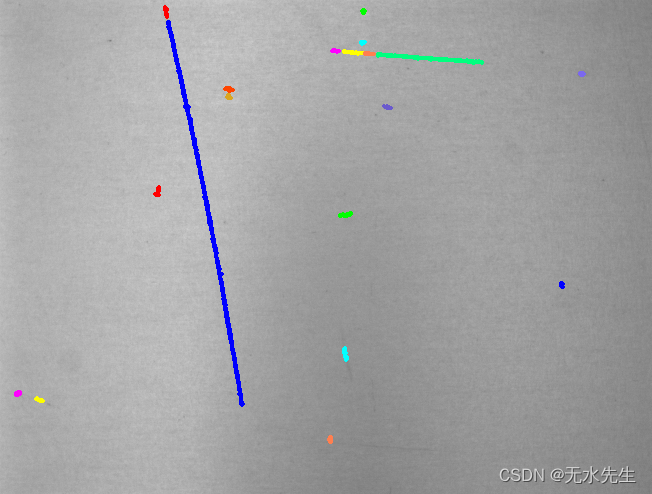
总结:
- 灰度低通滤波可以突出信号。
- dyn_threshold可以对两幅孪生图的信号进行阈值分割。
边栏推荐
- Introduction to Huawei cloud maintenance and sharing exchange platform
- Getting started with redis - Chapter 4 - data structures and objects - jump table
- 你真的理解LDO的输出电容吗!?
- EasyGBS如何解决对讲功能使用异常?
- 2光2电级联型光纤收发器千兆2光2电光纤收发器迷你嵌入式工业矿用本安型光纤收发器
- 你真的理解LDO的輸出電容嗎!?
- 语音数据标注工具与平台
- 基本数据类型和对应的包装类
- Analysis of six dimensional chart: analysis of enterprise growth of CSCEC
- [zero foundation wechat applet] actual development of ID photo changing background color applet based on Baidu brain portrait segmentation
猜你喜欢

"Dream of children's travel" in 2022, GAC Honda children's road safety charity travel entered the Northeast

利用XtraDiagram.DiagramControl进行流程图形的绘制和控制

凭借32量子比特!Rigetti Computing打入英国量子计算市场

Mysql, how to calculate the maximum value using stored procedures
4E1 PDH光端机19英寸机架式单纤传输20km E1接口光纤网络光端机

Blue Bridge Cup single chip microcomputer (I) -- turn off peripherals and turn off led

机器学习系列5:距离空间(1)

The country has entered the main flood season. The Ministry of transport: the lines that do not meet the conditions for safe operation will be resolutely shut down!
mysql,如何在使用存储过程计算最大值

并购增资或将有望启动东软越通新动能?
随机推荐
Redis 入门-第一篇-数据结构与对象-简单动态字符串(SDS)
利用XtraDiagram.DiagramControl进行流程图形的绘制和控制
简单易懂的软路由刷机使用教程
Surprise! Amd acquires Xilinx with USD 35billion!
On the structure of annotation platform
[zero foundation wechat applet] actual development of ID photo changing background color applet based on Baidu brain portrait segmentation
16路HD-SDI光端机多路HD-SDI高清视频光端机16路3G-SDI高清音视频光端机
Introduction to Huawei cloud maintenance and sharing exchange platform
wc 统计已过时,cloc 每一行代码都有效
4K-HDMI光端机1路[email protected] HDMI2.0光端机 HDMI高清视频光端机
2022工具钳工(初级)考试练习题模拟考试平台操作
开源之夏中选名单已公示,基础软件领域成为今年的热门申请
Does the inductance have polarity?
华为云如何实现实时音视频全球低时延网络架构
Open classes are short videos! Tonight, I will teach you how to realize accurately!
[cloud native & microservice viii] source code analysis of weightedresponsetimerule of ribbon load balancing strategy (response time weighting)
Meta称英安全法可能“扫描所有私人信息” 或侵犯隐私
Leetcode 1209. 删除字符串中的所有相邻重复项 II(牛逼,终于过了)
@Dark horse fans, haven't you received this "high temperature subsidy"?
Three ways to learn at work