当前位置:网站首页>聊聊Flink框架中的状态管理机制
聊聊Flink框架中的状态管理机制
2022-07-03 10:24:00 【InfoQ】
状态概述
有状态无状态
- 无状态流处理分别接收每条数据记录,然后根据最新输入的数据生成输出数据。(每次只转换一条输入记录,并且仅根据最新的输入记录输出结果)
- 有状态流处理会维护状态,并基于最新输入的记录和当前的状态值生成输出记录。(维护所有已处理记录的状态值,并根据每条新输入的记录更新状态,因此输出记录反映的是综合考虑多个事件之后的结果。)

算子状态
算子状态不能由相同或不同算子的另一个子任务访问
- 将状态表示为一组数据的列表。
- 也将状态表示为数据的列表。它与常规列表状态的区别在于,在发生故障时,或者从保存点(savepoint)启动应用程序时如何恢复。
- 如果一个算子有多项任务,而它的每项任务状态又都相同,那么这种特殊情况最适合应用广播状态
public class StateTest1_OperatorState {
public static void main(String[] args) throws Exception {
StreamExecutionEnvironment env = StreamExecutionEnvironment.getExecutionEnvironment();
//设施并行度为1
env.setParallelism(1);
DataStreamSource<String> inputStream = env.socketTextStream("localhost", 7777);
DataStream<SensorReading> dataStream = inputStream.map(line -> {
String[] fields = line.split(",");
return new SensorReading(fields[0], new Long(fields[1]), new Double(fields[2]));
});
// 定义一个有状态的Map操作 统计当前分区数据个数
SingleOutputStreamOperator<Integer> resultStream = dataStream.map(new MyCountMap());
resultStream.print();
env.execute();
}
//自定义mapFunction 注册状态实现ListCheckpointed
private static class MyCountMap implements MapFunction<SensorReading, Integer>, ListCheckpointed<Integer>{
// 定义一个本地变量作为算子状态
private Integer count = 0;
@Override
public Integer map(SensorReading sensorReading) throws Exception {
count++;
return count;
}
@Override
public List<Integer> snapshotState(long checkpointId, long timestamp) throws Exception {
return Collections.singletonList(count);
}
@Override
public void restoreState(List<Integer> state) throws Exception {
for (Integer number : state) {
count+=number;
}
}
}
}
键控状态
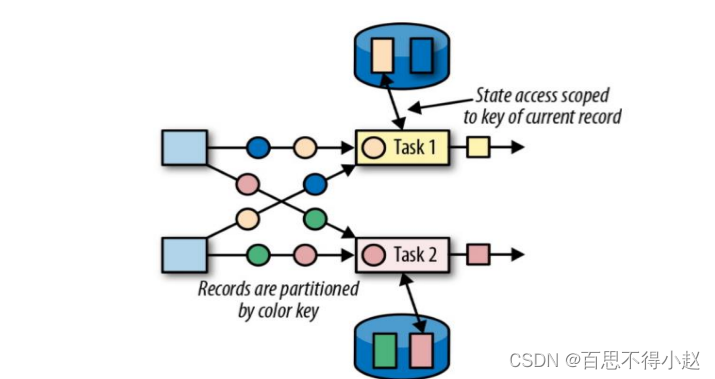
- 将状态表示为单个的值。
- 将状态表示为一组数据的列表
- 将状态表示为一组 Key-Value 对
- 将状态表示为一个用于聚合操作的列表
public class StateTest2_KeyedState {
public static void main(String[] args) throws Exception{
StreamExecutionEnvironment env = StreamExecutionEnvironment.getExecutionEnvironment();
//设施并行度为1
env.setParallelism(1);
DataStreamSource<String> inputStream = env.socketTextStream("localhost", 7777);
DataStream<SensorReading> dataStream = inputStream.map(line -> {
String[] fields = line.split(",");
return new SensorReading(fields[0], new Long(fields[1]), new Double(fields[2]));
});
// 定义一个有状态的Map操作 统计当前senser数据个数
SingleOutputStreamOperator<Integer> resultStream = dataStream.keyBy("id")
.map(new MyKeyCouneMap());
resultStream.print();
env.execute();
}
// 自定义RichMapFunction
private static class MyKeyCouneMap extends RichMapFunction<SensorReading,Integer> {
// 声明键控状态
private ValueState<Integer> KeyCouneState ;
//private ListState<String> listState;
//private MapState<String,Double> mapState;
// private ReducingState<SensorReading> reduceState;
@Override
public void open(Configuration parameters) throws Exception {
KeyCouneState = getRuntimeContext().getState(new ValueStateDescriptor<Integer>(
"key-count",Integer.class
));
// listState =getRuntimeContext().getListState(new ListStateDescriptor<String>(
// "list-count",String.class
));
//mapState = getRuntimeContext().getMapState(new MapStateDescriptor<String, Double>(
// "map-count",String.class,Double.class
));
//reduceState =getRuntimeContext().getReducingState(new ReducingStateDescriptor<SensorReading>(
// "reducing-count",SensorReading.class
//));class
}
@Override
public Integer map(SensorReading sensorReading) throws Exception {
// 读取状态
Integer count = KeyCouneState.value();
if (count==null){
count = 0;
}else {
count++;
}
// 更新状态,对状态赋值
KeyCouneState.update(count);
return count;
// listState
//Iterable<String> iterable = listState.get();
//for (String s : listState.get()) {
// System.out.println(s);
//}
//listState.add("hello");
// mapState
//mapState.get("1");
//mapState.put("2",12.3);
}
}
}
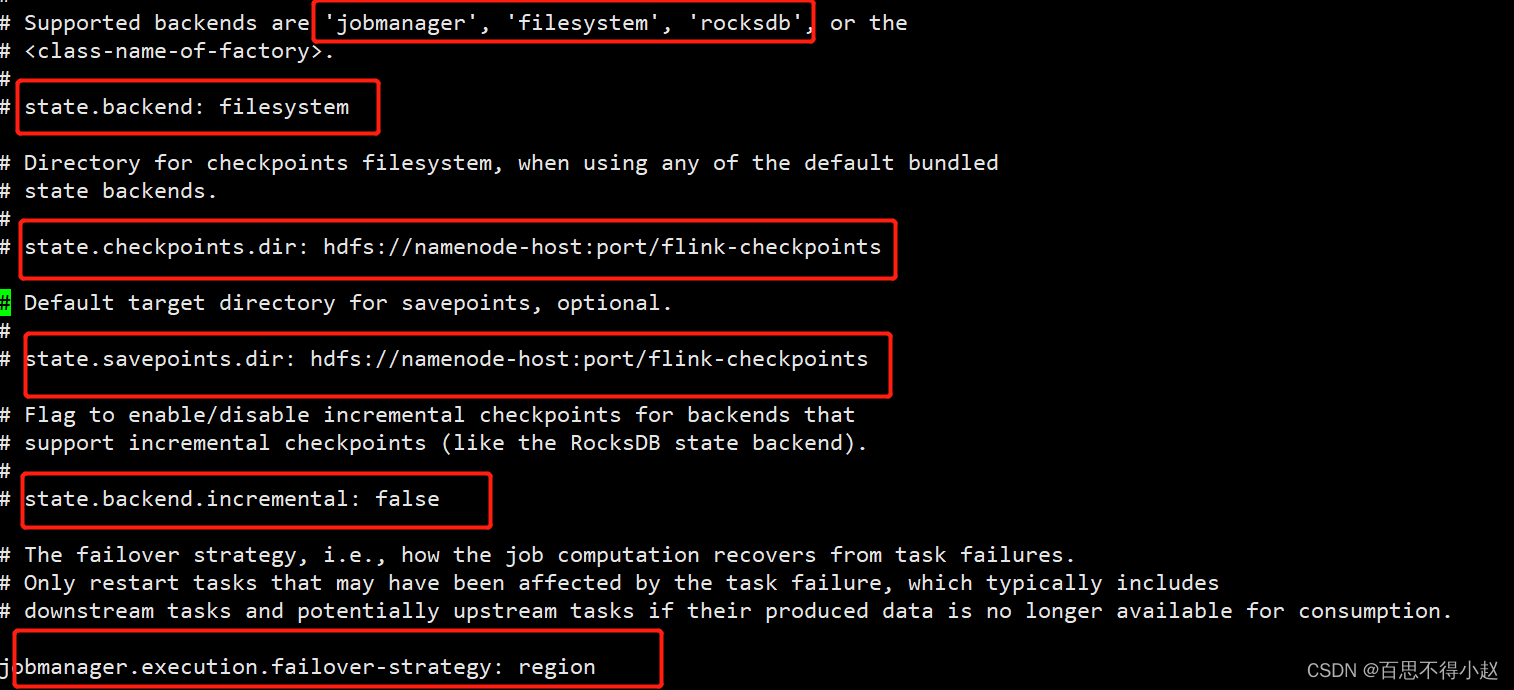
状态后端
- 内存级的状态后端,会将键控状态作为内存中的对象进行管理,将它们存储在TaskManager 的 JVM 堆上,而将 checkpoint 存储在JobManager 的内存中。特点:快速、低延迟,但不稳定。
- 将 checkpoint 存到远程的持久化文件系统(FileSystem)上,而对于本地状态,跟 MemoryStateBackend 一样,也会存在 TaskManager 的 JVM 堆上同时拥有内存级的本地访问速度,和更好的容错保证。
- 将所有状态序列化后,存入本地的 RocksDB 中存储
public class StateTest4_FaultTolerance {
public static void main(String[] args) throws Exception{
StreamExecutionEnvironment env = StreamExecutionEnvironment.getExecutionEnvironment();
// 状态后端配置
env.setStateBackend(new MemoryStateBackend());
env.setStateBackend(new FsStateBackend(""));
DataStreamSource<String> inputStream = env.socketTextStream("localhost", 7777);
DataStream<SensorReading> dataStream = inputStream.map(line -> {
String[] fields = line.split(",");
return new SensorReading(fields[0], new Long(fields[1]), new Double(fields[2]));
});
env.execute();
}
}
public class StateTest3_ApplicationCase {
public static void main(String[] args) throws Exception {
StreamExecutionEnvironment env = StreamExecutionEnvironment.getExecutionEnvironment();
//设施并行度为1
env.setParallelism(1);
DataStreamSource<String> inputStream = env.socketTextStream("localhost", 7777);
DataStream<SensorReading> dataStream = inputStream.map(line -> {
String[] fields = line.split(",");
return new SensorReading(fields[0], new Long(fields[1]), new Double(fields[2]));
});
// 定义一个flutmap操作,检测温度跳变输出报警
SingleOutputStreamOperator<Tuple3<String, Double, Double>> resultStream = dataStream.keyBy("id")
.flatMap(new TempChangeWarring(10.0));
resultStream.print();
env.execute();
}
private static class TempChangeWarring extends RichFlatMapFunction<SensorReading, Tuple3<String, Double, Double>> {
// 设置温度跳变的阈值
private Double threshold;
public TempChangeWarring(Double threshold) {
this.threshold = threshold;
}
// 定义状态,保存上一次温度值
private ValueState<Double> lastTempState;
@Override
public void open(Configuration parameters) throws Exception {
lastTempState = getRuntimeContext().getState(new ValueStateDescriptor<Double>(
"lastTemp", Double.class
));
}
@Override
public void flatMap(SensorReading value, Collector<Tuple3<String, Double, Double>> out) throws Exception {
// 获取状态
Double lastTemp = lastTempState.value();
// 如果不为null 就计算两次温度差
if (lastTemp != null) {
Double diff = Math.abs(value.getTemperature() - lastTemp);
if (diff>=threshold){
out.collect(new Tuple3<>(value.getId(),lastTemp,value.getTemperature()));
}
}
// 更新状态
lastTempState.update(value.getTemperature());
}
@Override
public void close() throws Exception {
lastTempState.clear();
}
}
}
边栏推荐
- Hal - General
- Oracle收回权限 & 创建角色
- 面試題總結(2) IO模型,集合,NIO 原理,緩存穿透,擊穿雪崩
- 多维度监控:智能监控的数据基础
- MATLAB提取不規則txt文件中的數值數據(簡單且實用)
- Multi dimensional monitoring: the data base of intelligent monitoring
- 线性表的双链表
- C language two-dimensional array
- BI技巧丨权限轴
- Balance between picture performance of unity mobile game performance optimization spectrum and GPU pressure
猜你喜欢

面試題總結(2) IO模型,集合,NIO 原理,緩存穿透,擊穿雪崩

MATLAB extrait les données numériques d'un fichier txt irrégulier (simple et pratique)
面试题总结(2) IO模型,集合,NIO 原理,缓存穿透,击穿雪崩

机器学习 3.2 决策树模型 学习笔记(待补)
Solve undefined reference to`__ aeabi_ Uidivmod 'and undefined reference to`__ aeabi_ Uidiv 'error
![[OBS] configFile in ini format of OBS](/img/b2/0b130cee6ea884557a30e4b408f49e.png)
[OBS] configFile in ini format of OBS

Numpy np.max和np.maximum实现relu函数
A simple method of adding dividing lines in recyclerview

Multi dimensional monitoring: the data base of intelligent monitoring

ASP.NET-酒店管理系统
随机推荐
搭建ADG后,实例2无法启动 ORA-29760: instance_number parameter not specified
Encapsulate a koa distributed locking middleware to solve the problem of idempotent or repeated requests
如何成为一名高级数字 IC 设计工程师(1-5)Verilog 编码语法篇:操作数
Expandablelistview that can expand and shrink (imitating the list page of professional selection of Zhilian recruitment)
MATLAB extrait les données numériques d'un fichier txt irrégulier (simple et pratique)
有赞CTO崔玉松:有赞Jarvis核心目标是使产品变得更加聪明和可靠
Intel 13th generation core flagship exposure, single core 5.5ghz
phpcms 提示信息页面跳转showmessage
ASP.NET-酒店管理系統
AMS series - application startup process
1. Hal driven development
活动预告 | 直播行业“内卷”,以产品力拉动新的数据增长点
[VTK] vtkPolydataToImageStencil 源码解读
2022-07-02: what is the output of the following go language code? A: Compilation error; B:Panic; C:NaN。 package main import “fmt“ func mai
CSRF
Stack, monotone stack, queue, monotone queue
Encapsulation attempt of network request framework of retro + kotlin + MVVM
Double linked list of linear list
Programmers' entrepreneurial trap: taking private jobs
Ext file system mechanism principle