当前位置:网站首页>Unity 之 图集属性详解和代码示例 -- 拓展一键自动打包图集工具
Unity 之 图集属性详解和代码示例 -- 拓展一键自动打包图集工具
2022-07-31 15:34:00 【InfoQ】
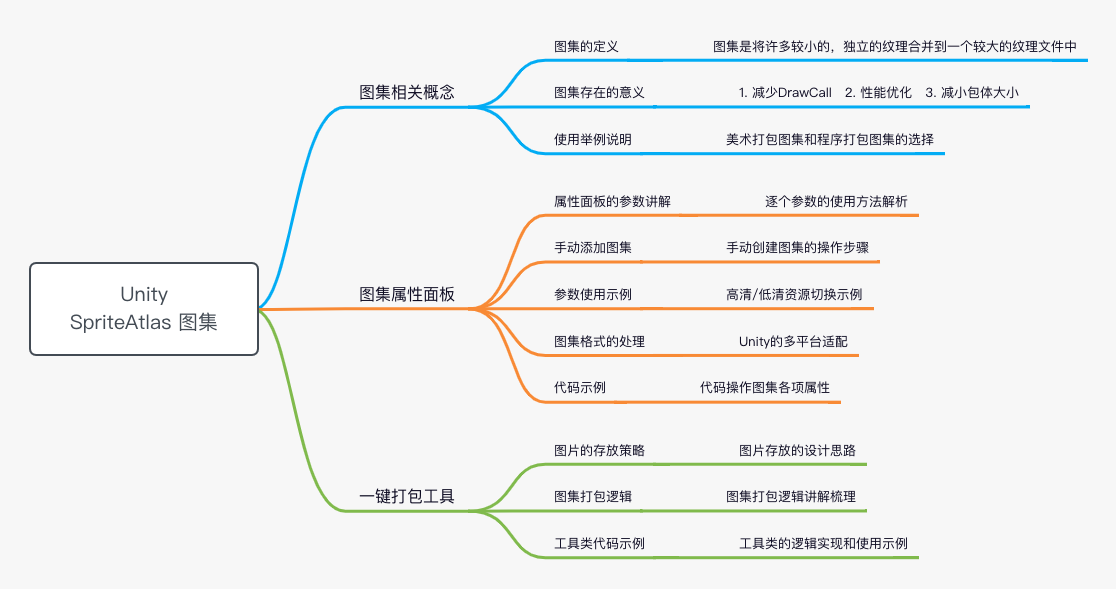
一,图集的相关概念
1.1 图集的定义
1.2 图集的意义
- 减少DrawCall:多张图片需要多次DrawCall,合并成一张大图只需要调用一次DrawCall
- 性能优化:图集将图片打包为2的幂次方的素材大小,GPU处理起来会快很多,方便unity渲染合批,降低渲染消耗,小图不可能每张都是2的n次方的大小,所以会提升效率。
- 减小包体大小:多张图片的打包占用会大于一张2的n次方的大图的大小。
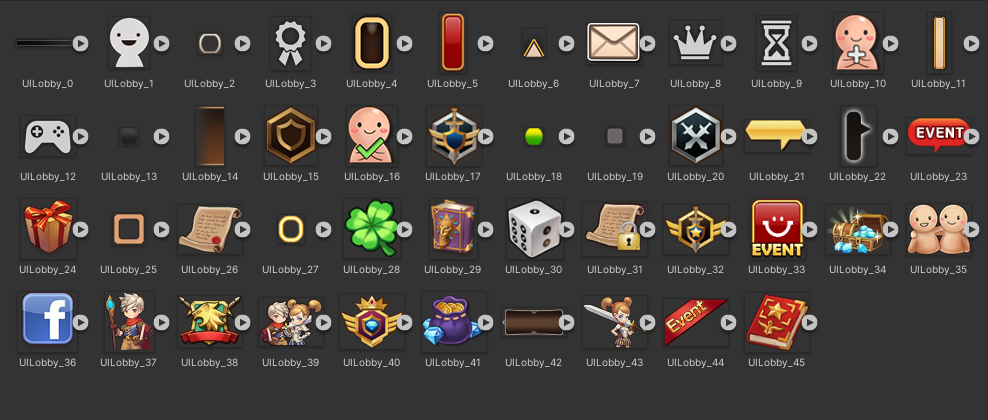
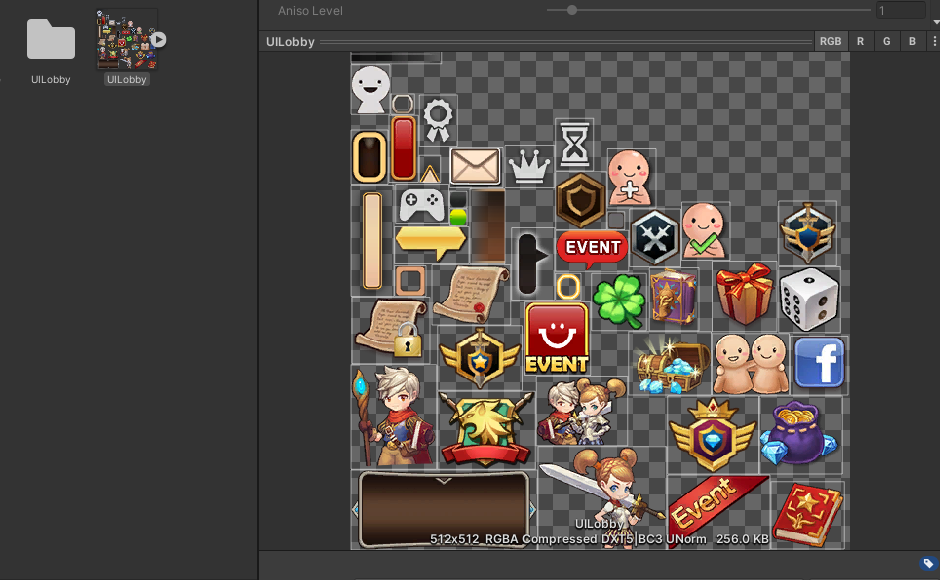
- 举个例子:
二,图集的属性介绍
2.1 属性面板

- 手动添加图集
+Pack Preview
- Variant - 高清/低清资源切换
Variant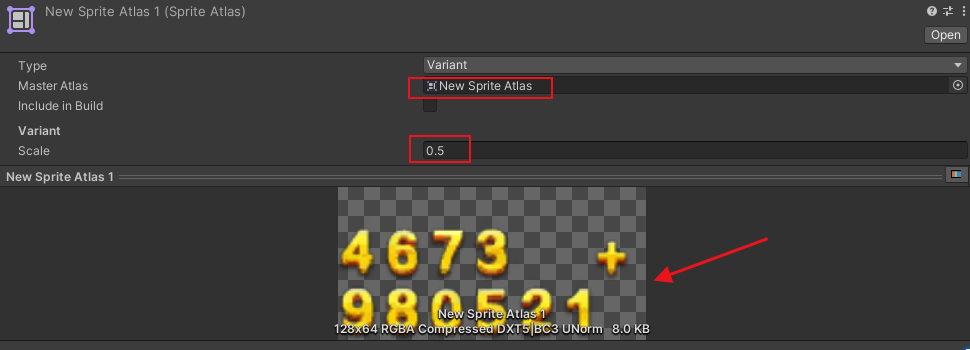
2.2 格式处理


2.3 代码操作
- 创建图集
SpriteAtlas spriteAtlas = new SpriteAtlas();
AssetDatabase.CreateAsset(spriteAtlas, "Assets/CzhenyaTest.spriteatlas");
- 添加图片到Sprite Atlas图集
SpriteAtlas spriteAtlas = new SpriteAtlas();
// 获取图集下图片
List<Object> packables = new List<Object>(spriteAtlas.GetPackables());

// 每个图集的所有图片路径
private static List<string> textureFullName = new List<string>();
foreach (string item in textureFullName)
{
 // 加载指定目录下的图片
 Object spriteObj = AssetDatabase.LoadAssetAtPath(item, typeof(Object));
 if (!packables.Contains(spriteObj))
 {
 // 添加到图集中
 spriteAtlas.Add(new Object[] {spriteObj});
 }
}
- 图集基础设置
SpriteAtlas spriteAtlas = new SpriteAtlas();

SpriteAtlasPackingSettings packSetting = new SpriteAtlasPackingSettings()
{
 blockOffset = 1,
 enableRotation = false,
 enableTightPacking = false,
 padding = 8,
};

spriteAtlas.SetPackingSettings(packSetting);
- 图集纹理设置
SpriteAtlas spriteAtlas = new SpriteAtlas();

SpriteAtlasTextureSettings textureSettings = new SpriteAtlasTextureSettings()
{
 readable = false,
 generateMipMaps = false,
 sRGB = true,
 filterMode = FilterMode.Bilinear,
};

spriteAtlas.SetTextureSettings(textureSettings);
- 分平台设置纹理
SpriteAtlas spriteAtlas = new SpriteAtlas();

TextureImporterPlatformSettings platformSetting = atlas.GetPlatformSettings("Android");
platformSetting.overridden = true;
platformSetting.maxTextureSize = 2048;
platformSetting.textureCompression = TextureImporterCompression.Compressed;
platformSetting.format = TextureImporterFormat.ASTC_6x6;

spriteAtlas.SetPlatformSettings(platformSetting);
三,拓展 -- 打包图集工具
3.1 图片存放策略
Editor
3.2 图集打包逻辑
- 创建图集 --> 图集基础设置 --> 图集纹理设置 --> 按需设置分平台图集格式
- 遍历文件夹 --> 根据格式过滤图片 --> 判断是否存在图集 --> 不存在则加入
3.3 图集打包代码
Editorusing System;
using System.Collections;
using System.Collections.Generic;
using System.IO;
using UnityEditor;
using UnityEditor.U2D;
using UnityEngine;
using UnityEngine.U2D;
using Object = UnityEngine.Object;
public class CreateAtlas : MonoBehaviour
{
/// <summary>
/// 图片根目录 -- 需要打包图集的文件夹父级
/// 适用目录结构:根部文件夹
/// -> 图片文件夹1
/// -> 图片文件夹2
/// ...
/// </summary>
private static string pathRoot = Application.dataPath + "/CreateAtlas/Editor/Res/SpriteAtlas/";
/// <summary>
/// 图集存储路径
/// </summary>Assets/CreateAtlas/Editor/Res/Textures
private static string atlasStoragePath = "Assets/CreateAtlas/Editor/Res/Textures/";
/// <summary>
/// 每个需要打图集的文件夹名 -- 即图集名
/// </summary>
private static string spritefilePathName;
[MenuItem("Tools/打包图集")]
public static void CreateAllSpriteAtlas()
{
Debug.Log("打包图集开始执行");
DirectoryInfo info = new DirectoryInfo(pathRoot);
int index = 0;
// 遍历根目录
foreach (DirectoryInfo item in info.GetDirectories())
{
spritefilePathName = item.Name;
SpriteAtlas spriteAtlas = AssetDatabase.LoadAssetAtPath(atlasStoragePath + "/" + spritefilePathName + ".spriteatlas", typeof(Object)) as SpriteAtlas;
// 不存在则创建后更新图集
if (spriteAtlas == null)
{
spriteAtlas = CreateSpriteAtlas(spritefilePathName);
}
string spriteFilePath = pathRoot + "/" + spritefilePathName;
UpdateAtlas(spriteAtlas, spriteFilePath);
// 打包进度
EditorUtility.DisplayProgressBar("打包图集中...", "正在处理:" + item, index / info.GetDirectories().Length);
index++;
}
EditorUtility.ClearProgressBar();
AssetDatabase.Refresh();
Debug.Log("打包图集执行结束");
}
/// <summary>
/// 创建图集
/// </summary>
/// <param name="atlasName">图集名字</param>
private static SpriteAtlas CreateSpriteAtlas(string atlasName)
{
SpriteAtlas atlas = new SpriteAtlas();
#region 图集基础设置
SpriteAtlasPackingSettings packSetting = new SpriteAtlasPackingSettings()
{
blockOffset = 1,
enableRotation = false,
enableTightPacking = false,
padding = 8,
};
atlas.SetPackingSettings(packSetting);
#endregion
#region 图集纹理设置
SpriteAtlasTextureSettings textureSettings = new SpriteAtlasTextureSettings()
{
readable = false,
generateMipMaps = false,
sRGB = true,
filterMode = FilterMode.Bilinear,
};
atlas.SetTextureSettings(textureSettings);
#endregion
#region 分平台设置图集格式
TextureImporterPlatformSettings platformSetting = atlas.GetPlatformSettings(GetPlatformName(BuildTarget.iOS));
platformSetting.overridden = true;
platformSetting.maxTextureSize = 2048;
platformSetting.textureCompression = TextureImporterCompression.Compressed;
platformSetting.format = TextureImporterFormat.PVRTC_RGB4;
atlas.SetPlatformSettings(platformSetting);
// 需要多端同步,就在写一份
platformSetting = atlas.GetPlatformSettings(GetPlatformName(BuildTarget.Android));
platformSetting.overridden = true;
platformSetting.maxTextureSize = 2048;
platformSetting.textureCompression = TextureImporterCompression.Compressed;
platformSetting.format = TextureImporterFormat.ASTC_6x6;
atlas.SetPlatformSettings(platformSetting);
#endregion
string atlasPath = atlasStoragePath + "/" + atlasName + ".spriteatlas";
AssetDatabase.CreateAsset(atlas, atlasPath);
AssetDatabase.SaveAssets();
return atlas;
}
/// <summary>
/// 每个图集的所有图片路径 -- 记得用之前清空
/// </summary>
private static List<string> textureFullName = new List<string>();
/// <summary>
/// 更新图集内容
/// </summary>
/// <param name="atlas">图集</param>
static void UpdateAtlas(SpriteAtlas atlas, string spriteFilePath)
{
textureFullName.Clear();
FileName(spriteFilePath);
// 获取图集下图片
List<Object> packables = new List<Object>(atlas.GetPackables());
foreach (string item in textureFullName)
{
// 加载指定目录
Object spriteObj = AssetDatabase.LoadAssetAtPath(item, typeof(Object));
Debug.Log("存png和jpg后缀的图片: " +item + " , " + !packables.Contains(spriteObj));
if (!packables.Contains(spriteObj))
{
atlas.Add(new Object[] {spriteObj});
}
}
}
/// <summary>
/// 递归文件夹下的图
/// </summary>
/// <param name="folderPath"></param>
static void FileName(string folderPath)
{
DirectoryInfo info = new DirectoryInfo(folderPath);
foreach (DirectoryInfo item in info.GetDirectories())
{
FileName(item.FullName);
}
foreach (FileInfo item in info.GetFiles())
{
// 存png和jpg后缀的图片
if (item.FullName.EndsWith(".png", StringComparison.Ordinal)
|| item.FullName.EndsWith(".jpg", StringComparison.Ordinal))
{
textureFullName.Add("Assets" + item.FullName.Replace(Application.dataPath, ""));
}
}
}
/// <summary>
/// 不同平台枚举对应的值
/// </summary>
/// <param name="target"></param>
/// <returns></returns>
static string GetPlatformName(BuildTarget target)
{
string platformName = "";
switch (target)
{
case BuildTarget.Android:
platformName = "Android";
break;
case BuildTarget.iOS:
platformName = "iPhone";
break;
case BuildTarget.PS4:
platformName = "PS4";
break;
case BuildTarget.XboxOne:
platformName = "XboxOne";
break;
case BuildTarget.NoTarget:
platformName = "DefaultTexturePlatform";
break;
default:
platformName = "Standalone";
break;
}
return platformName;
}
}
3.4 图集打包示例
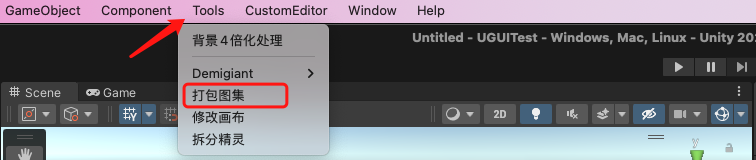
- 将3.3代码添加到工程之后,当代码编译完成后,会在上方工具栏中多出一个:Tools/打包图集 菜单,如下图:
- 点击打包图集后,就会把文件夹
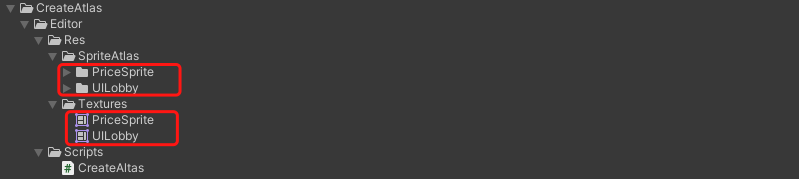
SpriteAtlas下面的图按照文件夹打包成图集。逻辑执行完成后就会在 Textures文件夹下生成新的图集:
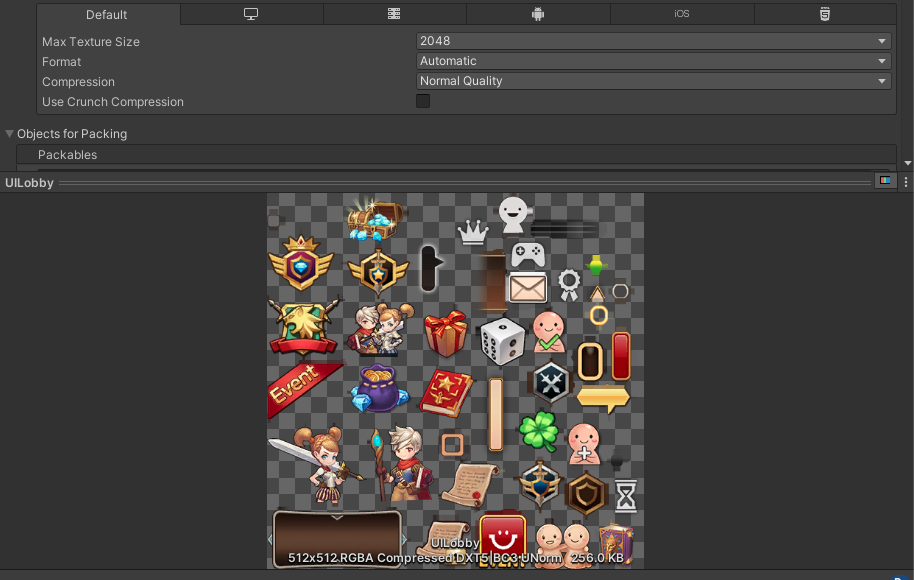
- 代码打包后的图集效果:
边栏推荐
猜你喜欢






随机推荐
TRACE32——C源码关联
Visualize GraphQL schemas with GraphiQL
11 pinia use
Applicable scenario of multi-master replication (2) - client and collaborative editing that require offline operation
多主复制下处理写冲突(4)-多主复制拓扑
Public Key Retrieval is not allowed error solution when DBeaver connects to MySQL 8.x
7、常见面试口语提问问题汇总
实现防抖与节流函数
ansible学习笔记02
Synchronized和volatile 面试简单汇总
t-sne 数据可视化网络中的部分参数+
三、数组
radiobutton的使用
TRACE32——常用操作
浏览器自带的拾色器
[Meetup Preview] OpenMLDB+OneFlow: Link feature engineering to model training to accelerate machine learning model development
【MySQL】Mysql范式及外键作用
TRACE32 - SNOOPer-based variable logging
leetcode303场周赛复盘
R语言向前或者向后移动时间序列数据(自定义滞后或者超前的期数):使用dplyr包中的lag函数将时间序列数据向前移动一天(设置参数n为正值)