当前位置:网站首页>Wireshark's analysis of IMAP packet capturing
Wireshark's analysis of IMAP packet capturing
2022-06-26 00:38:00 【tinychen777】
This article mainly uses Wireshark Use... For mail clients IMAP In the process of receiving e-mails, the protocol performs packet capturing analysis and uses telnet Command for simple operation .
1、IMAP brief introduction
IMAP and POP3 The two protocols are basically the most widely supported and used mail receiving protocols ,IMAP and POP3 Has many advantages over , Reference resources wiki And the following packet capturing results , Here are some advantages that can be verified when capturing packets later :
Support two operation modes of connection and disconnection
and POP3 The protocol is different from disconnecting from the server after receiving the mail ,IMAP The protocol can keep the connection with the server all the time, which greatly reduces the delay of receiving new mail .
Support multiple customers to connect to a mailbox at the same time
POP3 The protocol assumes that the current connection of the mailbox is the only connection . contrary ,IMAP4 The protocol allows multiple users to access the mailbox at the same time, and provides a mechanism for customers to perceive the operations of other users currently connected to the mailbox .
Support the retention of message status information on the server
By using in IMAP4 The flag defined in the protocol allows the client to track the message status , For example, whether the mail is read , reply , Or delete . These identities are stored on the server , Therefore, multiple customers accessing a mailbox at different times can perceive the operations of other users .
Support accessing multiple mailboxes on the server
IMAP4 Clients can create on the server , rename , Or delete mailbox ( It usually appears to users in the form of folders ). Support for multiple mailboxes also allows the server to provide access to shares and public folders .
Support to access... In messages MIME Partial and partial acquisition .
Almost all Internet Messages are MIME Format transmitted .MIME Allow messages to contain a tree structure , The leaf nodes of this tree structure are all single content types, rather than a combination of multiple block types .IMAP4 The protocol allows the client to acquire any independent MIME Part or all of the information obtained . These mechanisms enable users to browse the message content without downloading attachments or browse while getting the content .
2、 Caught analysis
MUA The settings in are as follows , It is also convenient to analyze data without using encryption protocol .

After the configuration is completed and packet capturing is started, it is found that the mailbox master has multi-threaded concurrent receiving operations , This can also be regarded as the use of IMAP The protocol allows multiple clients to connect to the same server , But it is obviously not helpful for us to analyze the whole process of a single connection recipient in serial mode , However, you can also compare the differences between multiple connections .
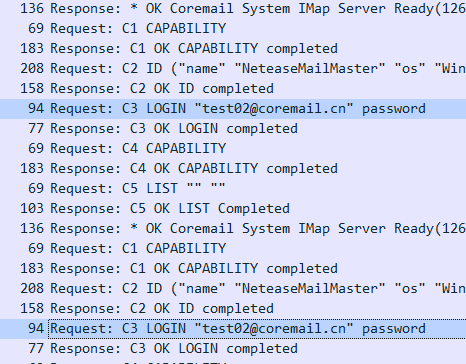
Because of the establishment of IMAP The communication connection must be logged in , So we only need to look at the message to know how many connections have been initiated in parallel , A total of three were found in this message LOGIN Request message for , Therefore, it can be judged that three connections have been initiated successively , The third connection is initiated after the end of the first connection , The specific analysis is as follows :
You can see that at the beginning, two... Were initiated almost at the same time IMAP Connect :
2.1 The first connection
Let's first analyze the first connection :

First of all, we can determine IMAP The transport layer protocol is also used TCP agreement , Also omit here TCP Analysis of three grips and four swings , Look directly at IMAP Message of relevant part :
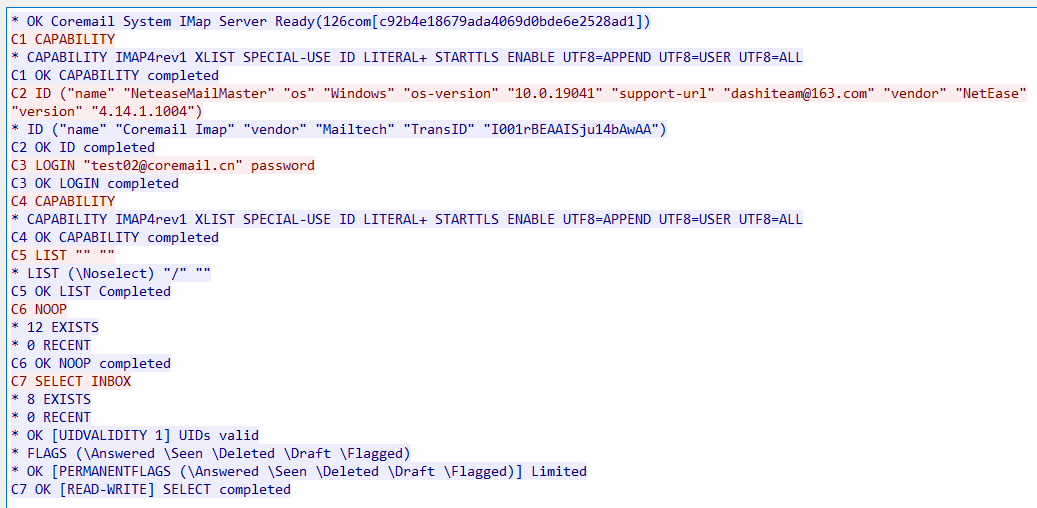
The client and IMAP The server TCP The connection is established after three handshakes
IMAP Server return OK Information , And explain that the type of its own mail system is coremail
The client sends CAPABILITY Command query available commands , This and POP3 Medium CAPA Same command function
IMAP The server returns an executable command
The client sends ID command , Incidental MUA and OS Information about
IMAP Server return ID character string , Information about the mail server is also attached
The client sends LOGIN Command to log in , Within the double quotation marks are email accounts , Followed by a space and followed by the password
IMAP Server return OK The command prompts that the login is successful
The client sends LIST Command to query the email information in the account , But the format of the command may be incorrect , No useful information was found
IMAP The query result returned by the server is null :
If you change the query command to
LIST "" "*"You can query all email folders of the account :

The client sends NOOP Instructions , And previous POP3 The agreement is similar to ,NOOP The function of the command should be to keep the connection , The default is equivalent to no operation , But this connection has not been used yet SELECT The command is also sent for the first time NOOP At the time of instruction ,IMAP The server will return the total number of messages in all directories under the account
IMAP Server return OK Command and returned the total number of messages 、
Client side usage SELECT Instructions , And chose INBOX Folder ( It usually corresponds to the inbox ), It is equivalent to selecting a data table in the database
Then the connection disappeared
2.2 The second connection
The packet of the second connection is long , We intercept some requests sent by clients :

Compare the first connection , The main differences are as follows :
- Used
XLIST "" "*"All folders under the email account have been queried ( inbox 、 The Outbox 、 Draft box 、 dustbin 、 Spam, etc ) - In turn use
SELECTCommand andUID SEARCH UIDCommand to operate on each folder , And then get the... Under the folder corresponding to the account The total number of all messages and the corresponding UID
2.3 The third connection
from wireshark From the sequence number marked on the packet , The third connection is initiated after the end of the first connection . The main operations of the corresponding client are as follows :

There are many repetitive operations in the above content , The main thing is to do this for each folder SELECT, Then get the specific content of the email inside , The main core operations are as follows
UID FETCH 1557156839:1557156846 (UID FLAGS RFC822.SIZE BODYSTRUCTURE INTERNALDATE BODY.PEEK[HEADER.FIELDS (Date Subject From Sender Reply-To To Cc Bcc Message-ID References In-Reply-To X-MailMaster-ShowOneRcpt X-CUSTOM-MAIL-MASTER-SENT-ID Disposition-Notification-To X-CM-CTRLMSGS)])UID FETCH 1557156844 BODY.PEEK[1]
In the above two request commands 1557156844 Is to use... In the first connection UID SEARCH Command to query the e-mail UID, It's used here UID FETCH Command to get the corresponding contents of the message . As we mentioned earlier, the format of the email is consistent with MIME The standard , and IMAP The agreement allows MUA Download in line with MIME Part of the standard email content , So these two UID The order is Used to get the content of a specific part of the corresponding message .
2.4 Summary
After changing another test account to perform the same packet capturing operation, I found that the two data request operations are almost the same , All have three connections , The operation is the same as above . From this we can analyze IMAP The operability of the protocol is better than POP3 Much better , Therefore, in the specific function implementation, there are different MUA There are also differences .
3、telnet operation
Similarly, we can telnet To the mail server 143 Port for command operation :
[[email protected] coremail]# telnet localhost 143
Trying 127.0.0.1...
Connected to localhost.
Escape character is '^]'.
* OK Coremail System IMap Server Ready(126com[c92b4e18679ada4069d0bde6e2528ad1])
C1 LOGIN "[email protected]" password
C1 OK LOGIN completed
C2 LIST "" ""
* LIST (\Noselect) "/" ""
C2 OK LIST Completed
C3 LIST "" "*"
* LIST () "/" "INBOX"
* LIST (\Drafts) "/" "Drafts"
* LIST (\Sent) "/" "Sent Items"
* LIST (\Trash) "/" "Trash"
* LIST (\Junk) "/" "Junk E-mail"
* LIST () "/" "Virus Items"
C3 OK LIST Completed
C4 SELECT INBOX
* 8 EXISTS
* 0 RECENT
* OK [UIDVALIDITY 1] UIDs valid
* FLAGS (\Answered \Seen \Deleted \Draft \Flagged)
* OK [PERMANENTFLAGS (\Answered \Seen \Deleted \Draft \Flagged)] Limited
C4 OK [READ-WRITE] SELECT completed
C5 UID SEARCH 1:*
* SEARCH 1557156839 1557156840 1557156841 1557156842 1557156843 1557156844 1557156845 1557156846
C5 OK SEARCH completed
C6 UID FETCH 1557156839
C6 BAD Parse command error
C7 UID FETCH 1557156839 FULL
* 1 FETCH (UID 1557156839 INTERNALDATE " 6-May-2019 23:33:59 +0800" FLAGS (\Seen) ENVELOPE ("Mon, 6 May 2019 23:33:59 +0800 (GMT+08:00)" "=?UTF-8?B?5qyi6L+O5L2/55SoQ29yZW1haWznlLXlrZDpgq7ku7bns7vnu58vV2VsY29tZSB0byB0aGUgQ29yZW1haWwgZS1tYWlsIHN5c3RlbQ==?=" ((NIL NIL "postmaster" "coremail.cn")) ((NIL NIL "postmaster" "coremail.cn")) ((NIL NIL "postmaster" "coremail.cn")) ((NIL NIL "test02" "coremail.cn")) NIL NIL NIL "<[email protected]>") BODY (("text" "html" ("charset" "UTF-8") NIL NIL "quoted-printable" 7274 152) "related") RFC822.SIZE 7959)
C7 OK Fetch completed
C8 UID FETCH 1557156846 FULL
* 8 FETCH (UID 1557156846 INTERNALDATE " 8-May-2019 09:43:11 +0800" FLAGS (\Seen) ENVELOPE ("Wed, 8 May 2019 09:43:11 +0800 (CST)" "=?UTF-8?B?dGVsbmV0IHRlc3QgbWFpbCBBdXRoZW50aWNhdGVk?=" (("=?UTF-8?B?InRlc3QwMSI=?=" NIL "test01" "coremail.cn")) (("=?UTF-8?B?InRlc3QwMSI=?=" NIL "test01" "coremail.cn")) (("=?UTF-8?B?InRlc3QwMSI=?=" NIL "test01" "coremail.cn")) (("=?UTF-8?B?InRlc3QwMiI=?=" NIL "test02" "coremail.cn")) NIL NIL NIL "<[email protected]>") BODY ("TEXT" "PLAIN" NIL NIL NIL "7BIT" 0 0) RFC822.SIZE 656)
C8 OK Fetch completed
C9 UID FETCH 1557156844 FULL
* 6 FETCH (UID 1557156844 INTERNALDATE " 8-May-2019 16:59:38 +0800" FLAGS (\Seen) ENVELOPE ("Wed, 8 May 2019 16:59:38 +0800 (CST)" "=?UTF-8?B?dGVsbmV0IHRlc3QgbWFpbA==?=" (("=?UTF-8?B?InRlc3QwMSI=?=" NIL "test01" "coremail.cn")) (("=?UTF-8?B?InRlc3QwMSI=?=" NIL "test01" "coremail.cn")) (("=?UTF-8?B?InRlc3QwMSI=?=" NIL "test01" "coremail.cn")) (("=?UTF-8?B?InRlc3QwMiI=?=" NIL "test02" "coremail.cn")) NIL NIL NIL "<[email protected]>") BODY ("TEXT" "PLAIN" NIL NIL NIL "7BIT" 0 0) RFC822.SIZE 642)
C9 OK Fetch completed
边栏推荐
- 7. common instructions (Part 2): common operations of v-on, v-bind and V-model
- Simulink求解器综合介绍
- Cloud rendering and Intel jointly create the "core" era of cloud rendering
- anchor free dection简介
- Qt之自定义带游标的QSlider
- DateTimeFormatter与LocalDateTime
- 2021-04-28
- 使用VS2022编译Telegram桌面端(tdesktop)
- 鼠标拖拽围绕某个物体旋转展示
- Daily question brushing record (IV)
猜你喜欢

深圳台电:联合国的“沟通”之道

POSTMAN测试出现SSL无响应

About Simple Data Visualization

Explain from a process perspective what happens to the browser after entering a URL?

Qt优秀开源项目之九:qTox

Machine vision: illuminating "intelligence" and creating a new "vision" world
Cloud rendering and Intel jointly create the "core" era of cloud rendering

How ASA configures port mapping and pat

【超能云终端创领先机】如何在48小时内交付一座方舱医院?

leetcode. 14 --- longest public prefix
随机推荐
redux工作流程讲解+小例子
idea设置mapper映射文件的模板
原型和原型链的理解
【ROS进阶篇】第一讲 常用API介绍
Thrift getting started
Comprehensive introduction to Simulink solver
Regular expression introduction and some syntax
ORA-01153 :激活了不兼容的介质恢复
Shenzhen Taipower: the way of "communication" of the United Nations
What do SMT operators do? operating duty?
Machine vision: illuminating "intelligence" and creating a new "vision" world
渲云携手英特尔,共创云渲染“芯”时代
19c安装psu 19.12
anchor free dection简介
1-10vmware builds customized network architecture
事物/现象/事情/东西/情况/表象
Types of feeder and how to work
What are AOI, X-ray and ICT in SMT industry? What does it do?
When installing PSU /usr/bin/ld:warning: -z lazload ignore
How to deliver a shelter hospital within 48 hours?