当前位置:网站首页>Hcip (Huawei Senior Network Security Engineer) (Experiment 8) (MPLS basic experiment)
Hcip (Huawei Senior Network Security Engineer) (Experiment 8) (MPLS basic experiment)
2022-06-30 18:11:00 【I took the third exam six times】
Catalog
Experimental steps and configuration
1、 Backbone links IP Address and loopback interface configuration
2、 start-up IGP agreement OSPF
3、 start-up MPLS, build MPLS Domain
4、 stay R2、R4 The two border routers are configured with channels of two different sites
5、 Configure the private network device IP Address and loopback interface
6、 Static configuration routing
7、 Dynamic routing configuration
8、R2 And R4 establish BGP Relationship
10、 stay R7 Configure the default route on
The experimental results are verified
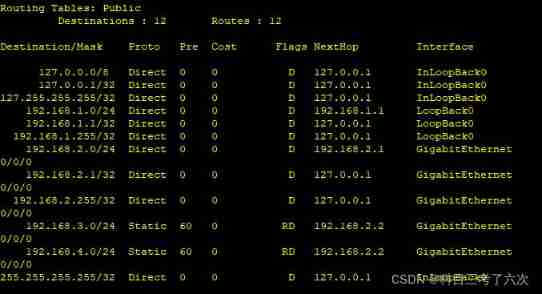
1、A Site R1 View the routing information of
2、B Site R6 View the routing information of
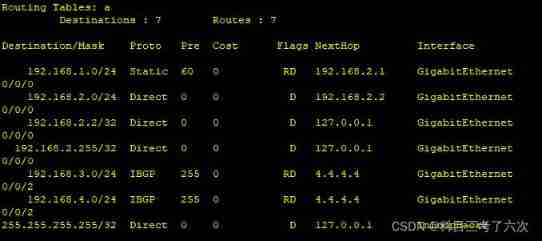
3、 Tunnel A Routing information for
4、 Tunnel B Routing information for
6、R7pingR2、R3、R4 Loopback interface

The experimental requirements
1、R1 and R5 It's the customer A Two sites CE equipment ,R6 and R7 It's the customer B Two sites CE equipment . equipment MPLS VPN The backbone network connects different sites of different customers .
2、R1 and R5 Use static routing to transfer private network routing ;R6 adopt RIP Pass private network route to PE equipment ;R7 adopt OSPF Pass private network route to PE equipment .
3、R1 And R2 Use static routing between private networks ;R4 And R5 Use static routing between private networks ;R2 And R6 Use between private networks RIP;R4 And R7 Use between private networks OSPF.
3、R7 Pull a separate network cable to ensure access to the public network ,R7 You can visit R2、R3、R4 Loopback .
Experimental thinking
1、 First, configure the backbone link IP Address and loopback interface , start-up IGP agreement OSPF And activation MPLS passageway .
2、 Configure... For the customer site IP Address and loopback interface , And divide different channels , Configure related routing protocols .
3、 The intermediate backbone link is started MP-BGP The protocol enables routing information to be transmitted .
4、 stay R7 Configure the default route on , bring R7 You can visit R2、R3、R4 Loopback .
Experimental steps and configuration
1、 Backbone links IP Address and loopback interface configuration
R2
[r2]int g0/0/2
[r2-GigabitEthernet0/0/2]ip a 23.0.0.1 24
[r2-GigabitEthernet0/0/2]int lo0
[r2-LoopBack0]ip a 2.2.2.2 24
R3
[r3]int g0/0/0
[r3-GigabitEthernet0/0/0]ip a 23.0.0.2 24
[r3-GigabitEthernet0/0/0]int g0/0/1
[r3-GigabitEthernet0/0/1]ip a 34.0.0.1 24
[r3-GigabitEthernet0/0/1]int lo0
[r3-LoopBack0]ip a 3.3.3.3 24
R4
[r4]int g0/0/0
[r4-GigabitEthernet0/0/0]ip a 34.0.0.2 24
[r4-GigabitEthernet0/0/0]int g4/0/0
[r4-GigabitEthernet4/0/0]ip a 47.0.0.2 24
[r4-GigabitEthernet4/0/0]int lo0
[r4-LoopBack0]ip a 4.4.4.4 24
R7
[r7]int g0/0/1
[r7-GigabitEthernet0/0/1]ip a 47.0.0.1 24
2、 start-up IGP agreement OSPF
R2
[r2]ospf 1 router-id 2.2.2.2
[r2-ospf-1]a 0
[r2-ospf-1-area-0.0.0.0]network 23.0.0.0 0.0.0.255
R3
[r3]ospf 1 router-id 3.3.3.3
[r3-ospf-1]a 0
[r3-ospf-1-area-0.0.0.0]network 23.0.0.0 0.0.0.255
[r3-ospf-1-area-0.0.0.0]network 34.0.0.0 0.0.0.255
[r3-ospf-1-area-0.0.0.0]network 3.3.3.3 0.0.0.0
R4
[r4]ospf 1 router-id 4.4.4.4
[r4-ospf-1]a 0
[r4-ospf-1-area-0.0.0.0]network 34.0.0.0 0.0.0.255
[r4-ospf-1-area-0.0.0.0]network 47.0.0.0 0.0.0.255
[r4-ospf-1-area-0.0.0.0]network 4.4.4.4 0.0.0.0
3、 start-up MPLS, build MPLS Domain
R2
[r2]mpls lsr-id 2.2.2.2
[r2]mpls
Info: Mpls starting, please wait... OK!
[r2]mpls ldp
[r2]int g0/0/2
[r2-GigabitEthernet0/0/2]mpls
[r2-GigabitEthernet0/0/2]mpls ldp
R3
[r3]mpls lsr-id 3.3.3.3
[r3]mpls
Info: Mpls starting, please wait... OK!
[r3]mpls ldp
[r3]int g0/0/0
[r3-GigabitEthernet0/0/0]mpls
[r3-GigabitEthernet0/0/0]mpls ldp
[r3]int g0/0/1
[r3-GigabitEthernet0/0/1]mpls
[r3-GigabitEthernet0/0/1]mpls ldp
R4
[r4]mpls lsr-id 4.4.4.4
[r4]mpls
Info: Mpls starting, please wait... OK!
[r4]mpls ldp
[r4]int g0/0/0
[r4-GigabitEthernet0/0/0]mpls
[r4-GigabitEthernet0/0/0]mpls ldp
4、 stay R2、R4 The two border routers are configured with channels of two different sites
R2
[r2]ip vpn-instance a Customer A Flow channel
[r2-vpn-instance-a]route-distinguisher 100:100
[r2-vpn-instance-a-af-ipv4]vpn-target 100:1 both
IVT Assignment result:
Info: VPN-Target assignment is successful.
EVT Assignment result:
Info: VPN-Target assignment is successful.
[r2]int g0/0/0
[r2-GigabitEthernet0/0/0]ip binding vpn-instance a
Info: All IPv4 related configurations on this interface are removed!
Info: All IPv6 related configurations on this interface are removed!
[r2]ip vpn-instance b Customer B Flow channel
[r2-vpn-instance-b]route-distinguisher 200:200
[r2-vpn-instance-b-af-ipv4]vpn-target 200:1 both
IVT Assignment result:
Info: VPN-Target assignment is successful.
EVT Assignment result:
Info: VPN-Target assignment is successful.
[r2]int g0/0/1
[r2-GigabitEthernet0/0/1]ip binding vpn-instance b
Info: All IPv4 related configurations on this interface are removed!
Info: All IPv6 related configurations on this interface are removed!
[r2]int g0/0/0
[r2-GigabitEthernet0/0/0]ip a 192.168.2.2 24
[r2-GigabitEthernet0/0/0]int g0/0/1
[r2-GigabitEthernet0/0/1]ip a 172.16.2.2 24
R4
[r4]ip vpn-instance a Customer A Flow channel
[r4-vpn-instance-a]route-distinguisher 100:100
[r4-vpn-instance-a-af-ipv4]vpn-target 100:1 both
IVT Assignment result:
Info: VPN-Target assignment is successful.
EVT Assignment result:
Info: VPN-Target assignment is successful.
[r4]int g0/0/1
[r4-GigabitEthernet0/0/1]ip binding vpn-instance a
Info: All IPv4 related configurations on this interface are removed!
Info: All IPv6 related configurations on this interface are removed!
[r4]ip vpn-instance b Customer B Flow channel
[r4-vpn-instance-b]route-distinguisher 200:200
[r4-vpn-instance-b-af-ipv4]vpn-target 200:1 both
IVT Assignment result:
Info: VPN-Target assignment is successful.
EVT Assignment result:
Info: VPN-Target assignment is successful.
[r4]int g0/0/2
[r4-GigabitEthernet0/0/2]ip binding vpn-instance b
Info: All IPv4 related configurations on this interface are removed!
Info: All IPv6 related configurations on this interface are removed!
[r4]int g0/0/1
[r4-GigabitEthernet0/0/1]ip a 192.168.3.2 24
[r4]int g0/0/2
[r4-GigabitEthernet0/0/2]ip a 172.16.3.2 24
5、 Configure the private network device IP Address and loopback interface
R1
[r1]int g0/0/0
[r1-GigabitEthernet0/0/0]ip a 192.168.2.1 24
[r1-GigabitEthernet0/0/0]int lo0
[r1-LoopBack0]ip a 192.168.1.1 24
R6
[r6-GigabitEthernet0/0/0]ip a 172.16.2.1 24
[r6-GigabitEthernet0/0/0]int lo0
[r6-LoopBack0]ip a 172.16.1.1 24
R5
[r5-GigabitEthernet0/0/0]ip a 192.168.3.1 24
[r5-GigabitEthernet0/0/0]int lo0
[r5-LoopBack0]ip a 192.168.4.1 24
R7
[r7-GigabitEthernet0/0/0]ip a 172.168.3.1 24
[r7-GigabitEthernet0/0/0]int lo0
[r7-LoopBack0]ip a 172.16.4.1 24
6、 Static configuration routing
R1
[r1]ip route-static 192.168.3.0 24 192.168.2.2
[r1]ip route-static 192.168.4.0 24 192.168.2.2
R2
[r2]ip route-static vpn-instance a 192.168.1.0 24 192.168.2.1
R5
[r5]ip route-static 192.168.1.0 24 192.168.3.2
[r5]ip route-static 192.168.2.0 24 192.168.3.2
R4
[r4]ip route-static vpn-instance a 192.168.4.0 24 192.168.3.1
7、 Dynamic routing configuration
R6
[r6]rip 1
[r6-rip-1]v 2
[r6-rip-1]network 172.16.0.0
R2
[r2]rip 1 vpn-instance b
[r2-rip-1]v 2
[r2-rip-1]network 172.16.0.0
R7
[r7]ospf 1 router-id 7.7.7.7
[r7-ospf-1]a 0
[r7-ospf-1-area-0.0.0.0]network 172.16.0.0 0.0.255.255
R4
[r4]ospf 2 vpn-instance b router-id 4.4.4.4
[r4-ospf-2]a 0
[r4-ospf-2-area-0.0.0.0]network 172.16.0.0 0.0.255.255
8、R2 And R4 establish BGP Relationship
R2
[r2]bgp 1
[r2-bgp]router-id 2.2.2.2
[r2-bgp]peer 4.4.4.4 as 1
[r2-bgp]peer 4.4.4.4 connect-interface LoopBack 0
[r2-bgp]ipv4-family vpnv4
[r2-bgp-af-vpnv4]peer 4.4.4.4 enable
R4
[r4]bgp 1
[r4-bgp]router-id 4.4.4.4
[r4-bgp]peer 2.2.2.2 as 1
[r4-bgp]peer 2.2.2.2 connect-interface LoopBack 0
[r4-bgp]ipv4-family vpnv4
[r4-bgp-af-vpnv4]peer 2.2.2.2 enable
9、 Publish route
R2
[r2-bgp]ipv4-family vpn-instance a take R1 Static and direct republishing
[r2-bgp-a]import-route static
[r2-bgp-a]import-route direct
R4
[r4-bgp]ipv4-family vpn-instance a take R5 Static and direct republishing
[r4-bgp-a]import-route static
[r4-bgp-a]import-route direct
R2
[r2-bgp]ipv4-family vpn-instance b take RIP And BGP Conduct two-way republishing
[r2-bgp-b]import-route rip 1
[r2]rip
[r2-rip-1]import-route bgp
R4
[r4-bgp]ipv4-family vpn-instance b take BGP And OSPF Conduct two-way republishing
[r4-bgp-b]import-route ospf 2
[r4]ospf 2
[r4-ospf-2]import-route bgp
10、 stay R7 Configure the default route on
[r7]ip route-static 0.0.0.0 0 47.0.0.2
The experimental results are verified
1、A Site R1 View the routing information of
2、B Site R6 View the routing information of

3、 Tunnel A Routing information for

4、 Tunnel B Routing information for


5、R1pingR5 Loopback interface

6、R7pingR2、R3、R4 Loopback interface



边栏推荐
- Tencent cloud installs MySQL database
- Send the injured baby for emergency medical treatment. Didi's driver ran five red lights in a row
- Redis (IX) - enterprise level solution (II)
- 5g business is officially commercial. What are the opportunities for radio and television?
- Daily interview 1 question - basic interview question of blue team - emergency response (1) basic idea process of emergency response +windows intrusion screening idea
- [Netease Yunxin] playback demo build: unable to convert parameter 1 from "asyncmodalrunner *" to "std:: nullptr\u T"**
- Redis (III) - transaction
- Communication network electronic billing system based on SSH
- 构建基本buildroot文件系统
- Solve the problem of unable to connect to command metric stream and related problems in the hystrix dashboard
猜你喜欢

If you want to learn software testing, you must see series, 2022 software testing engineer's career development

Radio and television 5g officially set sail, attracting attention on how to apply the golden band

大文件处理(上传,下载)思考
MySQL之零碎知识点

Share 5 commonly used feature selection methods, and you must see them when you get started with machine learning!!!

生成对抗网络,从DCGAN到StyleGAN、pixel2pixel,人脸生成和图像翻译。

Apache 解析漏洞(CVE-2017-15715)_漏洞复现

Redis (IV) - delete policy

MySQL reports that the column timestamp field cannot be null
![leetcode:787. The cheapest transfer flight in station K [k-step shortest path + DFS memory + defaultdict (dict)]](/img/28/78e2961877776ca3dfcba5ee7e35d2.png)
leetcode:787. The cheapest transfer flight in station K [k-step shortest path + DFS memory + defaultdict (dict)]
随机推荐
Unity开发bug记录100例子(第1例)——打包后shader失效或者bug
ABAP-发布Restful服务
Post MSF infiltration summary
MySQL reports that the column timestamp field cannot be null
墨天轮沙龙 | 清华乔嘉林:Apache IoTDB,源于清华,建设开源生态之路
[Netease Yunxin] playback demo build: unable to convert parameter 1 from "asyncmodalrunner *" to "std:: nullptr\u T"**
IEEE TBD SCI影响因子提升至4.271,位列Q1区!
Exploration and practice of "flow batch integration" in JD
MSF后渗透总结
元宇宙带来的游戏变革会是怎样的?
基于eNSP的校园网设计的仿真模拟
C语言结构体
Deep understanding of JVM (III) - memory structure (III)
每日面试1题-蓝队基础面试题-应急响应(1)应急响应基本思路流程+Windows入侵排查思路
Spin lock exploration
Flutter custom component
构建基本buildroot文件系统
ABAP publish restful service
Babbitt | yuanuniverse daily must read: minors ask for a refund after a reward. The virtual anchor says he is a big wrongdoer. How do you think of this regulatory loophole
Apache 解析漏洞(CVE-2017-15715)_漏洞复现