当前位置:网站首页>Tencent cloud installs MySQL database
Tencent cloud installs MySQL database
2022-06-30 17:45:00 【twinkle||cll】
Database migration , Record how to install on the new server mysql, It is convenient for others as well as for yourself
1、 uninstall MariaDB
1、 see rpm -qa|grep mariadb
 Copy code
2、 uninstall yum remove mariadb
Copy code
3、 Delete data directory  rm -rf /var/lib/mysql/*
 Copy code
4、 Delete profile rm -f /etc/my.cnf
Copy code
2. Download the corresponding package
========
- Download and install MySQL Official Yum Repository
wget -i -c http://dev.mysql.com/get/mysql57-community-release-el7-10.noarch.rpm
Copy code
2. download  MySQL  Repository configuration
  yum -y install mysql57-community-release-el7-10.noarch.rpm
 Copy code
- download mysql service
yum -y install mysql-community-server
Copy code
 This prompt indicates that the installation is successful
Installation did not succeed ,
------
> In step 3, an error may be reported during installation , as follows :

** The solution is as follows :**
Execute first : yum module disable mysql
Re execution : yum install mysql-community-server
Copy code
>  Then you can execute successfully

2. MySQL Database settings
=============
- see mysql The location of
find / -name mysql
Copy code
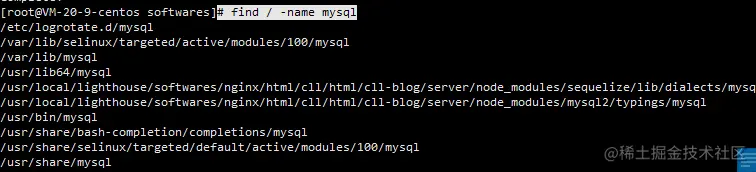
> The position shown in the figure is mysql The default installation location for
2. start-up MySQL
systemctl start mysqld.service
Copy code
3. see MySQL state
systemctl status mysqld.service
Copy code
```

```
4. Get the initial password
grep "password" /var/log/mysqld.log
Copy code
```

```
5. Enter the database to change the password
mysql -u root -p xxxxx,
And then execute :
ALTER USER 'root'@'localhost' IDENTIFIED BY 'new password'
Copy code
```
Here's the problem , If the new password is set too simply, an error will be reported :

The reason is because MySQL There are specifications for password settings , Specifically validate\_password\_policy The value of :

** Change password rules **
```
1. set global validate_password_policy=0;
2. set global validate_password_length=1;
Copy code
```
Reset the password
```
ALTER USER 'root'@'localhost' IDENTIFIED BY 'new password';
Copy code
```
Sign out and log back in
mysql -u user name -p password
The configuration is complete
Open the firewall
=====
> For firewalls , Everybody knows mysql The default port is 3306, If you can, you can change it yourself . Then open the port . Prevent malicious attacks from others
```
1. View firewall status
systemctl status firewalld
Copy code
```

```
2. Start the firewall
systemctl start firewalld
Copy code
```
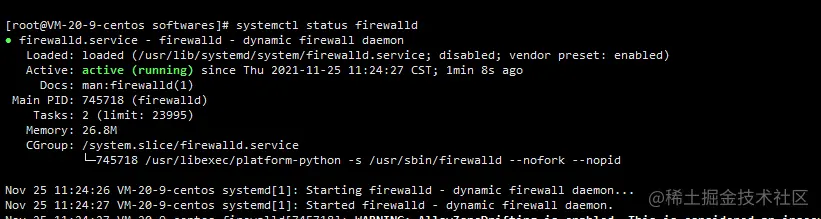
```
3. see mysql Whether the port of is open
firewall-cmd --zone=public --query-port=3306/tcp
// If you are open, the result is yes, It is no
Copy code
- Open ports
firewall-cmd --zone=public --add-port=3306/tcp --permanent
// The console will output success
Copy code
5. service iptables restart
firewall-cmd --reload
// Console output sucess, Just ok 了
 Copy code
```

 Login authorization for visualization tools
==========

>  Do you think , After the above operations are completed , You can connect remotely , Not yet

 Authorize remote clients , Otherwise, the connection fails , Permission validation failed .

(1)SSH Sign in root Administrator account

(2) Sign in MySql

```
mysql -u root -p
Enter password:
 Copy code
```

(3) Execute the authorization order

```
mysql> grant all privileges on *.* to [email protected]'localhost' identified by ' password ';
mysql> flush privileges;
 Copy code
```

 or

```
mysql> grant all privileges on *.* to [email protected]'%' identified by ' password ';
mysql> flush privileges;
 Copy code
```

(4) Exit and try again

```
mysql> quit
Bye
 Copy code
```

(5) Log in again

>  thereafter , The database installation is complete
边栏推荐
- 构建基本buildroot文件系统
- splitting.js密码显示隐藏js特效
- Canvas cloud shape animation
- 6 张图带你搞懂 TCP 为什么是三次握手?
- 【义修换届大礼包】
- 5g business is officially commercial. What are the opportunities for radio and television?
- 理解现货白银走势的关键
- 解决方法:STM32使用cJSON解析数据失败
- Analysis on the construction scheme and necessity of constructing expressway video monitoring platform
- The gates of Europe
猜你喜欢


随机推荐
24: Chapter 3: develop pass service: 7: user defined exceptions (to represent errors in the program); Create graceexceptionhandler to handle exceptions globally and uniformly (build JSON data of corre
Exch: database integrity checking
[C language] detailed explanation of threads - multi threads for collaborative operation
Plane intersection and plane equation
如何写一个技术方案
3D chart effectively improves the level of large data screen
Mysql8 NDB cluster installation and deployment
[proteus simulation] Arduino uno uses 74ls148 to extend interrupt
The new version of Shangding cloud | favorites function has been launched to meet personal use needs
广电5G正式启航,黄金频段将如何应用引关注
Splitting.js文本标题缓慢加载js特效
[Netease Yunxin] playback demo build: unable to convert parameter 1 from "asyncmodalrunner *" to "std:: nullptr\u T"**
New skill: accelerate node through code cache JS startup
[C language] explain threads in detail - solve the problem of shared memory caused by concurrent programs by "locking"
浅析搭建高速公路视频监控平台的建设方案及必要性
Is there an optimal solution to the energy consumption anxiety in the data center?
编写C语言的最简单小程序Hello world
parker比例溢流阀RS10R35S4SN1JW
网络:服务器网卡组技术原理与实践
Login box tricks