当前位置:网站首页>【微信小程序】项目实战—抽签应用
【微信小程序】项目实战—抽签应用
2022-07-27 16:21:00 【InfoQ】
- 完成学习前面章节的微信小程序开发必备的基础知识,从本章开始就可以进入完整的应用开发了。很多大型的应用主要通过App来实现,微信小程序的定义则主要是工具类的应用,宗旨是做到即用即走。抽签应用完全符合这一特性,所以本章将实现一个抽签类型的小程序。
- UI组件的使用
- 表单的使用
- 本地存储
1.项目起步
- 增加抽签项及其内容项
- 删除抽签项及其内容项
- 抽签
- 本地存储
- 输入校验
- 用户交互提示
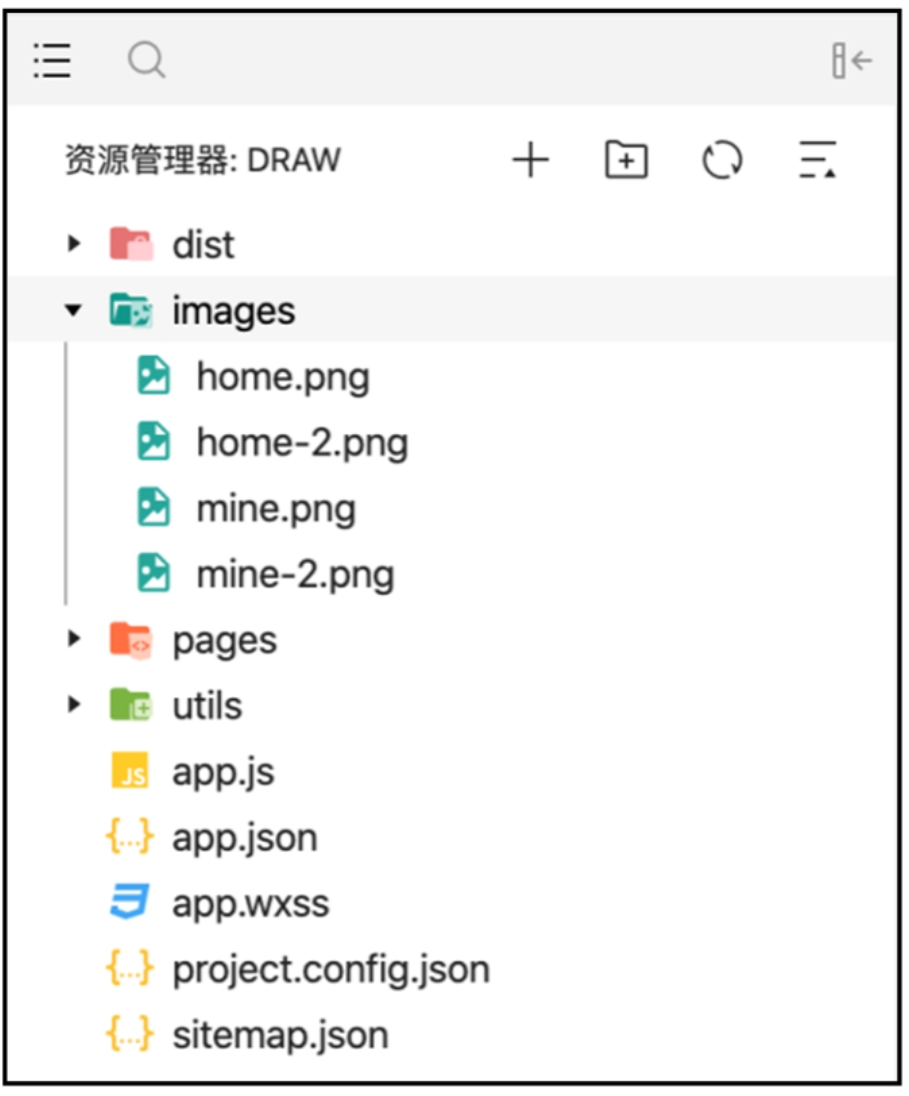
app.jshome、mine、edit-item、draw-viewapp.json、app.wxss// app.json
·..
"tabBar":{
"selectedColor":"#2C8BEF""list": [
{
"selectedIconPath":"images/home2.png","iconPath":"images/home.png","pagePath":"pages/home/home","text":"首页"},{
"selectedIconPath":"images/mine2.png","iconPath":"images/mine.png","pagePath":"pages/mine/mine","text":"我的"
}]
},
·..
// app.wxss page {
background-color: #EFEFEF;

2.项目开发
2.1首页开发
// home.json
"navigationBarTitleText":"首页""usingComponents":
{
"i-button":"/dist/button/index",
"i-cell-group":"/dist/cell-group/i ndex","i-cell":"/dist/cell/index",
"i-modal":"/dist/modal/index"
}
// home.wxml
<i-button type="primary" bind:click="addItem">添加选项</i-button>
<i-cell-group><i-cell
wx:for="{{listData}}" wx:for-item="item" wx:key="item"
data-item="{{item}}" title="{{item}}" bindtap="draw"
bindlongpress="delete" is-link></i-cell></i-cell-group>
<i-modal title="删除确认" visible="{{ visible }}" actions="{{ actions }}" bind:click="realDelete">
<view>删除后无法恢复哦</view></i-modal>
// home.js
// pages/home/home.js
Page({ data:{
listData:[],
currentItem:'' actions: [{
name:'取消'},
name:'删除',
color:'#ed3f14', loading:false}
],
visible:false},
onShow: function () {
this.setData({
listData:wx.getStorageSync('homeList')})},
//加选项 addItem() {
wx.navigateTo({
url:'../edit-item/edit-item',
},
//进入抽签页 draw(e){
wx.navigateTo({
url:'../draw-view/draw-view?item='+ e.currentTarget.dataset.item
},
//删除子选项弹窗 delete(e){
console.log(e) this.setData({
visible: true,
currentItem: e.currentTarget.dataset.item});
// 删除子选项
realDelete({detail}){
if (detail.index=== 1) {
var newArray=[];
for (const item of this.data.listData){
if (item!=this.data.currentItem){ newArray.push(item);
}
}
this.setData({
listData: newArray
1
wx.setStorageSync('homeList',this.data.listData)
wx.removeStoraqeSync(this.data.currentItem) wx.showToast({
title:'删除成功',
1)
this.setData({
visible: false
!({
})
2.2新增页面开发
// edit-item.json{
"navigationBarTitleText":"选项","usingComponents":{
"i-panel":"/dist/panel/index","i-input":"/dist/input/index","i-button":"/dist/button/index"
/
// edit-item.wxml
<i-panel title="{{title}}">
<i-input
value="{{itemName}!"
placeholder="请输入选项"
bind:change="changeItem"/></i-panel>
<i-button bind:click="submit" type="primary">提交</i-button>
// edit-item.js
// pages/edit-item/edit-item.js Page({
data:{
title:'添加选项',
saveKey:'homeList', itemName:''
},
onLoad:function (options){ if (options.item){ this.setData({
title:'添加"'+options.item+'"的子选项', saveKey:options.item})}
},
changeItem(e){ this.setData({
itemName: e.detail.detail.value})
},
// 提交
submit() {
if (this.data.itemName.length===0) { wx.showToast({
title:'内容过短', icon:'none'})
} else if (this.data.itemName.length >10){ wx.showToast({
title:'内容过长', icon:'none'})
}else {
var items;
var key= this.data.saveKey; if (wx.getStorageSync(key)) {
items=wx.getstorageSync(key); for (const key of items) {
if (key== this.data.itemName){ wx.showToast({ title:'已存在', icon:'none'})
returni
}
}else {
items = [];
items.push(this.data.itemName);
wx.setStorageSync(key,items); wx.showToast({
title:'保存成功',})
setTimeout(() => {
wx.navigateBack()},1000)
}})


2.3 抽签页面开发
// draw-view.json
"navigationBarTitleText":"抽签","usingComponents":{
"i-button":"/dist/button/index"
"i-cell-group":"/dist/cell-group/index","i-cell":"/dist/cell/index","i-modal":"/dist/modal/index"
// draw-view.wxml
<i-button type="primary" bind:click="addItem">添加子选项</i-button><i-button type="success" bind:click="draw">抽签</i-button>
<i-cell-group><i-cell
wx:for="{{listData}}" wx:for-item="item" wx:key="item"
data-item="{{item}}" title="{{item}}"
bindlongpress="delete"></i-cell></i-cell-group>
<i-modal title="删除确认"visible="{{ visible }}" actions="{{ actions }}"
bind:click="realDelete">
<view>删除后无法恢复哦</view></i-modal>
// draw-view.js
//pages/draw-view/draw-view.js Page({
data:{
listData:[], lastItem:''
currentItem:'', actions:[{
name:'取消'},
name:'删除',
color:'#ed3f14', loading:false}
],
visible:false},
onLoad:function(options){
this.setData({
lastItem: options.item
wx.setNavigationBarTitle({
title: options.item,})},
onShow:function() {
this.setData({
listData:wx.getStorageSync(this.data.lastItem)})},
//添加子选项 addItem() {
wx.navigateTo({
url:'../edit-item/edit-item?item='+ this.data.lastitem
})},
// 抽签 draw(){
if (this.data.listData.length == 0) { wx.showToast({
title:'没有数据', icon:'none'})
} else {
const randomNumber=this.getRandomNumber(0,
this.data.listData.length);
wx.showToast({
title:this.data.listData[randomNumber]})
},
// 获取随机数
getRandomNumber(begin,end){
return Math.floor(Math.random() * (end-begin))+ beging},
// 删除子选项弹窗 delete(e){
this.setData({
visible: true,
currentItem: e.currentTarget.dataset.item
});
},
// 删除子选项
realDelete({detail}) {
if (detail.index=== 1) {
var newArray=[];
for (const item of this.data.listData){
if (item!= this.data.currentItem){
newArray.push(item);
)}
this.setData({
listData: newArray})
wx.setStorageSync(this.data.lastItem,this.data.listData); wx.showToast({
title:'删除成功',})}
this.setData({
visible:false});}
})

2.4 我的页面开发
// mine.json{
"navigationBarTitleText":"我的",
"usingComponents":{
"i-card":"/dist/card/index"
"i-button":"/dist/button/index"
"i-cell-group":"/dist/cell-group/index""i-cell":"/dist/cell/index","i-modal":"/dist/modal/index"
// mine.wxml
<view class="view-margin">
<i-card
title="{{userInfo.nickName}}"
extra="{{userInfo.country}}"
thumb="{{userInfo.avatarUrl}}">
<!-- <view slot="content">用户名:张三</view> --></i-card>
</view>
<view class="view-margin"><i-cell-group><i-cell
title="清空数据"
bindtap="clearData" is-link></i-cell><i-cell
title="意见反馈"
bindtap="callBack" is-link></i-cell></i-cell-group></view>
<i-button
wx:if="{{userInfo.nickName=='未登录'}}" type="primary"
open-type="getUserInfo"
bind:getuserinfo="login">登录</i-button>
<i-button
wx:if="{{userInfo.nickName!='未登录'}}" type="error"
bind:click="logout">退出登录</i-button>
<i-modal
title="清空确认"
visible="{{ visible }}" bind:ok="delete"
bind:cancel="cancel">
<view>清空后无法恢复哦</view></i-modal>
// mine.wxss.view-margin{
margin-top:16px;}
// mine.js Page({
data:{
userInfo:{
nickName:'未登录', country:'-',
avatarUrl:'https://i.loli.net/2017/08/21/599a521472424.jpg
visible:false
onLoad(options){
if (wx.getStorageSync('userInfo')){ this.setData({
userInfo: wx.getStorageSync('userInfo')
})
},
clearData(){
this.setData({ visible:true
},
delete() {
const array=wx.getstorageSync('homeList') for (const item of array) {
wx.removeStorageSync(item)}
wx.removeStorageSync('homeList') this.setData({ visible:false
cancel() {
this.setData({ visible:false})},
login(e){
if (e.detail.userInfo){
this.setData({
userInfo: e.detail.userInfo})
wx.setStorageSync('userInfo',e.detail.userInfo)} else {
wx.showToast({
title:'登录失败', icon:'none'})
}
},
logout() {
wx.removeStorageSync('userInfo'y this.setData({
userInfo:{
nickName:'未登录', country: '-',
avatarUrl:"https://i.loli.net/2017/08/21/599a521472424.ipq
}
})}})


3.小结
边栏推荐
- ValueError: Found input variables with inconsistent numbers of samples: [80019456, 26673152]【报错】
- Was not registered for synchronization because synchronization is not active[resolved]
- MySQL 01 relational database design
- 20000 words + 30 pictures | what's the use of chatting about MySQL undo log, redo log and binlog?
- 建木持续集成平台v2.5.2发布
- ERROR 1366 (HY000): Incorrect string value: ‘\xE8\xB5\xB5\xE9\x9B\xB7‘ for column ‘s_ name‘ at row 1
- Jianmu continuous integration platform v2.5.2 release
- Uni app label jump
- The song of the virtual idol was originally generated in this way!
- LED带风扇护眼学习台灯触摸芯片-DLT8S12A
猜你喜欢



随机推荐
Nodejs 模板引擎ejs
The hero of the aircraft war comes out with bullets
Have you ever stumbled on MySQL's order by
npm的身份证和依赖
USB充电式暖手宝芯片-DLTAP602SC-杰力科创
浴室带除雾化妆镜触摸芯片-DLT8T10S
Full automatic breast pump chip dltap703sd
MySQL create event execution task
模仿线程扣除
【npm】 无法将“npm”项识别为 cmdlet、函数、脚本文件或可运行程序的名称。请检查名称的拼写,如果包括路径,请确保路径正确,然后再试一次。
你想得到想不到的MySQL面试题都在这了(2022最新版)
Mini washing machine touch chip dlt8ma12ts Jericho
LED学习护眼台灯触摸芯片-DLT8T10S-杰力科创
Product name fuzzy search:
MySQL 06 事务、视图、索引、备份和恢复
"MySQL things" explains the indexing principle in detail
The combination of text and words perfectly explains the implementation process of MySQL logical backup
Uni app label jump
百度地图鹰眼轨迹服务
Led learning eye protection table lamp touch chip-dlt8t10s-jericho