当前位置:网站首页>MySql5.7.25源码安装记录
MySql5.7.25源码安装记录
2022-07-26 09:23:00 【为天空着色】
在官网:http://dev.mysql.com/downloads/mysql/ 中下载要安装的版本的数据库:
mysql-5.7.25-linux-glibc2.12-x86_64.tar.gz
解压
tar -zxvf mysql-5.7.25-linux-glibc2.12-x86_64.tar.gz
移动并修改文件名
#mv /data/software/mysql-5.7.25-linux-glibc2.12-x86_64 /usr/local/mysql创建数据存放目录
#mkdir /data/mysql5.7_3306 新建mysql用户、组及目录
#useradd -r -s /sbin/nologin -g mysql mysql -d /usr/local/mysql改变目录属有者
#cd /usr/local/mysql
#chown -R mysql .
#chgrp -R mysql .
初始化数据库
#bin/mysqld --initialize --user=mysql --basedir=/usr/local/mysql --datadir=/data/mysql5.7_3306
记录下初始密码::+uJDQDtF6/u
#bin/mysql_ssl_rsa_setup --datadir=/data/mysql5.7_3306
修改系统配置文件( 5.7.18开始后面的版本没有my-default.cnf 需要的可以复制以前的my.cnf文件)
cd /usr/local/mysql/support-files
#复制启动文件
# cp mysql.server /etc/init.d/mysql
# vim /etc/init.d/mysql
# vim /etc/init.d/mysql 修改文件存放路径
basedir=/usr/local/mysql
datadir=/data/mysql5.7_3306

从别的地方复制了一个5.5.59的my.cnf放到了/etc目录下,启动mysql /etc/init.d/mysql start 报错

查看日志发现(/data/mysql5.7_3306/localhost.localdomain.err)

thread_concurrency 这个变量提示未定义,mysql在5.7.2后废除了这个配置,删掉后重新启动

登录
mysql -hlocalhost -uroot -p
如果出现:-bash: mysql: command not found
就执行: # ln -s /usr/local/mysql/bin/mysql /usr/bin
没有出现就不用执行
修改密码
mysql>set password for [email protected] = password('123456');
mysql>flush privileges;

设置root账户可以被远程登录
mysql>grant all privileges on *.* TO'root'@'%' identified by 'root' with grant option;
mysql>flush privileges;

修改密码
mysql>set password for [email protected]'%'= password('123456');
mysql>flush privileges;

查看表
mysql> use mysql;
mysql> select host,user from user;
配置mysql自动启动
# chmod 755 /etc/init.d/mysql
# chkconfig --add mysql
# chkconfig --level 345 mysql on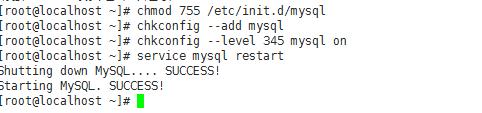
复制的5.5.59版本的my.cnf
# Example MySQL config file for large systems.
#
# This is for a large system with memory = 512M where the system runs mainly
# MySQL.
#
# MySQL programs look for option files in a set of
# locations which depend on the deployment platform.
# You can copy this option file to one of those
# locations. For information about these locations, see:
# http://dev.mysql.com/doc/mysql/en/option-files.html
#
# In this file, you can use all long options that a program supports.
# If you want to know which options a program supports, run the program
# with the "--help" option.

# The following options will be passed to all MySQL clients
[client]
#password	= your_password
port		= 3306
socket		= /tmp/mysql.sock

# Here follows entries for some specific programs

# The MySQL server
[mysqld]
port		= 3306
socket		= /tmp/mysql.sock
skip-external-locking
key_buffer_size = 256M
max_allowed_packet = 1M
table_open_cache = 256
sort_buffer_size = 1M
read_buffer_size = 1M
read_rnd_buffer_size = 4M
myisam_sort_buffer_size = 64M
thread_cache_size = 8
query_cache_size= 16M
# Try number of CPU's*2 for thread_concurrency
#thread_concurrency = 8

innodb_file_per_table=1

# Don't listen on a TCP/IP port at all. This can be a security enhancement,
# if all processes that need to connect to mysqld run on the same host.
# All interaction with mysqld must be made via Unix sockets or named pipes.
# Note that using this option without enabling named pipes on Windows
# (via the "enable-named-pipe" option) will render mysqld useless!
#
#skip-networking

# Replication Master Server (default)
# binary logging is required for replication
log-bin=mysql-bin

# binary logging format - mixed recommended
binlog_format=mixed

#slave_skip_errors = 1062

# required unique id between 1 and 2^32 - 1
# defaults to 1 if master-host is not set
# but will not function as a master if omitted
server-id	= 229
#binlog-do-db=ztong  #指定需要日志的数据库
# Replication Slave (comment out master section to use this)
#
# To configure this host as a replication slave, you can choose between
# two methods :
#
# 1) Use the CHANGE MASTER TO command (fully described in our manual) -
#    the syntax is:
#
#    CHANGE MASTER TO MASTER_HOST=<host>, MASTER_PORT=<port>,
#    MASTER_USER=<user>, MASTER_PASSWORD=<password> ;
#
#    where you replace <host>, <user>, <password> by quoted strings and
#    <port> by the master's port number (3306 by default).
#
#    Example:
#
#    CHANGE MASTER TO MASTER_HOST='125.564.12.1', MASTER_PORT=3306,
#    MASTER_USER='joe', MASTER_PASSWORD='secret';
#
# OR
#
# 2) Set the variables below. However, in case you choose this method, then
#    start replication for the first time (even unsuccessfully, for example
#    if you mistyped the password in master-password and the slave fails to
#    connect), the slave will create a master.info file, and any later
#    change in this file to the variables' values below will be ignored and
#    overridden by the content of the master.info file, unless you shutdown
#    the slave server, delete master.info and restart the slaver server.
#    For that reason, you may want to leave the lines below untouched
#    (commented) and instead use CHANGE MASTER TO (see above)
#
# required unique id between 2 and 2^32 - 1
# (and different from the master)
# defaults to 2 if master-host is set
# but will not function as a slave if omitted
#server-id       = 2
#
# The replication master for this slave - required
#master-host     =   <hostname>
#
# The username the slave will use for authentication when connecting
# to the master - required
#master-user     =   <username>
#
# The password the slave will authenticate with when connecting to
# the master - required
#master-password =   <password>
#
# The port the master is listening on.
# optional - defaults to 3306
#master-port     =  <port>
#
# binary logging - not required for slaves, but recommended
#log-bin=mysql-bin

# Uncomment the following if you are using InnoDB tables
#innodb_data_home_dir = /var/mysql/data
#innodb_data_file_path = ibdata1:10M:autoextend
#innodb_log_group_home_dir = /var/mysql/data
# You can set .._buffer_pool_size up to 50 - 80 %
# of RAM but beware of setting memory usage too high
#innodb_buffer_pool_size = 256M
#innodb_additional_mem_pool_size = 20M
# Set .._log_file_size to 25 % of buffer pool size
#innodb_log_file_size = 64M
#innodb_log_buffer_size = 8M
#innodb_flush_log_at_trx_commit = 1
#innodb_lock_wait_timeout = 50

[mysqldump]
quick
max_allowed_packet = 16M

[mysql]
no-auto-rehash
# Remove the next comment character if you are not familiar with SQL
#safe-updates

[myisamchk]
key_buffer_size = 128M
sort_buffer_size = 128M
read_buffer = 2M
write_buffer = 2M

[mysqlhotcopy]
interactive-timeout
边栏推荐
猜你喜欢

原根与NTT 五千字详解

Basic use of ArcGIS 1

2022 Shanghai safety officer C certificate examination questions and mock examination

神经网络与深度学习-6- 支持向量机1 -PyTorch
Stm32+mfrc522 completes IC card number reading, password modification, data reading and writing

Zipkin installation and use

异常处理机制二

Study notes of dataX

Study notes of canal

The Child and Binary Tree-多项式开根求逆
随机推荐
Grain College of all learning source code
Thread Join 和Object wait 的区别
838. Heap sorting
2022 Shanghai safety officer C certificate examination questions and mock examination
Does volatile rely on the MESI protocol to solve the visibility problem? (next)
OnTap 9 file system limitations
Zxing simplified version, reprinted
Simple message mechanism of unity
小程序纪录
The child and binary tree- open root inversion of polynomials
模板(三)
Object type collections are de duplicated according to the value of an attribute
el-table实现增加/删除行,某参数跟着变
cocoapods的安装和使用
Stm32+mfrc522 completes IC card number reading, password modification, data reading and writing
服务器内存故障预测居然可以这样做!
839. 模拟堆
吴恩达机器学习之线性回归
Use of off heap memory
C# Serialport的发送和接收