CiliumAs the most popular in recent two years Cloud native network solution , It can be said that there is no difference in the limelight . As the first to pass ebpf Realized kube-proxy Network plug-ins with all functions , What is its mysterious veil ? This paper mainly introducesCiliumThe development and evolution of , Function introduction and specific use examples .
background
With the increasing popularity of cloud native , The major manufacturers have basically realized the of business more or less K8s Containerization , Not to mention cloud computing vendors .
And along with K8s Of Universal , At present, clusters gradually show the following two characteristics :
- More and more containers , such as :K8s The official single cluster already supports 150k pod
- Pod The life cycle is getting shorter and shorter ,Serverless The scene is even as short as a few minutes , Seconds
As the container density increases , And the shortening of the life cycle , The challenge to the native container network is also increasing .
At present K8sService Load balancing Implementation status of
stay Cilium Before appearance , Service from kube-proxy To achieve , There are ways to achieve this userspace,iptables,ipvs Three models .
Userspace
In the current mode ,kube-proxy As a reverse proxy , Listen for random ports , adopt iptables Rule redirects traffic to proxy port , Again by kube-proxy Forward traffic to Back end pod.Service The request will first enter the kernel from user space iptables, And then back to user space , It costs a lot , Poor performance .
Iptables
The problem is :
- Poor scalability . With
serviceThousands of data , The performance of its control surface and data surface will decline sharply . The reason lies in iptables Interface design of control surface , Every rule added , You need to traverse and modify all the rules , Its control surface performance isO(n²). On the data side , Rules are organized in linked lists , Its performance isO(n). - LB The scheduling algorithm only supports random forwarding .
Ipvs Pattern
IPVS It's for LB The design of the . It USES hash table management service, Yes service All the additions, deletions and searches are O(1) Time complexity of . however IPVS The kernel module does not SNAT function , So I borrowed iptables Of SNAT function .
IPVS Do... For the message DNAT after , Save the connection information in nf_conntrack in ,iptables Do sth. accordingly SNAT. The model is currently Kubernetes The best choice for network performance . But because of nf_conntrack Complexity , It brings great performance loss .
Cilium The development of
Cilium Is based on eBpf An open source network implementation of , By means of Linux The kernel dynamically inserts powerful security 、 Visibility and network control logic , Provide network interworking , Service load balancing , Security and observability solutions . In short, it can be understood as Kube-proxy + CNI Network implementation .
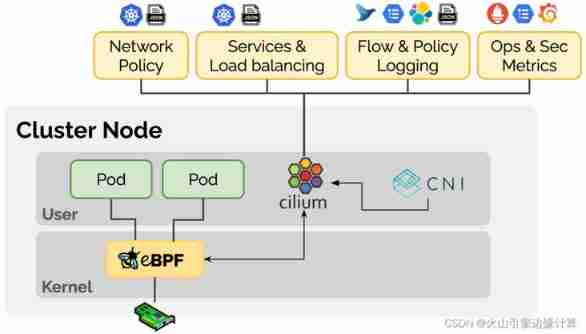
Cilium Located in the container scheduling system and Linux Kernel Between , Upward, you can configure the network and corresponding security for the container through the orchestration platform , Down through Linux Kernel mount eBPF Program , To control the forwarding behavior and security policy implementation of the container network .
A brief introduction Cilium Development history of :
- 2016 Thomas Graf founded Cilium, Now is Isovalent (Cilium The business company behind it ) Of CTO
- 2017 year DockerCon On Cilium First release
- 2018 year Release Cilium 1.0
- 2019 year Release Cilium 1.6 edition ,100% replace kube-proxy
- 2019 year Google Participate fully in Cilium
- 2021 year Microsoft 、 Google 、FaceBook、Netflix、Isovalent A number of enterprises, including, have announced the establishment of eBPF The foundation (Linux Under the foundation )
Function is introduced
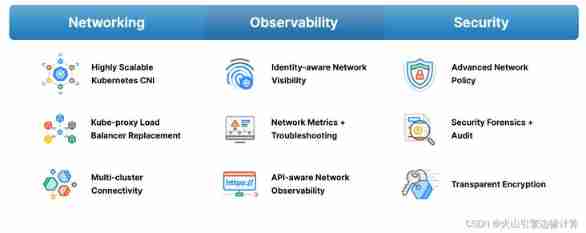
Check the website , You can see Cilium Its functions mainly include Three aspects , Pictured above :
The Internet
Highly scalable kubernetes CNI plug-in unit , Support large scale , Highly dynamic k8s Cluster environment . Support multiple network rental modes :
OverlayPattern , Support Vxlan And GeneveUnerlayPattern , adopt Direct Routing ( Direct routing ) The way , adopt Linux Forward the routing table of the host
- kube-proxy succedaneum , Realized Four layer load balancing function .LB be based on eBPF Realization , Use efficient 、 A hash table that can be expanded infinitely to store information . For North-South load balancing ,Cilium Optimized to maximize performance . Support XDP、DSR(Direct Server Return,LB Only modify the destination of the forwarded packet MAC Address )
- Connectivity of multiple clusters ,Cilium Cluster Mesh Support the load between multiple clusters , Observability and security control
<!---->
- Observability

- Provide observability tools available for production hubble, adopt pod And dns Identification to identify connection information
- Provide L3/L4/L7 Level monitoring indicators , as well as Networkpolicy Of Behavioral information indicators
- API Level observability (http,https)
- Hubble In addition to its own monitoring tools , You can also dock like Prometheus、Grafana And other mainstream cloud native monitoring systems , Implement scalable monitoring strategy
Security
- Not only support k8s Network Policy, And support DNS Level 、API Level 、 And cross cluster level Network Policy
- Support ip port Of Security audit log
- Transmission encryption
summary ,Cilium It's not just about kube-proxy + CNI Network implementation , It also includes many observability and security features .
Installation and deployment
linux Kernel requirements 4.19 And above May adopt helm perhaps cilium cli, Here the author uses cilium cli( Version is 1.10.3)
- download
cilium cli
wget https://github.com/cilium/cilium-cli/releases/latest/download/cilium-linux-amd64.tar.gz
tar xzvfC cilium-linux-amd64.tar.gz /usr/local/bin- install
cilium
wget https://github.com/cilium/cilium-cli/releases/latest/download/cilium-linux-amd64.tar.gz
tar xzvfC cilium-linux-amd64.tar.gz /usr/local/bincilium install --kube-proxy-replacement=strict # The choice here is to completely replace , By default probe,( Under this option pod hostport Feature does not support )
- Visualization components hubble( Optional packaging )
cilium hubble enable --ui- wait for pod ready after , see State the following :
~# cilium status
    /¯¯\
 /¯¯__/¯¯\    Cilium:         OK
 __/¯¯__/    Operator:       OK
 /¯¯__/¯¯\    Hubble:         OK
 __/¯¯__/    ClusterMesh:    disabled
    __/

DaemonSet         cilium             Desired: 1, Ready: 1/1, Available: 1/1
Deployment        cilium-operator    Desired: 1, Ready: 1/1, Available: 1/1
Deployment        hubble-relay       Desired: 1, Ready: 1/1, Available: 1/1
Containers:       hubble-relay       Running: 1
                  cilium             Running: 1
                  cilium-operator    Running: 1
Image versions    cilium             quay.io/cilium/cilium:v1.10.3: 1
                  cilium-operator    quay.io/cilium/operator-generic:v1.10.3: 1
hubble-relay quay.io/cilium/hubble-relay:v1.10.3: 1cilium cliAnd support Cluster availability check ( Optional )
~# cilium status
/¯¯\
/¯¯__/¯¯\ Cilium: OK
__/¯¯__/ Operator: OK
/¯¯__/¯¯\ Hubble: OK
__/¯¯__/ ClusterMesh: disabled
__/
DaemonSet cilium Desired: 1, Ready: 1/1, Available: 1/1
Deployment cilium-operator Desired: 1, Ready: 1/1, Available: 1/1
Deployment hubble-relay Desired: 1, Ready: 1/1, Available: 1/1
Containers: hubble-relay Running: 1
cilium Running: 1
cilium-operator Running: 1
Image versions cilium quay.io/cilium/cilium:v1.10.3: 1
cilium-operator quay.io/cilium/operator-generic:v1.10.3: 1
hubble-relay quay.io/cilium/hubble-relay:v1.10.3: 1etc. hubble After installation ,hubble-ui service It is amended as follows NodePort type , You can pass NodeIP+NodePort To log in Hubble Interface Check out the information .

Cilium After deployment , There are several components operator、hubble(ui, relay),Cilium agent(Daemonset form , One for each node ), The key components are cilium agent.

Cilium Agent As the core component of the whole architecture , adopt DaemonSet The way , In the mode of privilege container , Run on each host in the cluster .Cilium Agent As a user space daemon , Interact with the container runtime and container orchestration system through plug-ins , Then, configure the network and security for the container on the machine . At the same time, it provides an open API, For other components to call .
Cilium Agent When configuring network and security , use eBPF Program implementation .Cilium Agent Combine container identification and related strategies , Generate eBPF Program , And will eBPF The program is compiled into bytecode , Pass them to Linux kernel .
Introduction to relevant orders
Cilium agent Some debugging commands are built in , Let's introduce ,agent Medium cilium Different from the above cilium cli ( Although the same cilium).
cilium status
Main show cilium Some simple configuration information and status , as follows :
[[email protected]~]# cilium connectivity test
️ Single-node environment detected, enabling single-node connectivity test
️ Monitor aggregation detected, will skip some flow validation steps
[kubernetes] Creating namespace for connectivity check...
[kubernetes] Deploying echo-same-node service...
[kubernetes] Deploying same-node deployment...
[kubernetes] Deploying client deployment...
[kubernetes] Deploying client2 deployment...
[kubernetes] Waiting for deployments [client client2 echo-same-node] to become ready...
[kubernetes] Waiting for deployments [] to become ready...
[kubernetes] Waiting for CiliumEndpoint for pod cilium-test/client-6488dcf5d4-rx8kh to appear...
[kubernetes] Waiting for CiliumEndpoint for pod cilium-test/client2-65f446d77c-97vjs to appear...
[kubernetes] Waiting for CiliumEndpoint for pod cilium-test/echo-same-node-745bd5c77-gr2p6 to appear...
[kubernetes] Waiting for Service cilium-test/echo-same-node to become ready...
[kubernetes] Waiting for NodePort 10.251.247.131:31032 (cilium-test/echo-same-node) to become ready...
[kubernetes] Waiting for Cilium pod kube-system/cilium-vsk8j to have all the pod IPs in eBPF ipcache...
[kubernetes] Waiting for pod cilium-test/client-6488dcf5d4-rx8kh to reach default/kubernetes service...
[kubernetes] Waiting for pod cilium-test/client2-65f446d77c-97vjs to reach default/kubernetes service...
ð Enabling Hubble telescope...
️ Unable to contact Hubble Relay, disabling Hubble telescope and flow validation: rpc error: code = Unavailable desc = connection error: desc = "transport: Error while dialing dial tcp [::1]:4245: connect: connection refused"
️ Expose Relay locally with:
cilium hubble enable
cilium status --wait
cilium hubble port-forward&
ð Running tests...cilium service list
Exhibition service The implementation of the , It can be used through ClusterIP To filter , among ,FrontEnd by ClusterIP,Backend by PodIP.
[[email protected]~]# kubectl exec -it -n kube-system cilium-vsk8j -- cilium service list
Defaulted container "cilium-agent" out of: cilium-agent, ebpf-mount (init), clean-cilium-state (init)
ID    Frontend                 Service Type   Backend
1     10.111.192.31:80         ClusterIP      1 => 10.0.0.212:8888
2     10.101.111.124:8080      ClusterIP      1 => 10.0.0.81:8080
3     10.101.229.121:443       ClusterIP      1 => 10.0.0.24:8443
4     10.111.165.162:8080      ClusterIP      1 => 10.0.0.213:8080
5     10.96.43.229:4222        ClusterIP      1 => 10.0.0.210:4222
6     10.100.45.225:9180       ClusterIP      1 => 10.0.0.48:9180
#  Avoid too much , Not shown here
cilium service get
adopt cilium service get < ID> -o json To show the details :
[[email protected]~]# kubectl exec -it -n kube-system cilium-vsk8j -- cilium service get 132 -o json
Defaulted container "cilium-agent" out of: cilium-agent, ebpf-mount (init), clean-cilium-state (init)
{
"spec": {
"backend-addresses": [
{
"ip": "10.0.0.213",
"nodeName": "n251-247-131",
"port": 8080
}
],
"flags": {
"name": "autoscaler",
"namespace": "knative-serving",
"trafficPolicy": "Cluster",
"type": "ClusterIP"
},
"frontend-address": {
"ip": "10.98.24.168",
"port": 8080,
"scope": "external"
},
"id": 132
},
"status": {
"realized": {
"backend-addresses": [
{
"ip": "10.0.0.213",
"nodeName": "n251-247-131",
"port": 8080
}
],
"flags": {
"name": "autoscaler",
"namespace": "knative-serving",
"trafficPolicy": "Cluster",
"type": "ClusterIP"
},
"frontend-address": {
"ip": "10.98.24.168",
"port": 8080,
"scope": "external"
},
"id": 132
}
}
} There are also many useful commands , Limited to space , Not shown here , Interested students can try to explore (cilium status --help).






![[North Asia data recovery] SQLSERVER database encrypted data recovery case sharing](/img/6d/7fc3c563fa1c503cbf09f345a4c042.jpg)