当前位置:网站首页>[Node accesses MongoDB database]
[Node accesses MongoDB database]
2022-07-30 03:46:00 【꒰ঌsnail໒꒱】
目录
一、Node访问MongoDB数据库
1、Mongoose模块
Mongoose模块 :是Node访问MongoDB数据库的封装.Use the object schema to transform data in the database into JavaScript中的对象.
2、Schema
Schema : It is a database model skeleton stored as a file(表结构)
3、Model
Model : 由Schema发布生成的模型,具有抽象属性和行为的数据库操作对
4、Entity
Entity : 由Model创建的实体,他的操作也会影响数据库
5、使用方法
(1)安装模块
npm install mongoose
(2)创建配置文件,完成与MongoDB的连接
mongocofig.js文件:
//导入mongoose模块
const mongoose = require('mongoose')
//定义连接mongoDB的字符串(连接地址)
const db_url = 'mongodb://localhost:27017/mvc'
//连接
mongoose.connect(db_url,{
    useNewUrlParser:true,useUnifiedTopology:true});

//连接成功
mongoose.connection.on('connected',function (){

    console.log('MongoDB Connection open'+db_url)
})
//连接失败
mongoose.connection.on('error',function (err){

    console.log('MongoDB Connection error:'+err)
})
//断开连接
mongoose.connection.on('disconnected',function(){

    console.log('MongoDB disconnected ')
})

module.exports = mongoose
(3)创建Schema
(4)由Schema创建Model
ClassesSchema.js代码如下:
const mongoose = require('../mongoconfig')
const Schema = mongoose.Schema

//定义Schema
var ClassesSchema = new Schema({

    name:{
    type:String},
    age:{
    type:Number},
    sex:{
    type:String},
    hobby:{
    type:Array}
})

//由Schema生成Model,用Model操作数据库
module.exports = mongoose.model('Classes',ClassesSchema)
(5)创建路由文件
配置路由文件app.js:
var mongoRouter =require('./routes/mongo')
app.use('/mongo',mongoRouter)
(6)增、删、改、查操作
A、增加:使用Model的实例调用save方法(注意:only increase the use ofEntity操作数据库)
Model:ClassesModel
Entity :clazz = new ClassesModel()
clazz.save()
const express = require('express')
const ClassesModel = require('../config/model/ClassesSchema')
const router =express.Router()
//http://localhost:3000/mongo/add
router.post('/add',(req, res) => {

    let clazz =new  ClassesModel({

        name:'黄蓉',
        age:22,
        sex:'女',
        hobby:['武术','绘画']
    })
    clazz.save(function (err,result){

        if(err){

            res.json({

                code:1001,
                msg:'插入数据失败'
            })
        }else{

            res.json({

                code:1002,
                msg:'插入数据成功',
                data:result
            })
        }
    })
})
测试结果:
B、删除:使用Model操作数据库
| mongoose删除方法 | 说明 |
|---|---|
| deleteOne | 删除一条记录,返回删除的数量 |
| deleteMany | 删除多条记录,返回删除的数量 |
| findOneAndDelete | Find and then delete,If no matching record is found, no deletion is performed,返回null |
| findByIdAndDelete | ① 没有符合 id 的数据时,返回 null. ② id 为空或 undefined 时,返回 null.③ 删除成功返回 {} 形式的原数据. |
deleteOne:
const express = require('express')
const ClassesModel = require('../config/model/ClassesSchema')
const router =express.Router()
//http://localhost:3000/mongo/remove
router.delete('/remove',(req, res) => {

    ClassesModel.deleteOne({
    'name':'小明'},(err,result)=>{

        if(err){

            res.json({

                code:1001,
                msg:'删除失败'
            })
        }else{

            res.json({

                code:1002,
                msg:'删除成功',
                data:result
            })
        }
    })
})

module.exports = router;

findOneAndDelete:
const express = require('express')
const ClassesModel = require('../config/model/ClassesSchema')
const router =express.Router()
//http://localhost:3000/mongo/remove
router.delete('/remove',(req, res) => {

    ClassesModel.findOneAndDelete({
    'name':'张扬'},(err,result)=>{

            if(err){

                res.json({

                    code:1001,
                    msg:'删除失败'
                })
            }else{

                res.json({

                    code:1002,
                    msg:'删除成功',
                    data:result
                })
            }
    })
})
我们看一下mongdbWhether there is publicity in the database:
Find and then delete,If no matching record is found, no deletion is performed,返回null:

C、更新:使用Model操作数据库
| mongoose更新方法 | 说明 |
|---|---|
| updateOne、updateMany | 返回更新的数量 |
| findOneAndUpdate、findByIdAndUpdate | 查找后更新,If no matching record is found, no deletion is performed,返回null |
D、查询:使用Model操作数据库
| mongoose查询方法 | 说明 |
|---|---|
| find() | 查询所有 |
| findOne({}) | 按条件查询 |
| findById() | 按id查询 |
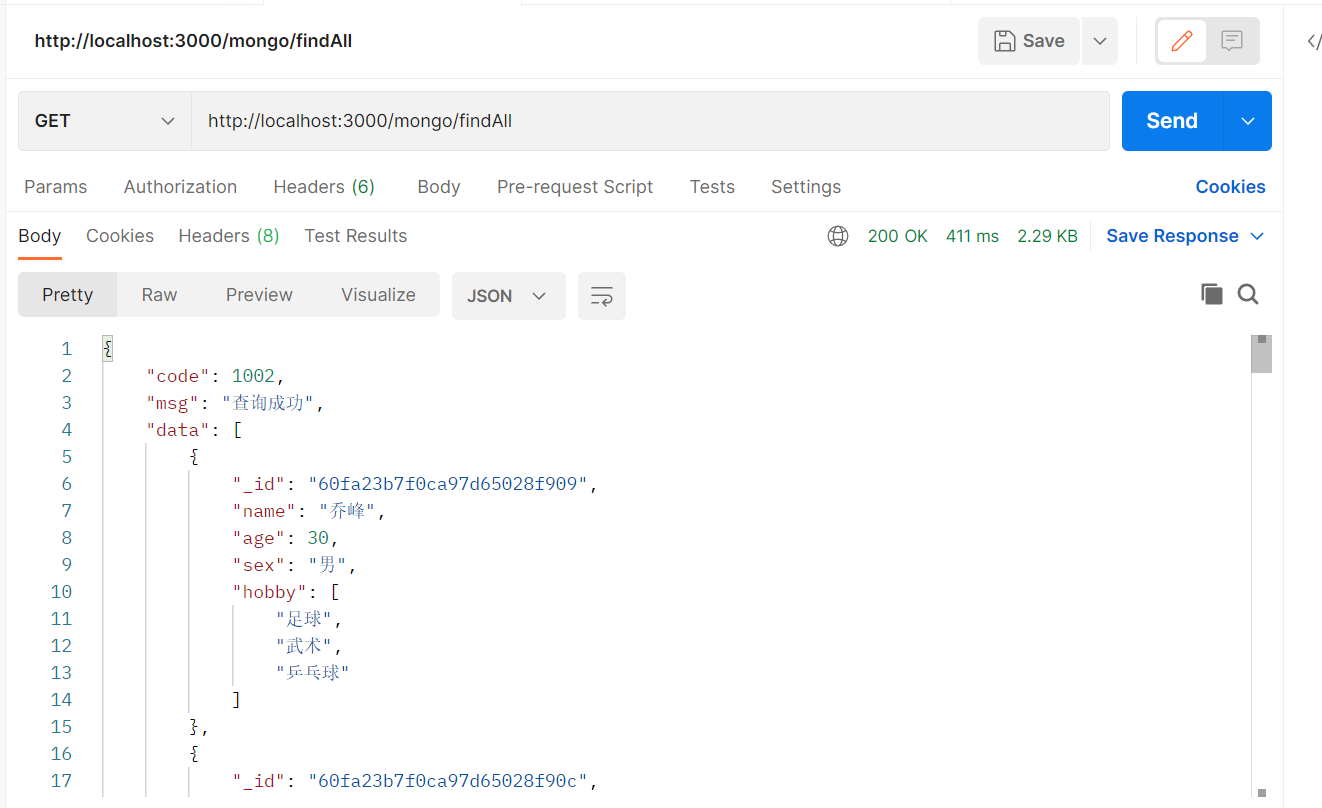
路由文件mongo.js代码如下:

```javascript
const express = require('express')
const ClassesModel = require('../config/model/ClassesSchema')
const router =express.Router()

//http://localhost:3000/mongo/findAll
router.get('/findAll',(req, res) => {

    ClassesModel.find(function (err,result){

        if(err){

            console.log(err)
            res.send({

                code:1001,
                msg:'查询失败'
            })
        }else{

            res.send({

                code:1002,
                msg:'查询成功',
                data:result
            })
        }
    })
})
module.exports = router;
测试结果如下:
边栏推荐
猜你喜欢

Is the snowflake the same question?

Mini Program Graduation Works WeChat Points Mall Mini Program Graduation Design Finished Products (3) Background Functions

How does the AI intelligent security video platform EasyCVR configure the simultaneous transmission of audio and video?

day10--install mysql on linux

MyCat中对分库分表、ER表、全局表、分片规则、全局序列等的实现与基本使用操作

SDL播放器实战

小程序毕设作品之微信二手交易小程序毕业设计成品(4)开题报告

spicy(一)基本定义
EasyCVR启动时报错“no such file or directory”,该如何解决?

LoadBalancer 负载均衡
随机推荐
SQL 入门之第一讲——MySQL 8.0.29安装教程(windows 64位)
Taobao/Tmall get the list of sold product orders API
Anti-shake and throttling
【Node访问MongoDB数据库】
使命、愿景、价值观到底有什么区别
Introduction to management for technical people 1: What is management
Mini Program Graduation Works WeChat Points Mall Mini Program Graduation Design Finished Products (6) Question Opening and Defense PPT
状态空间表示
sql中 exists的用法
(redistribute, special comprehensive experiment ospf area)
Gateway routing gateway
Mini Program Graduation Works WeChat Second-hand Trading Mini Program Graduation Design Finished Works (7) Interim Inspection Report
Mini Program Graduation Works WeChat Second-hand Trading Mini Program Graduation Design Finished Works (3) Background Functions
阿里巴巴按关键字搜索新品数据 API
OPENSQL
STM32 SPI+WM8978语音回环
CMake的安装和测试
精品:淘宝/天猫获取购买到的商品订单详情 API
SQL Server中如何在date类型中提取年、月、日数据
Nacos命名空间