当前位置:网站首页>How does the AI intelligent security video platform EasyCVR configure the simultaneous transmission of audio and video?
How does the AI intelligent security video platform EasyCVR configure the simultaneous transmission of audio and video?
2022-07-30 03:45:00 【EasyCVR】
EasyCVR supports massive video aggregation management, and can provide video services such as live video surveillance, cloud recording, cloud storage, video retrieval and review, intelligent alarm, platform cascade, and intelligent analysis.The platform supports equipment access through national standard GB28181, RTMP, RTSP/Onvif, Hikvision SDK, Dahua SDK, Ehome and other protocols, and can distribute video streams in RTSP, RTMP, FLV, HLS, WebRTC and other formats to the outside world.

EasyCVR is not only powerful, but also can adjust local functions according to user needs.Recently, some users have proposed whether it is possible to transmit the required video and audio at the same time.Since EasyCVR currently only starts video by default, the following configuration needs to be done to synchronize audio and video:
First, a camera that supports audio capture is required to provide audio transmission, and then find the corresponding channel in the channel list of the device, click Edit, check the Enable Audio option, and click the Modify button to save.


Finally, open the video of the channel on the channel list or video square page, click the icon of the speaker in the lower left corner, turn on the audio, and then you can hear the sound transmitted from the device.

After configuring according to the above steps, there may still be no sound.If this happens, it is related to the audio settings of the camera.
Just open the camera's web configuration page, find the audio configuration page on the settings page, change the audio encoding format to G.711A, and then return to the video playback page to play the sound.

EasyCVR is based on the cloud-edge-device integration architecture, which can aggregate, integrate and centrally manage various scattered video resources in a complex network environment.Smart security, smart factories, smart parks, etc.Interested users can go to the demo platform for experience or deployment testing.
边栏推荐
- 传统项目转型
- 【无标题】
- 【转】Swift 中的面向协议编程:引言
- Let's learn the layout components of flutter together
- Mini Program Graduation Works WeChat Points Mall Mini Program Graduation Design Finished Products (1) Development Overview
- Gateway 路由网关
- Advanced Microservices Cloud Alibaba
- TCP拥塞控制技术 与BBR的加速原理
- sqlmap使用教程大全命令大全(图文)
- 发给你的好友,让 TA 请你吃炸鸡!
猜你喜欢

sqlmap使用教程大全命令大全(图文)

vscode 调试和远程
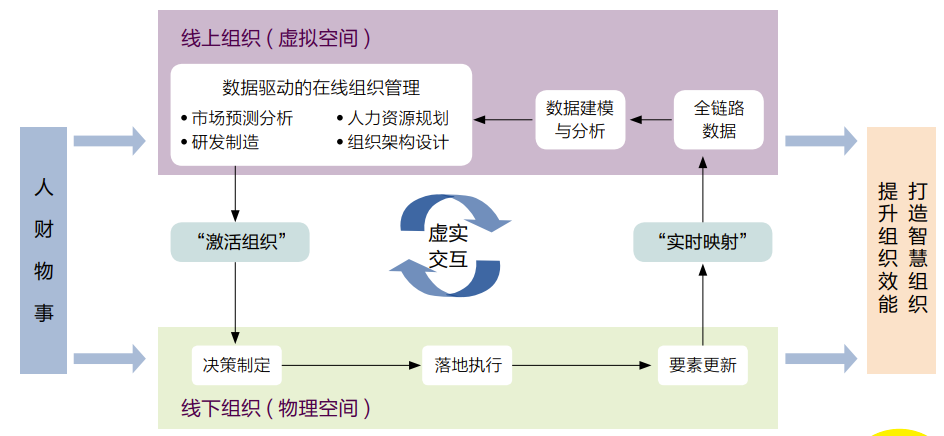
组织在线化:组织数字化变革的新趋势

【无标题】

Nacos Configuration Center

Mini Program Graduation Works WeChat Points Mall Mini Program Graduation Design Finished Product (8) Graduation Design Thesis Template
小程序毕设作品之微信积分商城小程序毕业设计成品(8)毕业设计论文模板

传统项目转型
Organizations Going Online: A New Trend in Organizational Digital Transformation

小程序毕设作品之微信积分商城小程序毕业设计成品(7)中期检查报告
随机推荐
BindingExpression path error: ‘selectMenusList‘ property not found on ‘object‘ ‘‘ViewModel“
SDL播放器实战
解决编译安装gdb-10.1 unistd.h:663:3: error: #error “Please include config.h first.“ 问题
小程序毕设作品之微信积分商城小程序毕业设计成品(4)开题报告
Monitor page deployment
AI智能安防视频平台EasyCVR如何配置音视频同时传输?
Mini Program Graduation Works WeChat Points Mall Mini Program Graduation Design Finished Work (5) Task Book
spicy (two) unit hooks
SQL 入门之第一讲——MySQL 8.0.29安装教程(windows 64位)
Gateway routing gateway
Flutter records and learns different animations (1)
进程优先级 nice
Nacos集群分区
STM32 SPI+WM8978语音回环
SDL player in action
JIT vs AOT
TCP拥塞控制技术 与BBR的加速原理
发给你的好友,让 TA 请你吃炸鸡!
北京bgp机房和普通机房的区别
小程序毕设作品之微信积分商城小程序毕业设计成品(7)中期检查报告