当前位置:网站首页>Popupwindow touch event transparent transmission scheme
Popupwindow touch event transparent transmission scheme
2022-06-24 20:25:00 【coder_ szc】
background
Sometimes we pop up a PopupWindow Pop up , There is such a need :
Click the control on the pop-up window ( Non blank area ) when , Execute the click logic of the control ;
When the finger touches the blank area on the pop-up window , The event was transmitted to the... Under the pop-up window view, That is, it does not affect the normal business logic
Ideas
to PopupWindow Set up onTouchInterceptor, Determine whether the coordinates of the touch event are in a component in the pop-up window , If yes, the touch event is transmitted by the pop-up root view ; Or give it to activity To deliver events .
Code implementation
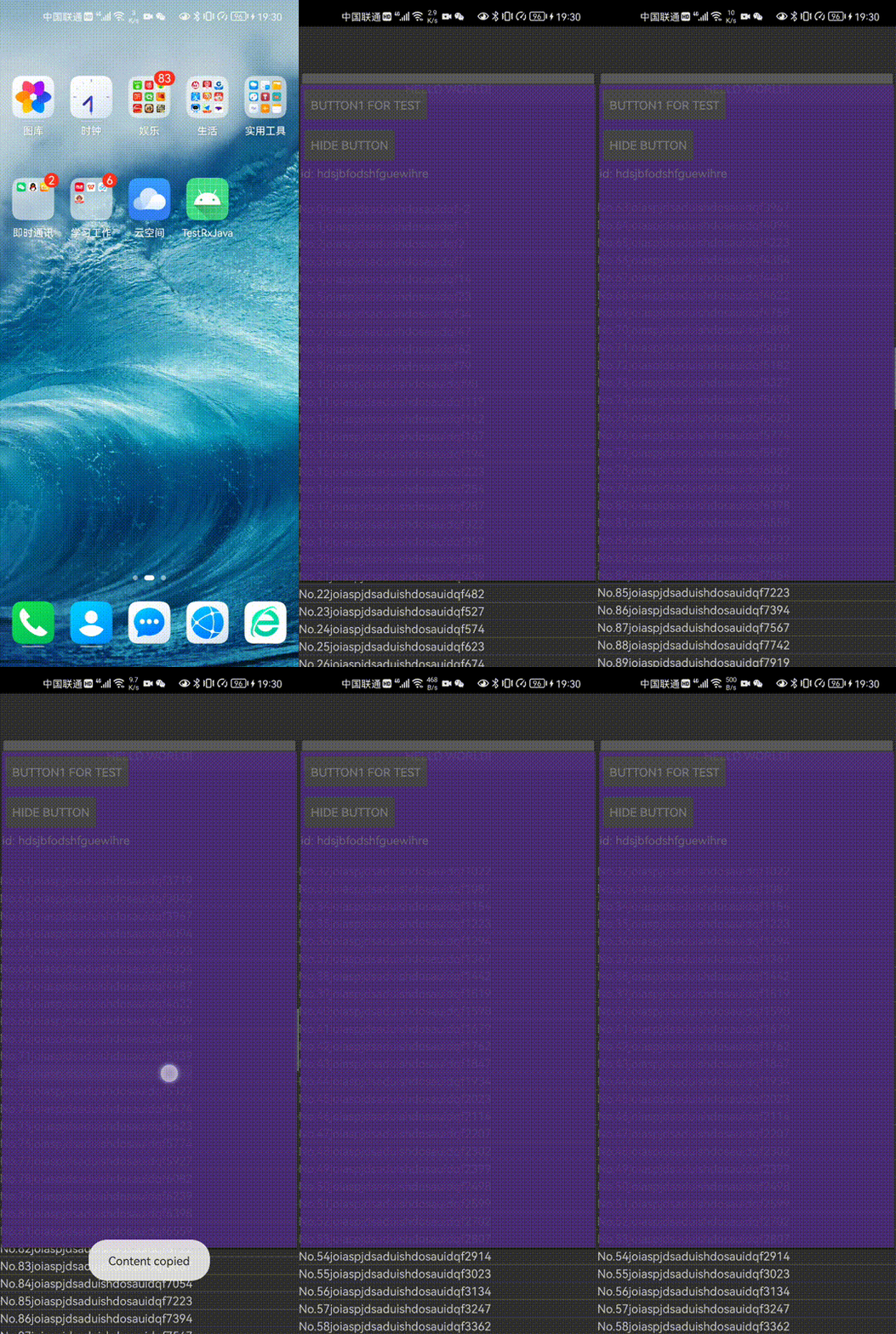
Construction scenario :Activity There is one of them. ListView, There are two in the pop-up window Button, One is responsible for displaying Toast, One is responsible for controlling the other Button The visibility of .
Set up UI Layout
Here are the three corresponding layout files :
main interface activity_main.xml:
<?xml version="1.0" encoding="utf-8"?>
<LinearLayout xmlns:android="http://schemas.android.com/apk/res/android"
    xmlns:app="http://schemas.android.com/apk/res-auto"
    xmlns:tools="http://schemas.android.com/tools"
    android:layout_width="match_parent"
    android:layout_height="match_parent"
    android:id="@+id/root"
    android:orientation="vertical"
    tools:context=".MainActivity">

    <TextView
        android:layout_width="match_parent"
        android:layout_height="wrap_content"
        android:text="Hello World!"
        android:id="@+id/text_view"
        android:visibility="gone"
        />

    <ListView
        android:id="@+id/list"
        android:layout_width="match_parent"
        android:layout_height="wrap_content"/>

</LinearLayout>
ListView List item layout item_layout.xml:
<?xml version="1.0" encoding="utf-8"?>
<LinearLayout xmlns:android="http://schemas.android.com/apk/res/android"
    android:orientation="vertical" android:layout_width="match_parent"
    android:layout_height="match_parent">

    <TextView
        android:id="@+id/text_item"
        android:layout_width="wrap_content"
        android:layout_height="wrap_content"/>

</LinearLayout>
Pop up window layout window_layout.xml
<?xml version="1.0" encoding="utf-8"?>
<LinearLayout xmlns:android="http://schemas.android.com/apk/res/android"
    android:layout_width="match_parent"
    android:layout_height="match_parent"
    android:orientation="vertical"
    android:background="@color/purple_500">

    <Button
        android:id="@+id/btn_window"
        android:text="Button1 for test"
        android:layout_width="wrap_content"
        android:layout_height="wrap_content"/>

    <Button
        android:id="@+id/btn_hide"
        android:text="Hide Button"
        android:layout_width="wrap_content"
        android:layout_height="wrap_content"/>

    <TextView
            android:id="@+id/text_window"
            android:textIsSelectable="true"
            android:layout_width="wrap_content"
            android:layout_height="match_parent"
            android:text="@string/many_letters"/>
</LinearLayout>
Set up the data
Mainly for ListView Set up the data , Our adapter class is shown below :
public class MyAdapter extends BaseAdapter {
    private List<String> mList;
    private Context mContext;

    public MyAdapter(List<String> list, Context context) {
        mList = list;
        mContext = context;
    }

    @Override
    public int getCount() {
        return mList.size();
    }

    @Override
    public String getItem(int i) {
        return mList.get(i);
    }

    @Override
    public long getItemId(int i) {
        return i;
    }

    @Override
    public View getView(int i, View view, ViewGroup viewGroup) {
        if (view == null) {
            view = LayoutInflater.from(mContext).inflate(R.layout.item_layout, null);
        }
        TextView textItem = view.findViewById(R.id.text_item);
        textItem.setText(getItem(i));
        return view;
    }
}
And then, in MainActivity In the binding ListView And adapters :
public class MainActivity extends AppCompatActivity {
    ...

    @Override
    protected void onCreate(Bundle savedInstanceState) {
        super.onCreate(savedInstanceState);
        setContentView(R.layout.activity_main);
        TextView textView = findViewById(R.id.text_view);
        ListView listView = findViewById(R.id.list);
        ArrayList<String> list = new ArrayList<>();
        for (int i = 0; i < 200; i++) {
            list.add("No." + i);
        }
        MyAdapter adapter = new MyAdapter(list, this);

        listView.setAdapter(adapter);

        adapter.notifyDataSetChanged();
        ...
    }

    ...
}
3)、 Construct pop ups
Defining attributes mWindowView, The transparent transmission of later events will use . And then, in MainActivity Of onCreate() in , Load the popup view under the binding adapter , And set the properties :
public class MainActivity extends AppCompatActivity {
    ...
    private View mWindowView;

    @Override
    protected void onCreate(Bundle savedInstanceState) {
        ...
        mWindowView = LayoutInflater.from(this).inflate(R.layout.window_layout, null);
        PopupWindow window = new PopupWindow(this);

        mButton = windowView.findViewById(R.id.btn_window);
        mButton.setOnClickListener(view -> {
            Toast.makeText(MainActivity.this, "Button on window has been clicked!", Toast.LENGTH_SHORT).show();
        });

        mHide = windowView.findViewById(R.id.btn_hide);
        mHide.setOnClickListener(v -> {
            mButton.setVisibility(mButton.getVisibility() == View.VISIBLE ? View.GONE : View.VISIBLE);
        });

        ...

        window.setContentView(mWindowView);
        window.setWidth(750);
        window.setHeight(1750);

        //  The display pop-up window must post
        textView.post(() -> {
            window.showAtLocation(textView, Gravity.START, 0, 0);
        });
        ...
    }
    ...
}
Achieve transparent transmission of touch events
We need to set a touch interceptor for the pop-up window , First try to get the touched sub view , If there is , Indicates that no blank area has been touched , Pop up to deliver and consume events ; otherwise , Indicates that a blank area has been touched , First modify the event coordinates , Again to activity:
public class MainActivity extends AppCompatActivity {
    private Button mButton;
    private Button mHide;

    @Override
    protected void onCreate(Bundle savedInstanceState) {
        ...

        window.setTouchInterceptor((view, motionEvent) -> { //  Set the touch interceptor
            //  Get the touched subview
            View target = Utils.getViewTouchedByEvent(mWindowView, motionEvent);

            //  Pop up processing events
            if (target != null) {
                mWindowView.dispatchTouchEvent(motionEvent);
                return true;
            }

            //  No child view consumption Events , Just send the incident to activity;
            //  First, transform the event coordinates , Then hand it over to the main interface for transmission , Do not consume the event stream
            int[] popupLocation = new int[2];
            mWindowView.getLocationOnScreen(popupLocation);
            event.offsetLocation(popupLocation[0], popupLocation[1]);

            MainActivity.this.dispatchTouchEvent(motionEvent);
            return false;
        });

        ...
    }

...
}
The method for obtaining the touched sub view getViewTouchedByEvent() It's encapsulated in Utils Class :
public class Utils {
    public static View getViewTouchedByEvent(View view, MotionEvent event) {
        if (view == null || event == null) {
            return null;
        }

        if (!(view instanceof ViewGroup)) {
            return isDebugWindowValidTouched(view, event) ? view : null;
        }

        ViewGroup parent = ((ViewGroup) view);
        int childrenCount = parent.getChildCount();
        for (int i = 0; i < childrenCount; i++) {
            View target = getViewTouchedByEvent(parent.getChildAt(i), event);
            if (target != null) {
                return target;
            }
        }
        return null;
    }

    //  Judge event Whether the coordinates are in the view view in
    private static boolean isDebugWindowValidTouched(View view, MotionEvent event) {
        if (event == null || view == null) {
            return false;
        }

        if (view.getVisibility() != View.VISIBLE) {
            return false;
        }

        final float eventRawX = event.getRawX();
        final float eventRawY = event.getRawY();

        RectF rect = new RectF();
        int[] location = new int[2];
        view.getLocationOnScreen(location);

        float x = location[0];
        float y = location[1];
        rect.left = x;
        rect.right = x + view.getWidth();
        rect.top = y;
        rect.bottom = y + view.getHeight();

        return rect.contains(eventRawX, eventRawY) ;
    }
}
The main step of this method is to judge the current view Is it right? ViewGroup: If yes , according to event The coordinates and view Coordinate judgment of view Is it touched ; Otherwise, yes view All son view Recursively call getViewTouchedByEvent(), To get the lowest level touched by the touch event view.
Last , Say when you touch a blank area , Pass the touch event to activity front , Reason for modifying event coordinates : Event coordinates are the coordinates of the event in the view , And at the bottom activity Is a normal size , Therefore, you need to add the coordinate offset of the pop-up root view on the screen , Again to activity.
effect
边栏推荐
- Stackoverflow annual report 2022: what are developers' favorite databases?
- Hosting service and SASE, enjoy the integration of network and security | phase I review
- Openstack actual installation and deployment tutorial, openstack installation tutorial
- Maps are grouped according to the values of the passed in parameters (similar to database groupby)
- Camera module and hardware interface of Camera1 camera
- Introduction: continuously update the self-study version of the learning manual for junior test development engineers
- lol手游之任务进度条精准计算
- Using dynamic time warping (DTW) to solve the similarity measurement of time series and the similarity identification analysis of pollution concentration in upstream and downstream rivers
- [go Language brossage] go from 0 to Getting started 4: Advanced use of slice, Primary Review and Map Getting started Learning
- Uninstall tool v3.5.10.5670 single file portable official version
猜你喜欢

Teach you how to view the number of connected people on WiFi in detail how to view the number of connected people on WiFi

16 excellent business process management tools

《梦华录》“超点”,鹅被骂冤吗?

Win7 10 tips for installing Office2010 five solutions for installing MSXML components

基于QT+MySQL的相机租赁管理系统

Redis installation of CentOS system under Linux, adding, querying, deleting, and querying all keys
![[go language questions] go from 0 to entry 4: advanced usage of slice, elementary review and introduction to map](/img/3a/db240deb4c66b219ef86f40d4c7b7d.png)
[go language questions] go from 0 to entry 4: advanced usage of slice, elementary review and introduction to map

宅男救不了元宇宙

Bytebase rejoint la communauté de base de données open source d'alicloud polardb

Stackoverflow 年度报告 2022:开发者最喜爱的数据库是什么?
随机推荐
[cann document express issue 04] unveiling the development of shengteng cann operator
Hosting service and SASE, enjoy the integration of network and security | phase I review
Jd.com: how does redis implement inventory deduction? How to prevent oversold?
Apache+php+mysql environment construction is super detailed!!!
Huawei cloud modelarts has ranked first in China's machine learning public cloud service market for the fourth time!
unity实战之lol技能释放范围
JVM tuning
Redis installation of CentOS system under Linux, adding, querying, deleting, and querying all keys
Bytebase加入阿里云PolarDB开源数据库社区
Confirm whether the host is a large terminal or a small terminal
Why is the executor thread pool framework introduced
图的基本概念以及相关定义
Bytebase joins Alibaba cloud polardb open source database community
Digital twin industry case: Digital Smart port
Teach you how to view the number of connected people on WiFi in detail how to view the number of connected people on WiFi
Data backup and recovery of PgSQL
用手机摄像头就能捕捉指纹?!准确度堪比签字画押,专家:你们在加剧歧视
The first public available pytorch version alphafold2 is reproduced, and Columbia University is open source openfold, with more than 1000 stars
IP address to integer
Comparative analysis of arrayblockingqueue and linkedblockingqueue