当前位置:网站首页>9、 Practical class
9、 Practical class
2022-07-23 11:53:00 【Piglet vs Hengge】
Catalog
Example 1: Enumeration defining gender
2、 Use enumeration to output weekly program information
Example 2: Basic data types are not allowed to be stored in the collection
2、 Wrapper class construction method
3、 Common methods of packaging
Example 4: Common methods of packaging
Example 5: Packing and unpacking
Example 6:Math Class common methods
Example 7:Random Some common methods of class
Example 9: Membership registration ( practice 01)
3、 Common string extraction methods
Example 10: Common string extraction methods
4、 String splitting ( Method )
Example 11: String splitting ( Use )
practice 02: Find the number of times a particular character appears
07、StringBuffer Classes and StringBuilder class
1、 Use StringBuffer Class handles strings
2、 Use StringBuilder Class handles strings
3、String class 、StringBuffer Class and StringBuilder Class comparison
(2)StringBuffer: String variable
(3)StringBuilder: String variable
4、 frequently-used StringBuffer Class methods use
Example 14:toString() Method ( Temporarily none )
Example 15: Get the current time
Example 16:Calendar Class common methods and character examples
Example 17 : Processing date ( Calculation 2015 year 4 month 6 Day is the week of the year )
(1) adopt API Inquire about SimpleDateFormat class : Date and time pattern table
(2)SimpleDateFormat Class common methods
Example 18: Use SimpleDateFormat Class formatting time
Example 19: Processing date ( For example 17 Expand )
01、Java API Introduce
02、 Cognitive enumeration
1、 Enumeration overview
(1) from Java SE 5.0 Start ,Java Programming languages introduce a new type ---> enumeration
(2) An enumeration is a type consisting of a fixed set of constants , Use keywords enum Definition .
(3) Define enumeration syntax format : To be added
Example 1: Enumeration defining gender
Requirement specification :
Define enumerations that represent gender , Two enumeration constants represent " male " and " Woman ".
Code :
(1)Genders class
(2)Student class
(3)StudentTest class
enum Enumeration class :
package cn.bdqn.demo09;
public enum Genders {
	// Enumeration is a type consisting of a set of fixed constants
	 male , Woman
}
Use the defined enumeration type "Genders" Declare variables "gender"
package cn.bdqn.demo09;
public class Student {
	public String name; // full name
	public Genders gender; // Gender

}
Implementation class
package cn.bdqn.demo09;
public class StudentTest {
	public static void main(String[] args) {
		// Create objects using the parameterless construction method
		Student stu = new Student();
		// Assign a value to a property
		stu.name = " Zhang San ";
		stu.gender = Genders. male ;
		System.out.println(stu.name+"--"+stu.gender);
	}
}
Output results :

2、 Use enumeration to output weekly program information
stay Java in , Enumerations are usually used to represent a finite set of values , Used to check the constraint of the input value .
To be added
03、 Packaging
1、 Overview of packaging
Wrapper classes convert basic data types into objects
Wrapper classes are not intended to replace basic data types , It is only used when basic data types need to be represented by objects .
The role of packaging :
(1) A series of practical methods are provided
(2) Basic data type data is not allowed in the collection , When storing numbers , Use the packaging type
The table below for : Corresponding table of package class and basic data type
| Basic data type | Packaging |
| byte | Byte |
| boolean | Boolean |
| short | Short |
| char | Character |
| int | Integer |
| long | Long |
| float | Float |
| double | Double |
There are two main uses of packaging :
(1) The wrapper class exists as a class corresponding to the basic data type , Facilitate the operation of objects
(2) The wrapper class contains the relevant attributes of each basic data type , If the maximum 、 minimum value , And the related operation method .
Example 2: Basic data types are not allowed to be stored in the collection
package cn.bdqn.demo10;

import java.util.ArrayList;

public class Demo01 {

	public static void main(String[] args) {
		ArrayList al = new ArrayList();
		// Basic data types are not allowed to be stored in the collection , there 100 and 45 First, it is automatically converted to the corresponding packaging type , Then the corresponding packaging type will be converted to Object type , Store in collection
		al.add(100);
		al.add(45);
		for (Object object : al) {
			System.out.println(object);
		}
	}

}
2、 Wrapper class construction method
All wrapper classes can take the corresponding basic data type as a parameter , To construct their instances .
Example 3: All wrapper classes can take the corresponding basic data type as a parameter , To construct their instances .
matters needing attention :
(1)Character class : except Character Out of class , Other wrapper classes can construct their instances with a string as a parameter
for example :Character character2 = new Character("char"); It's wrong.
(2)Boolean Class constructor parameters are String Type , If the content of the string is true( Regardless of case ), Then Boolean Objects represent true, Otherwise, it means false
(3) about Number Object of type , The string needs to be “ String in numeric form ”, Can't pass a null value , Otherwise, the compilation fails , The runtime throws NumberFormatException abnormal .
package cn.bdqn.demo10;

public class Demo02 {

	public static void main(String[] args) {
		// All wrapper classes can take the corresponding basic data type as a parameter , To construct their instances
		//  except Character Out of class , Other wrapper classes can construct their instances with a string as a parameter ( about Number Object of type , The string needs to be “ String in numeric form ”, Can't pass a null value )

		System.out.println("-------------------(1)Byte----------------------");
		byte byt = 10;
		//byte1 It's an object , This object stores data byt
		Byte byte1 = new Byte(byt);
		Byte byte2 = new Byte("123");
		//Byte byte3 = new Byte("abc");// The output here will report an error :NumberFormatException, The string needs to be “ String in numeric form ”, Can't pass a null value
		System.out.println(byte1);
		System.out.println(byte2);
		System.out.println(Byte.MAX_VALUE); // A constant , preservation  byte  The maximum value of type , namely  27-1.
		System.out.println(Byte.MIN_VALUE); // A constant , preservation  byte  The minimum value that the type can take , namely  -27.

		System.out.println("-------------------(2)Short----------------------");
		short sho=100;
		Short short1 = new Short(sho);
		Short short2 = new Short("1234");
		System.out.println(short1);
		System.out.println(short2);


		System.out.println(Short.MAX_VALUE);
		System.out.println(Short.MIN_VALUE);

		System.out.println("-------------------(3)Integer----------------------");
		int num = 1000;
		Integer integer1 = new Integer(num);
		Integer integer2 = new Integer("1122");
		System.out.println(integer1);
		System.out.println(integer2);

		System.out.println("-------------------(4)Long----------------------");
		long lon = 10000L;
		Long long1 = new Long(lon);
		Long long2 = new Long("156");
		System.out.println(long1);
		System.out.println(long2);

		System.out.println("-------------------(5)Float----------------------");
		float flo = 100.5F;
		Float float1 = new Float(flo);
		Float float2 = new Float("12.5");
		System.out.println(float1);
		System.out.println(float2);

		System.out.println("-------------------(6)Double----------------------");
		double dou = 100.5;
		Double double1 = new Double(dou);
		Double double2 = new Double("12.55");
		System.out.println(double1);
		System.out.println(double2);

		System.out.println("-------------------(7)Boolean----------------------");
		boolean bool = true;
		Boolean boolean1 = new Boolean(bool);	//true

		// The content in the string is true( Case insensitive ) When , Stored in the object is true, All other cases are false
		Boolean boolean3 = new Boolean("true"); //true
		Boolean boolean4 = new Boolean("false");//false
		Boolean boolean2 = new Boolean("xiaozhu");//false
		Boolean boolean5 = new Boolean(true); //true
		Boolean boolean6 = new Boolean(false); //false

		System.out.println("-------------------(8)Charater----------------------");
		char cha = ' good ';
		Character char1 = new Character(cha);
		System.out.println(char1); // good

	}
}
Output results :

3、 Common methods of packaging
(1)XXXValue(): Convert wrapper class to base type
(2)toString(): Returns the basic type data represented by the wrapper object as a string ( Basic types -> character string )
(3)parseXXX(): Convert the string to the corresponding basic data type (Character With the exception of , And the contents of the string should be able to be converted into numbers , Otherwise, an exception will be reported )( character string -> Basic types )
(5)valueOf():
1) All packaging classes have the following methods ( Basic types -> Packaging )
public static Type valueOf(type value)
2) except Character Out of class , Other packaging classes have the following methods ( character string -> Packaging )
public static Type valueOf(String s)
Example 4: Common methods of packaging
package cn.bdqn.demo10;

public class Demo03 {

	public static void main(String[] args) {
		// Common methods of packaging
		System.out.println("------------------(1)XXXValue()-----------------");
		//XXXValue(): The wrapper class is converted to the basic data type
		Long lon1 = new Long(125L);
		long num1 = lon1.longValue();  //num1=125

		System.out.println("------------------(2)toString()-----------------");
		// toString(): Returns the basic type data represented by the wrapper object as a string ( Basic types -> character string )
		String sex = Character.toString(' male ');  // male
		String str = Boolean.toString(true);	//true

		Integer inte = new Integer(100);
		String str1 = Integer.toString(inte);//100

		System.out.println("------------------(3)parseXXX()-----------------");
		// parseXXX(): Convert the string to the corresponding basic data type (Character With the exception of , And the contents of the string should be able to be converted into numbers , Otherwise, an exception will be reported )( character string -> Basic types )
		byte num2 = Byte.parseByte("123");
		System.out.println(num2);//123

		Boolean result = Boolean.parseBoolean("True");
		System.out.println(result);//true

		System.out.println("------------------(4)valueOf()-----------------");
		//valueOf(): All packaging classes have the following methods ( Basic types -> Packaging ) public static Type valueOf(type value)
		byte byte2 = 10;
		Byte byte3 = Byte.valueOf(byte2);

		Character cha = Character.valueOf(' Woman ');

		//  except Character Out of class , Other packaging classes have the following methods ( character string -> Packaging )public static Type valueOf(String s)
		Byte byte4 = Byte.valueOf("123");
		//Character.valueOf("a");   It's wrong.
	}

}
Output results :

4、 Packing and unpacking
(1) Packing : The basic data type is converted to the object of the wrapper class
(2) Unpacking : The wrapper object is converted to the primitive type
(3)JDK1.5 after , Allow mixed mathematical operations for basic data types and packaging types
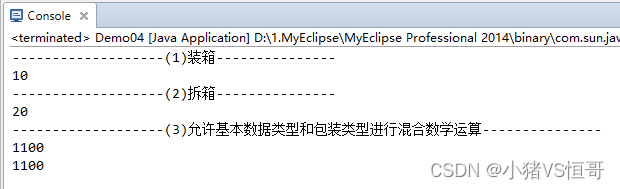
Example 5: Packing and unpacking
package cn.bdqn.demo10;

public class Demo04 {

	public static void main(String[] args) {
		// Packing and unpacking

		System.out.println("-------------------(1) Packing ---------------");
		// Passed before : Basic types --> Packaging
		byte byte1 = 10;

		Byte byte2 = new Byte(byte1);  //( Basic types -> Packaging )
		Byte byte3 = Byte.valueOf(byte1);//valueOf():( Basic types -> Packaging )
		// Packing : Directly assign the basic data type to the wrapper class object
		Byte byte4 = byte1;
		System.out.println(byte4);

		System.out.println("-------------------(2) Unpacking ---------------");
		// Passed before : Packaging --> Basic types
		Integer int1 = new Integer(20);

		int int2 = int1.intValue();
		// Unpacking :: Assign a wrapper class object directly to a variable of basic data type
		int int3 = int1;
		System.out.println(int3);

		System.out.println("-------------------(3) Allow mixed mathematical operations for basic data types and packaging types ---------------");
		Integer num1 = new Integer(100);
		int num2 = 1000;
		int sum = num1 + num2;
		System.out.println(sum);

		Integer sum2 = num1+num2;
		System.out.println(sum2);

	}

}
Output results :
04、Math class
java.lang.Math Class provides some methods of basic numeric operations and set operations . All methods in this class are static . This class is final class , So there are no subclasses .
Example 6:Math Class common methods
(1)Math.random(): Random access [0.0,1.0) Number between
Pick one at random [num1,num2) Integer between
(2)PI: PI
(3)abs(): Find the absolute value
(4)ceil(double a): Return to a ratio a Big distance a The nearest integer ( Rounding up )
floor(double a): Return to a ratio a Small distance a The nearest integer ( Rounding down )
(5)round(): Return data according to the principle of four colors and five entries
(6)max()/min(): Maximum / minimum value
(7)pow(double a,double b): return a Of b Power result
package cn.bdqn.demo01;

public class MathDemo {

	public static void main(String[] args) {
		System.out.println("------------(1)--------------");
		//Math.random(): Random access [0.0,1.0) Number between
		double num = Math.random();
		System.out.println(num);

		// Pick one at random [num1,num2) Integer between
		//int num = (int)(Math.random()*(num2-num1)+num1);

		System.out.println("---------------(2)PI---------------");
		double pi = Math.PI;
		System.out.println(pi); //3.141592653589793

		System.out.println("---------------(3)abs(): Find the absolute value ---------------");
		//abs(): Find the absolute value
		System.out.println(Math.abs(-35));//35

		System.out.println("---------------(4)-1 ceil(double a): Rounding up ---------------");
		//ceil(double a): Return to a ratio a Big distance a The nearest integer
		System.out.println(Math.ceil(3.8));  //4.0
		System.out.println(Math.ceil(-3.5)); //-3.0

		System.out.println("---------------(4)-2 floor(double a): Rounding down ---------------");
		//floor(double a): Return to a ratio a Small distance a The nearest integer
		System.out.println(Math.floor(3.8));//3.0
		System.out.println(Math.floor(-3.5));//-4.0

		System.out.println("---------------(5)round(): Return data according to the principle of rounding ---------------");
		//round(): Return data according to the principle of four colors and five entries
		System.out.println(Math.round(3.5)); //4


		System.out.println("---------------(6)max()/min(): Maximum / minimum value ---------------");
		System.out.println(Math.max(3, 5));//5
		System.out.println(Math.min(7, 9));//9

		System.out.println("---------------(7)pow(double a,double b): return a Of b Power result ---------------");
		//pow(double a,double b): return a Of b Power result
		System.out.println(Math.pow(3, 4)); //81.0
	}

}
Output results :

05、Random class
Random Class is used to generate random numbers .
Random There are two overloaded ways to construct classes , Here's the picture :
| Construction method | explain |
| Random() | Create a new random generator |
| Random(long seed) | Using a single long Seed creates a new random generator |
Be careful : If you initialize two with the same seed value Random object , Then call the same method with each object , Then the random number obtained is the same
Example 7:Random Some common methods of class
(1) nextBoolean(): Randomly generate boolean values
(2) nextInt(): Randomly generate integers
(3) nextInt(int n): Random generation [0,n) Integer between
package cn.bdqn.demo02;

import java.util.Random;

public class RandomDemo {

	public static void main(String[] args) {
		System.out.println("------------ Construction method :Random()- Create a new random generator -------------");
		//Random(): Create a new random generator
		// establish Random Class object
		Random random1 = new Random();
		System.out.println(random1);// Generate an address value


		System.out.println("------------(1) nextBoolean(): Randomly generate boolean values ------------");
		//nextBoolean(): Returns the next pseudo-random number , The return value type is Boolean
		boolean result1 = random1.nextBoolean();
		System.out.println(result1);// Randomly generate boolean values ,true or false


		System.out.println("------------(2) nextInt(): Randomly generate integers ------------");
		//nextint(): Returns the next pseudo-random number , It is evenly distributed in the sequence of the random number generator  int  value .
		int result2 = random1.nextInt();
		System.out.println(result2);


		System.out.println("------------(3) nextInt(int n): Random generation [0,n) Integer between ------------");
		//nextInt(int n): Returns a pseudo-random number , It is taken from the random number generator sequence 、 stay  0( Include ) And the specified value n( barring ) Evenly distributed between  int  value .
		int result3 = random1.nextInt(8);
		System.out.println(result3);


		System.out.println("------------ Construction method :Random(long seed)- Using a single long Seed creates a new random generator -----------");
		//Random(long seed): Using a single long Seed creates a new random generator
		// If you initialize two with the same seed value Random object , Then call the same method with each object , Then the random number obtained is the same
		Random random2 = new Random(100L);
		System.out.println(random2.nextInt());
		Random random3 = new Random(100L);
		System.out.println(random3.nextInt());
	}
}
Output results :

06、String class
1、String Class Overview
stay Java in , The string is called String Type object to handle .String Class is located java.lang In bag , By default , The package is automatically imported into all programs .
establish String The method of the object is as follows :
(1)String s = "HelloWorld";
(2)String s = new String();
(3)String s = new String("HelloWorld");
2、String Class
(1)length(): Get string length
(2)equals(): Compare the contents of two strings ( English letters are case sensitive )
(3)equalsIgnoreCase(): Compare the contents of two strings ( English letters are not case sensitive )
(4)toLowerCase() Method : Convert uppercase English letters to lowercase
(5)toUpperCase() Method : Convert lowercase English letters to uppercase
(6) String connection : Use + and concat
Example 8:String Class
package cn.bdqn.demo03;

public class StringDemo {

	public static void main(String[] args) {
		System.out.println("--------(1)length(): Get string length -----------");
		String str = "abcdefgh";
		//length(): Get string length
		System.out.println(str.length()); //8

		String str1 = "qwertyuiop";
		if(str1.length()<6||str1.length()>18){
			System.out.println(" The length of the password should be 6~18 Between , Please re-enter ");
		}

		System.out.println("--------(2)equals(): Compare the contents of two strings ( English letters are case sensitive )-----------");
		//equals(): Compare the contents of two strings ( English letters are case sensitive )
		String str2 = "abcdefg";
		String str3 = "abcdefG";
		System.out.println(str2.equals(str3));  //false

		System.out.println("--------(3)equalsIgnoreCase(): Compare the contents of two strings ( English letters are not case sensitive )-----------");
		System.out.println(str2.equalsIgnoreCase(str3)); //true

		System.out.println("--------(4)toLowerCase() Method : Convert uppercase English letters to lowercase -----------");
		System.out.println("--------(5)toUpperCase() Method : Convert lowercase English letters to uppercase -----------");
		String str4 = "ABCDqwert";
		System.out.println(str4.toLowerCase());  //abcdqwert
		System.out.println(str4.toUpperCase());  //ABCDQWERT

		System.out.println("--------(6) String connection : Use  +  and  concat-----------");
		String str5 = " The moon on the sea floor is the moon in the sky ";
		String str6 = " Here was a sweetheart ";
		System.out.println(str5+","+str6);  // The moon on the sea floor is the moon in the sky , Here was a sweetheart

		System.out.println(str5.concat(","+str6));  // The moon on the sea floor is the moon in the sky , Here was a sweetheart


	}

}
Output results :

Example 9: Membership registration ( practice 01)
Requirement specification :
Realize member registration , requirement
(1) The user name length is not less than 3
(2) The password length is not less than 6
(3) The two passwords must be the same when registering

Code :
package cn.bdqn.demo03;
import java.util.Scanner;
public class Demo02 {
	public static void main(String[] args) {
		/*
		 *  Realize member registration ,
		 *  Requirement specification :
		 * (1) The user name length is not less than 3
		 * (2) The password length is not less than 6
		 * (3) The two passwords must be the same when registering
		 */
		Scanner input = new Scanner(System.in);
		System.out.println("************ Welcome to the registration system ************");

		String userName; // user name
		String pwd; // password
		String repPwd;  // Enter the password again

		while (true) {
			System.out.print(" Please enter a user name :");
			userName = input.next();
			System.out.print(" Please input a password :");
			pwd = input.next();
			System.out.print(" Please input the password again :");
			repPwd = input.next();
			if (userName.length() < 3 || pwd.length() < 6) {
				System.out.println(" User name length cannot be less than 3, Password length cannot be less than 6!");
				continue;
			} else {
				if (!pwd.equals(repPwd)) {
					System.out.println(" The two passwords are not the same ");
					continue;
				} else {
					System.out.println(" Registered successfully , Please remember your user name and password .");
					break;
				}
			}
		}
	}
}
3、 Common string extraction methods
| Method | explain |
| public int indexOf(int ch) | Search for the first character that appears ch( Or a string value), If not found , return -1 |
| public int indexOf(String value) | |
| public int lastIndexOf(int ch) | Search for the last character that appears ch( Or a string value), If not found , return -1 |
| public int lastIndexOf(String value) | |
| public String substring(int index) | Extract the string part starting from the location index |
| public String substring(int beginindex, int endindex) | extract beginindex and endindex The string part between , Include the character starting the index , Excluding the characters that end the index |
| public String trim() | Returns a copy of the call string without any spaces before and after |
Example 10: Common string extraction methods
package cn.bdqn.demo03;

public class StringDemo02 {

	public static void main(String[] args) {
		System.out.println("--------------(1)-1 indexOf() ----------------");
		// public int indexOf(int ch): Search for the first character that appears ch( Or a string value), If not found , return -1
		// public int indexOf(String value) Search for the first character that appears ch( Or a string value), If not found , return -1

		// frequently-used ASCII The value of the code :A:65  a:97  0:48
		String str = "abcdefghijk01Amnabc";
		int num = str.indexOf(98);// Search for the first occurrence ASCII The code value is 98 The characters of ( Or a string ),ASCII Code value 98 For the b
		System.out.println(num);  // 1

		int num1 = str.indexOf("c");// The first string to appear in the search is c, And returns the subscript value .
		System.out.println(num1);  // 2

		int num2 = str.indexOf("de");// The first string to appear in the search is de, And returns the subscript value .
		System.out.println(num2);  // 3


		System.out.println("--------------(1)-2 lastIndexOf()----------------");
		// public int lastIndexOf(int ch): Search for the last character that appears ch( Or a string value), If not found , return -1
		// public int lastIndexOf(String value): Search for the last character that appears ch( Or a string value), If not found , return -1

		// Search for the last occurrence ASCII The code value is 98 The characters of ( Or a string ),ASCII Code value 98 For the b
		System.out.println(str.lastIndexOf(98));   //17
		// The last string to appear in the search is m, And returns the subscript value .
		System.out.println(str.lastIndexOf("m")); //14

		System.out.println("--------------(2)-1 substring(int index)----------------");
		//public String substring(int index): Extract the string part starting from the location index

		String str1 = "abcdef1Amnabc";
		String newStr = str1.substring(3);
		System.out.println(newStr);   //def1Amnabc

		System.out.println("--------------(2)-2 substring(int beginindex, int endindex)----------------");
		/* public String substring(int beginindex, int endindex):
		 *  extract beginindex and endindex The string part between , Include the character starting the index , Excluding the characters that end the index
		 */
		String str2 = "abcdef1Amnabc";
		String newStr1 = str2.substring(3, 6);
		System.out.println(newStr1); //def

		System.out.println("--------------(3) trim() ----------------");
		 //public String trim(): Returns a copy of the call string without any spaces before and after
		String str3 = "  abc    qwert   ";
		String newStr2 = str3.trim();
		System.out.println(str3);  //  abc    qwert
		System.out.println(newStr2);  //abc    qwert

	}
}
Output results :

4、 String splitting ( Method )
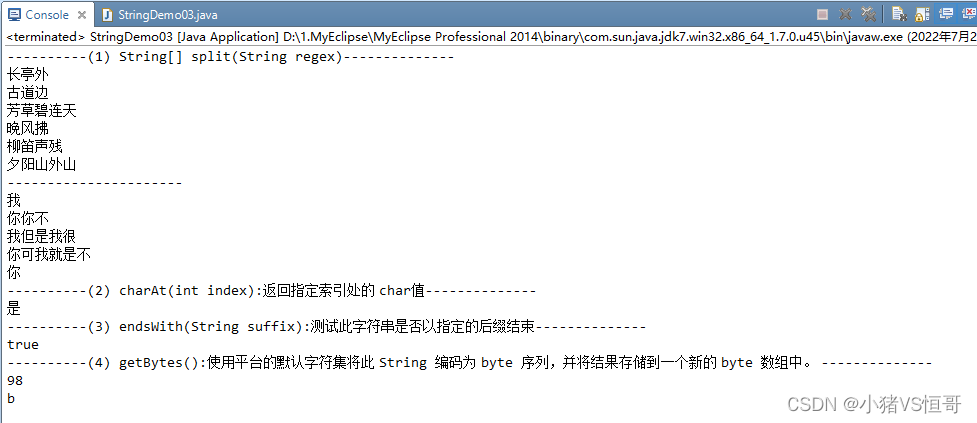
Example 11: String splitting ( Use )
package cn.bdqn.demo03;

public class StringDemo03 {

	public static void main(String[] args) {

		System.out.println("----------(1) String[] split(String regex)--------------");
		// String[] split(String regex) : Split the string according to the splitting rules
		String song = " Outside the long Pavilion , Beside the old road , The grass is green , The evening wind blows , The sound of willow flute is broken , The sunset is beyond the mountain ";
		String[] str1 = song.split(","); // By comma “,” Split
		for (String string : str1) {
			System.out.println(string);
		}

		System.out.println("----------------------");
		String love = " I love you, you don't love me, but I love you very much, but I just don't love you ";
		String[] loves = love.split(" Love ");// according to " Love " Split
		for (String string : loves) {
			System.out.println(string);
		}

		System.out.println("----------(2) charAt(int index): Returns the  char value --------------");
		//charAt(int index): Returns the  char value
		String str2 = " The moon on the sea is the moon in the sky , Here was a sweetheart ";
		char ch = str2.charAt(3);
		System.out.println(ch);  // yes

		System.out.println("----------(3) endsWith(String suffix): Tests whether the string ends with the specified suffix --------------");
		//boolean endsWith(String suffix): Tests whether the string ends with the specified suffix . Return value is Boolean
		boolean result = str2.endsWith(" receive patrons ");
		System.out.println(result);//true

		System.out.println("----------(4) getBytes(): Use the platform's default character set to set this  String  Encoded as  byte  Sequence , And store the results in a new  byte  Array . --------------");
		//getBytes(): Use the platform's default character set to set this  String  Encoded as  byte  Sequence , And store the results in a new  byte  Array .

		String str3 = "abcdefg10086";
		byte[] byte1 = str3.getBytes();
		System.out.println(byte1[1]); //98: Back to str The index of this array is 1 The elements of the ASCII Code value

		char result1 = (char)byte1[1];
		System.out.println(result1); // Take the above obtained ASCII Code value 98 Convert to b
	}
}
Output results :
practice 02: Find the number of times a particular character appears
Requirement specification :
Enter a string , Then enter the character you want to find , Judge the number of times the character appears in the string

07、StringBuffer Classes and StringBuilder class
1、 Use StringBuffer Class handles strings
Frequently modify the string ( Such as string concatenation ) when , Use StringBuffer Class can greatly improve the efficiency of program execution .
(1) How to use StringBuffer class :StringBuffer Class is located java.util In bag , yes String Class enhancement class .StringBuffer Class provides many methods to use .
(2) frequently-used StringBuffer Class method :insert() Method 、append() Method 、toString() Such method .
2、 Use StringBuilder Class handles strings
java.lang.StringBuilder yes JDK 5.0 New classes in version , It is a mutable class . This class provides a StringBuffer Compatible classes , Designed to be used as StringBuffer A simple alternative to , In most implementations , It is better than StringBuffer Execute quickly . Use StringBuilder Class handles strings in the same way StringBuffer Classes are basically the same .
3、String class 、StringBuffer Class and StringBuilder Class comparison
(1)String: String constant
String Is immutable , In every time right String Changing the type is actually equivalent to generating a new String object , Then point to the new String object , therefore It's better not to use a string that often changes its content String type , Because every time an object is generated, it has an impact on system performance .
(2)StringBuffer: String variable
StringBuffer It's a variable string , In every time right StringBuffer When the object changes , Would be right StringBuffer The object itself operates , Instead of generating new objects , Then change the object reference . therefore , stay It is recommended to use when string objects change frequently StringBuffer class .
for example : String connection operation ,StringBuffer Class is more efficient than String Class height .
(3)StringBuilder: String variable
JDK 5.0 The version provides StringBuilder class , It and StringBuffer Class equivalence , The difference lies in StringBuffer Class is thread safe ,StringBuilder Classes are single threaded , No synchronization is provided , Theoretically more efficient .
4、 frequently-used StringBuffer Class methods use
(1)insert(): Insert the parameter into the specified position of the string and return . Parameters can include String Any type of ( for example boolean、char、double、float、int、long etc. )
(2)append(): Connect the parameter to the string and return .
(3)toString(): take StringBuffer String of type 1 Convert to String Type and return
( character string 1.toString)
Example 12:insert() Method
Requirement specification :
Convert a numeric string into a comma separated numeric string , That is, every three numbers from the right are separated by commas
package cn.bdqn.demo01;

import java.util.Scanner;

public class StringBufferDemo01 {
	public static void main(String[] args) {
		/*
		 *  Convert a numeric string into a comma separated numeric string ,
		 *  That is, every three numbers from the right are separated by commas
		 * */

		// First step : To get the number entered by the keyboard
		Scanner input = new Scanner(System.in);
		System.out.print(" Please enter a string of numbers :");
		String num = input.next();

		// The second step : Use later StringBuffer Generic insert() Method , So first we have to num convert to StringBuffer
		StringBuffer sb = new StringBuffer(num);
		for (int i = sb.length()-3;i>0;i-=3) {
			sb.insert(i, ",");
		}
		System.out.println(sb);


	}
}
Output results :

Example 13:append()
Use append(): Connect the parameter to the string and return .
package cn.bdqn.demo01;

public class Demo01 {

	public static void main(String[] args) {

		String num = "123";
		// Use StringBuffer Generic append() Method , take num convert to StringBuffer
		StringBuffer sb = new StringBuffer(num);
		// Use append(): Connect the parameter to the string and return .
		sb.append(" Hengge 520");
		System.out.println(sb);
	}
}
Output results :

Example 14:toString() Method ( Temporarily none )
toString(): take StringBuffer String of type 1 Convert to String Type and return
08、 Date operation class
1、Date class
java.util.Date class :Date Class object is used to represent date and time , This class provides a series of methods for operating the components of date and time .Date The most used class is the class that gets time , Such as Date date = new Date(); This code uses the current time of the system to create a date object .
Example 15: Get the current time
package cn.bdqn.demo02;

import java.util.Date;

public class DateDemo01 {
	public static void main(String[] args) {

		// establish Date Class object
		Date date = new Date();
		System.out.println(date);// Display the year, month and day of the current time 、 Minutes and seconds :Sat Jul 02 09:14:59 CST 2022

		// Get the current number of years
		int year = date.getYear()+1900;// Oblique shoulder indicates that this method is out of date
		System.out.println(year);//2022

		// Get the current number of weeks
		int day = date.getDay();
		switch(day){
		case 0:
			System.out.println(" Sunday "); // Sunday is 0, Monday is 1,...., Saturday is 6
		case 6:
			System.out.println(" Saturday ");
		}

	}
}
Output results :

2、Calendar class
java.util.Calendar class :Calendar Class objects are also classes used to represent dates and times , It can be seen as Date An enhanced version of class .Calendar Class provides a set of methods , Allows you to convert a time in milliseconds to years 、 month 、 Japan 、 Hours 、 branch 、 second . You can put Calendar Class as a perpetual calendar , The current time is displayed by default , Of course, you can also check other times .
(1)Calendar Class is an abstract class , You can do this in a static way getInstance() Methods to get Calendar Class object , In fact, the obtained object is an object of its subclass .
(2) Used to set and get dates / Specific parts of time data .
(3)Calendar Class provides methods and static fields to manipulate calendars , As shown in the following table :
| Method to get properties | explain |
| int get(int field) | Return the value of the given calendar segment |
| YEAR | Indication year |
| MONTH | Indicates the month |
| DAY_OF_MONTH | Indicates a day of the month |
| HOUR | When instructed |
| MINUTE | Indicates the minutes of an hour |
| SECOND | Indicates the second in a minute |
| DAY_OF_YEAR | Today is the day of the year |
| DAY_OF_MONTH | Today is the day of the month |
| DAY_OF_WEEK | Today is the day of the week |
| WEEK_OF_YEAR | This week is the first few weeks of the year |
| WEEK_OF_MONTH | This week is the first few weeks of the month |
Example 16:Calendar Class common methods and character examples
package cn.bdqn.demo04;

import java.util.Calendar;

public class CalendarDemo01 {

	public static void main(String[] args) {
		//  By inquiring API know Calendar Class is an abstract class , Cannot instantiate directly ,
		//  You can call Calendar Class getInstance() Methods to get getInstance() Methods to get Calendar Class reference
		// getInstance(): Get a calendar using the default time zone and locale .
		Calendar cal = Calendar.getInstance();
		System.out.println(cal);//  Output cal You can get a lot of data , For example, date, hour, minute, second, week, etc , But the form is not what we want , So we're going to transform

		//int get(int field): Returns the value of the given calendar field , Inquire about API lookup Calendar Class field
		// Year of acquisition : Field (YEAR)
		int year = cal.get(Calendar.YEAR);
		System.out.println(" year :"+year);

		// Get the month : Field (MONTH)
		int month = cal.get(Calendar.MONTH);
		System.out.println(" month :"+(month+1));//  In calendar cal In the first month of 0 Express , For the second month 1 Express , And so on

		// Acquisition date : Field (DAY_OF_MONTH)
		int  day = cal.get(Calendar.DAY_OF_MONTH);
		System.out.println(" Japan :"+day);

		// When getting / branch / second : Field (HOUR/MINUTE/SECOND)
		int hour = cal.get(Calendar.HOUR);
		int minute = cal.get(Calendar.MINUTE);
		int second = cal.get(Calendar.SECOND);
		System.out.println(" present time :"+hour+":"+minute+":"+second);

		// Get how many days today is this year : Field (DAY_OF_YEAR)
		int dayYear = cal.get(Calendar.DAY_OF_YEAR);
		System.out.println(" Today is the first day of the year "+dayYear+" God ");

		// Get week : Field ()
		int dayWeek = cal.get(Calendar.DAY_OF_WEEK);
		System.out.println(" Today is a week "+(dayWeek-1));

	}

}
Output results :

Example 17 : Processing date ( Calculation 2015 year 4 month 6 Day is the week of the year )
package cn.bdqn.demo04;

import java.util.Calendar;

public class CalendarDemo02 {

	public static void main(String[] args) {
		Calendar cal = Calendar.getInstance();
		cal.set(2015, 3, 6);//  Notice that the month starts from 0 Start ,4 Monthly use 3 Express
		System.out.println(cal);
		int woy = cal.get(Calendar.WEEK_OF_YEAR);
		System.out.println(woy);
	}

}
Output results :

3、SimpleDateFormat class
java.text.SimpleDateFormat class :SimpleDateFormat Class is DateFormat Subclasses of classes ,SimpleDateFormat Class is DateFormat Subclasses that are used more in class , It's a concrete class that formats and parses dates in a locale related way , Such as "yyyy-MM-dd HH:mm:ss" Is a specified date and time format .
(1) adopt API Inquire about SimpleDateFormat class : Date and time pattern table

(2)SimpleDateFormat Class common methods
(1)format(): Will be given Date Format as date / Time string , And add the result to the given StringBuffer.
Example 18: Use SimpleDateFormat Class formatting time
package cn.bdqn.demo03;

import java.text.SimpleDateFormat;
import java.util.Date;

public class SimpleDateFormaDemo {

	public static void main(String[] args) {
		/*java.text.SimpleDateFormat class :
		 * SimpleDateFormat It's a concrete class that formats and parses dates in a locale related way .
		 *  It allows formatting ( date  ->  Text )、 analysis ( Text  ->  date ) And standardization .
		 * */

		// establish Date Class object
		Date date = new Date();
		System.out.println(date);// Output the above cal You can get a lot of data , For example, date, hour, minute, second, week, etc , But the form is not what we want , So we're going to transform

		SimpleDateFormat sdf = new SimpleDateFormat("yyyy-MM-dd HH:mm:ss E D w");// Inquire about API You know :y: year ---M: Month of the year ---d: Days in a month  ---H: The number of hours in a day (0-23)---m: The number of minutes in an hour ---s: Number of milliseconds
		String str = sdf.format(date);//format(): Will be given  Date  Format as date / Time string , And add the result to the given  StringBuffer.
		System.out.println(str);
	}
}
Output results :

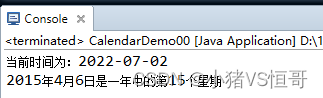
Example 19: Processing date ( For example 17 Expand )
Requirement specification
(1) Get the current time usage SimpleDateFormat With “ year - month - Japan ” Way to show
(2) Calculation 2015 year 4 month 6 Day is the week of the year
package cn.bdqn.demo04;

import java.text.SimpleDateFormat;
import java.util.Calendar;
import java.util.Date;

public class CalendarDemo00 {

	public static void main(String[] args) {
		/*
		 *  Requirement specification :
		 * (1) Get the current time , Use SimpleDateFormat With “ year - month - Japan ” Way to show
		 * (2) Calculation 2015 year 4 month 6 Day is the week of the year
		 * */
		//(1) Get the current time , Use SimpleDateFormat With “ year - month - Japan ” Way to show
		// establish Date Class object
		Date date = new Date();
		SimpleDateFormat cal = new SimpleDateFormat("yyyy-MM-dd");
		//format(): Will be given  Date  Format as date / Time string , And add the result to the given  StringBuffer.
		String str = cal.format(date);
		System.out.println(" The current time is :"+str);

		//(2) Calculation 2015 year 4 month 6 Day is the week of the year
		Calendar cal1 = Calendar.getInstance();
		cal1.set(2015, 3, 6);
		int weekYear = cal1.get(Calendar.WEEK_OF_YEAR);
		System.out.println("2015 year 4 month 6 Day is the... Of the year "+weekYear+" A few weeks ");
	}
}
Output results :
边栏推荐
猜你喜欢

Installation and process creation of activiti app used by activiti workflow

Data warehouse 4.0 notes - user behavior data collection IV
activiti7快速入门经验分享

数仓4.0笔记——业务数据采集——Sqoop

MySQL transaction rollback mechanism and principle

MySQL password free login settings

數倉4.0筆記——業務數據采集
Entrepôt de données 4.0 Notes - acquisition de données commerciales

Typescript advanced type
![[hudi]hudi compilation and simple use of Hudi & spark and Hudi & Flink](/img/6f/e6f5ef79c232d9b27a8334cd8ddaa5.png)
[hudi]hudi compilation and simple use of Hudi & spark and Hudi & Flink
随机推荐
数仓4.0笔记——数仓环境搭建—— Yarn配置
Introduction to the process structure used by activiti workflow
IP地址是什么
Cuda10.0 configuration pytorch1.7.0+monai0.9.0
MySQL用户管理
[radiology] bugfix: when GLCM features: indexerror: arrays used as indexes must be of integer (or Boolean) type
Sqli lab 1-16 notes with customs clearance
Digital collection development / digital collection system development solution
SQL labs 5-6 customs clearance notes
APP自动化测试工具-appium的安装及使用
Data warehouse 4.0 notes - data warehouse environment construction - Yan configuration
Chinese interpretation of notepad++ background color adjustment options
MySQL modify function permission is not effective
数仓4.0笔记——用户行为数据采集四
MySQL视图
CTF web common software installation and environment construction
Unable to negotiate with port 51732: no matching host key type found. Their offer:
NFT digital collection system development: Shenzhen Evening News "good times travel" digital collection online seconds chime
Typescript introduction
Gerrit operation manual