当前位置:网站首页>Pyqt5 rapid development and practice 4.11 drag and clipboard
Pyqt5 rapid development and practice 4.11 drag and clipboard
2022-07-28 10:45:00 【Ding Jiaxiong】
PyQt5 Rapid development and actual combat
List of articles
4. The first 4 Chapter PyQt5 Basic window control
4.11 Drag and clipboard
4.11.1 Drag And Drop
The drag function provided for users is very intuitive , In many desktop applications , Copying or moving objects can be done by dragging .
be based on MIME The type of drag data transfer is based on QDrag Class .QMimeData Object to associate the associated data with its corresponding MIME Associated with type .
MIME: Multipurpose Internet mail extension type . A file with an extension is a type of file opened by an application , When the extension file is accessed , The browser will automatically use the specified application to open , Mostly used to specify some client-side customized file names , And some ways to open media files .
MIME Types of data can be simply understood as various resources on the Internet , For example, the text 、 Audio and video resources , Every resource on the Internet belongs to one MIME Data of type .
MimeData Class functions allow easy detection and use of MIME type
| Judgment function | Set function | Get function | MIME type |
|---|---|---|---|
| hasText() | text() | setText() | text/plain |
| hasHtml() | html() | setHtml() | text/html |
| hasUrls() | urls() | setUrls() | text/uri-list |
| hasImage() | imageData() | setImageData() | image/* |
| hasColor() | colorData() | setColorData() | application/x-color |
many QWidget All objects support drag action , Controls that allow dragging data must be set to QWidget.setDragEnabled() by True. in addition , Control should respond to drag events , To store the dragged data .
Common drag events
| event | describe |
|---|---|
| DragEnterEvent | When performing a drag control operation , And when the mouse pointer enters the control , This event will be triggered . In this event, you can get the operated window control , The drag operation can also be conditionally accepted or rejected |
| DragMoveEvent | This event will be triggered when the drag operation is in progress |
| DragLeaveEvent | When performing a drag control operation , And when the mouse pointer leaves the control , This event will be triggered |
| DropEvent | When the drag operation is released on the target control , This event will be triggered |
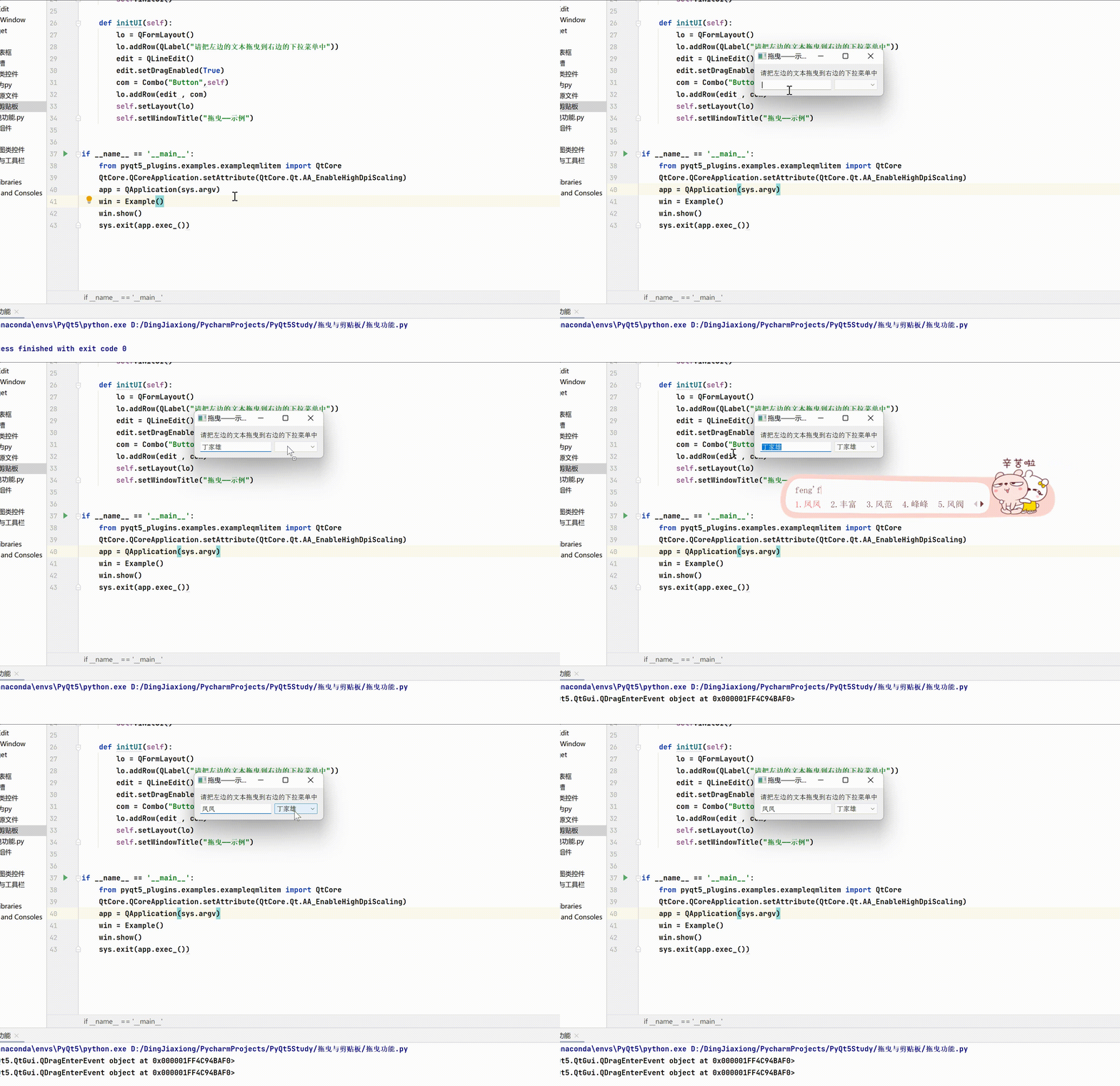
Drag function —— Case study
import sys
from PyQt5.QtCore import *
from PyQt5.QtGui import *
from PyQt5.QtWidgets import *

class Combo(QComboBox):
    def __init__(self , title , parent):
        super(Combo, self).__init__(parent)
        self.setAcceptDrops(True)

    def dragEnterEvent(self , e):
        print(e)
        if e.mimeData().hasText():
            e.accept()
        else:
            e.ignore()

    def dropEvent(self,e):
        self.addItem(e.mimeData().text())

class Example(QWidget):
    def __init__(self):
        super(Example, self).__init__()
        self.initUI()

    def initUI(self):
        lo = QFormLayout()
        lo.addRow(QLabel(" Please drag the text on the left to the drop-down menu on the right "))
        edit = QLineEdit()
        edit.setDragEnabled(True)
        com = Combo("Button",self)
        lo.addRow(edit , com)
        self.setLayout(lo)
        self.setWindowTitle(" drag —— Example ")


if __name__ == '__main__':
    from pyqt5_plugins.examples.exampleqmlitem import QtCore
    QtCore.QCoreApplication.setAttribute(QtCore.Qt.AA_EnableHighDpiScaling)
    app = QApplication(sys.argv)
    win = Example()
    win.show()
    sys.exit(app.exec_())
4.11.2 QClipboard
QClipboard Class provides access to the system clipboard , You can copy and paste data between applications . It operates like QDrag class , And use similar data types .
QApplication Class has a static method clipboard(), It returns a reference to the clipboard object . Of any kind MimeData Can be copied or pasted from the clipboard .
QClipboard Common methods in class
| Method | describe |
|---|---|
| clear() | Clear the contents of the clipboard |
| setImage() | take QImage Object is copied to the clipboard |
| setMimeData() | take MIME Data set to clipboard |
| setPixmap() | Copy from clipboard Pixmap object |
| setText() | Copy text from clipboard |
| text() | Retrieve text from clipboard |
QClipboard Class
| The signal | meaning |
|---|---|
| dataChanged | When the clipboard contents change , This signal is transmitted |
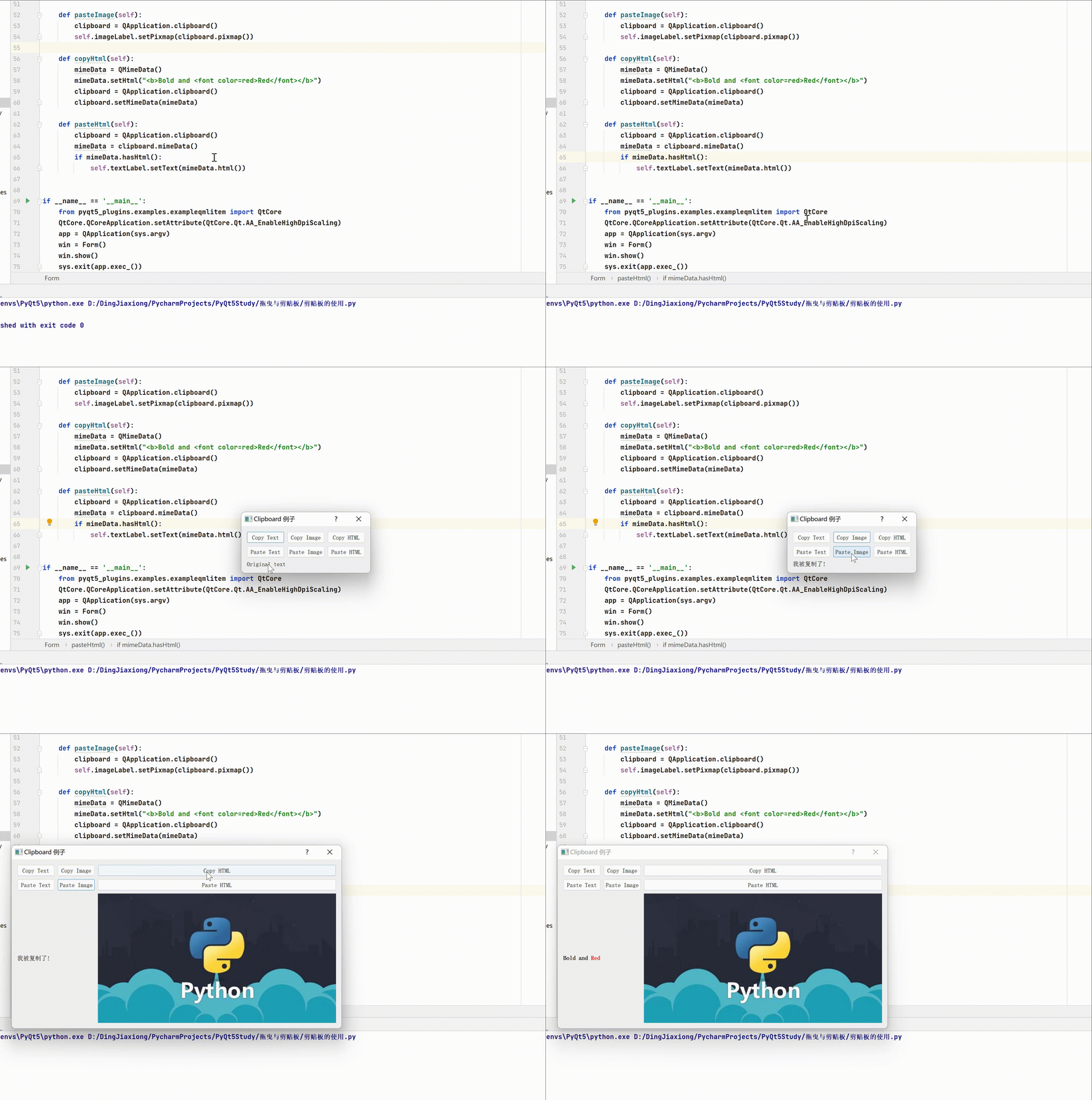
QClipboard Use —— Case study
import os
import sys
from PyQt5.QtCore import QMimeData
from PyQt5.QtWidgets import (QApplication,QDialog,QGridLayout,QLabel,QPushButton)
from PyQt5.QtGui import QPixmap


class Form(QDialog):
    def __init__(self, parent=None):
        super(Form, self).__init__(parent)
        textCopyButton = QPushButton("&Copy Text")
        textPasteButton = QPushButton("Paste &Text")
        htmlCopyButton = QPushButton("C&opy HTML")
        htmlPasteButton = QPushButton("Paste &HTML")
        imageCopyButton = QPushButton("Co&py Image")
        imagePasteButton = QPushButton("Paste &Image")
        self.textLabel = QLabel("Original text")
        self.imageLabel = QLabel()
        self.imageLabel.setPixmap(QPixmap(os.path.join(
            os.path.dirname(__file__), "images/clock.png")))
        layout = QGridLayout()
        layout.addWidget(textCopyButton, 0, 0)
        layout.addWidget(imageCopyButton, 0, 1)
        layout.addWidget(htmlCopyButton, 0, 2)
        layout.addWidget(textPasteButton, 1, 0)
        layout.addWidget(imagePasteButton, 1, 1)
        layout.addWidget(htmlPasteButton, 1, 2)
        layout.addWidget(self.textLabel, 2, 0, 1, 2)
        layout.addWidget(self.imageLabel, 2, 2)
        self.setLayout(layout)
        textCopyButton.clicked.connect(self.copyText)
        textPasteButton.clicked.connect(self.pasteText)
        htmlCopyButton.clicked.connect(self.copyHtml)
        htmlPasteButton.clicked.connect(self.pasteHtml)
        imageCopyButton.clicked.connect(self.copyImage)
        imagePasteButton.clicked.connect(self.pasteImage)
        self.setWindowTitle("Clipboard  Example ")

    def copyText(self):
        clipboard = QApplication.clipboard()
        clipboard.setText(" I was copied !")

    def pasteText(self):
        clipboard = QApplication.clipboard()
        self.textLabel.setText(clipboard.text())

    def copyImage(self):
        clipboard = QApplication.clipboard()
        clipboard.setPixmap(QPixmap(os.path.join(
            os.path.dirname(__file__), "../ Package resource files /pic/python.jpg")))

    def pasteImage(self):
        clipboard = QApplication.clipboard()
        self.imageLabel.setPixmap(clipboard.pixmap())

    def copyHtml(self):
        mimeData = QMimeData()
        mimeData.setHtml("<b>Bold and <font color=red>Red</font></b>")
        clipboard = QApplication.clipboard()
        clipboard.setMimeData(mimeData)

    def pasteHtml(self):
        clipboard = QApplication.clipboard()
        mimeData = clipboard.mimeData()
        if mimeData.hasHtml():
            self.textLabel.setText(mimeData.html())


if __name__ == '__main__':
    from pyqt5_plugins.examples.exampleqmlitem import QtCore
    QtCore.QCoreApplication.setAttribute(QtCore.Qt.AA_EnableHighDpiScaling)
    app = QApplication(sys.argv)
    win = Form()
    win.show()
    sys.exit(app.exec_())
边栏推荐
- GKNoise
- 20200217训练赛 L1 - 7 2019来了 (20分)
- 3、MapReduce详解与源码分析
- GKSpheresNoiseSource
- SemEval 2022 | 将知识引入NER系统,阿里达摩院获最佳论文奖
- OCR knowledge summary
- An example of SQL trace in MySQL
- 20200217 training match L1 - 7 2019 is coming (20 points)
- Bitwise and, or, XOR and other operation methods
- 机器人技术(RoboCup 2D)实验五十题及主要函数含义
猜你喜欢

GKVoronoiNoiseSource

Django celery redis send email asynchronously

Idea packages jar packages and runs jar package commands

8、Yarn系统架构与原理详解

粒子群实现最优解的求解

安装office自定义项 安装期间出错 解决办法

Excel word simple skills sorting (continuous update ~)
GKVoronoiNoiseSource

SQL Server 2016 learning records - single table query

Machine learning -- handwritten English alphabet 1 -- classification process
随机推荐
ACM winter vacation training 6
Use of Ogg parameter filter [urgent]
GKARC4RandomSource
20200229 training match L1 - 2 delete the substring in the string (20 points)
逆元&组合数&快速幂
GKCoherentNoiseSource
RoboCup (2D) experiment 50 questions and the meaning of main functions
Sleeping barber problem
PyQt5快速开发与实战 4.11 拖曳与剪贴板
Inside story of Wu xiongang being dismissed by arm: did the establishment of a private investment company harm the interests of shareholders?
GKVoronoiNoiseSource
Install mysql5.7 under centos7
产品端数据分析思维
SQL Server 2016 learning record - Data Definition
GKConstantNoiseSource
Lucene query syntax memo
How to write Ogg with multiple filter syntax?
Qt生成.exe文件 并 在无Qt环境下运行(Enigma Virtual Box进行绿色可执行软件封装)图文教程
Codeforces Round #614 (Div. 2) B. JOE is on TV!
SQL Server 2016 学习记录 --- 嵌套查询