当前位置:网站首页>C# 自定义并动态切换光标
C# 自定义并动态切换光标
2022-07-01 00:41:00 【dotNET跨平台】
本文经原作者授权以原创方式二次分享,欢迎转载、分享。
原文作者:唐宋元明清的博客
原文地址:https://www.cnblogs.com/kybs0/p/14873136.html
系统有很多光标类型 :Cursors 类 (System.Windows.Input) | Microsoft Docs[1]
本章介绍如何自定义光标、并动态切换光标类型。
动态切换光标类型
以白板书写为例:
鼠标操作时
Cursor为红点;触摸时
Cursor为空;
public MainWindow()
    {
        InitializeComponent();
        MouseEnter += (s, e) =>
        {
            ShowMouseCursor(e);
        };
        MouseMove += (s, e) =>
        {
            ShowMouseCursor(e);
        };
        StylusMove += (s, e) =>
        {
            ShowNoneCursor();
        };
    }
设置光标显示;
private void ShowNoneCursor()
  {
      if (Cursor == Cursors.None)
      {
          return;
      }
      Cursor = Cursors.None;
      Mouse.UpdateCursor();
  }
  private void ShowMouseCursor(MouseEventArgs e)
  {
      if (e.StylusDevice != null && e.StylusDevice.Id > -1)
      {
          return;
      }
      if (Cursor == GetFillCursor())
      {
          return;
      }
      Cursor = GetFillCursor();
      Mouse.UpdateCursor();
  }
  private Cursor _fillCursor = null;
  private Cursor GetFillCursor()
  {
      return _fillCursor ?? (_fillCursor = CursorHelper.CreateFillCursor());
}触摸书写时,会有个默认光标,所以此处把触摸时的光标置空Cursors.None;
Mouse.UpdateCursor()能强制更新光标。当然,不调用这个更新方法肉眼其实也看不出啥。。。
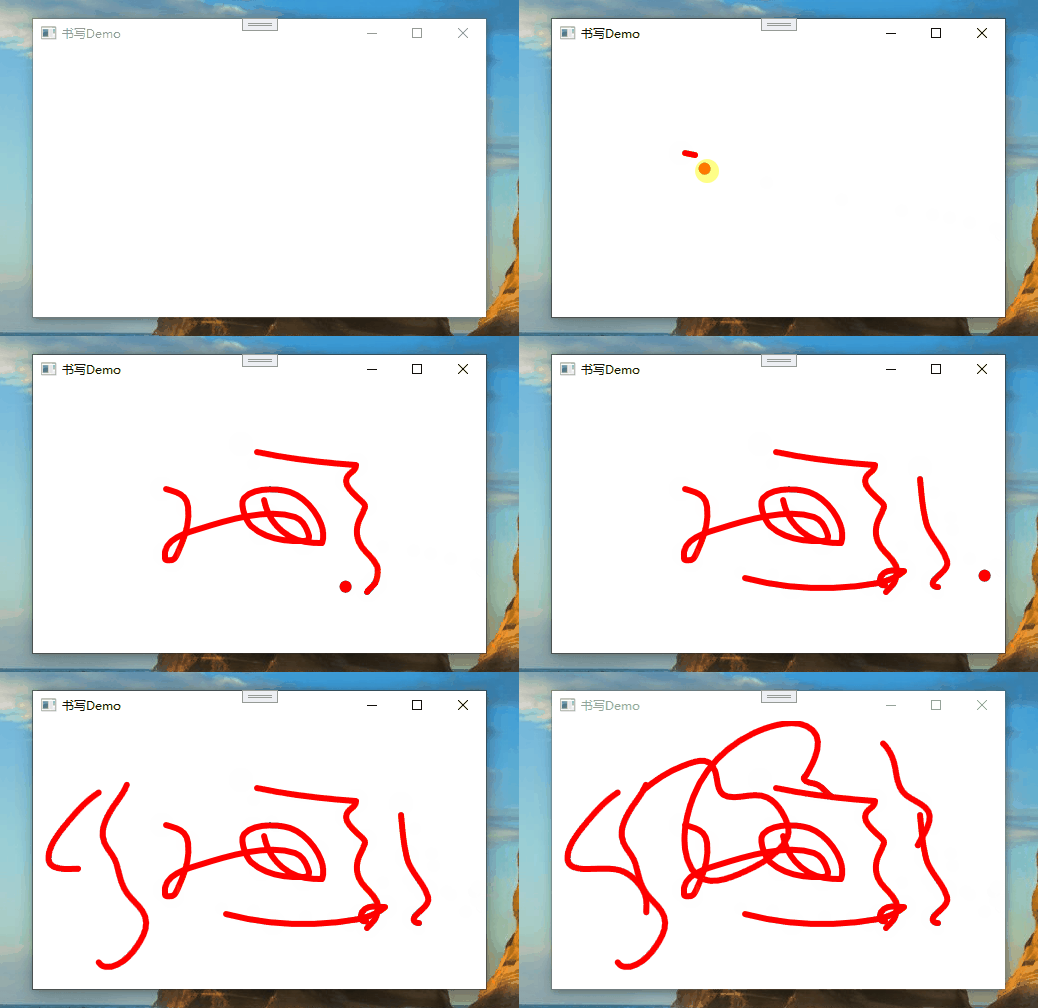
光标切换效果如上,前面一段是用鼠标书写,后面是触摸书写,光标类型有切换。红点光标自定义方案见下方。
自定义光标1)自定义一个纯色的圆形光标:
public static Cursor CreateFillCursor(int size = 24, Brush fillBrush = null)
    {
        int unitSize = size / 4;
        var bmp = new Bitmap(size, size);
        using (Graphics g = Graphics.FromImage(bmp))
        {
            g.Clip = new Region(new Rectangle(0, 0, size, size));
            g.SmoothingMode = SmoothingMode.HighQuality;
            g.InterpolationMode = InterpolationMode.HighQualityBicubic;
            using (var pen = new Pen(fillBrush ?? Brushes.Red, unitSize))
            {

                g.DrawEllipse(pen, new Rectangle(unitSize, unitSize, unitSize, unitSize));
            }
        }
        return BitmapCursor.CreateBmpCursor(bmp);
}2)也可以通过图片资源BitmapSource来生成光标;
public static Cursor CreateFromBitmapSource(BitmapSource source)
   {
       var bitmap = BitmapSourceToBitmap(source);
       return BitmapCursor.CreateBmpCursor(bitmap);
   }
   private static Bitmap BitmapSourceToBitmap(BitmapSource source)
   {
       using (var stream = new MemoryStream())
       {
           var e = new BmpBitmapEncoder();
           e.Frames.Add(BitmapFrame.Create(source));
           e.Save(stream);

           var bmp = new Bitmap(stream);

           return bmp;
       }
}2)BitmapCursor类;
internal class BitmapCursor : SafeHandle
   {
       public override bool IsInvalid => handle == (IntPtr)(-1);

       public static Cursor CreateBmpCursor(Bitmap cursorBitmap)
       {

           var c = new BitmapCursor(cursorBitmap);

           return CursorInteropHelper.Create(c);
       }
       protected BitmapCursor(Bitmap cursorBitmap)
           : base((IntPtr)(-1), true)
       {
           handle = cursorBitmap.GetHicon();
       }
       protected override bool ReleaseHandle()
       {
           bool result = DestroyIcon(handle);

           handle = (IntPtr)(-1);

           return result;
       }
       [DllImport("user32")]
       private static extern bool DestroyIcon(IntPtr hIcon);
   }
参考资料:
WPF 自定义鼠标光标 - DH_青叶 - 博客园[2]
[WPF]自定义鼠标指针 - 周银辉 - 博客园[3]
参考资料
[1]
Cursors 类 (System.Windows.Input) | Microsoft Docs: https://docs.microsoft.com/zh-cn/dotnet/api/system.windows.input.cursors?view=net-5.0
[2]WPF 自定义鼠标光标 - DH_青叶 - 博客园: https://www.cnblogs.com/dhqy/p/7754176.html
[3][WPF]自定义鼠标指针 - 周银辉 - 博客园: https://www.cnblogs.com/zhouyinhui/archive/2010/05/28/1746502.html
边栏推荐
猜你喜欢

Windows环境下安装MongoDB数据库

Orb-slam2 source code learning (II) map initialization

软硬件基础知识学习--小日记(1)

Q弹松软的大号吐司,带来更舒服的睡眠

Flutter Error: Cannot run with sound null safety, because the following dependencies don‘t support

Why not two or four TCP handshakes

Solve idea:class' xxx 'not found in module' xxx‘

2021电赛F题openmv和K210调用openmv api巡线,完全开源。

Service grid ASM year end summary: how do end users use the service grid?
Basic knowledge of software and hardware -- diary (1)
随机推荐
Packing and unpacking of C #
Solve idea:class' xxx 'not found in module' xxx‘
Q play soft large toast to bring more comfortable sleep
JS方法大全的一个小文档
自定义注解实现校验
Document service design
Vnctf 2022 cm CM1 re reproduction
[leetcode] sum of two numbers [1]
孔乙己第一问之服务通信知多少?
Call the classic architecture and build the model based on the classic
K210工地安全帽
分割链表[先取next再斩断链表防止断链]
Two position relay st2-2l/ac220v
機器人編程的培訓學科類原理
C语言一点点(未来可会增加)
[Deepin] 常用集合
用Steam教育启发学生多元化思维
Unhandled Exception: MissingPluginException(No implementation found for method launch on channel)
Analyze the maker education path integrating the essence of discipline
Win11安装redis 数据库以及redis desktop manager的下载