当前位置:网站首页>Es6: arrow function usage
Es6: arrow function usage
2022-07-28 08:19:00 【When is the bright moon 666】
Preface : This part mainly introduces the concept of arrow function , grammar , Usage scenarios and precautions
One 、 Preliminary knowledge
First , Need to know what is literal (literal beautiful /ˈlɪtərəl/).
Chinese Wikipedia : Literal quantity refers to the symbol representing a fixed value in the source program (token)
Baidu Encyclopedia : In computer science , Literals are used to express a fixed value in the source code (notation)
Definition of individual : Literal represents a fixed value of a data type in the source code .
for example ,
character string ( Data type ) Literal "hello world" perhaps 'hello world';
Number literal quantity 1、2、3;
Array literal [1, 2, 3];
Object literal {name: 'Alice', age: 18};
Functions also have literal values function(){} ( Anonymous functions )
Two 、 Arrow function
Arrow function is one of the forms of function literal .
Grammatical structure :
()=>{}
() Used to declare the parameter list ,{} Represents the body of the function
1. Simplification of arrow function
(1) Single parameter omits parentheses
const print = (msg) => {
    console.log(msg)};
//  simplify
const print = msg => {
    console.log(msg)};
Parentheses cannot be omitted if there are no parameters or multiple parameters 
(2) The function body contains only one expression statement , Omit curly braces and return
const add = (x, y) => {
    return x + y;}
//  Simplification
const add = (x, y) => x + y;
By default, the value of the expression will be returned , If the single line statement is a function call statement and has no return value , Then return to undefiend. If there is a return value, return it
(3) Returns the object
const add = (x, y)=>{
    value: x + y};
const res = add(1, 1);
console.log(res);
Running results :
{value: x + y} Is an object expression , According to the principle that , Single line expression statements can be returned directly . But in => Behind the , Curly braces are parsed as components of the function body , Instead of object expressions .value: x + y; Will be considered as a function of weight lable sentence .(label sentence ,break Then it will jump to label Statement continues execution ).
It's easy to solve , Just need to make {value: x + y} It can be parsed as an object expression . You can use (), Any value in it is considered an expression .
Self executing functions do the same ,(function(){})(); Writing anonymous functions directly is considered a function declaration , An error is reported because there is no function name , Use () contain , It will be considered an expression .

//  Modify the code
const add = (x, y)=> ({
    value: x + y});
const res = add(1, 1);
console.log(res);

Of course , It's perfectly possible that you don't abbreviate
//  Modify the code
const add = (x, y)=> {
    return {
    value: x + y}; }
{value: x + y} Appears in the return statement , It will also be considered an object expression .
3、 ... and 、 In the arrow function this Point to the problem
In the global scope this, In a browser environment , Will execute global objects this;
In general functions this Point to the calling object ;
And there's nothing in the arrow function this( local variable ), its this Execute global object .

Four 、 Not applicable to the scenario of arrow function
(1) Constructors
Constructor requires this, And there's nothing in the arrow function , its this Point to global object , Use it as a constructor , Attributes will be added to the global object
(2) Bind the callback function to the event
(3) Need to use arguments, Not in arrow function arguments( local variable )
边栏推荐
猜你喜欢

CLion调试redis6源码

node(一)

【17】建立数据通路(上):指令+运算=CPU

Use ffmpeg to generate single image + single audio streaming video in batches

对spark算子aggregateByKey的理解

protobuf 基本语法总结

Merge two sorted linked lists - two questions per day
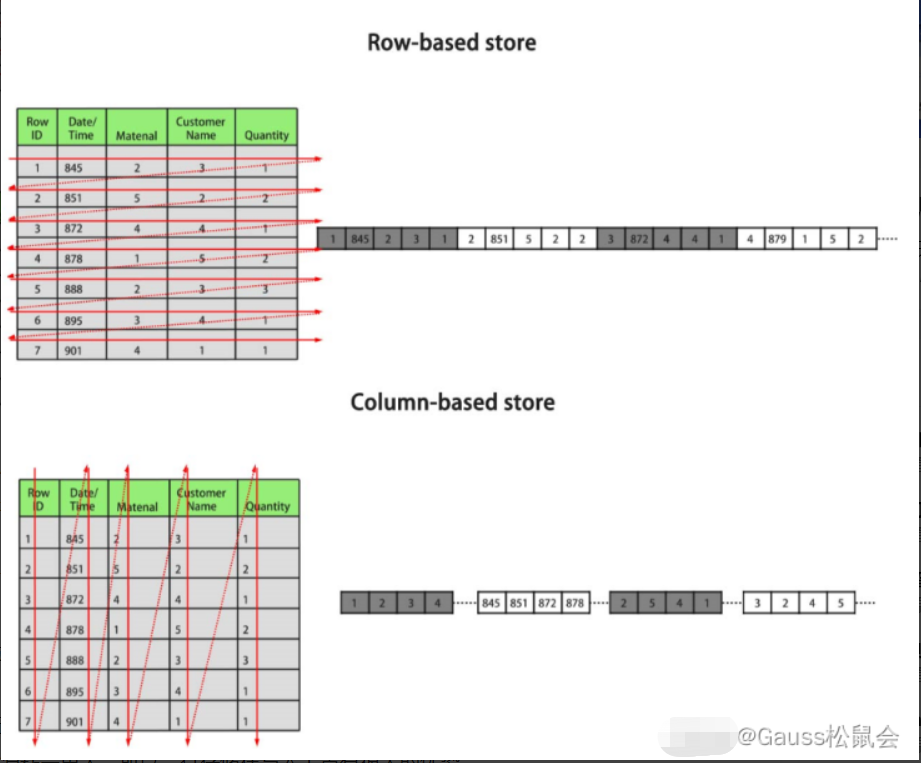
Talk about row storage and column storage of database

ArcGIS JS自定义Accessor,并通过watchUtils相关方法watch属性
Clion debugging redis6 source code
随机推荐
YOLO系列损失函数详解
对spark算子aggregateByKey的理解
Elaborate on common mode interference and differential mode interference
What if you are prompted that your connection to this website is not a private connection?
Using identity framework to realize JWT identity authentication and authorization in.Net 6.0
QT uses semaphores to control threads (qsemaphore)
Oracle local network service
Adjust the array order so that odd numbers precede even numbers - two questions per day
Discrimination coverage index / index coverage / Samsung index
Yaml parameter configuration based on singleton mode
DNA modified noble metal nanoparticles | DNA modified copper nanoparticles cunps-dna | research points
Enum class
Fxksmdb.exe process description
Chapter 01 introduction of [notes of Huashu]
【13】加法器:如何像搭乐高一样搭电路(上)?
【300+精选大厂面试题持续分享】大数据运维尖刀面试题专栏(八)
滴滴SQL面试题之打车业务问题如何分析
[book club issue 13] Chapter 2 notes on the packaging format and coding format of video files
Common solutions for distributed ID - take one
Method of hiding scroll bar in wechat applet