1, What is? Cookie?
Cookie It's some data , Stored in a text file on your computer .
When web The server sends... To the browser web When the page is , After the connection is closed , The server will not record the user's information .Cookie The purpose of this project is to solve How to record the user information of the client . When users access web When the page is , His name can be recorded in Cookie in . The next time the user visits the page , Can be in Cookie Read the user's access record in .
- When the browser requests from the server
webWhen the page is , Of this pageCookieWill be added to the request . The server can obtain the user's information in this way .
1.1, Storage form
Cookie Store... As a key value pair , As shown below :
userName=pony
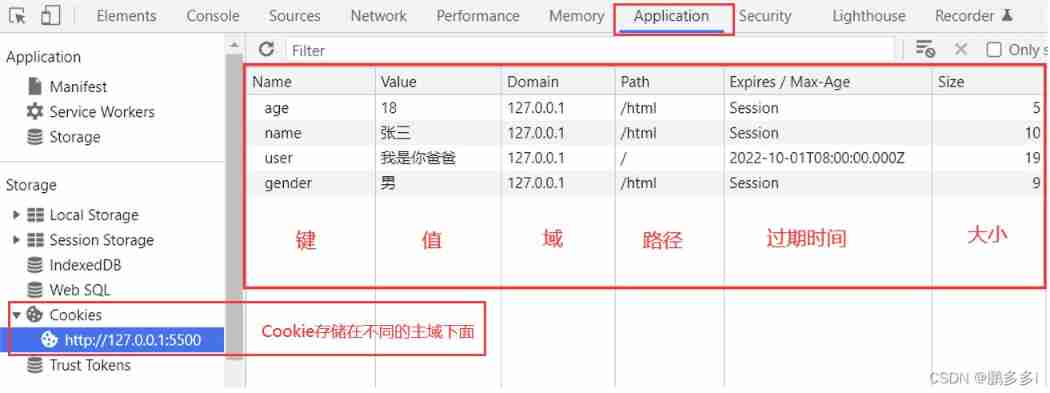
1.2, Common properties
| attribute | use | The default value is |
|---|---|---|
| Name | key | nothing |
| Value | value | nothing |
| Domain | Domains allowed to access | Current domain |
| Path | Allowed access path | current path |
| Expires / Max-Age | Expiration time | Close the page to clear (Session) |
| Size | Occupied byte size | No need to set |
1.3, Size limit
| browser | size (KB) | Limit the number of storage in each domain |
|---|---|---|
| Firefox | 4 | nothing |
| Safari | 4 | nothing |
| Opera | 4 | 30 |
| IE | 4 | 50 |
| Edge | 4 | 50 |
| Chrome | 4 | 50 |
2, increase or Change Cookie
/**
 *  Set up cookie
 * @param {String} key  key
 * @param {String} value  value
 * @param {String} expires  Expiration time (yyyy-MM-dd  or  yyyy-MM-dd HH:mm:ss  or   Time stamp ) => default: The page expires when it is closed (Session)
 * @param {String} domain  Domain  => default: Current domain
 * @param {String} path  route  => default:/
*/
function setCookie(key, value, expires = '', domain = window.location.hostname, path = '/') {
  const time = expires ? new Date(expires) : expires
  console.log(time)
  const cookie = `${key}=${value}; expires=${time}; domain=${domain}; path=${path}`
  document.cookie = cookie
}
Call example :
setCookie('user', ' I'm your father ', '2022-02-20 16:29:00').
//  perhaps
setCookie('user', ' I'm your father ', '2022-02-20')
//  perhaps
const timestamp = new Date('2022-10-01').getTime()
setCookie('user', ' I'm your father ', timestamp)
3, check Cookie
/**
 *  Get all cookie Of key
 * @return {Array<string>} Cookie An array of keys
*/
function getAllCookieKey() {
  const Cookie = document.cookie
  const cookieList = Cookie.split('; ')
  return cookieKeyList = cookieList.map(item => {
    return item.split('=')[0]
  })
}

/**
 *  according to cookie Of key Get the corresponding value
 * @param {String} key  key
 * @return {String} value  value
*/
function cookieKeyGetValue(key) {
  const Cookie = document.cookie
  const cookieList = Cookie.split('; ')
  const cookieKeyList = cookieList.map(item => {
    return item.split('=')[0]
  })
  const index = cookieKeyList.indexOf(key)
  return cookieList[index].split('=')[1]
}
4, Delete Cookie
/**
 *  according to key eliminate cookie
 * @param {String} key  key
 * @param {String} domain  Domain  => default: Current domain
 * @param {String} path  route  => default:/
*/
function clearCookie(key, domain = window.location.hostname, path = '/') {
  const Time = new Date()
  Time.setTime(Time.getTime() + -1 * 24 * 60 * 60 * 1000)
  const expires = `expires=${Time.toUTCString()}`
  document.cookie = `${key}=; ${expires}; path=${path}; domain=${domain}`
}


//  Clear all cookie
function clearAllCookie() {
  const cookieKeyList = getAllCookieKey()
  for (let key of cookieKeyList) {
    clearCookie(key)
  }
}
If you read it and find it helpful , I am a @ Peng Duoduo , welcome give the thumbs-up Focus on Comment on ;END
PS: On this page, press F12, stay console Input in document.querySelectorAll('.diggit')[0].click(), There's a surprise

official account

The articles
- Help you get started Vue3 Family barrel Vue-Router4 course
- Help you get started Vue3 Family barrel Vue3 course
- Help you get started Vue3 Family barrel VueX4 course
- Use nvm management node.js Version and replacement npm Taobao image source
- Hyperdetail !Vue-Router Hands on Tutorial
- vue In the use of .env Files store global environment variables , As well as the configuration vue Start and package commands
- Wechat applet to highlight search keywords
- Hyperdetail !Vue Nine modes of communication
- Hyperdetail !Vuex Hands on Tutorial
Personal home page


![[untitled]](/img/ed/847e678e5a652da74d04722bbd99ff.jpg)