当前位置:网站首页>② Cocoapods principle and podspec file uploading operation
② Cocoapods principle and podspec file uploading operation
2022-06-23 05:06:00 【Black code brother】
cocoapods principle
Gem It's a management Ruby Standard packages for libraries and programs , It passes through Ruby Gem( Such as http://rubygems.org/ ) Source 、 install 、 Upgrade and uninstall packages , It's very convenient .
Can pass pod --versionn see pod Version number
Can pass ruby -v see ruby Version number
Can pass gem -v see gem Version number
pod Basic operation
- View the third-party framework repository source
pod repo - Remove warehouse source
pod repo remove master - Add warehouse source
pod repo add master http://git.oschina.net/akuandev/Specs.git - initialization ( Download all the third-party framework information in the server , Cache to local computer )
pod setup pod searchFramework keywords — Cached from local " Third party framework description information " Retrieved... From the generated retrieval file Information about the relevant framework- Delete cocoapods Index file
rm ~/Library/Caches/CocoaPods/search_index.json - establish Podfile file , Go into your own project ( First level directory )
- Podfile The function of documents ?
answer : It's really just using ruby Grammatically written “ The framework depends on the description file ”; Just tell cocoapods Which frameworks need to be downloaded and integrated - Create command
pod init
- Podfile The function of documents ?
- Install the frame
pod install

cocoapods Schematic diagram :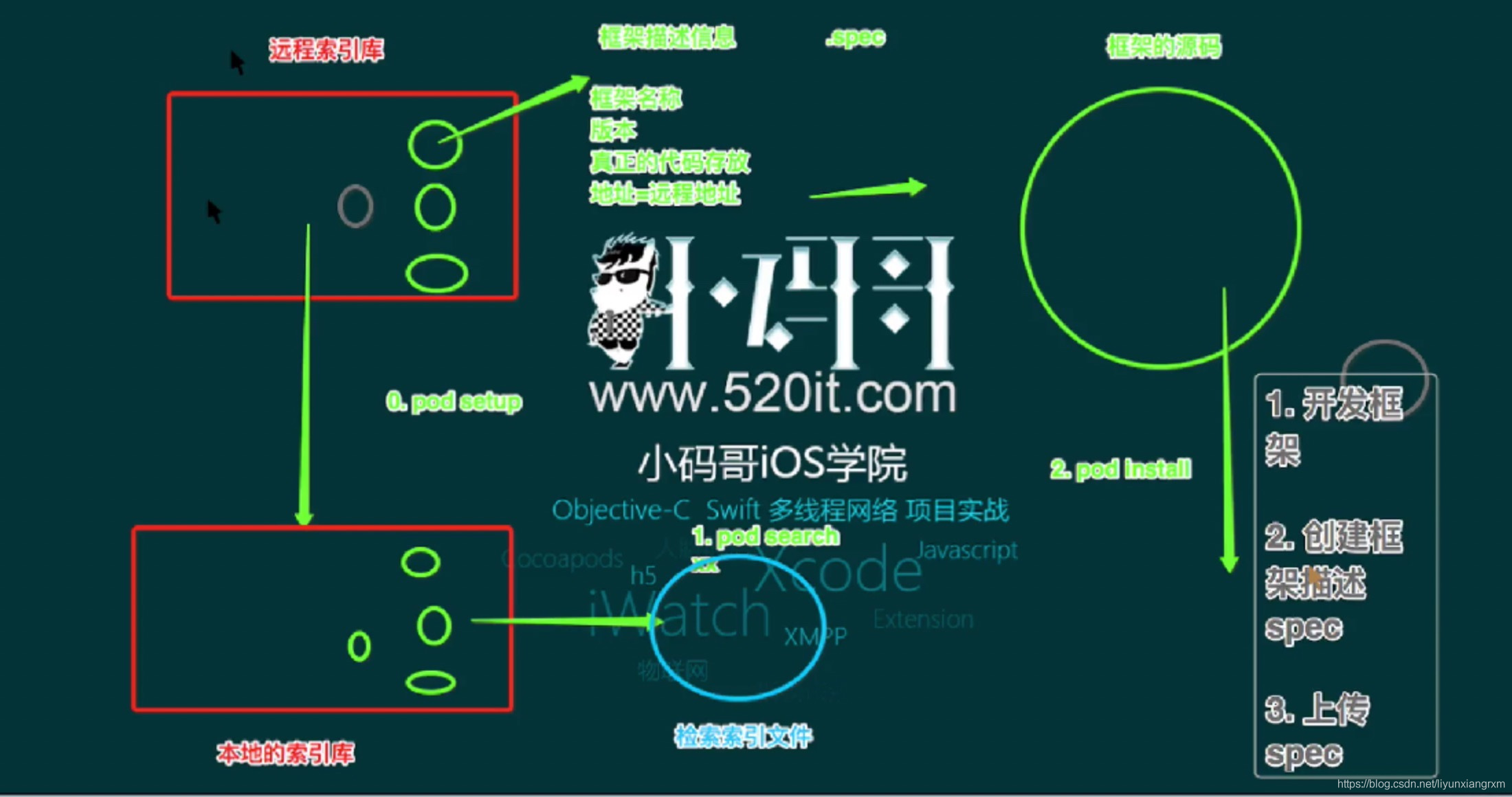
sepcs
Remote index library
`pod setup``
In fact, it is to download the remote index library to the local index library
If we pod install after , Then download the three parties to the project .
When we use these source codes again in another project , then install after , It will be soon , Because a local backup has been made
When we first pod search It's going to be slow , Because it will be downloaded again , Then put it in the cache , So it will be much faster to perform this operation next time . The following figure shows the cache path 
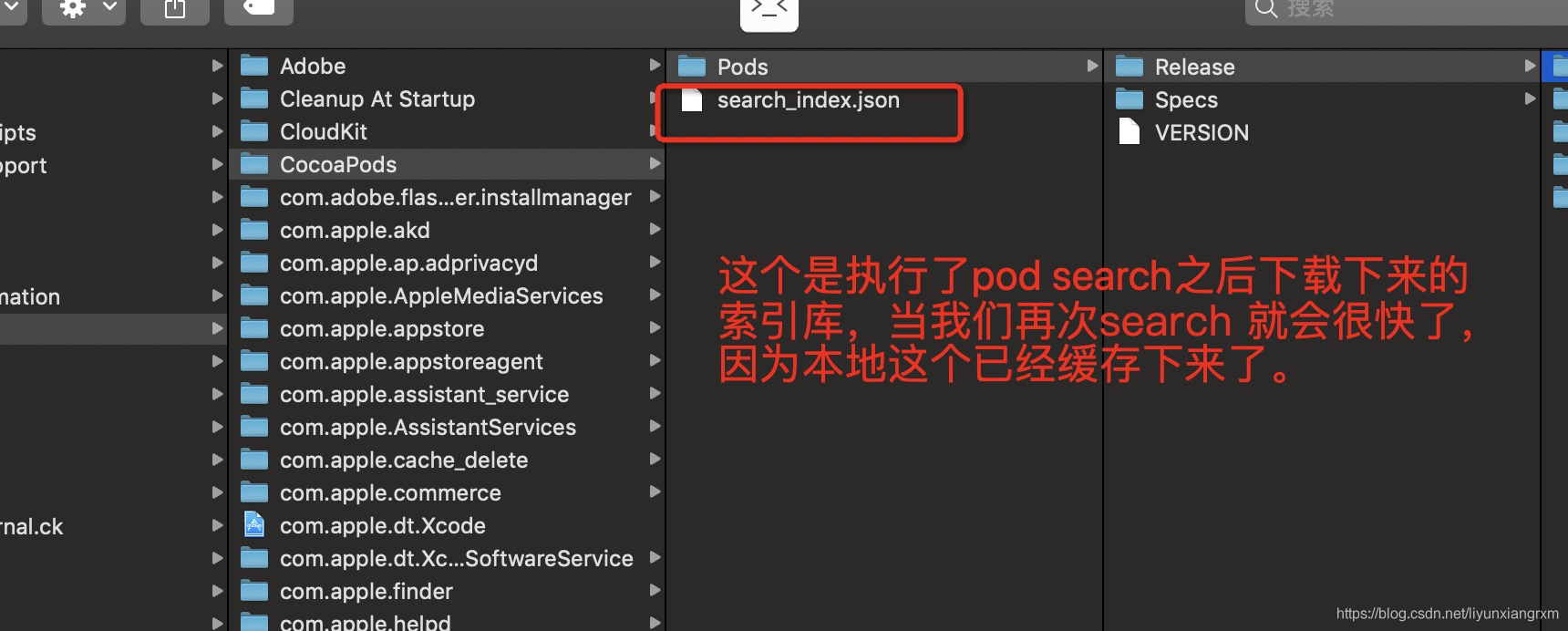
Create a remote library , And make PodSpec adopt trunk push podspec file
First step , Upload items to github, And label it
- See my first componentization article for specific operations git Basic use
git push origin mastergit tag '1.0.0'git push --tags
The second step , register trunk
pod trunk register 157******[email protected] 'wanggang' --verbose
–verbose Parameter is used to output debugging information during registration- After registration, the email will be sent to you , Go in and check .
The third step , Configure and upload the framework PodSpec file
principle
- PodSpec file Describe your framework information : author , edition , Download address, etc
- pod search Search framework , It is based on the information in this
- Be careful : Generally, the name of this file is consistent with the project name
- Create command :
pod spec create File name - I'll do it myself :
$ cd /Users/liuxitong/Desktop/testLib
$ pod spec create testLib
This creates , As shown in the figure :
PodSpec File format
- Can be downloaded by cocoapods Description information in the management framework , You can also check on the official website The website links
- pod spec lint podspec file
- If the check fails , If you find any problems, you can modify them podspec Corresponding place .
- some podspec Field interpretation in :
spec.source_files: Which tag files to get from the address Wildcards denote directories , namely classes Directory in folder
spec.source_files = “Classes”, "Classes//*.{h,m}"
adopt trunk push podspec file
pod trunk push- I'll do it here
pod trunk push testLib.podspec
So we will PodSpec Upload succeeded , And then we were in cocoapod You can also add our new third-party library . - This method is actually uploading the description file to cocoapods stay github In the warehouse above , Warehouse address
- Then you need to wait for the review , Follow pull request equally , The author's consent is required
Step four , Update local pod Third party framework information data source
pod setupStep five , Use pod search Command to search your own frame , If you can search , Then it means that the audit has passed
边栏推荐
- Static two position relay gls-3004k/dc220v
- Laravel 8.4 routing problem. At the end is the cross reference table on the left side of the editor, which can be understood by Xiaobai
- 使用teqcplot对teqc 质量分析结果进行可视化展示
- openwrt目录结构
- rtklib新版本2.4.3 b34测试对比
- Project summary 1 (header file, switch, &, bit variables)
- 【图像融合】基于非凸罚分的稀疏正则化实现图像融合附matlab代码
- How can mushrooms survive a five-year loss of 4.2 billion yuan?
- Thinkphp6 solving jump problems
- E45: ‘readonly‘ option is set (add ! to override)
猜你喜欢

Abnova liquidcell negative enrichment cell separation and recovery system

ICER skills 03design compile

Laravel 8.4 routing problem. At the end is the cross reference table on the left side of the editor, which can be understood by Xiaobai

美团好文:从预编译的角度理解Swift与Objective-C及混编机制

Go learning record II (window)

Chrome debugging tips

Shadertoy基础教学01、画圆(smoothstep()函数讲解)

The solution to prompt "this dictionary creation could be rewritten as a dictionary literal" when updating the dictionary key value in pychart

【OFDM通信】基于matlab OFDM多用户资源分配仿真【含Matlab源码 1902期】
Using editor How to handle MD uploading pictures?

随机推荐
Apache atlas quick start
Meituan's good article: understand swift, Objective-C and the mixing mechanism from the perspective of precompiling
Non return to zero code NRZ
Cloud function realizes fuzzy search function
prometheus、influxdb2.2安装及flume_export下载编译使用
Receive incoming files and download (simple usage) a tag
微信小程序:星际旅行飞船乘坐票制作生成
Emergency response HW review
Shadertoy基础教学02、画笑脸
Do280openshift command and troubleshooting -- common troubleshooting and chapter experiments
Shadertoy basic teaching 02. Drawing smiling faces
Cloud native database is in full swing, and the future can be expected
精密星历介绍与使用
Const understanding one
七年码农路
ApiPost接口测试的用法之------Post
rtklib2.4.3 b34 单点定位的一个bug
A mvc5+easyui enterprise rapid development framework source code BS framework source code
"Wechat applet - Basics" takes you to understand the routing system of the applet (2)
Metadata management Apache Atlas Compilation (embedded) deployment and various error records encountered