当前位置:网站首页>Hc-sr04 use method and routine of ultrasonic ranging module (STM32)
Hc-sr04 use method and routine of ultrasonic ranging module (STM32)
2022-07-29 08:22:00 【zeruns】
be based on STM32 and HC-SR04 The module realizes the function of ultrasonic distance measurement
Recently learning STM32 Do a simple application and practice , An article by the way .
The single chip microcomputer used in this paper is STM32F103C8T6, The ultrasonic ranging module is HC-SR04, The ranging results are displayed with 0.96 " OLED Screen module .
Effect display
Less than in the following figure 10cm There is something wrong with the display result of , The code has been fixed and updated

The result after repair :
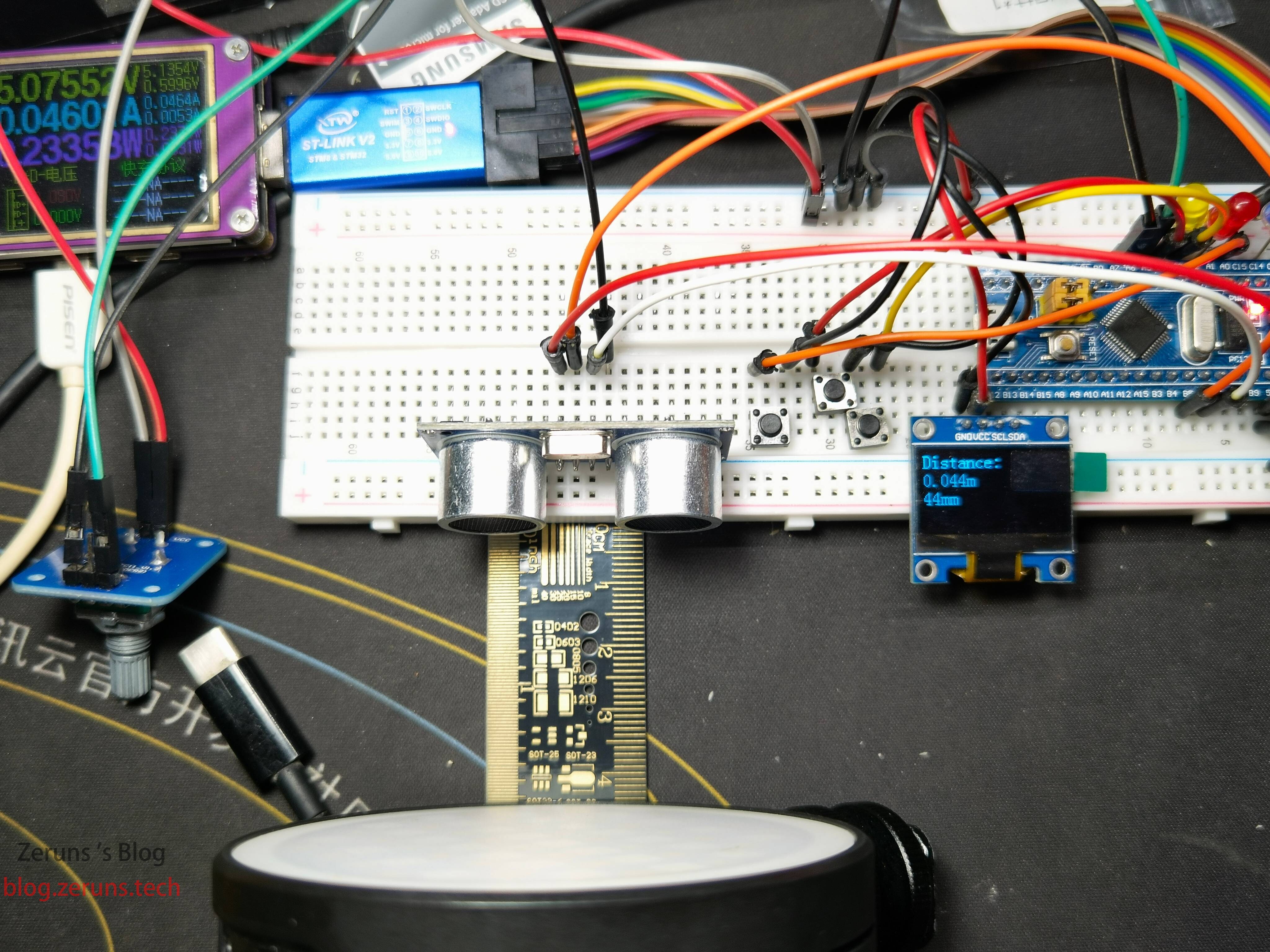
Video demo :https://www.bilibili.com/video/BV1Sg411Z7ex/
be based on STM32 and HC-SR04 The module realizes the function of ultrasonic distance measurement
HC-SR04 Hardware overview
HC-SR04 The core of ultrasonic distance sensor is two ultrasonic sensor . One used as a transmitter , Convert an electrical signal into 40 KHz Ultrasonic pulse . The receiver monitors the transmitted pulse . If you receive them , It will generate an output pulse , Its width can be used to determine the distance of pulse propagation . It's so simple !
The sensor is small , Easy to use in any robot project , And provide 2 Cm to 400 centimeter ( about 1 Inches to 13 feet ) Excellent non-contact range detection , Accuracy of 3mm.
| Operating Voltage Working voltage | Direct 5V |
|---|---|
| Operating Current Working current | 15 Ma |
| Operating Frequency Operating frequency | 40K Hertz |
| Max Range Maximum range | 4m |
| Min Range Minimum range | 2 centimeter |
| Ranging Accuracy Ranging accuracy | 3 mm |
| Measuring Angle Measure the angle | 15 degree |
| Trigger Input Signal Trigger input signal | 10µS TTL pulse |
| Dimension Size | 45 x 20 x 15 mm |

HC-SR04 Ultrasonic sensor pin

Let's take a look at its pin arrangement .
VCC yes HC-SR04 Power supply of ultrasonic distance sensor , We are connected to 5V Power supply of .
Trig (Trigger) Pin is used to trigger ultrasonic pulse , Used in the following routine GPIOB5, So connect STM32 Of GPIOB5.
Echo Echo when a reflected signal is received , The pin generates a pulse . The length of the pulse is proportional to the time required to detect the transmitted signal , Used in the following routine GPIOB6, So connect STM32 Of GPIOB6.
GND Should be connected to STM32 Land .
HC-SR0 How to work ?
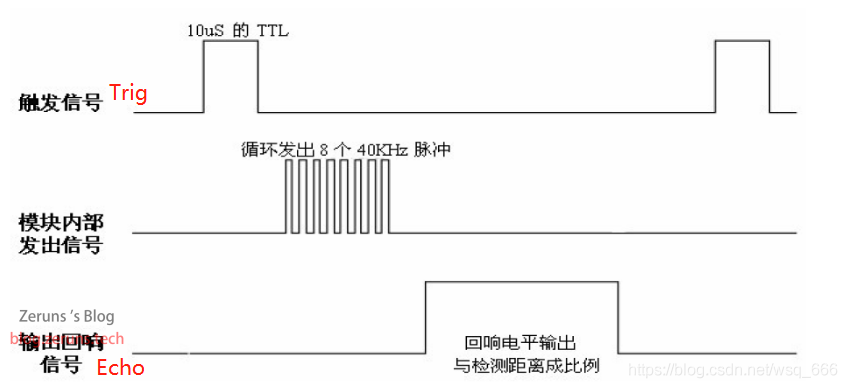
When the duration is at least 10 µS(10 Microsecond ) When the pulse of is applied to the trigger pin , It all started . In response to this , The sensor is in the form of 40 KHz Sound pulses that emit eight pulses . such 8 Pulse mode makes the device “ Ultrasonic features ” Become unique , Thus, the receiver can distinguish the transmission mode from the ambient ultrasonic noise .
Eight ultrasonic pulses travel through the air , Stay away from the transmitter . meanwhile , The echo pin becomes high , The beginning of forming echo signal .
If these pulses are not reflected back , Then the echo signal will be 38 millisecond (38 millisecond ) After timeout and return to low level . therefore 38 ms The pulse of indicates that there is no blockage within the sensor range .
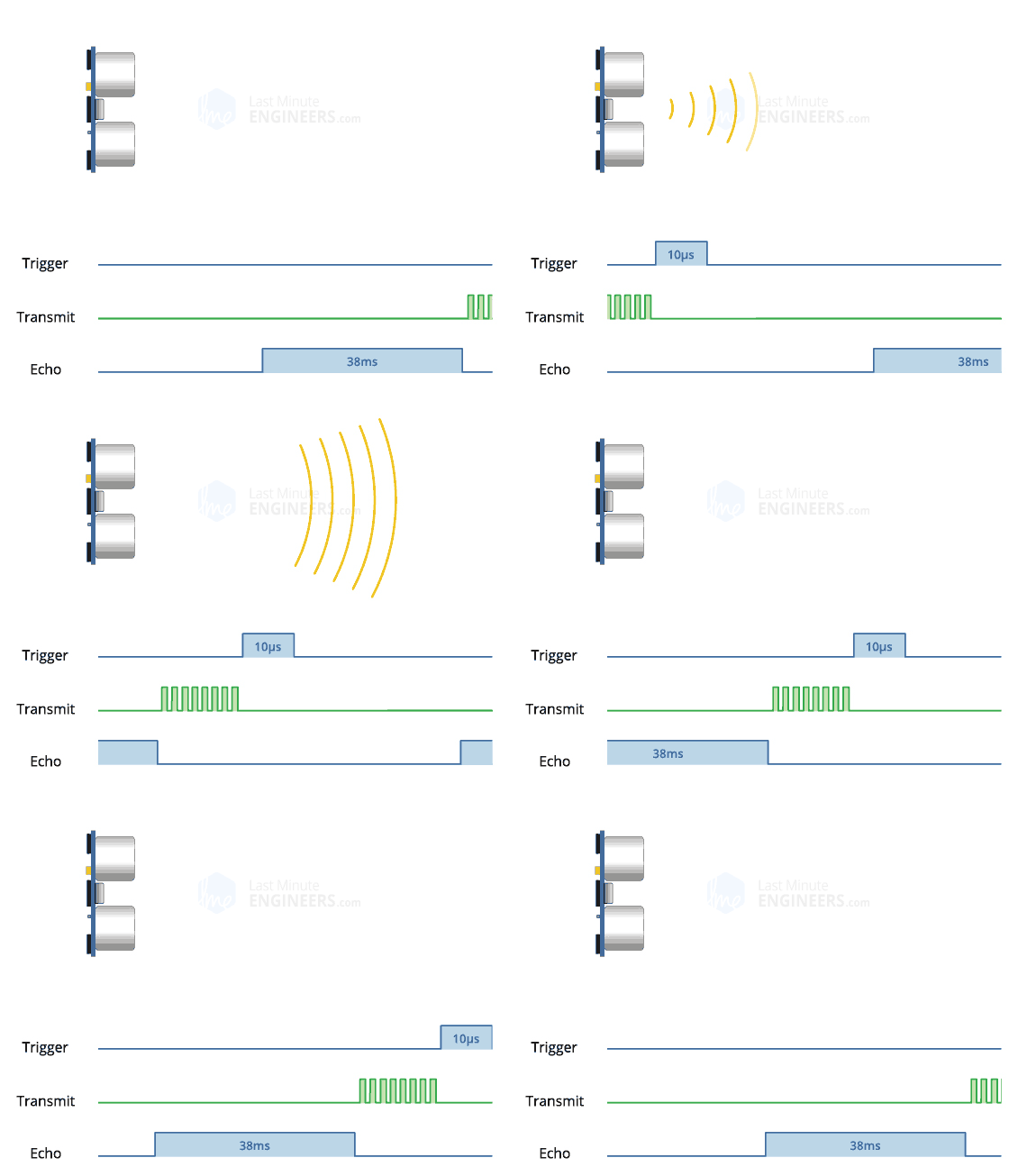
If these pulses are reflected back , After receiving the signal ,Echo The pin will go low . This will produce a pulse , Its width is in 150 µS to 25 mS Change between , It depends on the time it takes to receive the signal .

HC-SR04 The sequence diagram is as follows :
then , The width of the received pulse is used to calculate the distance to the reflected object . This can be achieved through the simple distance we learned in junior high school - Speed - Time equation to solve .
distance = Speed x Time
connection
take HC-SR04 and 0.96 " OLED The screen is connected to STM32.
| HC-SR04 | STM32 |
|---|---|
| VCC | 5V |
| Trig | GPIO PB5 |
| Echo | GPIO PB6 |
| Gnd | Gnd |
| OLED | STM32 |
|---|---|
| VCC | 3.3V |
| GND | GND |
| SCL | GPIO PB12 |
| SDA | GPIO PB13 |
The influence of temperature on distance measurement
Even though HC-SR04 It is quite accurate for most of our projects , For example, intruder detection or proximity alarm ; But sometimes you may want to design a device to be used outdoors or in an extremely hot or cold environment . under these circumstances , You may want to consider that the speed of sound in the air varies with temperature , The fact that air pressure and humidity change .
Enter due to sound factors HC-SR04 The speed of distance calculation , Therefore, it may affect our reading . If the temperature is known (°C) And humidity , Please consider the following formula :
The speed of sound m/s = 331.4 +(0.606 * temperature )+(0.0124 * humidity )
Purchase address
The purchase address of the module used in this article is as follows :
STM32F103C8T6 Development board :https://s.click.taobao.com/8SoQMVu
ST-LINK V2 Emulator :https://s.click.taobao.com/FEuPMVu
HC-SR04 modular :https://s.click.taobao.com/Ing88Vu
0.96 " OLED modular :https://s.click.taobao.com/o4fPMVu
Breadboard :https://s.click.taobao.com/dBjPMVu
Special jumper for bread board :https://s.click.taobao.com/7eG88Vu
Program
I use ST The program written in the standard library , The article releases the main program , Please click the link below to download the complete project file .
Download the complete project file :https://url.zeruns.tech/HCSR04
Extraction code :d9xr
main.c
#include "stm32f10x.h"                  // Device header
#include "Delay.h"
#include "OLED.h"
#include "Timer.h"
#include "HCSR04.h"

uint64_t numlen(uint64_t num)// Calculate the length of the number
{
    uint64_t len = 1;        //  The initial length is 1
    for(; num > 9; ++len)    //  Judge num Is it greater than 9, Otherwise, the length +1
        num /= 10;	         //  Use division to calculate , until num Less than 1
    return len;              //  Returns the value of the length
}

int main(void)
{
	OLED_Init();		// initialization OLED screen
	Timer_Init();		// Initialize the timer
	HC_SR04_Init();		// Initialize the ultrasonic ranging module

	OLED_ShowString(1, 1, "Distance:");		//OLED Screen output string

	while (1)
	{
		int Distance_mm=sonar_mm();			// Obtain distance measurement results , In millimeters (mm)
		int Distance_m=Distance_mm/1000;	// Convert to meters (m) In units of , Put the integer part into Distance_m
		int Distance_m_p=Distance_mm%1000;	// Convert to meters (m) In units of , Put the decimal part in Distance_m_p
		OLED_Clear_Part(2,1,16);			// take OLDE Screen page 2 Clear the screen
		OLED_ShowNum(2, 1,Distance_m,numlen(Distance_m));	// Display the integer part of the measurement result
		OLED_ShowChar(2, 1+numlen(Distance_m), '.');		// Show decimal point
		if(Distance_m_p<100){								// Judge whether it is less than 100 mm
			OLED_ShowChar(2, 1+numlen(Distance_m)+1,'0');								// Because the unit is meter , So less than 10cm We need to add 0
			OLED_ShowNum(2, 1+numlen(Distance_m)+2,Distance_m_p,numlen(Distance_m_p));	// Display the decimal part of the measurement result
			OLED_ShowChar(2, 1+numlen(Distance_m)+2+numlen(Distance_m_p), 'm');			// Display units
		}else																			// https://blog.zeruns.tech
		{
			OLED_ShowNum(2, 1+numlen(Distance_m)+1,Distance_m_p,numlen(Distance_m_p));	// Display the decimal part of the measurement result
			OLED_ShowChar(2, 1+numlen(Distance_m)+1+numlen(Distance_m_p), 'm');			// Display units
		}
		OLED_Clear_Part(3,1,16);			// take OLDE Screen page 3 Clear the screen
		OLED_ShowNum(3, 1,Distance_mm,numlen(Distance_mm));		// Display the distance result in mm
		OLED_ShowString(3, 1 + numlen(Distance_mm), "mm");
		Delay_ms(300);						// Time delay 300 millisecond

	}
}
Timer.c
#include "stm32f10x.h"                  // Device header
//blog.zeruns.tech
void Timer_Init(void)
{
	RCC_APB1PeriphClockCmd(RCC_APB1Periph_TIM3, ENABLE);		// Enable TIM3 The clock

	TIM_InternalClockConfig(TIM3);								// Set up TIM3 Use the internal clock

	TIM_TimeBaseInitTypeDef TIM_TimeBaseInitStructure;			// Defining structure , Configure timer
	TIM_TimeBaseInitStructure.TIM_ClockDivision = TIM_CKD_DIV1;	// Set up 1 frequency division ( Regardless of the frequency )
	TIM_TimeBaseInitStructure.TIM_CounterMode = TIM_CounterMode_Up;	// Set the counting mode to count up
	TIM_TimeBaseInitStructure.TIM_Period = 10 - 1;			// Set the maximum count value , When the maximum value is reached, an update event is triggered , Because from 0 Start counting , So counting 10 Next is 10-1, Every time 10 One microsecond trigger
	TIM_TimeBaseInitStructure.TIM_Prescaler = 72 - 1;			// Set the clock prescaler ,72-1 It's every   clock frequency (72Mhz)/72=1000000  Clock cycle counter plus 1, Every time 1 Microsecond +1
	TIM_TimeBaseInitStructure.TIM_RepetitionCounter = 0;		// Repeat counter ( Advanced timer , So set 0)
	TIM_TimeBaseInit(TIM3, &TIM_TimeBaseInitStructure);			// initialization TIM3 Timer

	TIM_ClearFlag(TIM3, TIM_FLAG_Update);			// Clear the update interrupt flag bit
	TIM_ITConfig(TIM3, TIM_IT_Update, ENABLE);		// Turn on update interrupt

	NVIC_PriorityGroupConfig(NVIC_PriorityGroup_2);				// Set interrupt priority group

	NVIC_InitTypeDef NVIC_InitStructure;						// Defining structure , Configure interrupt priority
	NVIC_InitStructure.NVIC_IRQChannel = TIM3_IRQn;				// Specifies the interrupt channel
	NVIC_InitStructure.NVIC_IRQChannelCmd = ENABLE;				// Interrupt enable
	NVIC_InitStructure.NVIC_IRQChannelPreemptionPriority = 2;	// Set preemption priority
	NVIC_InitStructure.NVIC_IRQChannelSubPriority = 2;			// Set response priority
	NVIC_Init(&NVIC_InitStructure);								// https://blog.zeruns.tech

	TIM_Cmd(TIM3, ENABLE);							// Turn on timer
}

/*
void TIM3_IRQHandler(void)			// Update interrupt function
{
	if (TIM_GetITStatus(TIM3, TIM_IT_Update) == SET)		// obtain TIM3 Update interrupt flag bit of timer
	{

		TIM_ClearITPendingBit(TIM3, TIM_IT_Update);			// Clear the update interrupt flag bit
	}
}*/
Timer.h
#ifndef __TIMER_H
#define __TIMER_H

void Timer_Init(void);

#endif
HCSR04.c
#include "stm32f10x.h"
#include "Delay.h"

/*
 My blog :blog.zeruns.tech
 Please read the specific instructions on my blog
*/


#define Echo GPIO_Pin_6		//HC-SR04 Modular Echo Foot joint GPIOB6
#define Trig GPIO_Pin_5		//HC-SR04 Modular Trig Foot joint GPIOB5

uint64_t time=0;			// Declare variables , Used to time
uint64_t time_end=0;		// Declare variables , Store echo signal time

void HC_SR04_Init(void)
{
	RCC_APB2PeriphClockCmd(RCC_APB2Periph_GPIOB,ENABLE);	// Enable GPIOB The peripheral clock of
	GPIO_InitTypeDef GPIO_InitStructure;					// Defining structure
	GPIO_InitStructure.GPIO_Mode = GPIO_Mode_Out_PP;		// Set up GPIO The port is push-pull output
	GPIO_InitStructure.GPIO_Pin = Trig;						// Set up GPIO mouth 5
	GPIO_InitStructure.GPIO_Speed = GPIO_Speed_50MHz;		// Set up GPIO Mouth speed 50Mhz
	GPIO_Init(GPIOB,&GPIO_InitStructure);					// initialization GPIOB

	GPIO_InitStructure.GPIO_Mode = GPIO_Mode_IPD;			// Set up GPIO The port is in the pull-down input mode
	GPIO_InitStructure.GPIO_Pin = Echo;						// Set up GPIO mouth 6
	GPIO_Init(GPIOB,&GPIO_InitStructure);					// initialization GPIOB
	GPIO_WriteBit(GPIOB,GPIO_Pin_5,0);						// Output low level
	Delay_us(15);											// Time delay 15 Microsecond
}

int16_t sonar_mm(void)									// Measure the distance and return the distance result in mm
{
	uint32_t Distance,Distance_mm = 0;
	GPIO_WriteBit(GPIOB,Trig,1);						// Output high level
	Delay_us(15);										// Time delay 15 Microsecond
	GPIO_WriteBit(GPIOB,Trig,0);						// Output low level
	while(GPIO_ReadInputDataBit(GPIOB,Echo)==0);		// Wait for the low level to end
	time=0;												// Time zero
	while(GPIO_ReadInputDataBit(GPIOB,Echo)==1);		// Wait for the high level to end
	time_end=time;										// Record the time at the end
	if(time_end/100<38)									// Judge whether it is less than 38 millisecond , Greater than 38 Milliseconds is timeout , Directly adjust to the following to return 0
	{
		Distance=(time_end*346)/2;						// Calculated distance ,25°C The speed of sound in the air is 346m/s
		Distance_mm=Distance/100;						// Because of the above time_end Its unit is 10 Microsecond , So we need to get the distance result in millimeters , You have to divide by 100
	}
	return Distance_mm;									// Return the ranging result
}

float sonar(void)										// Measure the distance and return the distance result in meters
{
	uint32_t Distance,Distance_mm = 0;
	float Distance_m=0;
	GPIO_WriteBit(GPIOB,Trig,1);					// Output high level
	Delay_us(15);
	GPIO_WriteBit(GPIOB,Trig,0);					// Output low level
	while(GPIO_ReadInputDataBit(GPIOB,Echo)==0);
	time=0;
	while(GPIO_ReadInputDataBit(GPIOB,Echo)==1);
	time_end=time;
	if(time_end/100<38)
	{
		Distance=(time_end*346)/2;
		Distance_mm=Distance/100;
		Distance_m=Distance_mm/1000;
	}
	return Distance_m;
}

void TIM3_IRQHandler(void)			// Update interrupt function , Used to time , Every time 10 Microsecond variable time Add 1
{
	if (TIM_GetITStatus(TIM3, TIM_IT_Update) == SET)		// obtain TIM3 Update interrupt flag bit of timer
	{
		time++;
		TIM_ClearITPendingBit(TIM3, TIM_IT_Update);			// Clear the update interrupt flag bit
	}
}
HCSR04.h
#ifndef __HCSR04_H
#define __HCSR04_H

void HC_SR04_Init(void);
int16_t sonar_mm(void);
float sonar(void);

#endif
Recommended reading
- Cost effective and cheap VPS/ ECS recommends :https://blog.zeruns.tech/archives/383.html
- ESP8266 Construction of development environment and project demonstration :https://blog.zeruns.tech/archives/526.html
- Arduino Read DHT11,DHT22,SHTC3 Temperature and humidity data :https://blog.zeruns.tech/archives/527.html
- Students' exclusive preferential rights and interests , Educational benefits :https://blog.zeruns.tech/archives/557.html
- How to build a personal blog :https://blog.zeruns.tech/archives/218.html
- Use NPS Build intranet penetration server , belt Web panel :https://blog.zeruns.tech/archives/660.html
边栏推荐
- [beauty of software engineering - column notes] "one question and one answer" issue 3 | 18 common software development problem-solving strategies
- What constitutes the smart charging pile system?
- Smart energy management system solution
- 简易计算器微信小程序项目源码
- Day4: the establishment of MySQL database and its simplicity and practicality
- Product promotion channels and strategies, cosmetics brand promotion methods and steps
- Unity Shader学习(六)实现雷达扫描效果
- torch.nn.functional.one_ hot()
- Unity multiplayer online framework mirror learning record (I)
- [beauty of software engineering - column notes] 29 | automated testing: how to kill bugs in the cradle?
猜你喜欢

深度学习(1):银行客户流失预测

Cv520 domestic replacement of ci521 13.56MHz contactless reader chip
![[beauty of software engineering - column notes] 29 | automated testing: how to kill bugs in the cradle?](/img/e1/8a61f85bf93801d842e78ab4f7edc7.png)
[beauty of software engineering - column notes] 29 | automated testing: how to kill bugs in the cradle?

简易计算器微信小程序项目源码

DC motor control system based on DAC0832

Application scheme of charging pile
![[beauty of software engineering - column notes] 30 | make good use of source code management tools to make your collaboration more efficient](/img/d1/5b980d8b9580b9808b2b3f51d5b9c6.png)
[beauty of software engineering - column notes] 30 | make good use of source code management tools to make your collaboration more efficient
Simplefoc parameter adjustment 2- speed and position control

STM32 MDK (keil5) contents mismatch error summary

Ga-rpn: recommended area network for guiding anchors
随机推荐
Week 2: convolutional neural network basics
Day15 (day16 extension): file contains vulnerability
commonjs导入导出与ES6 Modules导入导出简单介绍及使用
Simple operation of SQL server data table
Dp1332e multi protocol highly integrated contactless read-write chip
Proteus simulation based on msp430f2491
Temperature acquisition and control system based on WiFi
DC motor speed regulation system based on 51 single chip microcomputer (use of L298)
Huawei wireless device configuration uses WDS technology to deploy WLAN services
简易计算器微信小程序项目源码
[robomaster] a board receives jy-me01 angle sensor data -- Modbus Protocol & CRC software verification
Cs4344 domestic substitute for dp4344 192K dual channel 24 bit DA converter
torch.nn.functional.one_hot()
Preparation of SQL judgment statement
谷歌浏览器免跨域配置
Application of explosion-proof inclination sensor in safe operation of LNG
Inclination sensor accuracy calibration test
Unity multiplayer online framework mirror learning record (I)
Back up Google or other browser plug-ins
Domestic application of ft232 replacing gp232rl usb-rs232 converter chip