当前位置:网站首页>Target detection notes - overview and common data sets
Target detection notes - overview and common data sets
2022-07-28 22:53:00 【leu_ mon】
Overview and common data sets
0. summary
- Want to have Classification of network Related basic knowledge

- Target detection is divided into two categories :One-Stage,Two-Stage
1.Two-Stage: Faster R-CNN
1) Go through special modules Generate candidate boxes (RPN), Looking for the future as well as Adjust the bounding box ( be based on anchors)
2) Based on the previously generated candidate box Further classify and adjust the bounding box ( be based on proposals)
2.One-Stage: SSD,YOLO
be based on anchors Directly classify and adjust the bounding box
One-Stage,Two-Stage contrast :One-Stage testing Faster ,Two-Stage testing More accurate
1.TF Official API
up See the video for details https://www.bilibili.com/video/BV1KE411E7Ch?spm_id_from=333.999.0.0
2.PASCAL VOC2012 Data sets
- Click on **Download the training/validation data (2GB tar file)** download
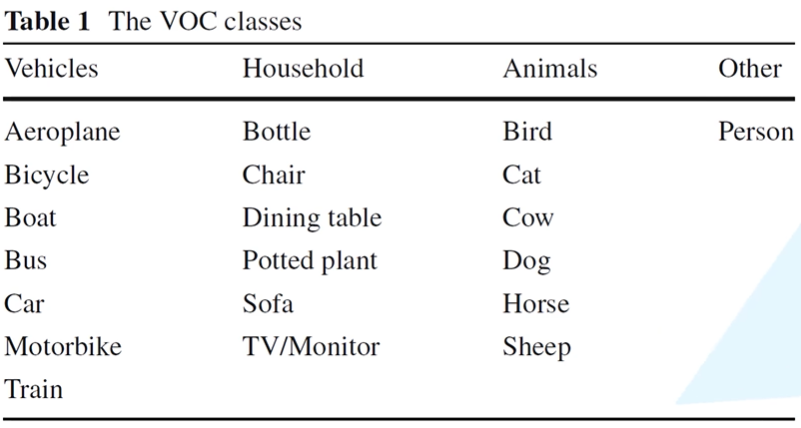
- There are mainly 20 Categories , It is divided into 4 Categories:
- Dataset catalog

- Usage method :
- Read train.txt Each line of information in the file ( Image name )
- stay Annotations Find the corresponding .xml file
- adopt .xml file You can get picture information ( Width , Height , Target location, etc )
- stay JPEGImages Find the corresponding picture under the folder , Load memory .
3. MS COCO Data set and usage

There are Object80 class and stuff91 class ,Object80 Class is stuff91 Class A subset of , Generally, target detection only needs Object80 class , Let's see the usage scenarios .
be relative to PASCAL VOC The effect of pre training is better , But it takes more time .
Coco Data sets Official website :http://cocodataset.org/
SkyDrive address : link :https://pan.baidu.com/s/1_kQBJxB019cXpzfqNz7ANA Extraction code :m6s5

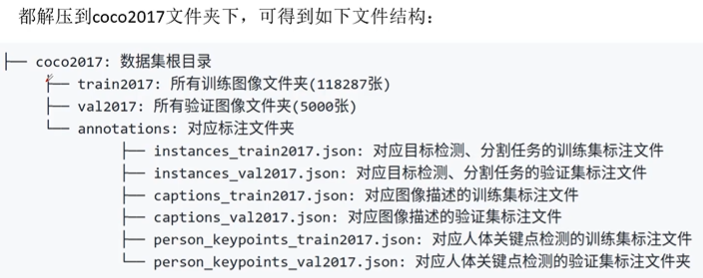
bilibili up Explain the video :https://www.bilibili.com/video/BV1TK4y1o78H?spm_id_from=333.999.0.0
Recommended blog links :https://blog.csdn.net/qq_37541097/article/details/112248194
github link :https://github.com/WZMIAOMIAO/deep-learning-for-image-processing
For more details, please see the official website document :http://cocodataset.org/#format-data
Ps: It is meaningless to divide the test set with your own data , Because the data distribution is basically the same
import json
#  see json The data structure of the file
json_path = "G:/coco2017/annotations/instances_val2017.json"
json_labels = json.load(open(json_path,"r"))
print(json_labels)
# >>>json_label
# |-info: Describe file information
# |-licenses: No impact information
# |-image:5000 Two elements correspond to 5000 A picture , Contains picture information
# |-annotations:3w+ Elements correspond to 3w+ The goal is
# | |-segmentation: Split information
# | |-area: area
# | |-iscrowed: Is it overlapping , Generally, only 0 Training for
# | |-image_id: picture id
# | |-bbox: Mark box information ( Left upper coordinate , Length and width )
# | |_category_id: Category name
# |_categories:80 Two elements correspond to 80 Classes
# PS:categories in id Discontinuous , Pay attention during training .
#  About coco Official tools pycocotools Installation
# liunx:pip install pycocotools
# windows:pip install pycocotools-windows
import os
from pycocotools.coco import COCO
from PIL import Image,ImageDraw
import matplotlib.pyplot as plt

json_path = "G:/coco2017/annotations/instances_val2017.json"
img_path = "G:/coco2017/val2017"
#  Import coco data
coco = COCO(annotation_file=json_path)
#  Get the index of all pictures
ids = list(sorted(coco.imgs.keys()))
print("number of image:%d"%len(ids))
#  Get everything coco Category labels
coco_classes = dict([(v["id"], v["name"]) for k,v in coco.cats.items()])
#  Traverse the first three pictures
for img_id in ids[:3]:
    #  Obtain the corresponding image id All of the annotations ids Information
    ann_ids = coco.getAnnIds(img_id)
    #  according to annotations idx Information get all annotation information
    targets = coco.loadAnns(ann_ids)
    #  Get the name of the image file
    path = coco.loadImgs(img_id)[0]["file_name"]
    #  Read the image according to the path , Convert to RGB Format
    img = Image.open(os.path.join(img_path,path)).convert('RGB')
    #  Drawing pictures
    draw = ImageDraw.Draw(img)
    #  Draw the target box
    for target in targets:
        x,y,w,h = target["bbox"]  #  Extract the target box information
        x1,y1,x2,y2 = x,y,int(x+w),int(y+h)  #  Calculate the coordinate
        draw.rectangle((x1,y1,x2,y2))  #  Draw the target box
        draw.text((x1,y1),coco_classes[target["category_id"]])  #  Drawing class name
    #  display picture
    plt.imshow(img)
    plt.show()
# coco File form of target detection results in
''' [{ "image_id" :int, #  Record the image to which the target belongs id "category_id" :int, #  Record the category index that predicts the target  "bbox" :[x,y,w,h] #  Record the bounding box information that predicts the target  "score" :float #  Record the probability of predicting the goal  }] '''
#  The output of training results is saved as json form , Compare with the results on the validation set
from pycocotools.coco import COCO
from pycocotools.cocoeval import COCOeval
#  Load the dimension file of the validation set
coco_ture = COCO(annotation_file="./val_2017.json")
#  Load network at coco2017 Verify the prediction results on the set
coco_pre = coco_ture.loadRes('./predict_results.json')
#  Output the effect of prediction , indicators mAP, See section 5 Section
coco_evaluator = COCOeval(cocoGt=coco_ture, cocoDt=coco_pre, iouType="bbox")
coco_evaluator.evaluate()
coco_evaluator.accumulate()
coco_evaluator.summarize()
4. Create your own data set LabelImg&Labelme
LabelImg Generated are xml File with the VOC2012 Agreement
Labelme It's not just the sample that can mark the target detection , Other sample annotations such as semantic segmentation can also be carried out .
- Download and install :
pip install labelImg - Input
labelImgOpen software

5. object detection coco Common indicators
TP(True Positive):IOU>0.5 Number of detection frames ( same Ground Truth Calculate only once ).
FP(Flase Positive):IOU<=0.5 The detection frame of ( Or the same... Is detected Ground Truth Redundant detection box ) The number of .
FN(False Negative): Not detected Ground Truth The number of .
Precision( Precision rate ):TP/(TP+FP) Of all the goals predicted by the model , Predict the right proportion .
Recall( Recall rate ):TP/(TP+FN) Among all real targets , The model predicts the correct target proportion .
AP(Average Precision): P-R(Precision-Recall) Area under curve .
mAP(mean Average Precision): That is, each category AP Average value
边栏推荐
- 《Robust and Communication-Efficient Federated Learning From Non-i.i.d. Data》论文阅读
- OSV-q The size of tensor a (3) must match the size of tensor b (320) at non-singleton dimension 3
- 2020年国内十大IC设计企业曝光!这五大产业挑战仍有待突破!
- 775. Inverted words
- 轮子六:QSerialPort 串口数据 收发
- Improvement 13 of yolov5: replace backbone network C3 with lightweight network efficientnetv2
- STM32 -- program startup process
- Binary source code, inverse code, complement code
- 软件测试面试笔试题及答案(软件测试题库)
- Wheel 6: qserialport serial port data transceiver
猜你喜欢
STM32 - interrupt overview (interrupt priority)
STM32 - reset and clock control (cubemx for clock configuration)

STM32 - Basic timer (tim6, tim7) working process, interpretation function block diagram, timing analysis, cycle calculation

Anomaly detection summary: intensity_ based/Normalizing Flow

cannot resize variables that require grad

Bluetooth smart Bracelet system based on STM32 MCU

高等数学解题常用公式笔记总结

php二维数组如何删除去除第一行元素

《Shortening passengers’ travel time A dynamic metro train scheduling approach using deep reinforcem》

STM32 board level support package for keys
随机推荐
美国FCC提供16亿美元资助本国运营商移除华为和中兴设备
Yolov5 improvement 5: improve the feature fusion network panet to bifpn
简单的es高亮实战
Annaconda installs pytoch and switches environments
STM32 single chip microcomputer drive L298N
歌尔股份与上海泰矽微达成长期合作协议!专用SoC共促TWS耳机发展
Using PCL to batch display PCD point cloud data flow
轮子六:QSerialPort 串口数据 收发
Reading of "robust and communication efficient federated learning from non-i.i.d. data"
Symbol符号类型
即将获售高通、联发科芯片,荣耀要超越华为做国内第一?
Intelligent control -- fuzzy mathematics and control
无代码开发平台管理后台入门教程
Improvement 16 of yolov5: replace backbone network C3 with lightweight network pp-lcnet
842. Arrange numbers
TypeError: can‘t convert cuda:0 device type tensor to numpy. Use Tensor. cpu() to copy the tensor to
DirectX修复工具下载(exagear模拟器数据包在哪里)
《Robust and Communication-Efficient Federated Learning From Non-i.i.d. Data》论文阅读
Record a question about the order of trigonometric function exchange integrals
776. String shift inclusion problem