当前位置:网站首页>MySQL download and configuration MySQL remote control
MySQL download and configuration MySQL remote control
2022-06-26 18:04:00 【Mouth strong programmer】
Catalog
install mysql5.7.23 Decompression version
solve mysql Unable to connect remotely :
download mysql Official website address
MySQL :: Download MySQL Installer
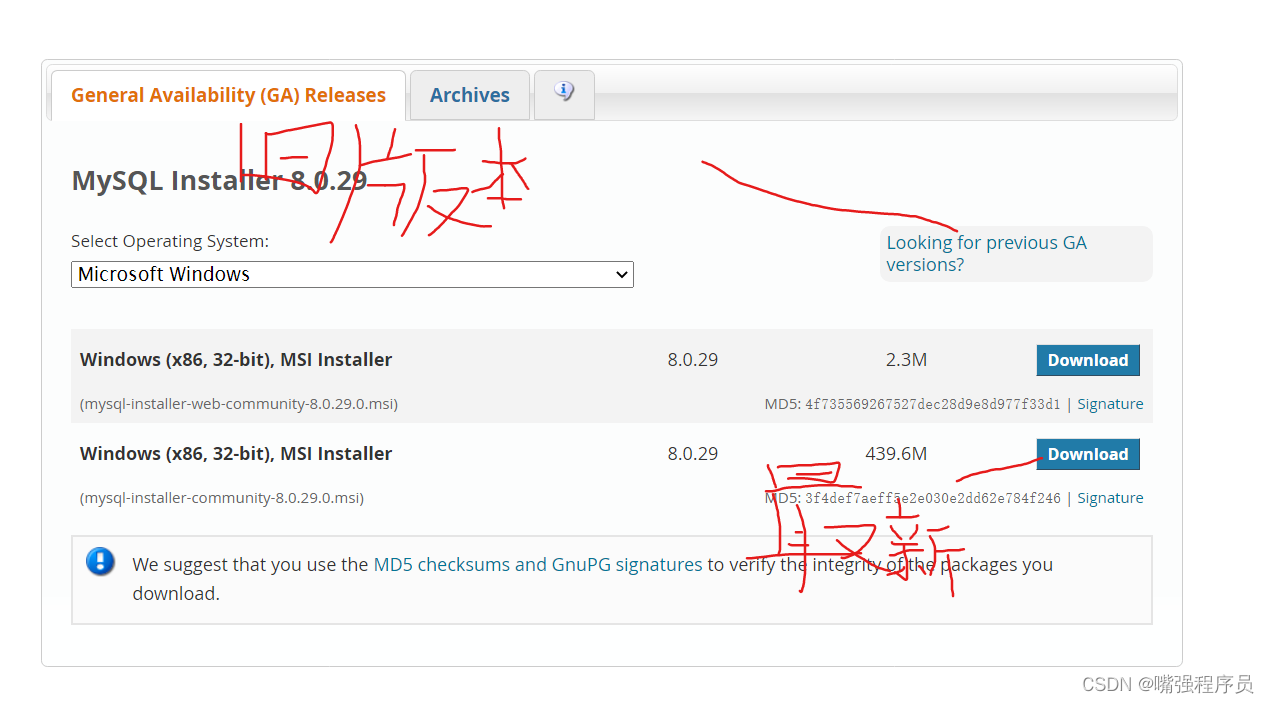
2. Configuration initialization file my.ini
Create a txt file , Name is my, The file suffix is ini
Then copy the following code and put it in the file
( The newly unzipped file does not my.ini file , You need to create your own )
In addition to the installation directory and data storage directory, the following code needs to be modified , The rest need not be modified
[mysqld]
#  Set up 3306 port
port=3306
#  Set up mysql Installation directory    ---------- Is your file path -------------
basedir=E:\mysql\mysql
#  Set up mysql Database data storage directory   --------- Is your file path data The folder is created by itself
datadir=E:\mysql\mysql\data
#  Maximum connections allowed
max_connections=200
#  Number of connection failures allowed .
max_connect_errors=10
#  The character set used by the server defaults to utf8mb4
character-set-server=utf8mb4
#  The default storage engine that will be used when creating a new table
default-storage-engine=INNODB
#  By default “mysql_native_password” Plug in authentication
#mysql_native_password
default_authentication_plugin=mysql_native_password
[mysql]
#  Set up mysql Client default character set
default-character-set=utf8mb4
[client]
#  Set up mysql The default port when the client connects to the server
port=3306
default-character-set=utf8mb4
Change the path after creation

One . install mysql5.7.23 Decompression version
1. decompression Environment variables enter Right click this computer -- attribute -- Find advanced settings
2. Configure environment variables : MYSQL_HOME D:\soft\mysql-5.7.23-winx64 It is best to configure in the system variable User variables cannot be used if you change users
3. edit path %MYSQL_HOME%\bin
4. newly build my.ini Put it in D:/soft/mysql-5.7.23-winx64 Under the folder
[mysqld]
port = 3306
basedir=D:/soft/mysql-5.7.23-winx64
datadir=D:/soft/mysql-5.7.23-winx64/data
max_connections=200
character-set-server=utf8
default-storage-engine=INNODB
sql_mode=NO_ENGINE_SUBSTITUTION,STRICT_TRANS_TABLES
[mysql]
default-character-set=utf8explain :
sql_mode
NO_ENGINE_SUBSTITUTION:mysql stay create table You can specify engine Clause
STRICT_TRANS_TABLES: For a single insert operation , Whether inserting a single row or multiple rows , As long as the inserted data is incompatible with the field type , be insert Operation failed and rolled back
And mysql The closest thing is mariadbcmd Command the administrator to run Get into mysql Of bin Catalog
Need to go to bin Catalog : When inputting, you can press Tab Complete the input
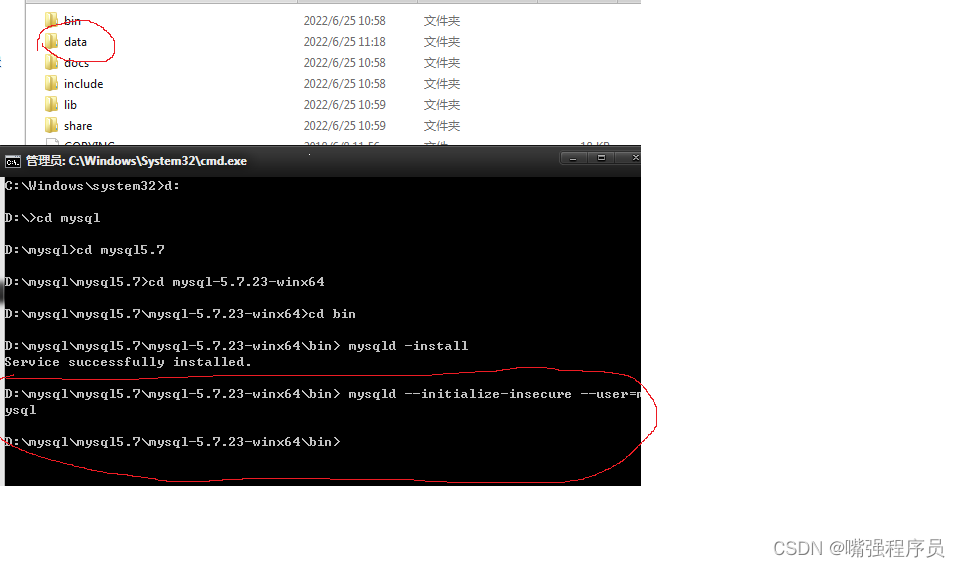
5. install mysqld -install
insecure During initialization, this parameter sets the default password to null
6. initialization mysqld --initialize-insecure --user=mysql According to just my.ini File to initialize , Then it will produce a data Folder
7. start-up net start mysql

8. Set the password mysqladmin -u root -p password New password
9.Enter password: Old password Directly enter , Because initialization directly puts mysql The password for is set to null
The next two are settings password And re-enter the password
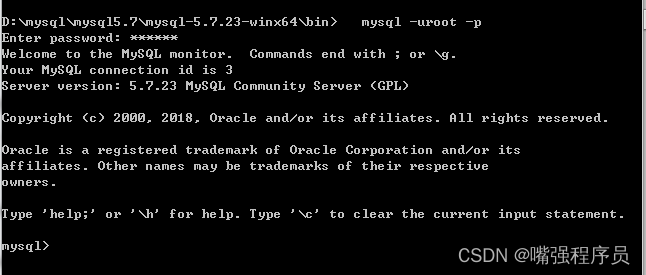
10. Connect mysql -uroot -p enter then Enter the password you set
Display database show databases;
Display table show tables;
Two 、 uninstall mysql
1 Out of Service net stop mysql
2. Delete service sc delete mysql But the service is only disabled , Services still exist
3. Remove the service mysqld remove Need to go to bin Catalog , Could not find in the service mysql Yes
4. Delete registry information
1)HKEY_LOCAL_MACHINE\SYSTEM\ControlSet001\Services\Eventlog\Application\MySQL2)HKEY_LOCAL_MACHINE\SYSTEM\ControlSet002\Services\Eventlog\Application\MySQL
3)HKEY_LOCAL_MACHINE\SYSTEM\CurrentControlSet\Services\Eventlog\Application\MySQL
5. Delete mysql Installation directory
Open the registry win Add R Input
regeditOpen the service
services.msc
Be careful 1: Protected shutdown , In particular, self-protection should be turned off , Otherwise, you can't uninstallBe careful 2: Permission problems
3、 ... and : solve mysql Unable to connect remotely :1. stay mysql Enter... On the server mysql The command line
2. Execute the following statement : ( Note that the password needs to be modified according to your own configuration )% The percent sign means that the database can be operated remotely
mysql> grant all privileges on *.* to [email protected]'%' identified by '123456';
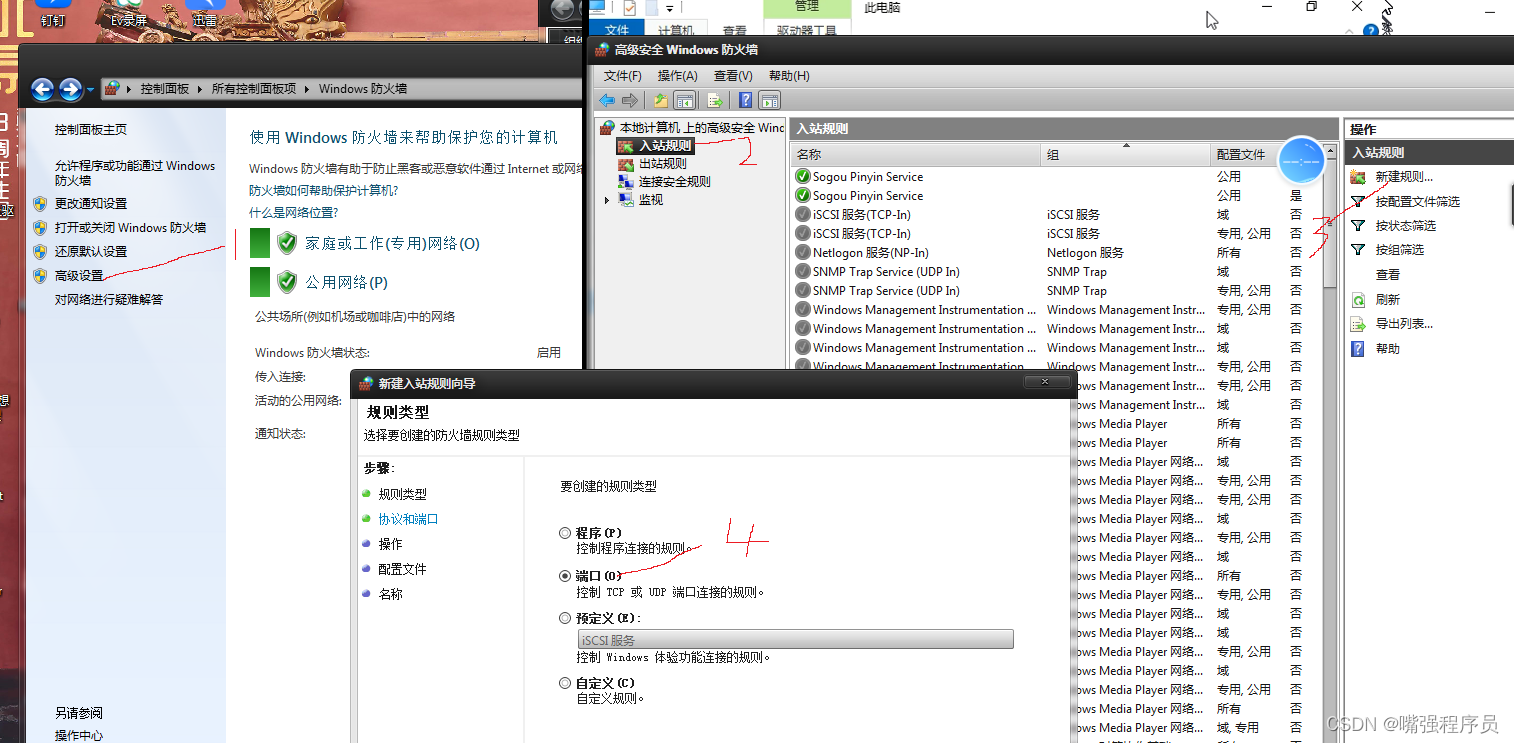
mysql> flush privileges;3. You need to add a firewall that needs to remotely control your computer mysql The port number can be passed directly, otherwise the firewall will block access
Select port Direct electricity next step
tcp agreement Port number 3306 This is mysql Default port number And then click next
Go straight to the next step
next step
Give me a name You can get up at will
A rule will be automatically added after the configuration number
Then you can go through ip Address to access the database on the computer where you configure the remote and set the rules
NAVIcat Download tool Can be connected to a variety of databases Decompress it and you can use it directly
Authoring tool download
Navicat Premium 12.0.11_x64.zip - Blue clouds
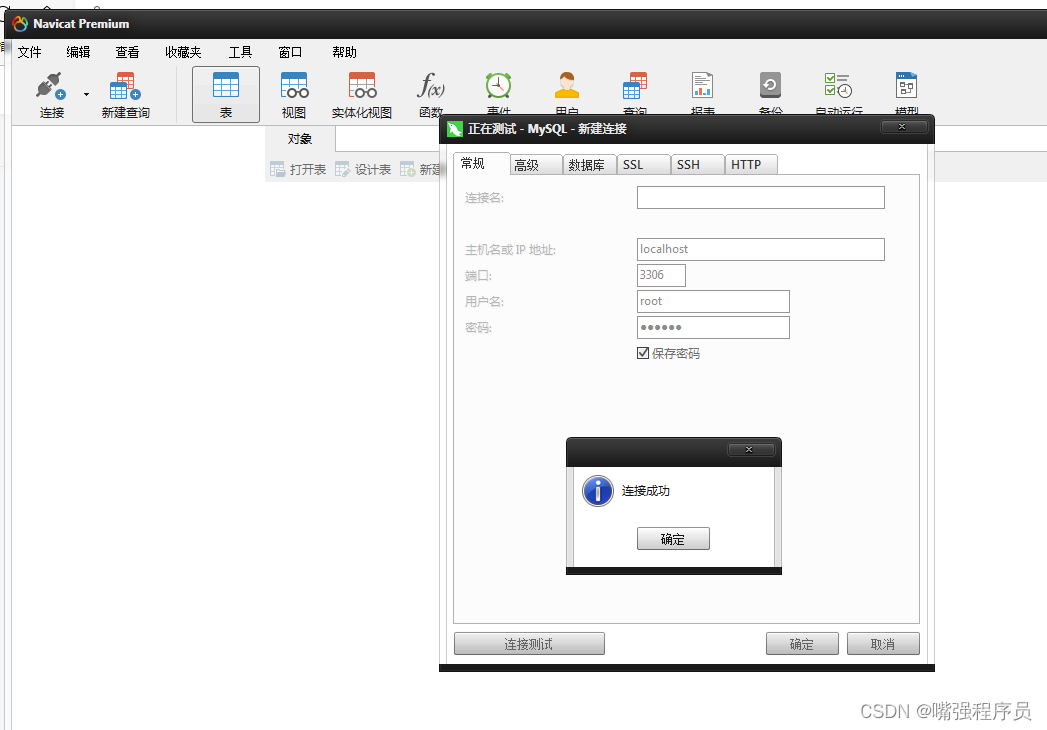
Click Connect to select the database Then enter the password to connect If you need to connect to a remote service ip Change the address








边栏推荐
猜你喜欢
Niuke network: Design LRU cache structure design LFU cache structure

丰富专业化产品线, 江铃福特领睿·极境版上市

(必须掌握的多线程知识点)认识线程,创建线程,使用Thread的常见方法及属性,以及线程的状态和状态转移的意义

transforms. The input of randomcrop() can only be PIL image, not tensor

Concept and working principle of data encryption standard (DES)

MySQL exports all table indexes in the database
transforms.RandomCrop()的输入只能是PIL image 不能是tensor
分页查询、JOIN关联查询优化

带你解决哈希冲突,并实现一个简单hash表,
Detailed explanation of MySQL mvcc mechanism
随机推荐
Various types of gypsum PBR multi-channel mapping materials, please collect them quickly!
【动态规划】剑指 Offer II 091. 粉刷房子
How about opening an account at Guojin securities? Is it safe to open an account?
DoS及攻擊方法詳解
陈强:阿里千亿级大规模数字商业知识图谱助力业务增长
Vscode usage - Remote SSH configuration description
Bayesian network explanation
halcon之区域:多种区域(Region)特征(5)
Binary search-1
[unity] use C in unity to execute external files, such as Exe or bat
力扣每日一题-第28天-566.重塑矩阵
LeetCode——226. 翻轉二叉樹(BFS)
DoS及攻击方法详解
MySql 导出数据库中的全部表索引
Leetcode HOT100 (22--- bracket generation)
RSA concept explanation and tool recommendation - LMN
国信证券怎么开户?通过链接办理股票开户安全吗
同花顺开户怎么样安全吗?怎么炒股开户
Applet setting button sharing function
14《MySQL 教程》INSERT 插入数据