This article briefly introduces ML.NET Background and orientation .NET Developed features , And a typical example of machine learning coding , And share your own ML.NET API Quick reference manual .
ML.NET brief introduction
ML.NET It's for .NET A cross platform machine learning framework for developers , It has the ability to integrate machine learning models into .NET Capabilities in applications .
2002 Microsoft started a research project named TMSN, Its intention “Test mining search and navigation”, Later it was renamed TLC(The learning code).ML.NET It is derived from TLC library , Originally used in Microsoft's internal products .
ML.NET The core of can train user-defined machine learning model by specifying algorithm , You can also import pre training TensorFlow and ONNX The model continues to train . After the model is generated , It can be added to the application for prediction .ML.NET Support in use .NET Core/.NET Framework Of Windows、Linux and macOS Up operation , All platforms support 64 position , Besides Windows Platform support 32 position , but TensorFlow、LightGBM and ONNX Except for related functions .
ML.NET It integrates many mainstream Converters 、 Algorithm library , adopt API The object evaluator provides a wealth of algorithms and data processing , And right Infer.NET、NimbusML、Scikit-Learn、TensorFlow And other machine learning related packages provide a convenient extension mechanism . If you are a .NET developer , You'll easily get started with , And seamlessly integrate the results into .NET Core In the application , especially ASP.NET Core Of Web Implement some advanced intelligent services in the application .
Example of logistic regression model
A simple example trains a logistic regression model for binary classification. The code is as follows :
//Step 1. Create an ML Context
var ctx = new MLContext();

//Step 2. Read in the input data from a text file for model training
IDataView trainingData = ctx.Data
    .LoadFromTextFile<ModelInput>(dataPath, hasHeader: true);

//Step 3. Build your data processing and training pipeline
var pipeline = ctx.Transforms.Text
    .FeaturizeText("Features", nameof(SentimentIssue.Text))
    .Append(ctx.BinaryClassification.Trainers
        .LbfgsLogisticRegression("Label", "Features"));

//Step 4. Train your model
ITransformer trainedModel = pipeline.Fit(trainingData);

//Step 5. Make predictions using your trained model
var predictionEngine = ctx.Model
    .CreatePredictionEngine<ModelInput, ModelOutput>(trainedModel);

var sampleStatement = new ModelInput() { Text = "This is a horrible movie" };

var prediction = predictionEngine.Predict(sampleStatement);
ML.NET Currently in Github Open source projects (https://github.com/dotnet/mac...) Perform continuous update iterations , The latest version is 1.6.
ML.NET features
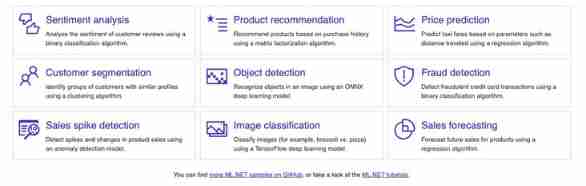
ML.NET The popular machine learning tasks supported cover a large number of , Including the traditional classification 、 Return to 、 clustering , It also supports the neural network of timing and image . Currently known application scenarios, such as : Sentiment analysis 、 Product recommendation 、 Price forecast 、 Customer stratification 、 Object detection 、 Fraud detection 、 Peak detection 、 Image classification 、 Sales forecast, etc .
ML.NET Yes .NET Developers are very friendly , It provides Visual Studio Expand Model Builder, This is a visual tool suite , The machine learning model of specified task type can be quickly trained with very low threshold operation requirements , And automatically generate relevant source code , It is convenient for subsequent modification and maintenance . For partners who like to carry out machine learning tasks through code , The official has provided a wealth of documents (https://docs.microsoft.com/en...) And sample code base (https://github.com/dotnet/mac...).

in addition ,ML.NET in the light of CLI Command line tools are also provided , And support AutoML Of , Make the common machine learning scenarios realize zero coding .

Quick reference manual
adopt AutoML The generated code will not be used to reading at first , It is also not conducive to the subsequent transformation of the code to meet the actual needs of developers . If you have never been in contact with machine learning developers , May worry about not remembering 、 Look not to understand 、 I'm not used to it ML.NET API There are many objects and methods based on professional terms in the document , Given the obstacles to collecting feedback from actual developers , The author will ML.NET API Follow the classic machine learning implementation steps , Organize the common methods into an atlas , And added some code snippets to help quickly understand API Rules for using objects and methods . in addition , At the bottom of the atlas, up to now ML.NET The built-in supported model trainer and data converter have been listed in a table to facilitate the mastery of complete information . The album is shared with pictures in HD vector format , When coding, put it in the customary place , Like developing other .NET Applications can be viewed at any time , Be clear at a glance .

Quick reference manual HD version download :https://beanhsiang.github.io/...