当前位置:网站首页>Configuration software -- control import
Configuration software -- control import
2022-06-11 07:28:00 【Fantastical Yu ruiyin】
Catalog
Configuration software – Control import
I have been using it recently Qt Make configuration software , At the beginning with QGraphics To do configuration software UI Design procedure , No kidding , To be honest, it looks a bit like , But there are big problems in the subsequent secondary development , So the second time is for reference feiyangqingyun Great God's attribute design idea , It can be said that it went very smoothly 10 Most of the work was finished in days .
First of all, let's show the effect 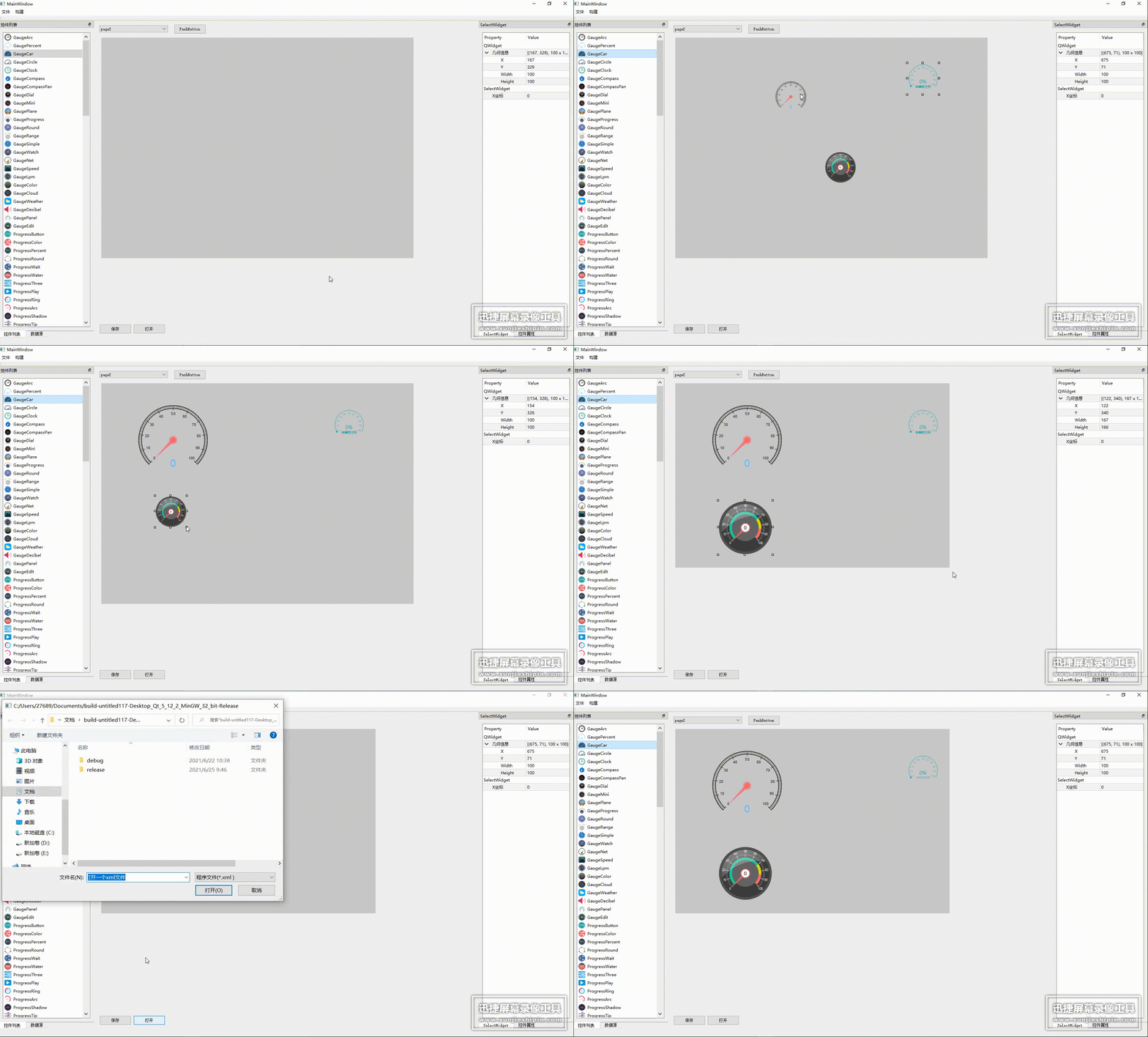
Realization function
Control loading
Related instructions
This part of the code is completely plagiarized feiyangqingyun Great God control loaded program , Don't ask why , Because this code is really powerful , I can't ask any questions , But this part of the code may not conform to my habit of writing programs , I usually like to write a function directly into one QObject In a class of , In this way, the function can be realized by binding the corresponding type of control with the pointer when calling the function , So there is a little difference
Program
//pluginInsert.h
#ifndef PLUGININSERT_H
#define PLUGININSERT_H

/******* *  function ------ Bind one listwidget, And realize the loading of the control library  *  The most important function  pluginInsert, To use this function, you must call , The second constructor is recommended  *  The most important parameter listWidgets、listNames Control list and name list parameters , It can be used for subsequent control generation  ******/

#include <QObject>
#include <QListWidget>
#include <QtDesigner/QDesignerCustomWidgetInterface>
#include <QStringList>
#include <QPluginLoader>
#include <QtDesigner/QDesignerCustomWidgetCollectionInterface>
class pluginInsert :public QObject   // Import UI Used by plug-ins , Bind one listwidget, The default import quc The plug-in of the control group of
{

    Q_OBJECT
public:
    pluginInsert(QObject *parent = nullptr);
    pluginInsert(QListWidget **widget,QObject *parent = nullptr);
    void setlistwidget(QListWidget **widget);
    QList<QDesignerCustomWidgetInterface *> listWidgets;   // Control list parameters 1
    QStringList listNames;                                 // Control list parameters 2
private:
    void initPlugin();
    void loadPlugin(const QString &fileName);
    void openPlugin(const QString &fileName);
    QListWidget *listwidget;
};

#endif // PLUGININSERT_H
#include "plugininsert.h"
#include <QApplication>
pluginInsert::pluginInsert(QObject *parent)
    :QObject(parent)
{

    listwidget=nullptr;
}

pluginInsert::pluginInsert(QListWidget **widget, QObject *parent)
    :QObject(parent)
{

    setlistwidget(widget);
}

void pluginInsert::setlistwidget(QListWidget **widget)
{

    listwidget=*widget;
    initPlugin();
}
void pluginInsert::initPlugin()
{

    // Load the default plug-in
#if defined(Q_OS_WIN)
    QString pluginName = QString("%1/quc.dll").arg(qApp->applicationDirPath());
#elif defined(Q_OS_UNIX)
    QString pluginName = QString("%1/libquc.so").arg(qApp->applicationDirPath());
#elif defined(Q_OS_MAC)
    QString pluginName = QString("%1/libquc.dylib").arg(qApp->applicationDirPath());
#endif
    loadPlugin(pluginName);
    // Load default control xml data
    //openFile(qApp->applicationDirPath() + "/quc.xml");

    qApp->processEvents();
    //ui->listWidget->verticalScrollBar()
}

void pluginInsert::loadPlugin(const QString &fileName)
{

    openPlugin(fileName);
   // this->setWindowTitle(QString(" Custom control property designer ( common  %1  Controls )
}

void pluginInsert::openPlugin(const QString &fileName)
{


    qDeleteAll(listWidgets);
    listWidgets.clear();
    listNames.clear();
    listwidget->clear();

    // Load custom control plug-in collection information , Including getting class names + Icon
    QPluginLoader loader(fileName);
    if (loader.load()) {

        QObject *plugin = loader.instance();

        // Get plug-in container , Then walk through the container one by one to find a single plug-in
        QDesignerCustomWidgetCollectionInterface *interfaces = qobject_cast<QDesignerCustomWidgetCollectionInterface *>(plugin);
        if (interfaces)  {

            listWidgets = interfaces->customWidgets();
            int count = listWidgets.count();
            for (int i = 0; i < count; i++) {

                QIcon icon = listWidgets.at(i)->icon();
                QString className = listWidgets.at(i)->name();

                QListWidgetItem *item = new QListWidgetItem(listwidget);
                item->setText(className);
                item->setIcon(icon);
                listNames << className;
            }
        }

        // Get the class names of all plug-ins
        const QObjectList objList = plugin->children();
        foreach (QObject *obj, objList) {

            QString className = obj->metaObject()->className();
            //qDebug() << className;
        }
    }
}
This part of the program is a complete version ,listwidget After binding a control, the control import function can be realized . But the premise is that it must be compiled exe Under path by quc.dll and libquc.lib Two documents , Otherwise, the display is still blank .
Reference blog
https://qtchina.blog.csdn.net/article/details/100652152
边栏推荐
- Miscellany C language
- [analysis of STL source code] summary notes (3): vector introduction
- 【编译原理】05-语法制导的语义计算——基于翻译模式的语义计算
- 【Oracle 数据库】奶妈式教程day04 排序查询
- 2、 User login and registration
- Android and IOS reverse analysis / security detection / penetration testing framework
- [Oracle database] mammy tutorial day03 Sorting Query
- Mobile console Gobang (first draft of detailed design)
- JVM learning record (VII) -- class loading process and parental delegation model
- 【Oracle 数据库】奶妈式教程day02 数据库管理工具SQLPLUS的使用
猜你喜欢

No response from win10 explorer when dragging files
Typora set markdown syntax inline mode

Senior openstacker - Bloomberg, vexxhost upgraded to the Gold member of openinfra Foundation
10 advanced concepts that must be understood in learning SQL
![[Oracle database] mammy tutorial day03 Sorting Query](/img/ea/24c9495a2ef4f1786f7b7852bde321.png)
[Oracle database] mammy tutorial day03 Sorting Query

CMAP of Matplotlib
Qstring to hexadecimal qstring

Education expert wangzhongze shared his experience for many years: family education is not a vassal

Sdl-2 thread logic
![[analysis of STL source code] summary note (4): behind the scenes hero allocator](/img/b9/cf53fd8f933042ff65844d61eca55e.jpg)
[analysis of STL source code] summary note (4): behind the scenes hero allocator
随机推荐
Ffmpeg extraction package format extracts AAC and customizes adtc header to realize arbitrary frame decoding
2022 low voltage electrician operation certificate test question simulation test platform operation
【Oracle 数据库】奶妈式教程day02 数据库管理工具SQLPLUS的使用
[STL source code analysis] summary notes (10): hashtable exploration
Building a full-featured NAS server with raspberry pie (06): built-in file synchronization tool for penetration
Leetcode-104. Maximum Depth of Binary Tree
Concurrent tool class
Raspberry pie builds a full-featured NAS server (07): manage your library & read as you please
Seata的几种事务模式
I/o multiplexing - select/poll/epoll
正则表达式匹配
C language to write a calculator calculation logic
Menu double linkage effect in uniapp
Leetcode-141. Linked List Cycle
Regular Expression Matching
Compound ratemodel contract analysis
The gap between the parent box and the child box
R language Parallel Computing practice tutorial
C+tinycthread implementation thread
Smart pointer (simple version)