当前位置:网站首页>Building a full-featured NAS server with raspberry pie (06): built-in file synchronization tool for penetration
Building a full-featured NAS server with raspberry pie (06): built-in file synchronization tool for penetration
2022-06-11 07:15:00 【Janvis of the stark family】
Write it at the front
That's it nextcloud, We are no longer strangers to personal online disks . But you want to synchronize files anytime, anywhere , Public network is also required IP/ Intranet through .
Actually speaking of file synchronization , There is also a built-in intranet penetration P2P File synchronization tools must be introduced , Namely syncthing.
Imagine , You are in the company / Half the files edited in the lab can still be at home / The seamless connection between the dormitory and the other half of the editor must feel great .
And this time the protagonist is no longer nas, It can be any device on the whole platform . In some synchronization scenarios ( The following is an example ) It will be very easy to use .
Syncthing What is it?
Syncthing Is a free and open source file synchronization tool , The most important thing is based on P2P technology .

The synchronization thus achieved is decentralized , That is, there is no need to have a central server to support the synchronization service . It only needs that both devices are online to complete the synchronization .
The logic of file synchronization is very similar to the nut cloud we mentioned , The usage scenario is similar , But the tools we are introducing now are free from the payment limit , To some extent, there will be a higher degree of freedom . And open source is also important for security .
install
Get into syncthing Of github Project address , Find the boot page :
Community Contributions — Syncthing v1 documentation
You can see that there are many installation methods , Can be installed on many platforms .
You can install synchronization on any device you need , For example, between computers and mobile phones or between computers and computers , It's all right .
Here we mainly talk about installing on the server , use docker-compose.
Open our old friend linuxserver.io, find doc( Pay attention to the version )
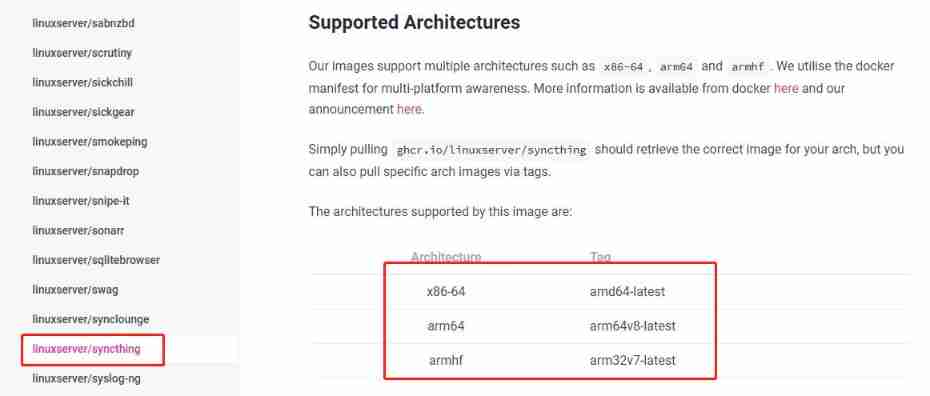
The parameters are as follows :

1.PUID and PGID
What each installation says , Fill in after query .
2.path/to/data
Set the directory address mapping of the synchronization file , It can also be modified later
3. Port number
Just keep the default , The default port number is 8384
After setting, you can deploy stack 了 .
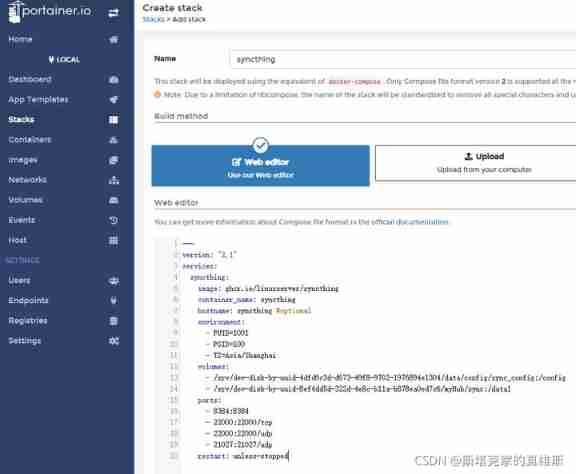
Set up
Server side configuration
Use 8384 Ports open Syncthing

First set a password
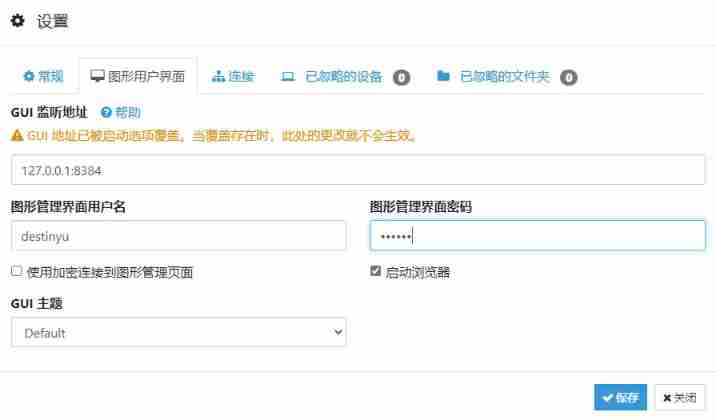
Then it is the most basic to add a shared folder

To add a folder, you need to set these .

Note here :
1. Folder labels can be used at will , Used to identify
2. Folder ID Is the unique identifier of the share
3. The folder path is the path that we have mapped during installation ( Of course, the new path can also , But you need to map on the server first )
This interface indicates success

Other client configurations
Here we have windows Take the client as an example to demonstrate how to connect to sharing .
First download & Double-click to open SyncTrayzor.
Release Version 1.1.29 · canton7/SyncTrayzor · GitHub
There is no difference between the interface and the server side

Then you need to add a remote device ( Here, you can add it on the server side )

ID It is the long thing with two-dimensional code in the current device , The device name is given by itself .
At this time, the added end will have a confirmation message .

After confirmation, the connection is successful , You can create a shared folder locally .

Be sure to pay attention to this ID To synchronize with the folder you created at that time ID Agreement .

Then check share

Then go back to the server to confirm

Synchronous success !

Use scenarios
For the shared folders you create ,Syncthing After the connection is confirmed, the contents of the two folders will always be unified , Always consistent . It is very friendly for some scenarios that require multiple processing of office documents .
Similar to the nut cloud , Put files in a shared folder , Then the other devices connected to this folder can get a copy .
Of course , The synchronization time should be determined according to your network environment . LAN to LAN is definitely the fastest , The external network needs to use its own internal network penetration .
Basic usage :
1. You can sync your phone directly with your computer , You can also synchronize between computers .
2. But if you want to share your files elsewhere at home , It means that the devices on both sides must be turned on to connect successfully .(P2P Why )
3. You can use the server as an intermediary , Two by two , In this way, the left and right devices do not need to be turned on at any time .( Of course, the server should do a good job in the public network IP/ Intranet penetration should be more comfortable )
4. Use an infrequently used computer as an intermediary , Keep it synchronized .
Other skills
Change specific document requirements
You can change the specific requirements of shared folders in settings

Ignore mode
You can filter folders that do not need to be synchronized ( See the document for the specific use of wildcards )

version control
It is the same as synchronizing cloud disks ,Syncthing It also has version control function .
The version control here is highly selective , You can choose to keep several versions or clear the time interval, and so on .

conflict management
When a file you modify on one device has not yet been synchronized to another device , The file was also modified on another device , This will lead to file conflicts .
At this time Syncthing A new conflict document will be created for you .

You can choose to keep any of these versions .
Summary
Syncthing It can be said that it is a synchronization tool that can solve some practical problems in daily life .
The setup is not complicated , Once and for all , The function is also simple and clear , Especially the usage is very direct , Designed for synchronizing files on both sides , Safe and reliable .
If you don't need a lot of file synchronization at ordinary times , And want to be convenient and fast without being disturbed by various accounts , Then you can try it .
边栏推荐
- Leetcode-104. Maximum Depth of Binary Tree
- MS office level II wrong question record [4]
- 品牌定位个性六种形态及结论的重大意义
- 顶流编辑器 Atom,将于 12 月 15 日退出历史舞台
- Shangtang technology has actively resumed work and will vigorously invest in the capacity and deployment of the digital sentry
- Library management system 2- demand analysis
- LEARNING TARGET-ORIENTED DUAL ATTENTION FOR ROBUST RGB-T TRACKING
- Listen to the left width of the browser to calculate the distance
- Atom, the top stream editor, will leave the historical stage on December 15
- MS office level II wrong question record [7]
猜你喜欢

Leetcode hot topic 100 topic 21-25 solution

Mobile console Gobang (first draft of detailed design)

Drawing with qpainter

Records how cookies are carried in cross domain requests

Leetcode-141. Linked List Cycle

Duality-Gated Mutual Condition Network for RGBT Tracking

First day of database
Leetcode-141. Linked List Cycle

Decimal to binary
![[并发进阶]——线程池总结](/img/69/dc8146dafc30f8a8efa012b67aa05c.png)
[并发进阶]——线程池总结
随机推荐
Comparison of DOM tags of wechat applet development (native and uniapp)
Leetcode-141. Linked List Cycle
Atom, the top stream editor, will leave the historical stage on December 15
P5431 [template] multiplicative inverse 2
Atomicinteger atomic operation class
Bat (batch processing) processing special symbols (exclamation point, percent sign), etc
[Xunwei dry goods] opencv test of Godson 2k1000 development board
2022低压电工考题及在线模拟考试
matplotlib的cmap
About daily report plan
[deploy private warehouse based on harbor] 3 deploy harbor
QT 基于QScrollArea的界面嵌套移动
Graph Attention Tracking
P3327 [sdoi2015] approximate sum (Mobius inversion + formula)
1300. the array closest to the target value after transforming the array and
Interview question 17.08 Circus tower
Leetcode hot topic 100 topic 11-15 solution
Typora set markdown syntax inline mode
Education expert wangzhongze shared his experience for many years: family education is not a vassal
213. house raiding II