当前位置:网站首页>matlab图像去雾技术GUI界面-全局平衡直方图
matlab图像去雾技术GUI界面-全局平衡直方图
2022-07-24 15:18:00 【studyer_domi】
1、内容简介
略
431-可以交流、咨询、答疑
2、内容说明
略
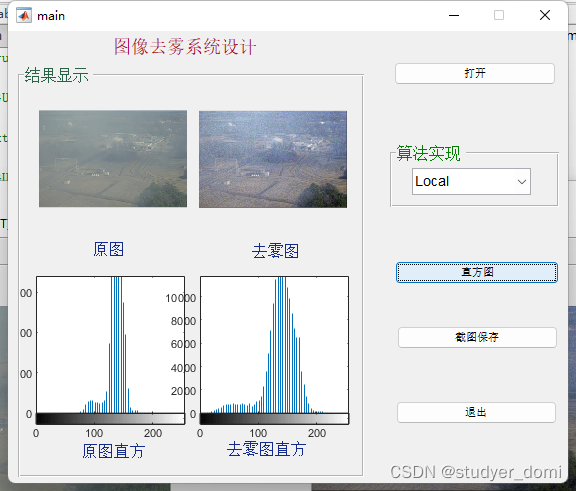
3、仿真分析
function varargout = main(varargin)
% MAIN MATLAB code for main.fig
%      MAIN, by itself, creates a new MAIN or raises the existing
%      singleton*.
%
%      H = MAIN returns the handle to a new MAIN or the handle to
%      the existing singleton*.
%
%      MAIN('CALLBACK',hObject,eventData,handles,...) calls the local
%      function named CALLBACK in MAIN.M with the given input arguments.
%
%      MAIN('Property','Value',...) creates a new MAIN or raises the
%      existing singleton*.  Starting from the left, property value pairs are
%      applied to the GUI before main_OpeningFcn gets called.  An
%      unrecognized property name or invalid value makes property application
%      stop.  All inputs are passed to main_OpeningFcn via varargin.
%
%      *See GUI Options on GUIDE's Tools menu.  Choose "GUI allows only one
%      instance to run (singleton)".
%
% See also: GUIDE, GUIDATA, GUIHANDLES

% Edit the above text to modify the response to help main

% Last Modified by GUIDE v2.5 14-Apr-2019 17:22:46

% Begin initialization code - DO NOT EDIT
gui_Singleton = 1;
gui_State = struct('gui_Name',       mfilename, ...
                   'gui_Singleton',  gui_Singleton, ...
                   'gui_OpeningFcn', @main_OpeningFcn, ...
                   'gui_OutputFcn',  @main_OutputFcn, ...
                   'gui_LayoutFcn',  [] , ...
                   'gui_Callback',   []);
if nargin && ischar(varargin{1})
    gui_State.gui_Callback = str2func(varargin{1});
end

if nargout
    [varargout{1:nargout}] = gui_mainfcn(gui_State, varargin{:});
else
    gui_mainfcn(gui_State, varargin{:});
end
% End initialization code - DO NOT EDIT


% --- Executes just before main is made visible.
function main_OpeningFcn(hObject, eventdata, handles, varargin)
% This function has no output args, see OutputFcn.
% hObject    handle to figure
% eventdata  reserved - to be defined in a future version of MATLAB
% handles    structure with handles and user data (see GUIDATA)
% varargin   command line arguments to main (see VARARGIN)

% Choose default command line output for main
handles.output = hObject;

% Update handles structure
guidata(hObject, handles);

% UIWAIT makes main wait for user response (see UIRESUME)
% uiwait(handles.figure1);


% --- Outputs from this function are returned to the command line.
function varargout = main_OutputFcn(hObject, eventdata, handles)
% varargout  cell array for returning output args (see VARARGOUT);
% hObject    handle to figure
% eventdata  reserved - to be defined in a future version of MATLAB
% handles    structure with handles and user data (see GUIDATA)

% Get default command line output from handles structure
varargout{1} = handles.output;


% --- Executes on selection change in popupmenu1.
function popupmenu1_Callback(hObject, eventdata, handles)
% hObject    handle to popupmenu1 (see GCBO)
% eventdata  reserved - to be defined in a future version of MATLAB
% handles    structure with handles and user data (see GUIDATA)

% Hints: contents = cellstr(get(hObject,'String')) returns popupmenu1 contents as cell array
%        contents{get(hObject,'Value')} returns selected item from popupmenu1
global Img2
%具体算法实现
val=get(handles.popupmenu1,'value');
switch val
    case 1
        if isequal(handles.Img1, 0)
            msgbox('请载入图像!', '提示信息');
            return;
        end
        Img2 = RemoveFogByGlobalHisteq(handles.Img1, 0);
        axes(handles.axes2); imshow(Img2, []);
    case 2
       if isequal(handles.Img1, 0)
             msgbox('请载入图像!', '提示信息');
             return;
       end
        Img2 = RemoveFogByLocalHisteq(handles.Img1, 0);
        axes(handles.axes2); imshow(Img2, []);
    case 3
        if isequal(handles.Img1, 0)
            msgbox('请载入图像!', '提示信息');
            return;
        end
        Img2 = RemoveFogByRetinex(handles.Img1, 0);
        axes(handles.axes2); imshow(Img2, []);
end

% --- Executes during object creation, after setting all properties.
function popupmenu1_CreateFcn(hObject, eventdata, handles)
% hObject    handle to popupmenu1 (see GCBO)
% eventdata  reserved - to be defined in a future version of MATLAB
% handles    empty - handles not created until after all CreateFcns called

% Hint: popupmenu controls usually have a white background on Windows.
%       See ISPC and COMPUTER.
if ispc && isequal(get(hObject,'BackgroundColor'), get(0,'defaultUicontrolBackgroundColor'))
    set(hObject,'BackgroundColor','white');
end


% --- Executes on button press in pushbutton1.
function pushbutton1_Callback(hObject, eventdata, handles)
% hObject    handle to pushbutton1 (see GCBO)
% eventdata  reserved - to be defined in a future version of MATLAB
% handles    structure with handles and user data (see GUIDATA)
% 打开
warning off all;
% 载入图像
[FileName,PathName] = uigetfile({'*.jpg;*.tif;*.png;*.gif', ...
    '所有图像文件';...
    '*.*','所有文件' },'载入图像',...
    '.\images\\sweden_input.jpg');
if isequal(FileName, 0) || isequal(PathName, 0)
    return;
end
Img1 = imread(fullfile(PathName, FileName));
axes(handles.axes1);
imshow(Img1, []);
handles.Img1 = Img1;
handles.Img2 = 0;
guidata(hObject, handles);


% --- Executes on button press in pushbutton2.
function pushbutton2_Callback(hObject, eventdata, handles)
% hObject    handle to pushbutton2 (see GCBO)
% eventdata  reserved - to be defined in a future version of MATLAB
% handles    structure with handles and user data (see GUIDATA)
global Img1 Img2
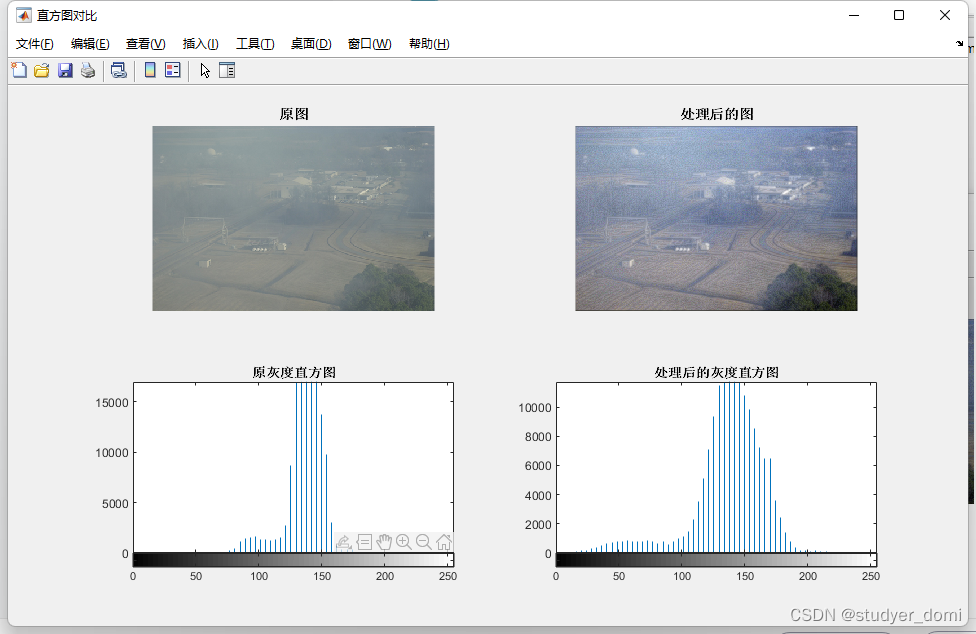
%直方图
figure('Name', '直方图对比', 'NumberTitle', 'Off', ...
    'Units', 'Normalized', 'Position', [0.1 0.1 0.5 0.5]);
one = rgb2gray(handles.Img1);
two = rgb2gray(Img2);
subplot(2, 2, 1); imshow(handles.Img1); title('原图','FontWeight', 'Bold');
subplot(2, 2, 2); imshow(Img2, []); title('处理后的图','FontWeight', 'Bold');
subplot(2, 2, 3); imhist(one,64); title('原灰度直方图', 'FontWeight', 'Bold');
subplot(2, 2, 4); imhist(two,64); title('处理后的灰度直方图', 'FontWeight', 'Bold');


one = rgb2gray(handles.Img1);
axes(handles.axes3);
imhist(one,64);
axes(handles.axes4);
imhist(two,64);

% --- Executes on button press in pushbutton3.
function pushbutton3_Callback(hObject, eventdata, handles)
% hObject    handle to pushbutton3 (see GCBO)
% eventdata  reserved - to be defined in a future version of MATLAB
% handles    structure with handles and user data (see GUIDATA)
% 截图保存
SnapImage();

% --- Executes on button press in pushbutton4.
function pushbutton4_Callback(hObject, eventdata, ~)
% hObject    handle to pushbutton4 (see GCBO)
% eventdata  reserved - to be defined in a future version of MATLAB
% handles    structure with handles and user data (see GUIDATA)
%退出
close();
4、参考论文
略
边栏推荐
- 文件操作详解
- 接参处理和@Param
- Property datasource is required exception handling [idea]
- File upload and download and conversion between excel and data sheet data
- MySQL function
- [bug solution] error in installing pycocotools in win10
- 【OpenCV 例程300篇】238. OpenCV 中的 Harris 角点检测
- Route planning method for UAV in unknown environment based on improved SAS algorithm
- How do novices buy stocks for the first time? Which securities company is the best and safest to open an account
- The accuracy of yolov7 in cracking down on counterfeits, not all papers are authentic
猜你喜欢

接参处理和@Param
Rest style

celery 启动beat出现报错ERROR: Pidfile (celerybeat.pid) already exists.

Spark Learning Notes (III) -- basic knowledge of spark core
27.目录与文件系统
26. Code implementation of file using disk

Mysql库的操作

2022 RoboCom 世界机器人开发者大赛-本科组(省赛)-- 第三题 跑团机器人 (已完结)

How to set packet capturing mobile terminal

Outlook tutorial, how to create tasks and to DOS in outlook?
随机推荐
(09) flask is OK if it has hands - cookies and sessions
C# SQLite Database Locked exception
spark:获取日志中每个时间段的访问量(入门级-简单实现)
24.原生磁盘的使用
佣金哪家券商最低,我要开户,手机上开户安不安全
Simple encapsulation of wechat applet wx.request
2022 RoboCom 世界机器人开发者大赛-本科组(省赛)-- 第三题 跑团机器人 (已完结)
spark:指定日期输出相应日期的日志(入门级-简单实现)
25.从生磁盘到文件
【USENIX ATC'22】支持异构GPU集群的超大规模模型的高效的分布式训练框架Whale
[tkinter美化] 脱离系统样式的窗口(三系统通用)
JMeter - call the interface for uploading files or pictures
Self join usage of SQL
Circular structure practice
2022 RoboCom 世界机器人开发者大赛-本科组(省赛) CAIP 完整版题解
Which securities company is the best and safest to open an account? How to open an account and speculate in stocks
Huffman tree (optimal binary tree)
The accuracy of yolov7 in cracking down on counterfeits, not all papers are authentic
【Flutter -- 布局】流式布局(Flow和Wrap)
在哪家证券公司开户最好最安全 如何开户炒股票