当前位置:网站首页>Classic interview questions of interface testing: what is the difference between session, cookie and token?
Classic interview questions of interface testing: what is the difference between session, cookie and token?
2022-07-24 19:28:00 【hogwartstester】
Classic interview questions of interface test :Session、cookie、token What's the difference? ?
This article is excerpted from the internal textbook of Hogwarts testing and development society
HTTP Is a stateless agreement , The advantage of this feature is higher efficiency , But the disadvantages are also very obvious , The agreement itself does not support website Association , such as https://ceshiren.com/ and https://ceshiren.com/t/topic/9737/7 These two websites , You have to use other methods to connect the two . That's it session 、cookie 、token.
- session Conversational , It's a persistent network protocol , It plays a role in creating associations between the client side and the server side , So as to exchange data packets .
- cookie yes “ Small text files ”, It's some websites to identify users , Conduct session Tracking data stored on the user's local terminal ( Usually encrypted ), Information temporarily or permanently saved by the user's client computer .
- token In computer authentication, it's a token ( temporary ) It means , In lexical analysis, the meaning of mark . Usually as an invitation 、 Log in to the system to use .
And get、post Detailed explanation of the difference in actual combat Same chapter , In order to avoid the interference of other factors , Use Flask Write a simple one demo server(Flask Installation and startup reference of get、post Detailed explanation of the difference in actual combat chapter ), To demonstrate cookie And session.
demo server Demo code
from flask import Flask,session,Request, request,make_responseapp = Flask(__name__)request: Requestapp.secret_key = "key"@app.route('/')def hello_world():
    return 'Hello, World!'@app.route("/session")def session_handle():
    # Read request
    for k, v in request.args.items():
    # Write after receiving the request session
        session[k] = v
    # Create server response , take session Print out the contents
    resp = make_response({k: v for k, v in session.items()})
    for k, v in request.args.items():
    # Set the server cookie, And add cookie String to identify
        resp.set_cookie(f"cookie_{k}", v)
return respFirst, use the browser's traceless mode to launch a visit to the demonstration website , And pass in a、b Two parameters Take a request as an example , see cookie Transfer process
The first request header information is as follows , You can see that there is no cookie Information :
GET /session?a=1&b=2 HTTP/1.1
Host: 127.0.0.1:5000
Connection: keep-alive
Pragma: no-cache
Cache-Control: no-cache
sec-ch-ua: " Not A;Brand";v="99", "Chromium";v="90", "Google Chrome";v="90"sec-ch-ua-mobile: ?0
Upgrade-Insecure-Requests: 1User-Agent: Mozilla/5.0 (Macintosh; Intel Mac OS X 10_15_0) AppleWebKit/537.36 (KHTML, like Gecko) Chrome/90.0.4430.212 Safari/537.36
Accept: text/html,application/xhtml+xml,application/xml;q=0.9,image/avif,image/webp,image/apng,*/*;q=0.8,application/signed-exchange;v=b3;q=0.9
Sec-Fetch-Site: none
Sec-Fetch-Mode: navigate
Sec-Fetch-User: ?1
Sec-Fetch-Dest: document
Accept-Encoding: gzip, deflate, br
Accept-Language: enResponse header information of the first request , Returned to the client set-cookie Field :
HTTP/1.0 200 OK
Content-Type: application/json
Content-Length: 18Set-Cookie: cookie_a=1; Path=/
Set-Cookie: cookie_b=2; Path=/
Vary: Cookie
Set-Cookie: session=eyJhIjoiMSIsImIiOiIyIn0.YKSvNA.2sSLXbraXxQ-MfKOLhoLJPZmV9U; HttpOnly; Path=/
Server: Werkzeug/1.0.1 Python/3.8.7
Date: Wed, 19 May 2021 06:24:52 GMTRequest header information of the second request , When the client requests from the server, the request header is one more cookie Information , And submitted and the second time set-cookie The same information :
GET /session?a=1&b=2 HTTP/1.1
Host: 127.0.0.1:5000
... Omit ...
Cookie: cookie_a=1; cookie_b=2; session=eyJhIjoiMSIsImIiOiIyIn0.YKSvNA.2sSLXbraXxQ-MfKOLhoLJPZmV9UWhen the user accesses the belt cookie Browser time , This server generates a unique cookie, And use this as an index to generate an item in the back-end database of the server , Then add a message called Set-cookie The first line of , The format is k:v.
So when the user visits this website next time , It will add a name when making a request to the server Cookie The first line of . From this, the browser can know the user's identity , So users don't need to re-enter some personal information .
Use curl The command launched a get request , And pass in a、b Two parameters
curl 'http://127.0.0.1:5000/session?a=1&b=2' -v -s &>sessionsee session Request and response contents in the document
*   Trying 127.0.0.1...
* TCP_NODELAY set* Connected to 127.0.0.1 (127.0.0.1) port 5000 (#0)> GET /session?a=1&b=2 HTTP/1.1
> Host: 127.0.0.1:5000
> User-Agent: curl/7.64.1
> Accept: */*
>
* HTTP 1.0, assume close after body
< HTTP/1.0 200 OK
< Content-Type: application/json
< Content-Length: 18< Set-Cookie: cookie_a=1; Path=/
< Set-Cookie: cookie_b=2; Path=/
< Vary: Cookie
< Set-Cookie: session=eyJhIjoiMSIsImIiOiIyIn0.EWX6Qg.M8tEGPyRhlf0iUiLktEqup-4e-U; HttpOnly; Path=/
< Server: Werkzeug/1.0.1 Python/3.7.5
<{ [18 bytes data]* Closing connection 0{"a":"1","b":"2"}You can find... From above , Different from the previous chapter, there are more response values 3 individual Set-Cookie Field . There is a Set-Cookie Is shown as session=eyJhIjoiMSIsImIiOiIyIn0.EWX6Qg.M8tEGPyRhlf0iUiLktEqup-4e-U; HttpOnly; Path=/, thus it can be seen session Generally, it is in encrypted string format , Can pass cookie Pass on .
token There is a very classic scenario for the use of , Is in the github The use of . stay github->settings->Developer settings->Personal access tokens in , Can generate a token Used to access the github Of api, This token There is no timeliness ,“ anybody ” They can be used instead of passing HTTPS Of Git password , It can also be used to provide basic authentication to API Authentication .
Use OAuth Token pair GitHub API Authentication ( There are too many personal information returned, so the display is omitted )
$ curl -u username:$token https://api.github.com/usertoken It's stateless , After the client passes the user data to the server , The server encrypts the data to generate token And send it back to the client . In this way, the client will pass token, And the server decrypts token after , You can know the customer's information .
stay github in ,token It will only be generated once , And will not expire , But in many other web App site ,token There will be an expiration mechanism .
@startuml
autonumber
title session、cookie The process
participant  client  as c
participant  The server  as s

c -> s:  First request
s -> s:  establish SessionID And save
s -> c:  return SessionID, and Set-Cookie
c -> c: Cookie preservation \n In the browser.
c -> s:  Second request , Carry... In the request Cookie and SessionId
s -> s:  Judge SessionId\n To which user
s -> c:  Respond to

@enduml@startuml
autonumber
title token Authentication process
participant client as c
participant The server as s
c -> s: First request , Carry user information ( Account 、 password )
s -> s: User information encryption \n And then get token
s -> c: return token
c -> s: Bring on request token
s -> s: Yes token Decrypt and authenticate
s -> c: Respond to
@enduml- session Store on the server side ,cookie Store on client .
- cookie Can be set to hold for a long time ,session Short general failure time , Client shutdown ( By default ) perhaps session Timeout will fail .
- session Record session information ,token Session information will not be recorded .token It's stateless .
边栏推荐
- Emergency lighting design of large stadiums and gymnasiums
- Converter
- Sequences, time series and prediction in tessorflow quizs on coursera (I)
- Hucang integrated release of full data value, sequoiadb V5.2 online conference heavy attack
- Ebpf verifier
- Hidden Markov model HMM
- [untitled]
- MySQL final chapter
- Ensure the health and safety of front-line construction personnel, and implement wrong time construction at Shenzhen construction site
- Chapter 4 compound type
猜你喜欢

拿捏C指针
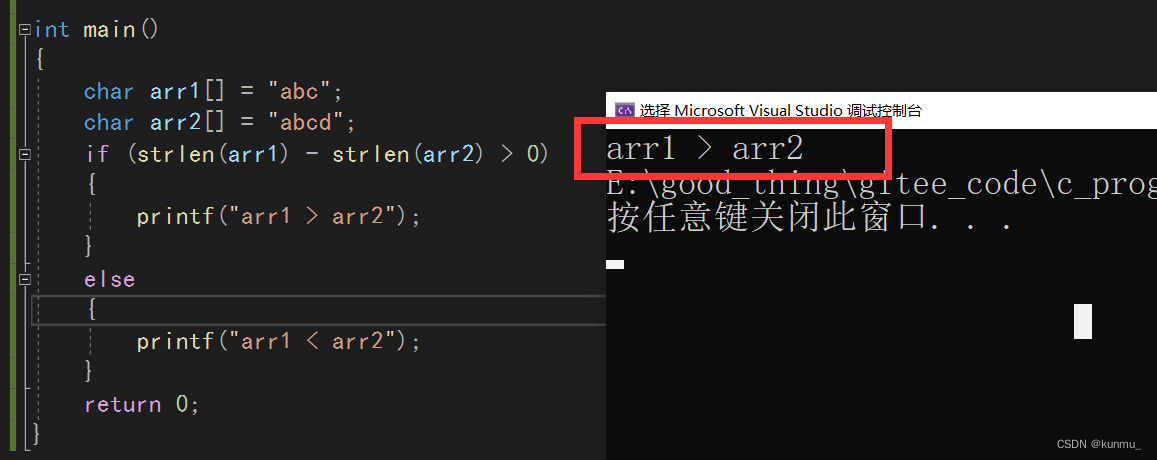
strlen函数剖析和模拟实现

Timed task framework
![[question 39] special question for Niuke in-depth learning](/img/18/0e182f2c003ff5dd8ed3751c718d73.png)
[question 39] special question for Niuke in-depth learning

Why are there loopholes in the website to be repaired

Sequences, time series and prediction in tessorflow quizs on coursera (I)

PostgreSQL Elementary / intermediate / advanced certification examination (7.16) passed the candidates' publicity
![[laser principle and application -6]:q switching element and Q drive circuit board](/img/30/e199b73fb9b0ad335f26f2378cfc45.png)
[laser principle and application -6]:q switching element and Q drive circuit board

LSTM and Gru of RNN_ Attention mechanism

Emergency lighting design of large stadiums and gymnasiums
随机推荐
【JVM学习04】JMM内存模型
【JVM学习03】类加载与字节码技术
Tencent Browser service TBS usage
文献阅读:GoPose 3D Human Pose Estimation Using WiFi
Leetcode652 finding duplicate subtrees
Mysql8.0 learning record 19 - Page segments and tablespaces
Techempower web framework performance test 21st round results release --asp Net core continue to move forward
Prevent static decompilation, dynamic debugging and plug-in
Pyhanlp installation tutorial
Mysql database, subquery, union, limit
day 2
JVM method call
Leetcode402 remove K digits
OpenGL learning (III) glut two-dimensional image rendering
Database index: index is not a panacea
Integer
Math
Meshlab & PCL ISS key points
Nacos introduction and console service installation
Jedi survive and eat chicken F12 screenshot save path reference