当前位置:网站首页>PaddleLite 编译以及代码跑通复盘
PaddleLite 编译以及代码跑通复盘
2022-07-29 10:51:00 【氵文大师】
我是tm的大冤种,看到 Paddle lite 就害怕
有时候运行 Paddle Lite 如果代码报错,在spyder里边儿直接给我restart kernel,我tm…
基本操作都是按照这个文档:
https://paddle-lite.readthedocs.io/zh/develop/source_compile/windows_compile_windows.html
(PaddleLite 的更新速度较快,诸位注意时效性)
1. git的基本操作问题
前边儿遇到了各种git的基本操作问题:
- 能否成功
ping github.com,ping不通就改 host 文件(不细说) - git 始终 clone 不下来,用一个加速通道
https://github.91chi.fun/,嗐,之前的hub.fastgit.org挂了 - 然后就是 third-party 目录要将第三方的github包clone下来,递归修改
.gitmodule和.git/config文件,直到执行命令git submodule update --init --recursive没有任何问题
这里补充一下,当前版本的 Paddle Lite Windows 编译的脚本lite\tools\build_windows.bat
有bug,他自己的文档写着,把 third-party 目录删掉,该脚本会自动下载 third-party,然而实际上有问题

看他的 batch 脚本,直接从这个链接下载吧:
https://paddlelite-data.bj.bcebos.com/third_party_libs/third-party-91a9ab3.tar.gz
2. 编译开始:
我遇到了VS2019编译出现问题,所以我下载了 VS2015
关于VS2015 的安装,可以参考这里:
https://blog.csdn.net/HaoZiHuang/article/details/126020139
然后直接编译:
lite\tools\build_windows.bat with_extra with_profile with_precision_profile

10000+多个 warning…
中间有些小插曲:
CMake Error at lite/kernels/CMakeLists.txt:118 (message):
  Traceback (most recent call last):

    File "xxxxx/Paddle-Lite/lite/tools/cmake_tools/create_fake_kernel_registry.py", line 243, in <module>
      parse_fake_kernels_from_path(faked_kernels_list_path)
    File "xxxxx/Paddle-Lite/lite/tools/cmake_tools/create_fake_kernel_registry.py", line 101, in parse_fake_kernels_from_path
      paths = set([path for path in f])
    File "xxxxx/Paddle-Lite/lite/tools/cmake_tools/create_fake_kernel_registry.py", line 101, in <listcomp>
      paths = set([path for path in f])

  UnicodeDecodeError: 'gbk' codec can't decode byte 0x95 in position 37:
  illegal multibyte sequence


-- Configuring incomplete, errors occurred!
See also "xxxxx/Paddle-Lite/build.lite.x86/CMakeFiles/CMakeOutput.log".
See also "xxxxx/Paddle-Lite/build.lite.x86/CMakeFiles/CMakeError.log".
需要给上边的 open 中添加 encoding='utf-8',向官方PR,不知道是否会被合并:
https://github.com/PaddlePaddle/Paddle-Lite/pull/9301
如果用 VS2019 或者 VS2017 编译,那就用 use_vs2017 和 use_vs2019 参数指定一下,不加这俩参数,就是默认 VS2015 编译,如果你的安装位置变了或者么有安装,他就让你手动填路径,如果你填了 VS2019 或者 VS2017 的路径,这个命令行直接退出… 一点儿提示都没有
关于编译的具体参数可以参考:
https://paddle-lite.readthedocs.io/zh/develop/source_compile/windows_compile_windows.html

3. 预编译包
从这里可以下载到预编译包,但是目前没有Py3.8以及以上的版本:
https://paddle-lite.readthedocs.io/zh/latest/quick_start/release_lib.html#windows

关于每个编译文件的含义,以下参考自这里:
https://paddle-lite.readthedocs.io/zh/develop/source_compile/windows_compile_windows.html#id14
编译结果位于 build.lite.x86\inference_lite_lib
详细内容如下:
cxx文件夹:包含 c++ 的库文件与相应的头文件include: 头文件lib: 库文件
静态库文件:libpaddle_api_full_bundled.lib:full_api 静态库libpaddle_api_light_bundled.lib:light_api 静态库third_party文件夹:依赖的第三方预测库 mklml
mklml : Paddle Lite 预测库依赖的 mklml 数学库demo\cxx文件夹:C++ 示例 demomobilenetv1_full:使用 full_api 执行 mobilenet_v1 预测的 C++ demomobilenetv1_light:使用 light_api 执行 mobilenet_v1 预测的 C++ demodemo\python: Python 示例 demomobilenetv1_full_api.py:使用 full_api 执行 mobilenet_v1 预测的 Python demomobilenetv1_light_api.py:使用 full_api 执行 mobilenet_v1 预测的 Python demopython文件夹:包含 Python 的库文件和对应的 .whl 包install文件夹:编译成功的 .whl 包位于install\dist\*.whllib文件夹:.whl 包依赖的库文件
实际上,编译的结果,和这个预编译包的内容是一样的
但是,我编译完毕的包不能用,在github上提了issue:
https://github.com/PaddlePaddle/Paddle-Lite/issues/9298
4. pip直接安装(建议这个…)
由于目前py3.8以上的预编译包都没有,所以就新建一个 conda 环境 Python=3.7
然后:
python -m pip install paddlelite==2.11
5. 验证 (转换部分)
PaddleLite 需要将静态图模型转化为 nb 格式,在linux环境有 opt 工具,在windows环境,只能用脚本:
import paddlelite.lite as lite

a = lite.Opt()

# 非 combined 形式
# a.set_model_dir("mobilenet_v1")

# combined 形式,具体模型和参数名称,请根据实际修改
a.set_model_file("model.pdmodel")
a.set_param_file("model.pdiparams")

a.set_optimize_out("pplite")
a.set_valid_places("x86")

a.run()
需要说明的是
model.pdmodel文件与__model__文件对应model.pdiparams文件与__param__文件对应
另外,静态图模型有两种:非 combined 形式 与 combined 形式
后者就是上边儿那俩,前者是酱紫的: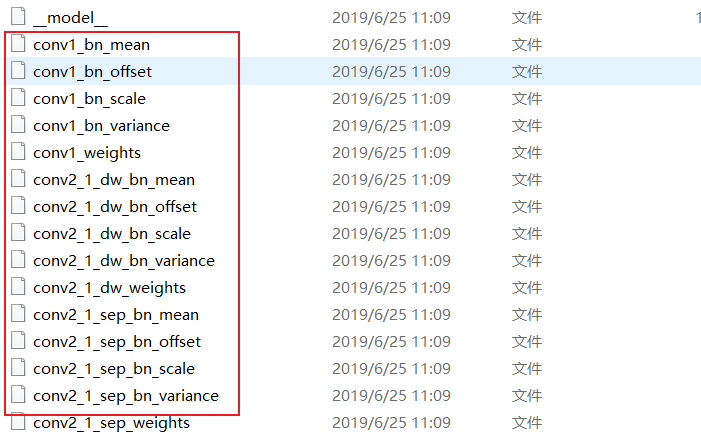
__model__ 文件是模型的拓扑结构,其余文件是参数文件
上边儿那个脚本,会生成一个 .nb 文件
6. 验证 (推理部分)
摘自PaddleLite文档:
https://paddle-lite.readthedocs.io/zh/latest/api_reference/python_api_doc.html
from paddlelite.lite import *
import numpy as np
from PIL import Image

# (1) 设置配置信息
config = MobileConfig()
config.set_model_from_file("./mobilenet_v1_opt.nb")

# (2) 创建预测器
predictor = create_paddle_predictor(config)

# (3) 从图片读入数据
image = Image.open('./example.jpg')
resized_image = image.resize((224, 224), Image.BILINEAR)
image_data = np.array(resized_image).transpose(2, 0, 1).reshape(1, 3, 224, 224)

# (4) 设置输入数据
input_tensor = predictor.get_input(0)
input_tensor.from_numpy(image_data)

# (5) 执行预测
predictor.run()

# (6) 得到输出数据
output_tensor = predictor.get_output(0)
print(output_tensor.shape())
print(output_tensor.numpy())
可以运行就行
边栏推荐
- 【Unity,C#】Character键盘输入转向与旋转
- 【图像处理】基于中轴变换实现图像骨架提取附matlab代码
- 会议OA项目(五)---- 会议通知、反馈详情
- Research on the realization of linear gradient circular progress bar
- 『面试知识集锦100篇』1.面试技巧篇丨HR的小心思,你真的懂吗?
- 重磅 | 2022 开放原子全球开源峰会在北京开幕
- Understand what a binary tree is (types, traversal methods, definitions of binary trees)
- R language brca MRNA data set analysis
- Create PHP message board system with kubernetes
- A tour of grp:04 - GRP unary call unary call
猜你喜欢

周鸿祎:360是世界上最大的安全大数据公司

Watch the open source summit first | quick view of the sub Forum & Activity agenda on July 29

Kunlun storage vs PostgreSQL OLTP test
开源峰会抢先看 | 7月29日分论坛&活动议程速览

Learning R language these ebooks are enough!

JVM知识点详细整理(长文警告)

Analysis of QT basic engineering

Discussion on the application of arcing smart electricity in elderly care institutions

VMWare:使用命令更新或升级 VMWare ESXi 主机

「PHP基础知识」使用数组保存数据
随机推荐
正则表达式匹配网址
数据可视化设计指南(信息图表篇)
站点数据收集-Scrapy使用笔记
Leetcode bit operation
The heavyweight foundation awarded platinum, gold and silver donors
「PHP基础知识」使用数组保存数据
使用R包skimr汇总统计量的优美展示
Data office system
StarRocks 技术内幕:实时更新与极速查询如何兼得
Watch the open source summit first | quick view of the sub Forum & Activity agenda on July 29
会议OA项目----我的审批
Why use markdown to write?
Achieve the effect of a menu tab
2022cuda summer training camp Day2 practice
Luogu p4185 [usaco18jan]mootube g problem solution
How to realize the function of adding watermark
The 2022 open atom global open source summit opened in Beijing
Leetcode binary tree series -- 144. Preorder traversal of binary trees
Kunlunbase instruction manual (II) best practices for peer-to-peer deployment
factoextra:多元统计方法的可视化PCA