当前位置:网站首页>@Detailed explanation of requestmapping
@Detailed explanation of requestmapping
2022-07-28 17:45:00 【Timely movement】
Hello everyone , I am a ~
Today's main introduction is Dora a One of the magic weapons of dreams —— Random door , We know that any door can lead to the place we want to reach , It's just a door , Open it and go to another place , It's amazing .
And in our Java web There is an equally magical magic weapon in development , It can save us a lot of time and code , So as to realize the mapping between browser and server , It is ——RequestMapping annotation , Now let's take a look .

List of articles
@RequestMapping
Preface
We are in the actual development , There is not necessarily only one method in a controller , And these methods are used to process requests , So how can we match the request to the processing method one by one , Of course through RequestMapping Annotation to handle these mapping requests , It is used to specify what the controller can handle URL request .
@RequestMapping
@RequestMapping An annotation is an annotation used to handle the address mapping of a request , Can be used to map a request or a method , Can be used on classes or methods .
[email protected] Where to mark
1.1 Mark on the method
For the method , Indicates that adding the address in the annotation on the method under the parent path of the class will access
The method@Controller
public class RequestMappingController {@RequestMapping("/testRequest") public String testRequest(){ return "success"; }}
At this time, the request path of the request mapped by the request mapping is :http://http://localhost:8080/springmvc_study02/testRequest
Be careful :springmvc_study02 Is the project name
1.2 Label on classes and methods
For classes , This address is the parent path of all methods in the class that respond to requests .
@Controller
@RequestMapping(“/hello”)
public class RequestMappingController {@RequestMapping("/testRequest") public String testRequest(){ return "success"; }}
At this time, the request path of the request mapped by the request mapping is :http://localhost:8080/springmvc_study02/hello/testRequest
Be careful : When you add... To a class RequestMapping After the note , If you want to request a mapping , This means that the request must first be mapped to the location of the annotation class , Then map to the method of this class . If not, the following errors will appear 
2. @RequestMapping Properties of
- We can check the source code first : Hold down Ctrl key , Mouse click RequestMapping Annotation, you can see the following interface
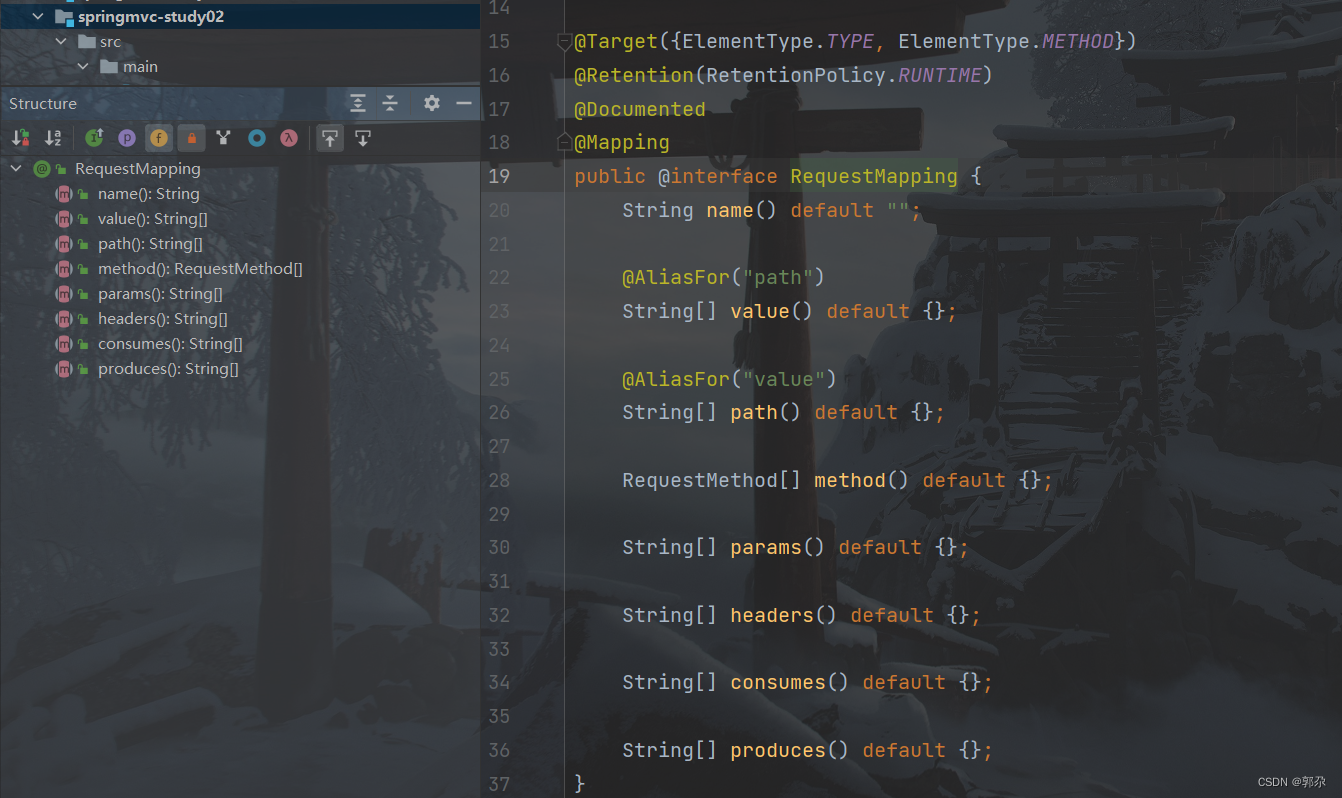
- In the source code, we can see @RequestMapping All attributes of , Then let's take a look at these properties
2.1 @RequestMapping Of value attribute *
- @RequestMapping Of value Property must be set to a value ;
- @RequestMapping Of value Property matches the request by the request address of the current request ;
- You can see from the source code above value Property is an array of string types , Therefore, it shows that multiple requests can be mapped to one method , Only need to value To specify an array containing multiple paths .
Set up value The value of the property :
@Controller
public class RequestMappingController {

    @RequestMapping(value = {"/testRequest","/test"})
    public String testRequest(){
        return "success";
    }
}
Enter the following path in the browser to test :

Be careful : From the above two pictures, we can see , At this time, the request path of the request mapped by the request mapping is select value Any one of the arrays can .
2.2 @RequestMapping Of method attribute *
- @RequestMapping Of method Attribute is to match the request by the request mode of the current request ;
- Browser sends request to server , There are many ways to request GET、HEAD、POST、PUT、PATCH、DELETE、OPTIONS、TRACE. have access to method Property to constrain the request method .
Set request mode to get:
@Controller
public class RequestMappingController {

    @RequestMapping(value = "/testRequest",method = RequestMethod.GET)
    public String testRequest(){
        return "success";
    }
}
With post Mode request :
<form th:action="@{/testRequest}" method="post">
    <input type="submit">
</form>
Request the results :
Be careful : We are @RequestMapping Add a method to the annotation to limit :method = RequestMethod.GET, Then the request must be get Of , Otherwise, the above error will occur .
The mapping method clearly requires that the request method is get, therefore post The method is not allowed , Only modify to get, To be able to request success , If you want to support both ways , Just in @RequestMapping Annotated method Add another method to the property , Separated by commas .
Expand :
@GetMapping: Handle get Method requested mapping
@PostMapping: Handle post Method requested mapping
@PutMapping: Handle put Method requested mapping
@DeleteMapping: Handle delete Method requested mapping
@GetMapping Equivalent to @RequestMapping(method=RequestMethod.GET), It will be get Map to a specific method .
Usage mode :@GetMapping(value = "/testRequest")
2.3 @RequestMapping Of params attribute
@RequestMapping Of params Attribute is to match the request parameters of the current request ;
@RequestMapping Of params Property is an array of string types , You can set the matching relationship through the following four expressions
- “param”: The request that requires a request mapping must be one that contains param Request parameters for
- “!param”: Requests that require mapping cannot contain param Request parameters for
- “param=value”: Requests that require request mapping must contain param Request parameters for , And param The value of the parameter must be value
- “param!=value”: Requests that require request mapping must contain param Request parameters for , Its value cannot be value.
Set up params The property value of is username:
@RequestMapping(value = "/test",params = "username")
    public String test(){
        return "success";
    }
Request the results :
Be careful : We set it up params attribute , This means that the request mapped to the request must contain username To be able to request success .
When we pass in parameters, we use http://localhost:8080/springmvc_study02/test?username Path to visit , Let's see the results :
When params Property when setting multiple property values , It must be satisfied at the same time to request success , Otherwise, the following error will appear 
2.4 @RequestMapping Of headers attribute
@RequestMapping Of headers Property is to match the request through the request header information of the current request ;
@RequestMapping Of headers Property is an array of string types , You can set the matching relationship through the following four expressions
- “header”: The request that requires a request mapping must be one that contains header Request header information for
- “!header”: Requests that require request mapping must be requests that do not contain header Request header information for
- “header=value”: The request that requires a request mapping must be one that contains header Request header information for , also header The value of must be value
- “header!=value”: The request that requires a request mapping must be one that contains header Request header information for , also header The value of must not be value
Set the request header information :
 @RequestMapping(value = "/test",headers = "Host = localhost:8081")
    public String test(){
        return "success";
    }
Request the results :
Be careful : If the current request is not satisfied headers attribute , The page will show 404 error , That is, the resource was not found .
After learning this magic weapon , Does it feel very interesting , Well, let's go and have a try .
边栏推荐
猜你喜欢

软件测试工程师如何突破职业发展瓶颈

软件测试前景如何?该如何进行学习呢?

Map R language

医学公共数据库

Hgu95av2. Online installation failed

Openpcd安装过程记录

In depth sharing of Ali (ant financial) technical interview process, with preliminary preparation and learning direction

Visual object class introduces Pascal VOC dataset

Please make sure you have the correct access rights and the repository exists.
![[阅读笔记] For Paper:R-CNN系列的三篇论文总结](/img/1d/8b862ac66ea04d9371f64e35fc4396.png)
[阅读笔记] For Paper:R-CNN系列的三篇论文总结
随机推荐
mmdetection3d(3)---网络输出
Multithreading (ThreadPoolExecutor of thread pool)
软件测试前景如何?
100+ collection of medical image data sets
【p5.js】实战临摹——国际象棋盘
软件测试工程师如何突破职业发展瓶颈
ROS system installation
怎样将IDEA与码云进行绑定
PyTorch中grid_sample的使用方法
阿里云天池大赛赛题解析(深度学习篇)--阅读笔记1--赛题一
mmdetection3d(2)---结果、log可视化
小白必看的软件测试发展路线
编译原理学习笔记2(语法分析介绍)
生信人的20个R语言习题
想学习软件测试,零基础去哪里学呢?
软件测试就业前景怎么样?
Ros自定义消息及使用
Generation and use of dynamic link library (error summary)
MySQL面试题大全(陆续更新)
Talk about what you know about publishing online (2)