当前位置:网站首页>Who can't capture packets these days? Wireshark packet capture and common protocol analysis are for you!
Who can't capture packets these days? Wireshark packet capture and common protocol analysis are for you!
2022-07-27 14:39:00 【51CTO】
WireShark Introduction to the principle and process of packet capture
WireShark brief introduction
Wireshark Is a network packet analysis software . The function of network packet analysis software is to extract network packets , And display the most detailed network packet data as much as possible .Wireshark Use WinPCAP As an interface , Directly exchange data messages without network cards .
WireShark Application
Used by network administrators Wireshark To detect network problems , Network security engineers use Wireshark To check information security related issues , Developers use Wireshark To debug the new protocol , Ordinary users use Wireshark To learn about network protocols . Of course , Some people will “ Harbour evil intent designs ” Use it to find some sensitive information ……
WireShark Quick packet analysis techniques
- determine Wireshark The location of . If you don't have a correct position , start-up Wireshark It will take a long time to capture some irrelevant data .
- Select capture interface . Generally, they choose to disobey Internet Network interface , Only in this way can we capture data that is not network related . otherwise , The other data captured will not help you .
- Use capture filters . By setting the capture filter , It can avoid generating too large capture data . In this way, when users analyze data , It will not be disturbed by other data . and , It can also save users a lot of time .
- Use display filters . Capture filters are usually used to filter the data , It's often complicated . In order to make the filtered packets more detailed , At this time, use the display filter to filter .
- Use shading rules . The data filtered by the display filter is usually used , Are useful packets . If you want to highlight a session , You can highlight using shading rules .
- Building charts . If users want to see more clearly the changes of data in a network , The data distribution can be easily displayed in the form of charts .
- Reorganizing data . When transferring large pictures or files , The information needs to be distributed in multiple packets . At this time, we need to use the method of reorganizing data to capture the complete data .Wireshark Recombination function of , You can reorganize the information of different packets in a session , Or reorganize a complete picture file .
actual combat :WireShark Packet capture and fast packet location skills
Common protocol packages
- ARP agreement
- ICMP agreement
- TCP agreement
- UDP agreement
- DNS agreement
- HTTP agreement
- FTP agreement
Tips: This section mainly analyzes the above protocol types
Use WireShark Carry out bag grabbing
start-up WireShark

There will be an error message , It is not recommended that we use root User run . We click directly OK Just go , This error message does not affect any of our use .

Choose our network card
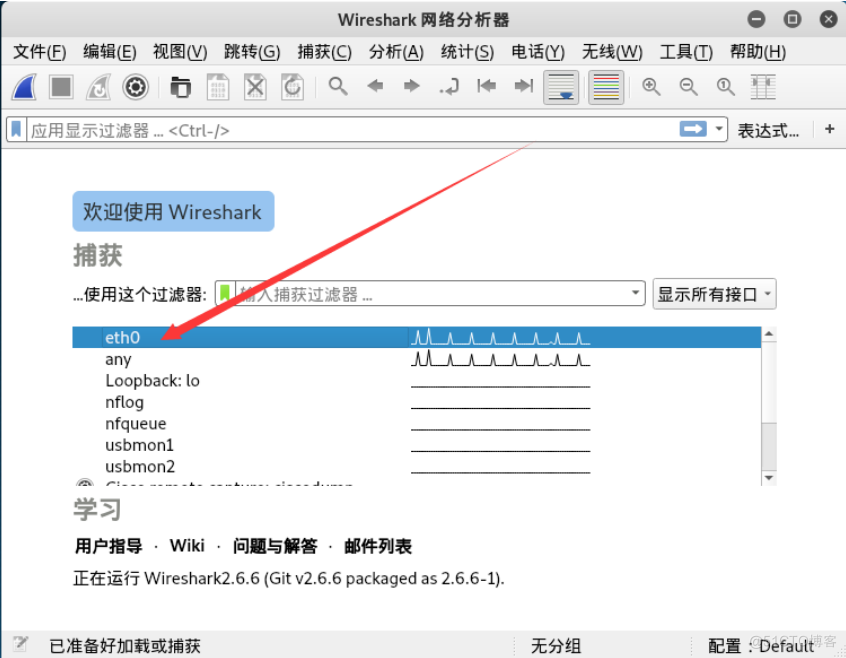
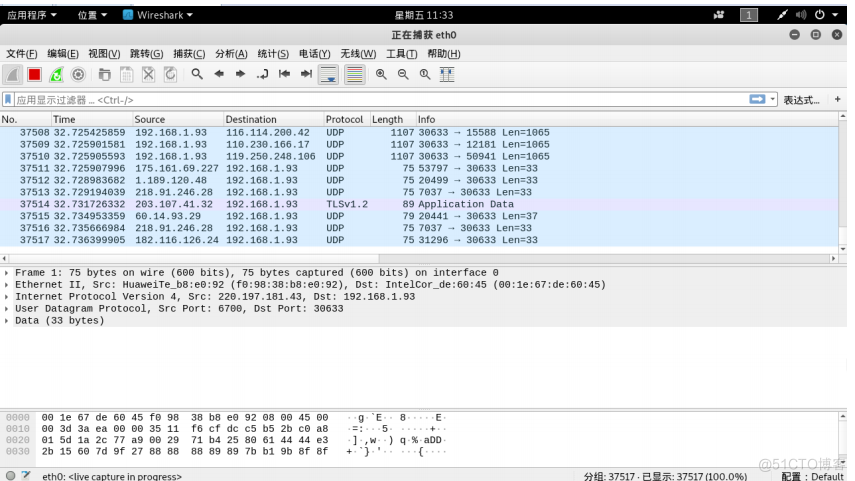
Double click the network card and you will automatically capture packets
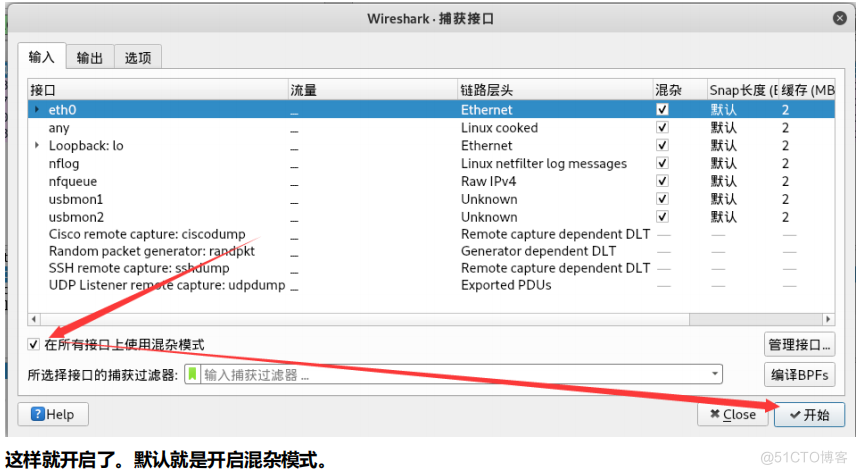
Introduction to hybrid mode
1、 Overview of hybrid patterns : Hybrid mode is to receive all packets passing through the network card , Including the package sent to this machine , That is, no validation. MAC Address . In normal mode, the network card only receives packets sent to the local computer ( Include broadcast package ) Pass it to the upper program , Discard all other packets .
Generally speaking , Hybrid mode will not affect the normal operation of network card , It is mostly used on network monitoring tools .
2、 Methods of turning off and on hybrid mode
Before closing and opening mixed mode , You need to stop the current packet capture , If you are currently in the process of capturing packets , Click on “ Stop capture ”

WireShark The filter used
Let's talk about confusion patterns to feel , We capture again — Using hybrid mode on all interfaces can directly capture packets


Here is our filter , We can filter the packets we want according to our own conditions .
example 1: Filter using filters TCP Data packets of
Be careful : We can use lowercase as the filter criteria , Capitalized words will not recognize .


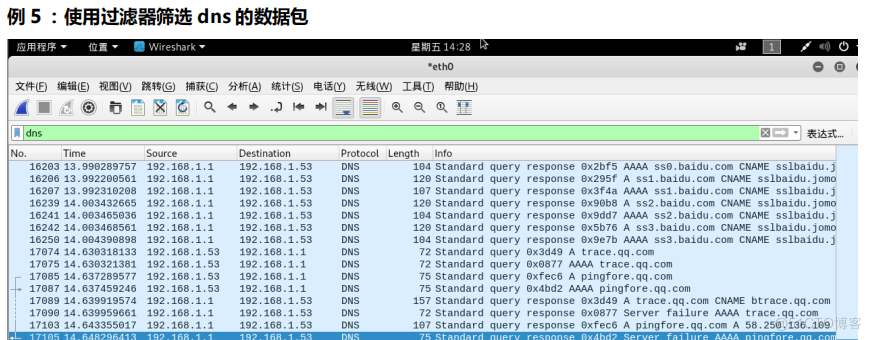
In fact, we can not only screen the agreement types , We have more screening conditions , For example, source address, destination address, etc ...
example 5: The filter source address is 192.168.1.53 Or the destination address is 192.168.1.1 At terminal ping 192.168.1.1
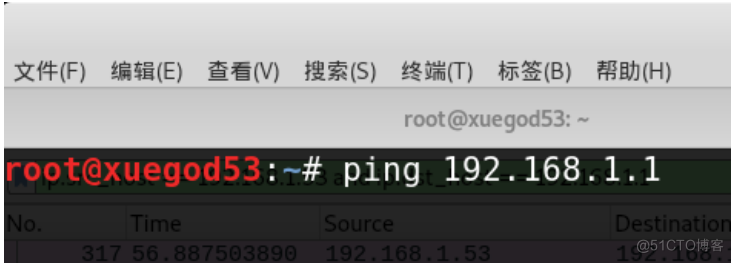
Then modify the filter condition to :
What does this judgment condition mean ?
- ip.src_host == 192.168.1.53 Represents the source IP Address
- ip.dst_host == 192.168.1.1 Indicates the destination address
- Between us or Spliced , Represents or Of course we can use it and Said don't ,or If one of the left and right conditions is met, the qualified packets will be displayed ,and Left and right 2 Only when both conditions are met will it show .


actual combat : Use WireShark Capture and analyze the principle of common protocols
When analyzing the protocol, we turn off the confusion mode , Avoid the presence of some interfering packets .
Common protocol analysis -ARP agreement
Address resolution protocol ( English :Address Resolution Protocol, abbreviation :ARP) It is a network transmission protocol that finds the address of data link layer by parsing the address of network layer , It's in IPv4 It's very important .ARP Is located by network address MAC Address . Start the bag. — Filter arp
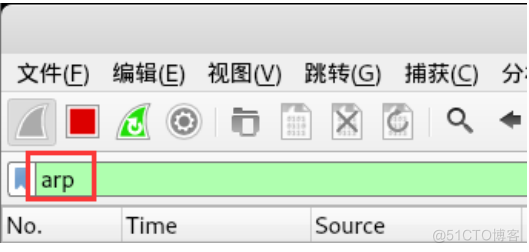


- Address Resolution Protocol (request) #ARP Address resolution protocol request Represents the request package
- Hardware type : Ethernet (1) # Hardware type
- Protocol type: IPv4 ( 0x0800 ) # Protocol type - Hardware size: 6 # Hardware address
- Protocol size: 4 # Length of agreement
- Opcode: _ request ( 1 ) # opcode , The value is 1 Express ARP Request package
- Sender MAC address: Vmware_ 96:67:52 (00:0c:29:96:67:52) # Source MAC Address
- Sender IP address: 192.168.1.53 . # Source IP Address
- Target MAC address: 00:00:00_ 00: 00:00 (00: 00: 00 :00: 00:00) # The goal is MAC Address
- Target IP address: 192.168.1.1 # The goal is IP Address
Let's analyze the second packet ARP Reply packet
- first floor Frame It's the physical layer , Ahead 32 Indicates the number of packages .42 Represents the number of bytes .
- The second floor Data link layer details :

- Destination:Boradcast Show purpose MAC Address ff Indicates our broadcast address
- Source Represents the source MAC The address is our current host MAC Address
- Type:ARP(0x0806) It means that our upper layer agreement is ARP
- Padding:000 Indicates filling ,
- The third level Address Resolution Protocol (reply) ARP Address resolution protocol

- Address Resolution Protocol (reply) #ARP Address resolution protocol reply Indicates the reply package
- Hardware type: Ethernet (1) # Hardware type

Common protocol analysis -ICMP agreement


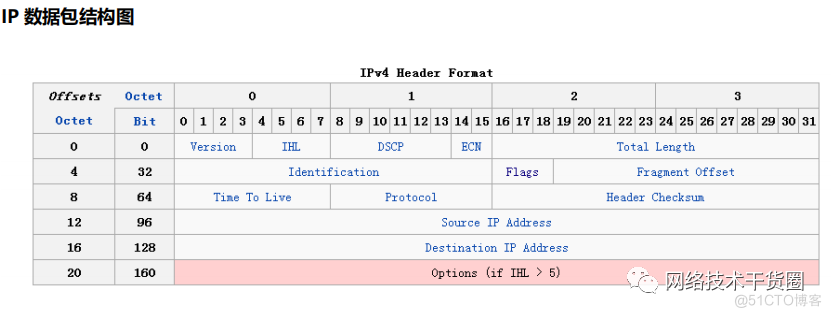
We analyze useful information
- Version 4 Express IPv4
= Differentiated Services It turns out that 8 Bytes are defined as TOS(Type of Service), Now is - RFC2474 Defined as Differentiated services( Differentiated services ) and ECN.
- Total Length The length of the entire packet , Including head , Unit is Byte( byte )
- Identification Packet identification , Used to distinguish the same packets , Like our ping package
- Flags 0x4000,Don’t fragment It means that the data package is divided and subcontracted
- Time to Live:64 TTL The value is reduced every time it passes through a network device 1 Until 0 Packet discarded
- Protocol:ICMP(1) Upper layer agreement No ICMP yes 1,TCP yes 6,UDP yes 17
- Header Checksum Head CRC Verification is used to verify IPv4 The header is damaged
- Source IP Address Source IP Address
- Destination IP Address The goal is IP Address

working process :
The machine sends a ICMP Echo Request The recipient of the package returned a ICMP Echo Reply, It includes receiving data copies and some other instructions
Common protocol analysis -TCP agreement


We can see from the above information that this is a SYN Data packets ,SYN=1 Means to send a link request . At this time Seq and ACK All are 0 We analyze the second packet


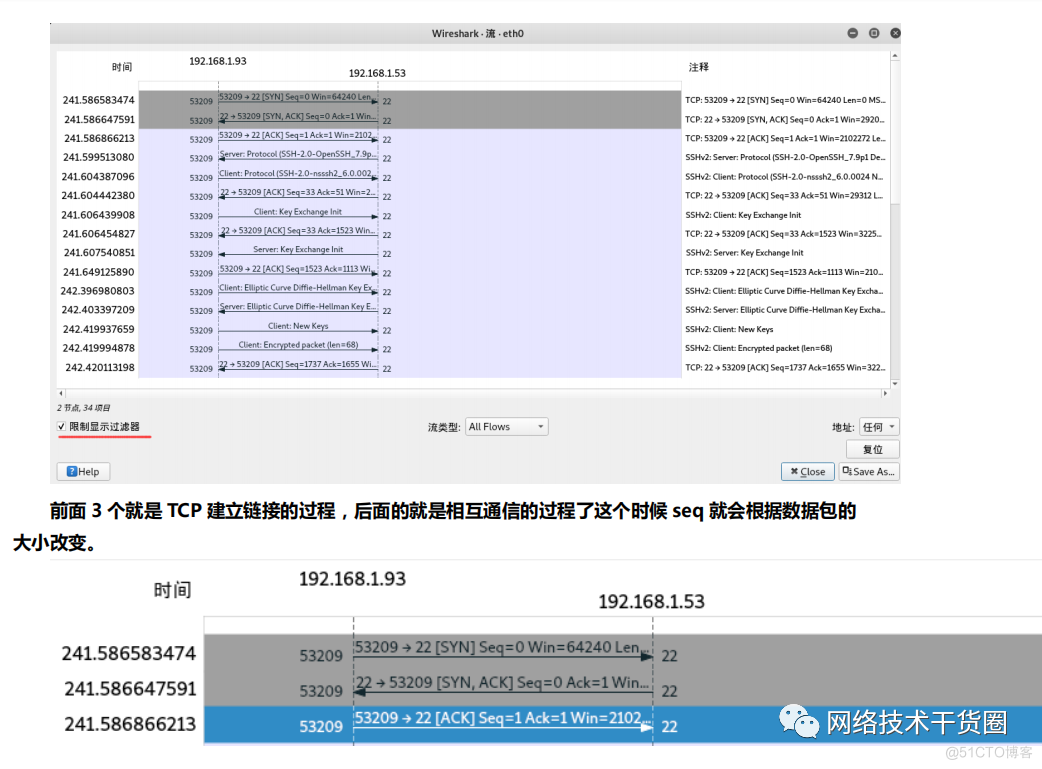


Let's analyze the process , We input... At the terminal EXIT In fact, we Kali Orders executed on , It means that we SSHD Of Server The client sends a link closing request to the client .
First wave : The server sends a [FIN+ACK], I have no data to send , Want to disconnect , And enter FIN_WAIT_1 state
Second wave : Client received FIN after , Know that there will be no more data from the server , send out ACK Confirm , Confirmation No. is receipt No +1( No SYN identical , One FIN Occupy a sequence number ), Client access CLOSE_WAIT state .
Third wave : The client sends FIN Give each other , I have no data to send , The client enters LAST_ACK state , Then directly disconnect TCP Conversation violation , Release the corresponding resources .
Fourth wave : The service client received a request from the client FIN After signaling , Enter TIMED_WAIT state , And send the ACK Confirmation message . The service side in TIMED_WAIT State, , Wait for a while , No data came , I think the opposite side has received the message sent by myself ACK And the entry is closed correctly CLOSE state , I'm disconnected myself TCP Disobey , Release all resources . When the client receives a message from the server ACK After response , Will enter CLOSE State and close the local session interface , Release resources .
Common protocol analysis -HTTP agreement
Let's screen TCP The agreement is because HTTP yes TCP Top level agreement , So we filter TCP Your data will contain HTTP Protocol packets


First step : We sent a HTTP Of HEAD request
The second step : The server received our request and returned a SEQ/ACK Confirm
The third step : Server will HTTP The header information is returned to our client Status code for 200 Indicates that the page is normal
Step four : The client receives the header information returned by the server and sends it to the server SEQ/ACK After confirming the completion of sending, the client will send FIN/ACK To make a request to close the link .


actual combat :WireShark Packet capture solves the problem that the server is hacked and can't go online
scene : The server was hacked off the network , Sure ping Through gateway , But you can't surf the Internet .
Simulation scenario
Modify host TTL The value is 1, The following method is to modify the kernel parameters temporarily .
expand :
- TTL : Life cycle of data message .
- Default linux Operating system value : 64, Every time you pass a router node ,TTL Value reduction 1.TTL The value is 0 when , State that the destination address cannot
- Reach and return : Time to live exceeded
- effect : Prevent packets , Unlimited forwarding in the public network . We test the results


We compared the packets and found that the source address that returned our discarded packets became 123.115.0.1, This proves that the packet has reached the next network device in the network before it is discarded , From this, we can also judge that the gateway address of our operator is 123.115.0.1 But we Failed to reach target host . We restore the system kernel parameters


summary
- WireShark Introduction to the principle and process of packet capture
- Real :WireShark Packet capture and fast packet location skills
- Real : Use WireShark Capture and analyze the principle of common protocols
- Real :WireShark Packet capture solves the problem that the server is hacked and can't go online
边栏推荐
- Chapter 3 business function development (view clue details)
- watch VS watchEffect
- DVWA full level customs clearance tutorial
- NFT 的 10 种实际用途
- Arduino+ze08-ch2o formaldehyde module, output formaldehyde content
- JS epidemic at home, learning can't stop, 7000 word long text to help you thoroughly understand the prototype and prototype chain
- 基于GEC6818开发板的相册
- This points to problems, closures, and recursion
- [popular science] the difference and connection between accuracy and resolution
- How to view revenue and expenditure by bookkeeping software
猜你喜欢

Chapter 3 business function development (add clues and remarks, and automatically refresh the added content)
![[intensive reading of papers] grounded language image pre training (glip)](/img/3a/4ad136065acb8627df9e064ed8ef32.png)
[intensive reading of papers] grounded language image pre training (glip)

C language layered understanding (C language array)

面向流行性疾病科普的用户问题理解与答案内容组织
面向不平衡数据的电子病历自动分类研究

线程知识总结

软件产品第三方测试费用为什么没有统一的报价?

codeforces 1708E - DFS Trees

汉字风格迁移篇---对抗性区分域适应(L1)Adversarial Discriminative Domain Adaptation

【科普】精度和分辨率的区别与联系
随机推荐
[popular science] the difference and connection between accuracy and resolution
Schematic diagram of C measuring tool
Cognition -- classic of the road to success of hardware engineers
第3章业务功能开发(查看线索明细)
SLAM综述阅读笔记四:A Survey on Deep Learning for Localization and Mapping: Towards the Age of Spatial 2020
PROFINET 模拟器使用教程
Weice biological IPO meeting: annual revenue of 1.26 billion Ruihong investment and Yaohe medicine are shareholders
Hdu1422 revisits the world cup [DP]
Unity3d learning note 10 - texture array
Flexible and easy to use WYSIWYG visual report
Named entity recognition of Chinese electronic medical records based on Roberta WwM dynamic fusion model
Navicate报错access violation at address 00000000
Why does script file 'd:\anaconda3\envs\pad appear_ env\Scripts\pip-script. py‘ is not present.
HDU4496 D-City【并查集】
一篇文章看懂JS执行上下文
Pure C handwriting thread pool
JS 疫情宅在家,学习不能停,七千字长文助你彻底弄懂原型与原型链
Slam overview Reading Note 4: a survey on deep learning for localization and mapping: towards the age of spatial 2020
< C> C language hash table usage
How to deploy open source Siyuan privately