当前位置:网站首页>教程详解|在酷雷曼系统中如何编辑设置导览功能?
教程详解|在酷雷曼系统中如何编辑设置导览功能?
2022-06-24 19:46:00 【酷雷曼VR全景】
我们观看VR全景有的时候是自动浏览场景的,这是因为有导览功能,添加导览功能后可以使作品根据我们设置的导览点自动浏览,突出介绍需要展示的地方或者是物品,每个导览点之前我们还可以添加文字和音频介绍。一般性在展馆、博物馆以及景区等地方会使用导览功能较多,因为他们都需要一个个场景按顺序浏览过去。

一、添加导览点
全局作品均可以根据需要展示的位置来添加导览点,导览分为两种添加模式,手动添加导览点以及一键生成导览。每个导览点之间可以调整切换时间,还可以添加文字和音频介绍。
1、一键生成导览:点击一键生成导览,系统会把当前所有场景按照现有顺序组合在一起进行播放,每个导览点位转动的时间一致,这个功能可以很大程度上缩短作品的制作时间。

2、手动添加导览点:点击添加导览点,接着转动电脑屏幕找到需要添加下一个导览点的位置。每一个导览点在同一水平上添加,展示的效果会比较好。期间要注意,如果涉及到下一个场景的导览点的话,下一个场景的导览点序号就不是重新开始,而是从上一个导览点序号数值开始的。

3、设置导览点:设置导览点就是设置导览点之间的切换时长、文字介绍以及音频介绍,要记得场景点切换时间一定要大于音频播放时间。对于时间设置,从右侧每个导览点之间可以看到,我们可以点击进去自行更改,重新设置导览点切换时间,后台默认的时间是5秒。
接下来还有文字介绍和音频介绍,文字介绍只能上传200个字符,在开始自动导览进行浏览的时候文字就会显示在作品之中;而音频介绍就是在导览点之前设置语音解说和背景音乐,音频可以直接调用资料管理中的音频文件。同时也要注意音频时间要小于导览点切换时间,并且在自动导览的时候音频是自动播放的。

二、全局设置
导览点过度时间和全局音频都可以进行设置,也就是设置导览点切换时间和添加全景音频,但是如果设置了每个导览点之间的转动时间,就不需要重复设置了。而导览形象是可以选择使用三种,我们选择一种勾选开启后就可以在作品前端展示出来了。

导览开始/导览结束也需要设置显示图,可以增加导览展示的效果,显示图也能添加商家的logo。还有其他设置,例如控制导览是否需要循环播放、文字介绍里面文字大小调整、控制自动导览播放时是否显示热点等,我们都可以酌情进行设置。
边栏推荐
- 基于三维GIS开发的水电工程建设方案
- What you must know about time series database!
- Continuous soul torture from two MySQL indexes of interviewers
- Simple use of libnum Library (hexadecimal string conversion)
- JS listens for page or element scroll events, scrolling to the bottom or top
- 7-3 maximum sub segment and
- The R language uses the matchit package for propensity matching analysis and match The data function constructs the matched sample set, and performs Welch double sample t-test analysis and double inde
- 2021-2022中国金融数字化“新”洞察行业研究报告
- Hello C (V) -- pointer and array
- 抖音實戰~項目關聯UniCloud
猜你喜欢

Still using simpledateformat for time formatting? Be careful of project collapse

Morris traversal

Today's sleep quality record 79 points

Outer screen and widescreen wasted? Harmonyos folding screen design specification teaches you to use it

Go language pointer, value reference and pointer reference

国内有哪些好的智能家居品牌支持homekit?

2021-2022 China's financial digitalization "new" insight Industry Research Report
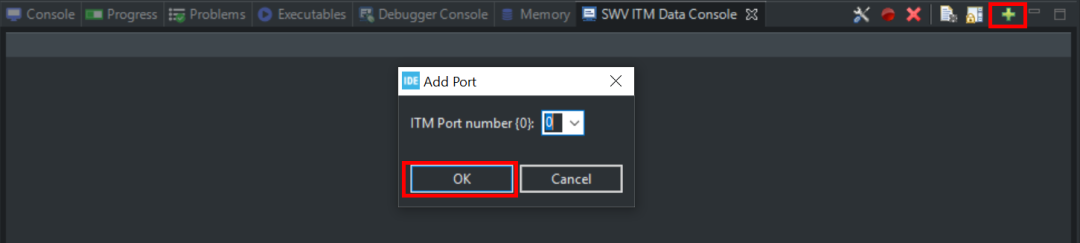
STM32CubeIDE SWV功能使用方法

Solution of IP network broadcasting system in Middle School Campus - Design Guide for Campus Digital IP broadcasting system

一文理解OpenStack网络
随机推荐
Hyperledger Fabric 2. X dynamic update smart contract
7-6 铺设油井管道
Global and Chinese 3-Chlorobenzaldehyde industry operation mode and future development trend report 2022 ~ 2028
Hello C (VII) - structure
Tiktok practice ~ project associated unicloud
Ethernet ARP Protocol
SAP PA certificate for no birds, which can be tested by new peers
Idea creation module prompt already exists
The file containing the file operation vulnerability (6)
无鸟用的SAP PA证书,刚入行的同行可以考一考
R language uses the polR function of mass package to build an ordered multi classification logistic regression model, and uses exp function, confint function and coef function to obtain the confidence
Simple use of libnum Library (hexadecimal string conversion)
Development status and prospect trend forecast report of humic acid sodium industry in the world and China from 2022 to 2028
JS listens for page or element scroll events, scrolling to the bottom or top
Hello C (III) - pointer
Daily calculation (vowel case conversion)
7-8 梯云纵
Uninstall hero League
Hydropower project construction scheme based on 3D GIS Development
libnum库简单使用(进制字符串转换)