当前位置:网站首页>[pyGame] this "groundhog" game is going to be popular (come on, come on)
[pyGame] this "groundhog" game is going to be popular (come on, come on)
2022-06-10 23:59:00 【Programmer pear】
Preface
author :“ Programmer pear ”
** The article brief introduction **: This article mainly uses pygame Make a hamster game .
** Article source code access **: In order to thank everyone who pays attention to me, the project source code of each article is distributed free of charge
Enjoy drops
Welcome friends give the thumbs-up 、 Collection 、 Leaving a message.

Text
Play with hamsters ?
Hee hee , You still remember the games you played when you were a child !《 snake 》、《 Card 》......
A few days ago, I happened to see that the children at home were still playing with hamsters , see , Today's material is coming , Teach you to make a simple and good
Playful 《Python Version of the hamster game 》 Give it to everyone !
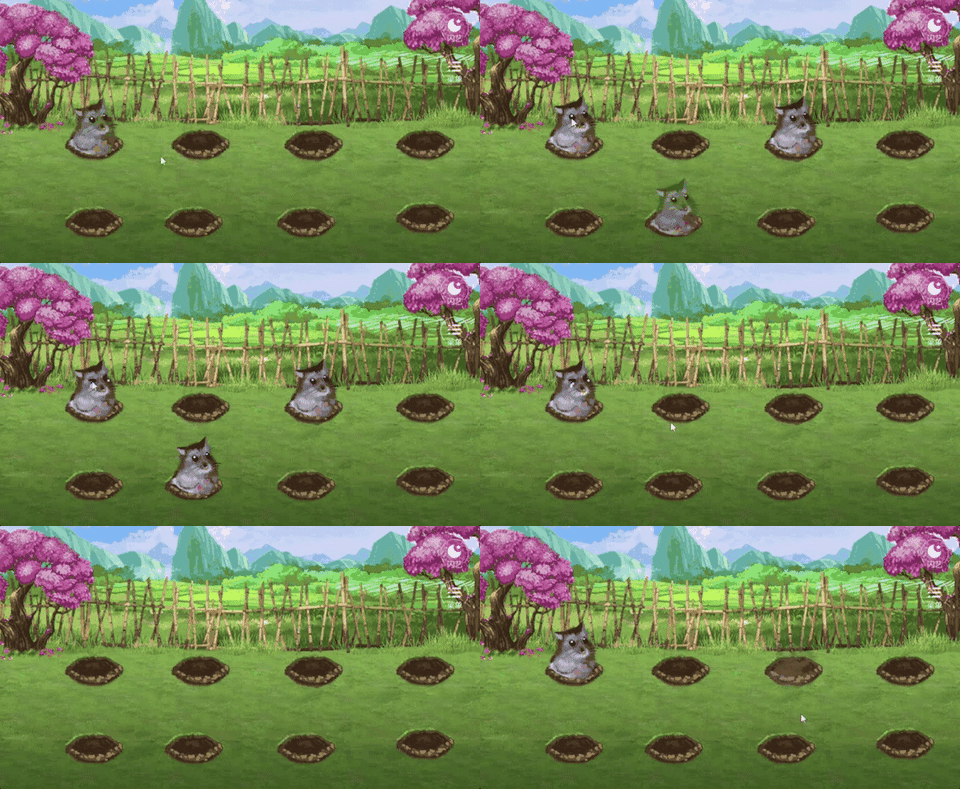
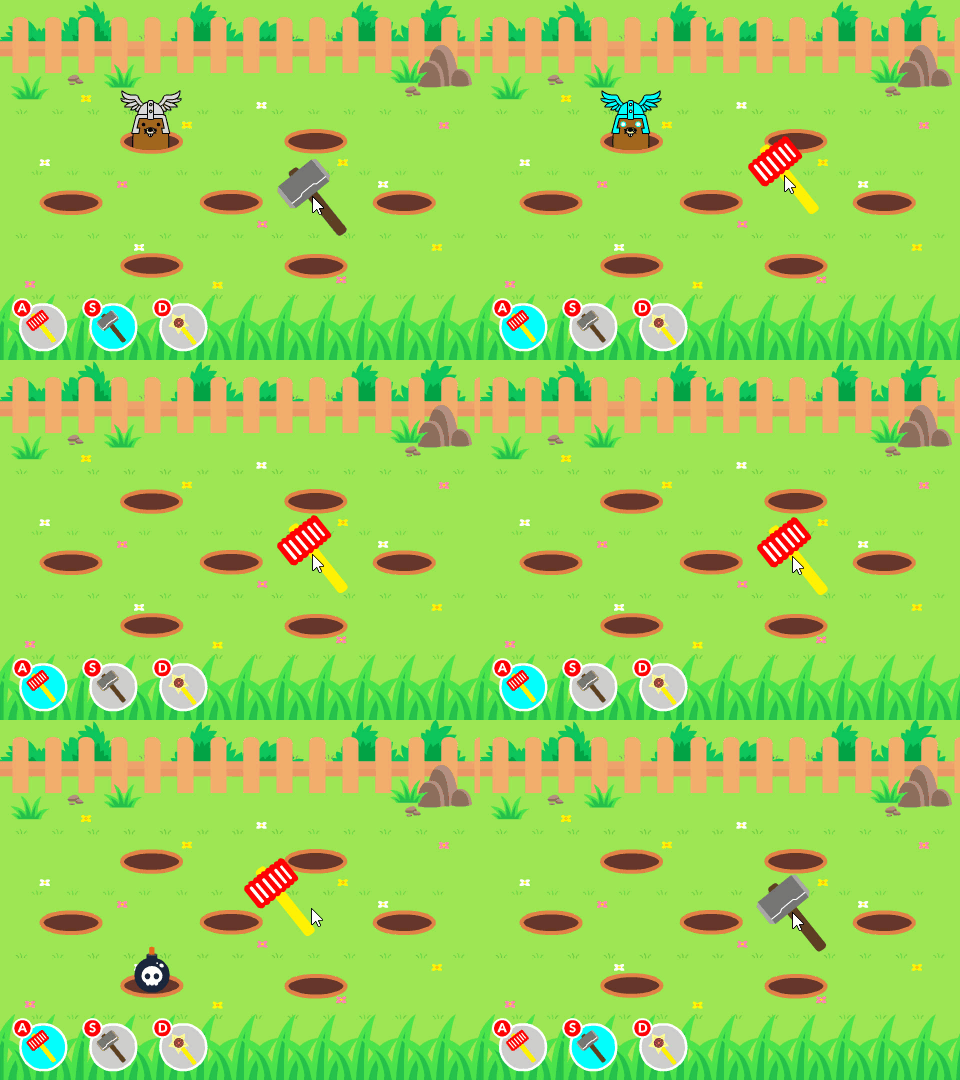
1) Effect display
Start interface : Happy

Game interface :
2) Code implementation
Start interface
import sys
import pygame


''' Game start screen '''
def startInterface(screen, begin_image_paths):
    begin_images = [pygame.image.load(begin_image_paths[0]), pygame.image.load(begin_image_paths[1])]
    begin_image = begin_images[0]
    while True:
        for event in pygame.event.get():
            if event.type == pygame.QUIT:
                pygame.quit()
                sys.exit()
            elif event.type == pygame.MOUSEMOTION:
                mouse_pos = pygame.mouse.get_pos()
                if mouse_pos[0] in list(range(419, 574)) and mouse_pos[1] in list(range(374, 416)):
                    begin_image = begin_images[1]
                else:
                    begin_image = begin_images[0]
            elif event.type == pygame.MOUSEBUTTONDOWN:
                mouse_pos = pygame.mouse.get_pos()
                if event.button == 1 and mouse_pos[0] in list(range(419, 574)) and mouse_pos[1] in list(range(374, 416)):
                    return True
        screen.blit(begin_image, (0, 0))
        pygame.display.update()
The main program
import cfg
import sys
import pygame
import random
from modules import *


''' Game initialization '''
def initGame():
    pygame.init()
    pygame.mixer.init()
    screen = pygame.display.set_mode(cfg.SCREENSIZE)
    pygame.display.set_caption(' Whac-A-Mole ')
    return screen


''' The main function '''
def main():
    #  initialization
    screen = initGame()
    #  Load background music and other sound effects
    pygame.mixer.music.load(cfg.BGM_PATH)
    pygame.mixer.music.play(-1)
    audios = {
        'count_down': pygame.mixer.Sound(cfg.COUNT_DOWN_SOUND_PATH),
        'hammering': pygame.mixer.Sound(cfg.HAMMERING_SOUND_PATH)
    }
    #  Load Fonts
    font = pygame.font.Font(cfg.FONT_PATH, 40)
    #  Load background image
    bg_img = pygame.image.load(cfg.GAME_BG_IMAGEPATH)
    #  Start interface
    startInterface(screen, cfg.GAME_BEGIN_IMAGEPATHS)
    #  The timing of gopher changing position
    hole_pos = random.choice(cfg.HOLE_POSITIONS)
    change_hole_event = pygame.USEREVENT
    pygame.time.set_timer(change_hole_event, 800)
    #  Gophers
    mole = Mole(cfg.MOLE_IMAGEPATHS, hole_pos)
    #  The hammer
    hammer = Hammer(cfg.HAMMER_IMAGEPATHS, (500, 250))
    #  The clock
    clock = pygame.time.Clock()
    #  fraction
    your_score = 0
    flag = False
    #  Initial time
    init_time = pygame.time.get_ticks()
    #  The main cycle of the game
    while True:
        # -- The game time is 60s
        time_remain = round((61000 - (pygame.time.get_ticks() - init_time)) / 1000.)
        # -- Reduced game time ,  Gophers change position and speed faster
        if time_remain == 40 and not flag:
            hole_pos = random.choice(cfg.HOLE_POSITIONS)
            mole.reset()
            mole.setPosition(hole_pos)
            pygame.time.set_timer(change_hole_event, 650)
            flag = True
        elif time_remain == 20 and flag:
            hole_pos = random.choice(cfg.HOLE_POSITIONS)
            mole.reset()
            mole.setPosition(hole_pos)
            pygame.time.set_timer(change_hole_event, 500)
            flag = False
        # -- Countdown sound
        if time_remain == 10:
            audios['count_down'].play()
        # -- Game over
        if time_remain < 0: break
        count_down_text = font.render('Time: '+str(time_remain), True, cfg.WHITE)
        # -- Key detection
        for event in pygame.event.get():
            if event.type == pygame.QUIT:
                pygame.quit()
                sys.exit()
            elif event.type == pygame.MOUSEMOTION:
                hammer.setPosition(pygame.mouse.get_pos())
            elif event.type == pygame.MOUSEBUTTONDOWN:
                if event.button == 1:
                    hammer.setHammering()
            elif event.type == change_hole_event:
                hole_pos = random.choice(cfg.HOLE_POSITIONS)
                mole.reset()
                mole.setPosition(hole_pos)
        # -- collision detection
        if hammer.is_hammering and not mole.is_hammer:
            is_hammer = pygame.sprite.collide_mask(hammer, mole)
            if is_hammer:
                audios['hammering'].play()
                mole.setBeHammered()
                your_score += 10
        # -- fraction
        your_score_text = font.render('Score: '+str(your_score), True, cfg.BROWN)
        # -- Bind the necessary game elements to the screen ( Order of attention )
        screen.blit(bg_img, (0, 0))
        screen.blit(count_down_text, (875, 8))
        screen.blit(your_score_text, (800, 430))
        mole.draw(screen)
        hammer.draw(screen)
        # -- to update
        pygame.display.flip()
        clock.tick(60)
    #  Read the best score (try Block to avoid the first game without .rec file )
    try:
        best_score = int(open(cfg.RECORD_PATH).read())
    except:
        best_score = 0
    #  If the current score is greater than the best score, the best score will be updated
    if your_score > best_score:
        f = open(cfg.RECORD_PATH, 'w')
        f.write(str(your_score))
        f.close()
    #  End the screen
    score_info = {'your_score': your_score, 'best_score': best_score}
    is_restart = endInterface(screen, cfg.GAME_END_IMAGEPATH, cfg.GAME_AGAIN_IMAGEPATHS, score_info, cfg.FONT_PATH, [cfg.WHITE, cfg.RED], cfg.SCREENSIZE)
    return is_restart


'''run'''
if __name__ == '__main__':
    while True:
        is_restart = main()
        if not is_restart:
            break
End the screen
import sys
import pygame


''' End the screen '''
def endInterface(screen, end_image_path, again_image_paths, score_info, font_path, font_colors, screensize):
    end_image = pygame.image.load(end_image_path)
    again_images = [pygame.image.load(again_image_paths[0]), pygame.image.load(again_image_paths[1])]
    again_image = again_images[0]
    font = pygame.font.Font(font_path, 50)
    your_score_text = font.render('Your Score: %s' % score_info['your_score'], True, font_colors[0])
    your_score_rect = your_score_text.get_rect()
    your_score_rect.left, your_score_rect.top = (screensize[0] - your_score_rect.width) / 2, 215
    best_score_text = font.render('Best Score: %s' % score_info['best_score'], True, font_colors[1])
    best_score_rect = best_score_text.get_rect()
    best_score_rect.left, best_score_rect.top = (screensize[0] - best_score_rect.width) / 2, 275
    while True:
        for event in pygame.event.get():
            if event.type == pygame.QUIT:
                pygame.quit()
                sys.exit()
            elif event.type == pygame.MOUSEMOTION:
                mouse_pos = pygame.mouse.get_pos()
                if mouse_pos[0] in list(range(419, 574)) and mouse_pos[1] in list(range(374, 416)):
                    again_image = again_images[1]
                else:
                    again_image = again_images[0]
            elif event.type == pygame.MOUSEBUTTONDOWN:
                mouse_pos = pygame.mouse.get_pos()
                if event.button == 1 and mouse_pos[0] in list(range(419, 574)) and mouse_pos[1] in list(range(374, 416)):
                    return True
        screen.blit(end_image, (0, 0))
        screen.blit(again_image, (416, 370))
        screen.blit(your_score_text, your_score_rect)
        screen.blit(best_score_text, best_score_rect)
        pygame.display.update()
summary
Hee hee , This little game , If you like, find me Naha !
Note: Xiaobian can get more wonderful content ! Remember to click on the portal
Remember Sanlian ! If you need packaged source code + Free sharing of materials !! Portal
边栏推荐
- Ilruntime hotfix framework installation and breakpoint debugging
- 【Pygame小游戏】Chrome上的小恐龙竟可以用代码玩儿了?它看起来很好玩儿的样子~
- MySQL command line import and export data
- 【Pygame小游戏】《坦克大战》,那些童年的游戏你还记得几个呢?
- LabVIEW确定控件在显示器坐标系中的位置
- Is the financial management of qiniu school reliable and safe
- Redis installation and common problem solving based on centeros7 (explanation with pictures)
- 插入排序
- The serial port in the visa test panel under LabVIEW or max does not work
- SystemVerilog(十)-用户自定义类型
猜你喜欢

Solve access denied for user 'root' @ 'localhost' (using password: yes)

Interface test learning notes

LabVIEW and VDM extract color and generate gray image
Leetcode 501: mode dans l'arbre de recherche binaire

【Turtle表白合集】“海底月是天上月,眼前人是心上人。”余生多喜乐,长平安~(附3款源码)

LabVIEW确定控件在显示器坐标系中的位置

【Pygame小游戏】趣味益智游戏 :打地鼠,看一下能打多少只呢?(附源码)

【Pygame小游戏】来了来了它来了——这款五子棋小游戏超A的,分享给你的小伙伴儿一起pk吧~

【Opencv实战】寒冷的冬季,也会迎来漫天彩虹,这特效你爱了嘛?

LabVIEW error "memory full - Application stopped on node"
随机推荐
2022年高考量化卷|请各位量化考生答题
IGBT and third generation semiconductor SiC double pulse test scheme
Simple impedance matching circuit and formula
What Fiddler does for testing
示波器刷新率怎么测量
LabVIEW phase locked loop (PLL)
LabVIEW pictures look bright or dark after being cast from 16 bits to 8 bits
How to measure the refresh rate of oscilloscope
【自动回复小脚本】新年快乐,每一个字都是我亲自手打的,不是转发哦~
Ilruntime hotfix framework installation and breakpoint debugging
LeetCode 501 :二叉搜索樹中的眾數
【Opencv实战】这个印章“神器”够牛,节省了时间提高了效率,厉害~(附完整源码)
Fiddler filtering sessions
B 树的简单认识
Six procurement challenges perplexing Enterprises
LabVIEW图片在从16位强制转换为8位后看起来要亮或暗
Baidu quick collection SEO optimization keyword ranking optimization skills
启牛学堂理财可靠吗,安全吗
[new version] new pseudo personal homepage v2.0- starze V Club
LabVIEW prohibits other multi-core processing applications from executing on all cores