当前位置:网站首页>微信小程序开发之全局配置与页面配置
微信小程序开发之全局配置与页面配置
2022-07-25 19:24:00 【Aricl.】
目录
一、全局配置
app.json文件就是项目的全局配置文件

(1)小程序窗口的组成部分

(2)导航栏 navigationBar
1)window节点常用配置项

2)设置导航栏
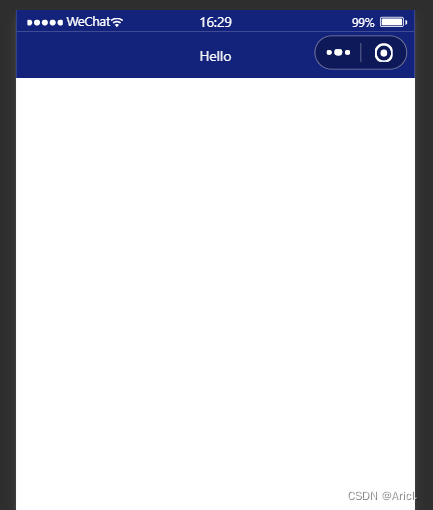
- 设置导航栏标题文字
app.json-->window-->navigationBarTitleText
- 设置导航栏背景色
app.json-->window-->navigationBarBackgroundColor
- 设置导航栏的标题颜色
app.json-->window-->navigationBarTextStyle
app.json文件中window节点代码
 "window":{
    "backgroundTextStyle":"light",
    "navigationBarBackgroundColor": "#13227a",
    "navigationBarTitleText": "Hello",
    "navigationBarTextStyle":"white"
}, 
(3)下拉刷新页面
1)概念
下拉刷新是移动端的转有名词,指的是通过手指在屏幕上的下拉滑动操作,从而重新加载页面数据的行为
2)设置下拉刷新
- 开启下拉刷新
app.json-->window-->enablePullDownRefresh-->true
- 设置下拉刷新时窗口的背景色
app.json-->window-->backgroundColor-->指定十六进制的颜色值#efefef
- 设置下拉刷新时loading样式
app.json-->window-->backgroundTextStyle-->dark
"window":{
    "navigationBarBackgroundColor": "#13227a",
    "navigationBarTitleText": "Hello",
    "navigationBarTextStyle":"white",
    "enablePullDownRefresh": true,
    "backgroundColor": "#efefef",
    "backgroundTextStyle":"dark"
}, 
(4)上拉触底的距离
1)概念
上拉触底是移动端的专有名词,通过手指在屏幕上的上拉滑动操作,从而加载更多数据的行为
2)设置
app.json-->window-->onReachBottomDistance-->设置新值
注意:小程序默认触底距离为50px,若没有特殊的需求,那么直接使用默认值即可
(5)底部导航栏 tabBar
1)概念
tabBar是移动端应用常见的页面效果,用于实现多页面的快速切换
小程序中tabBar分为两类
- 底部tabBat(常用)
- 顶部tabBar
注意点
- tabBar中只能配置最少2个、最多5个tab页签
- 当渲染顶部tabBar时,不显示icon图标,只显示文本
tabBar的6个组成部分

2)tabBar节点配置项

3)每个tab项的配置选项

4)示例

app.json文件中tabBar节点代码
"tabBar": {
    "list": [{
      "pagePath": "pages/index/index",
      "text": "首页",
      "iconPath": "images/home.png",
      "selectedIconPath": "images/home-active.png"
    },
    {
      "pagePath": "pages/message/message",
      "text": "消息",
      "iconPath": "images/message.png",
      "selectedIconPath": "images/message-active.png"
    },
    {
      "pagePath": "pages/contract/contract",
      "text": "联系我们",
      "iconPath": "images/contract.png",
      "selectedIconPath": "images/contract-active.png"
    }
  ]
}, 
注意事项
- 可以先在项目的根目录下新建image文件夹,来专门存储项目需要使用到的icon图标
- 作为tabBar的页面必须放在app.json文件中Pages节点的前面,否则无法正常跳转(切记)
(5)图标的获取
博主极力推荐阿里巴巴图库矢量网,免费,且图标丰富,真的很良心的一个实用网站!

二、页面配置
(1)概念
小程序中,每一个页面都有一个属于自己的.json页面配置文件,用来对当前页面的窗口外观、页面效果等进行特定的配置
(2)页面配置与全局配置的关系
- app.json中的window节点,可以全局配置小程序中每一个页面的窗口表现
- 若某个页面想要特殊的窗口外观表现,就可以使用页面级别的.json配置文本进行配置
- 当全局配置与页面配置冲突时,根据“ 就近原则 ”,会以页面配置为准从而覆盖掉全局配置
(3)常用配置项

配置方法与全局配置同理,不再展示。
三、综合案例
本案例是本地生活小程序首页界面的初步实现
(1)步骤
- 先配置导航栏效果
- 配置底部tabBar效果
- 实现顶部的轮播图
- 实现九宫格功能框
- 实现底部图片布局
(2)真机调试效果图

(3) 完整代码
- js文件
// index.js
Page({
  data: {
        image: [{path:"/images/food.png",name:"吃美食"},{path:"/images/wash.png",name:"约洗浴"},{path:"/images/marry.png",name:"结婚啦"},{path:"/images/KTV.png",name:"去唱歌"},{path:"/images/work.png",name:"找工作"},{path:"/images/teacher.png",name:"报辅导"},{path:"/images/car.png",name:"养汽车"},{path:"/images/hotel.png",name:"定酒店"},{path:"/images/fush.png",name:"找装修"}],
  },
  onLoad:function(options) {
     console.log(options)
  }
})
(图片路径需自定义)
- json文件
{
  "usingComponents": {
    "mt-test1":"/components/test/test1"
  },
  "enablePullDownRefresh": true,
  "backgroundColor": "#efefef",
  "backgroundTextStyle": "dark"
}
- wxml文件
<!-- 首页顶部的轮播图效果 -->
<swiper indicator-dots indicator-color="white" circular autoplay >
        <swiper-item>
           <image src="/images/locallife.png" ></image>
        </swiper-item>
        <swiper-item>
           <image src="/images/locallife2.png"></image>
        </swiper-item>
        <swiper-item>
            <image src="/images/locallife3.png"></image>
        </swiper-item>
</swiper>

<!-- 九宫格功能区 -->
<!-- 外层容器 -->
<view class="gridList">
      <!-- 内层容器 -->
      <navigator class="gridItem" wx:for="{
   {image}}" url="/pages/shoplist/shoplist?title={
   {item.name}}">
            <image src="{
   {item.path}}"></image>
            <text>{
   {item.name}}</text>
      </navigator>
</view>

<!-- 底部图片功能块 -->
<view class="img-box">
     <image src="/images/tuijian.png" mode="widthFix"></image>
     <image src="/images/pingjia.png" mode="widthFix"></image>
</view>
- wxss文件
swiper {
  height: 400rpx;
}
swiper image{
  width: 100%;
  height: 100%;
}

.gridList{
  /* flex布局格式 */
  display: flex;
  /* 允许自动换行 */
  flex-wrap: wrap;
  /* 给外层容器左边与上部加上边框线 */
  border-left: 1rpx solid #efefef;
  border-top:  1rpx solid #efefef;
}

.gridItem{
  width: 33.33%;
  /* 每个图片的固定高度 */
  height: 200rpx;
  display: flex;
  flex-direction: column;
  align-items: center;
  justify-content: center;
  /* 给内层容器中的每一项加上右侧和底部的边框线 */
  border-right: 1rpx solid #efefef;
  border-bottom: 1rpx solid #efefef;
  /* 改变盒子的方式为border-box */
  box-sizing: border-box;

}

.gridItem image{
  width: 60rpx;
  height: 60rpx;
}

.gridItem text{
  font-size: 24rpx;
  /* 设置文本与图片的上部距离 */
  margin-top: 10rpx;
}

.img-box{
  display: flex;
  padding: 20rpx 10rpx;
  justify-content: space-around;
}
.img-box image{
  width: 45%;
}
都看到这里了,不妨点个赞再溜哈(doge)
边栏推荐
- 【小程序开发】你了解小程序开发吗?
- 基于FPGA的1080P 60Hz BT1120接口调试过程记录
- Why learn service grid istio
- iMeta | Sangerbox: 交互式整合临床生信分析平台
- The second "future Cup" knowledge map championship was officially launched
- 485 current acquisition module dam-8041
- Wechat campus maintenance application applet graduation design finished product of applet completion work (3) background function
- 基础乐理--配置和弦
- [cloud native kubernetes] management of secret storage objects under kubernetes cluster
- 小程序毕设作品之微信校园维修报修小程序毕业设计成品(1)开发概要
猜你喜欢

小程序毕设作品之微信校园维修报修小程序毕业设计成品(8)毕业设计论文模板

【919. 完全二叉树插入器】

微信小程序 27 进度条的动态实现和搜索框、热搜榜的静态搭建

Monitor MySQL based on MySQL exporter

【HDLBits 刷题】Verilog Language(3)Modules: Hierarchy 部分

帝国CMS7.5仿《问答库》题库问答学习平台网站源码 带手机版

基础乐理之音程的度数
![[iniparser] simple use of the project configuration tool iniparser](/img/2b/1d20b4ef44dfe2544891d9c72b676e.png)
[iniparser] simple use of the project configuration tool iniparser

Wechat campus maintenance and repair applet graduation design finished product (5) assignment of applet completion work

Fruit chain "siege": it's a journey of sweetness and bitterness next to apples
随机推荐
GBASE 8s UDR内存管理_02_mi_dalloc
The degree of interval of basic music theory
新瓶装老酒--近期APT32(海莲花)组织攻击活动样本分析
微信小程序 27 进度条的动态实现和搜索框、热搜榜的静态搭建
Sccm2012r2 network deployment reinstallation system
Youfu force supercomputing provides customized high-performance computing services for customers
How to be a self disciplined person?
[hdlbits questions] Verilog language (3) modules: hierarchy section
Have you ever seen this kind of dynamic programming -- the stock problem of state machine dynamic programming (Part 1)
前夕 - 0day威胁情报
微信小程序 29 热搜榜的完善②
小程序毕设作品之微信校园维修报修小程序毕业设计成品(5)任务书
Wechat campus maintenance and repair applet graduation design finished product of applet completion work (4) opening report
一个函数中写多少行代码比较合适呢? 代码整洁之道
Juzhi cloud computing opens a new era to the "proprietary cloud" of Youfu network
Pymoo learning (5): convergence analysis
Pyqt5 click qtableview vertical header to get row data and click cell to get row data
[server data recovery] a data recovery case of a brand ProLiant server raid paralysis, database file loss, and database file backup damage
KCon 2022 亮点及议程大揭秘!
InTouch advanced alarm (alarm filtering)