当前位置:网站首页>NVM download, installation and use
NVM download, installation and use
2022-06-24 17:28:00 【Dandelion】
download
Useful commands to download , Download the source code , I downloaded the source code
Address :https://github.com/coreybutler/nvm-windows/releases
perhaps :
open GitHub, Search for nvm, I downloaded it nvm-windows,
Then click the version download , The latest thing I have here is 1.1.9

install
Found downloaded nvm package , decompression , Double click installation 
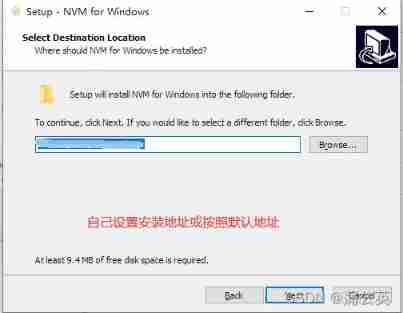

First installation directory : The default installation directory is not used here , Change the installation directory to D:\system\nvm
Readers can choose the installation directory
The second installation directory : add to node.js Installation directory
Be careful :
Here we use “ add to node.js Installation directory ” In fact, my statement is not very accurate , The exact term should be configuration node.js Installation directory
By default C:\Program Files\nodejs Catalog ,C:\Program Files\nodejs So is the catalog node.js Default installation directory
If the reader is installing nvm Already installed before node.js, And modified node.js Installation directory , Then the directory here should be changed to node.js Installation directory
If the reader is installing nvm It's not installed before node.js, Then the directory here can be defined by itself
Reference resources :https://www.cnblogs.com/jing-tian/p/11225123.html

installation is complete
Use
Set Taobao image
node_mirror: https://npm.taobao.org/mirrors/node/
npm_mirror: https://npm.taobao.org/mirrors/npm/
copy The order of
nvm install stable ##  Install the latest stable version  node
nvm install <version> ##  Install the specified version
nvm uninstall <version> ##  Delete the installed specified version
nvm use <version> ##  Switch to the specified version node
nvm ls ##  List all installed versions
nvm ls-remote ##  Lists the versions of all remote servers
nvm current ##  Show current version
nvm alias <name> <version> ##  Add aliases to different version numbers
nvm unalias <name> ##  Delete the defined alias
nvm reinstall-packages <version> ##  In current version  node  In the environment , again     Global installation of the specified version number  npm  package
nvm alias default [node Version number ] ## Set the default version

Download the latest version

At first, there was a mistake , I have no good solution after Baidu , It was reinstalled nvm, That's fine
Turn on use
Report errors : The screenshot is as follows 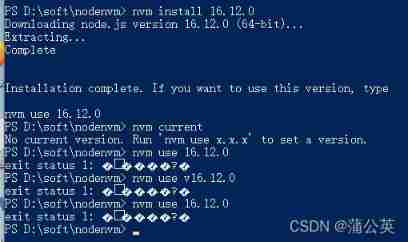
solve : Start using a version with administrator privileges 
perhaps :
result 
边栏推荐
- Redis source code analysis RDB
- About with admin option and with grant option
- To redefine the storage architecture, Huawei has used more than five "cores"
- zblog判断某个插件是否安装启用的内置函数代码
- Go collaboration and pipeline to realize asynchronous batch consumption scheduling task
- How to use SEO to increase the inquiry volume?
- Conditional competition overview
- Using consistent hash algorithm in Presto to enhance the data cache locality of dynamic clusters
- Tencent monthly security report helps rural revitalization, releases cloud security reports, and jointly builds a joint network security laboratory
- Let ups "Impressionist users" re understand reliability
猜你喜欢


随机推荐
Elastic searchable snapshot function (frozen Tier 3)
[2021 taac & Ti-One] frequently asked questions related to the notebook function
FPGA systematic learning notes serialization_ Day10 [sequential logic, competitive adventure, synchronous reset, asynchronous reset]
2021-04-02: given a square or rectangular matrix, zigzag printing can be realized.
How to convert XML to HL7
Low education without food? As an old Android rookie in the past six years, I was the most difficult one
[DB Bao 45] MySQL highly available mgr+consult architecture deployment
How to troubleshoot and solve the problem that the ultra-low delay security live broadcast system webrtc client plays no audio in the browser?
Welcome to the network security threat information sharing program
On N handshakes and M waves of TCP
Using easyjson to improve the efficiency of serialization transmission
Memory alignment in golang
zblog判断某个插件是否安装启用的内置函数代码
[play with Tencent cloud] check 9 popular Tencent cloud products
Cloud native monitoring configuration self built alertmanager to realize alarm
What is the reason for the worse website SEO ranking?
Tiktok Kwai, e-commerce enters the same river
Leveldb source code analysis -- writing data
TCB series learning articles - using redis extension in cloud functions
Learn typescript with VAM (phase 1)