当前位置:网站首页>七夕来袭——属于程序员的浪漫
七夕来袭——属于程序员的浪漫
2022-08-01 07:10:00 【鱼找水需要时间】
*七夕来袭!是时候展现专属于程序员的浪漫了!你打算怎么给心爱的人表达爱意?鲜花礼物?代码表白?还是创意DIY?或者…无论那种形式,快来秀一秀IT人的浪漫!
记录一起走过的那些日子
讲述和亲爱的TA一起经历的那些故事
- 那些初见印象
- 那些浪漫的开始
- 那些铭记于心的大小事
- 那些经历的曲折
- 那些经历的幸福与快乐
- 那些珍贵的瞬间
- 那些对未来的期许/计划
…
创意代码表白
以程序员的方式撒狗粮,专业浪漫,值得拥有!
程序员 520 – 玫瑰花

<!DOCTYPE html>
<html lang="en">

<head>
    <meta charset="UTF-8">
    <meta http-equiv="X-UA-Compatible" content="IE=edge">
    <meta name="viewport" content="width=device-width, initial-scale=1.0">
    <title>Document</title>
</head>
<style> .flower {
       margin-left: 32%; margin-top: 9%; } </style>

<body>
    <canvas id="c" class="flower"></canvas>
</body>

</html>
<script> var b = document.body; var c = document.getElementsByTagName('canvas')[0]; var a = c.getContext('2d'); document.body.clientWidth; with (m = Math) C = cos, S = sin, P = pow, R = random; c.width = c.height = f = 600; h = -250; function p(a, b, c) {
       if (c > 60) return [S(a * 7) * (13 + 5 / (.2 + P(b * 4, 4))) - S(b) * 50, b * f + 50, 625 + C(a * 7) * (13 + 5 / (.2 + P(b * 4, 4))) + b * 400, a * 1 - b / 2, a]; A = a * 2 - 1; B = b * 2 - 1; if (A * A + B * B < 1) {
       if (c > 37) {
       n = (j = c & 1) ? 6 : 4; o = .5 / (a + .01) + C(b * 125) * 3 - a * 300; w = b * h; return [o * C(n) + w * S(n) + j * 610 - 390, o * S(n) - w * C(n) + 550 - j * 350, 1180 + C(B + A) * 99 - j * 300, .4 - a * .1 + P(1 - B * B, -h * 6) * .15 - a * b * .4 + C(a + b) / 5 + P(C((o * (a + 1) + (B > 0 ? w : -w)) / 25), 30) * .1 * (1 - B * B), o / 1e3 + .7 - o * w * 3e-6] } if (c > 32) {
       c = c * 1.16 - .15; o = a * 45 - 20; w = b * b * h; z = o * S(c) + w * C(c) + 620; return [o * C(c) - w * S(c), 28 + C(B * .5) * 99 - b * b * b * 60 - z / 2 - h, z, (b * b * .3 + P((1 - (A * A)), 7) * .15 + .3) * b, b * .7] } o = A * (2 - b) * (80 - c * 2); w = 99 - C(A) * 120 - C(b) * (-h - c * 4.9) + C(P(1 - b, 7)) * 50 + c * 2; z = o * S(c) + w * C(c) + 700; return [o * C(c) - w * S(c), B * 99 - C(P(b, 7)) * 50 - c / 3 - z / 1.35 + 450, z, (1 - b / 1.2) * .9 + a * .1, P((1 - b), 20) / 4 + .05] } } setInterval('for(i=0;i<1e4;i++)if(s=p(R(),R(),i%46/.74)){z=s[2];x=~~(s[0]*f/z-h);y=~~(s[1]*f/z-h);if(!m[q=y*f+x]|m[q]>z)m[q]=z,a.fillStyle="rgb("+~(s[3]*h)+","+~(s[4]*h)+","+~(s[3]*s[3]*-80)+")",a.fillRect(x,y,1,1)}', 0) </script>
各国语言我爱你
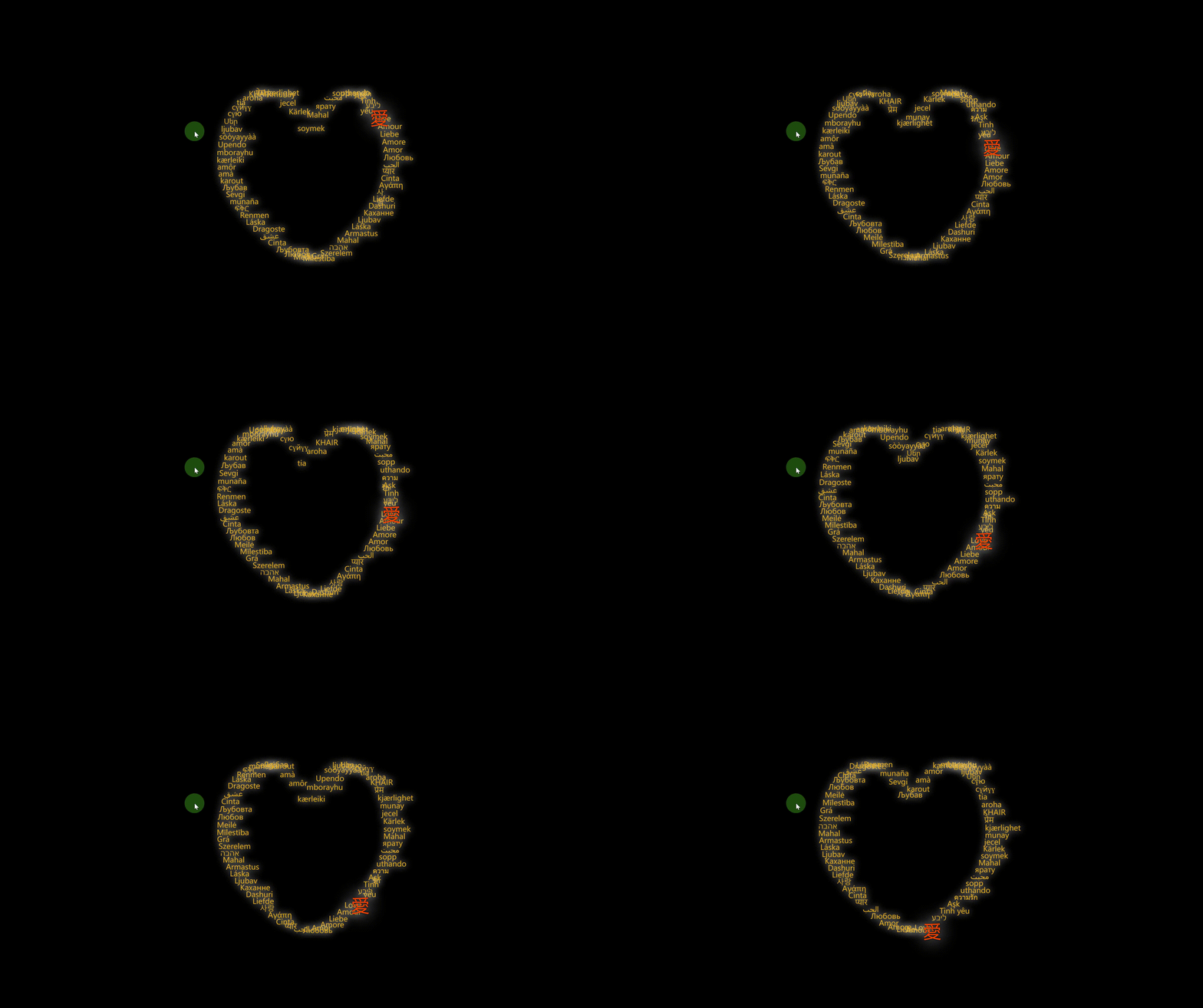
<!DOCTYPE html>
<html lang="en">

<head>
    <meta charset="UTF-8">
    <meta http-equiv="X-UA-Compatible" content="IE=edge">
    <meta name="viewport" content="width=device-width, initial-scale=1.0">
    <title>Document</title>
    <script src="https://cdn.staticfile.org/d3/4.13.0/d3.min.js"></script>
    <style> body {
       margin: 0; height: 100vh; display: flex; align-items: center; justify-content: center; background-color: black; overflow: hidden; } .love {
       width: 450px; height: 450px; position: relative; } .love span {
       position: absolute; left: 0; color: goldenrod; font-size: 20px; font-family: sans-serif; text-shadow: 0 0 1em white; animation: x-move 10s ease-in-out infinite alternate, y-move 20s linear infinite; animation-delay: calc(20s / var(--particles) * var(--n) * -1); user-select: none; } .love span:first-child {
       color: orangered; font-size: 3em; text-shadow: 0 0 0.1em black, 0 0 1em white; z-index: 1; } @keyframes x-move {
       to {
       left: 450px; } } @keyframes y-move {
       0% {
       transform: translateY(180px); } 10% {
       transform: translateY(45px); } 15% {
       transform: translateY(5px); } 18% {
       transform: translateY(0); } 20% {
       transform: translateY(5px); } 22% {
       transform: translateY(35px); } 24% {
       transform: translateY(65px); } 25% {
       transform: translateY(110px); } 26% {
       transform: translateY(65px); } 28% {
       transform: translateY(35px); } 30% {
       transform: translateY(5px); } 32% {
       transform: translateY(0); } 35% {
       transform: translateY(5px); } 40% {
       transform: translateY(45px); } 50% {
       transform: translateY(180px); } 71% {
       transform: translateY(430px); } 72.5% {
       transform: translateY(440px); } 75% {
       transform: translateY(450px); } 77.5% {
       transform: translateY(440px); } 79% {
       transform: translateY(430px); } 100% {
       transform: translateY(180px); } } </style>
</head>

<body>
    <div class="love"></div>
</body>

</html>
<script> const words = [ '愛', 'Love', 'Amour', 'Liebe', 'Amore', 'Amor', 'Любовь', 'الحب', 'प्यार', 'Cinta', 'Αγάπη', '사랑', 'Liefde', 'Dashuri', 'Каханне', 'Ljubav', 'Láska', 'Armastus', 'Mahal', 'אהבה', 'Szerelem', 'Grá', 'Mīlestība', 'Meilė', 'Любов', 'Љубовта', 'Cinta', 'عشق', 'Dragoste', 'Láska', 'Renmen', 'ፍቅር', 'munaña', 'Sevgi', 'Љубав', 'karout', 'amà', 'amôr', 'kærleiki', 'mborayhu', 'Upendo', 'sòòyayyàà', 'ljubav', 'Սեր', 'сүю', 'сүйүү', 'tia', 'aroha', 'KHAIR', 'प्रेम', 'kjærlighet', 'munay', 'jecel', 'Kärlek', 'soymek', 'Mahal', 'ярату', 'محبت', 'sopp', 'uthando', 'ความรัก', 'Aşk', 'Tình yêu', 'ליבע']; d3.select('.love') .style('--particles', words.length) .selectAll('span') .data(words) .enter() .append('span') .style('--n', (d, i) => i + 1) .text((d) => d); </script>
我爱你一生一世

<!DOCTYPE html>
<html lang="en">
<head>
    <meta charset="UTF-8">
    <meta http-equiv="X-UA-Compatible" content="IE=edge">
    <meta name="viewport" content="width=device-width, initial-scale=1.0">
    <title>Document</title>
    <style> .heart {
       position: relative; width: 100px; height: 90px; } .heart:before, .heart:after {
       position: absolute; content: ""; left: 150px; top: 0; width: 150px; height: 240px; background: red; border-radius: 150px 150px 0 0; transform: rotate(-45deg); transform-origin: 0 100%; } .heart:after {
       left: 0; transform: rotate(45deg); transform-origin: 100% 100%; } </style>
</head>
<body>

  <div class="heart"></div>
</body>
</html>
lovecanvas

<!DOCTYPE html>
<html lang="en">

<head>
    <meta charset="UTF-8">
    <meta http-equiv="X-UA-Compatible" content="IE=edge">
    <meta name="viewport" content="width=device-width, initial-scale=1.0">
    <title>Document</title>
</head>

<body>
    <canvas id="cavs"></canvas>
</body>

</html>
<script> var canvas = document.getElementById("cavs"); const WIDTH = window.innerWidth; const HEIGHT = window.innerHeight; canvas.setAttribute("width", WIDTH); canvas.setAttribute("height", HEIGHT); var context = canvas.getContext("2d"); var start = {
       loves: [], DURATION: 30, begin: function () {
       this.createLove(); }, createLove: function () {
       for (var i = 0; i < WIDTH / 59; i++) {
       var love = new Love(); this.loves.push(love); } setInterval(this.drawLove.bind(this), this.DURATION); }, drawLove: function () {
       context.clearRect(0, 0, WIDTH, HEIGHT); for (var key in this.loves) {
       this.loves[key].draw(); } } } function Love() {
       var me = this; function rand() {
       me.attr.scale = (Math.random() * 0.8 + 0.3) * WIDTH / 521; me.attr.x = Math.floor(Math.random() * WIDTH - 40); me.attr.y = Math.floor(HEIGHT - Math.random() * 200); me.attr.ColR = Math.floor(Math.random() * 255); me.attr.ColG = Math.floor(Math.random() * 255); me.attr.ColB = Math.floor(Math.random() * 255); me.attr.alpha = Math.random() * 0.2 + 0.8; me.attr.vector = Math.random() * 5 + 0.4; } (function () {
       me.attr = {
      }; rand(); }()); me.draw = function () {
       if (me.attr.alpha < 0.01) rand(); x = me.attr.x; y = me.attr.y; scale = 4 * me.attr.scale; context.beginPath(); context.bezierCurveTo(x + 2.5 * scale, y + 2.5 * scale, x + 2.0 * scale, y, x, y); context.bezierCurveTo(x - 3.0 * scale, y, x - 3.0 * scale, y + 3.5 * scale, x - 3.0 * scale, y + 3.5 * scale); context.bezierCurveTo(x - 3.0 * scale, y + 5.5 * scale, x - 1.0 * scale, y + 7.7 * scale, x + 2.5 * scale, y + 9.5 * scale); context.bezierCurveTo(x + 6.0 * scale, y + 7.7 * scale, x + 8.0 * scale, y + 5.5 * scale, x + 8.0 * scale, y + 3.5 * scale); context.bezierCurveTo(x + 8.0 * scale, y + 3.5 * scale, x + 8.0 * scale, y, x + 5.0 * scale, y); context.bezierCurveTo(x + 3.5 * scale, y, x + 2.5 * scale, y + 2.5 * scale, x + 2.5 * scale, y + 2.5 * scale); context.fillStyle = "rgba(" + me.attr.ColR + "," + me.attr.ColG + "," + me.attr.ColB + "," + me.attr.alpha + ")"; context.fill(); context.lineWidth = 0.5; context.stroke(); me.attr.y -= me.attr.vector; me.attr.alpha -= (me.attr.vector / 2.9 * 3.5 / HEIGHT); } } window.onload = function () {
       start.begin(); } </script>
我的心是你的
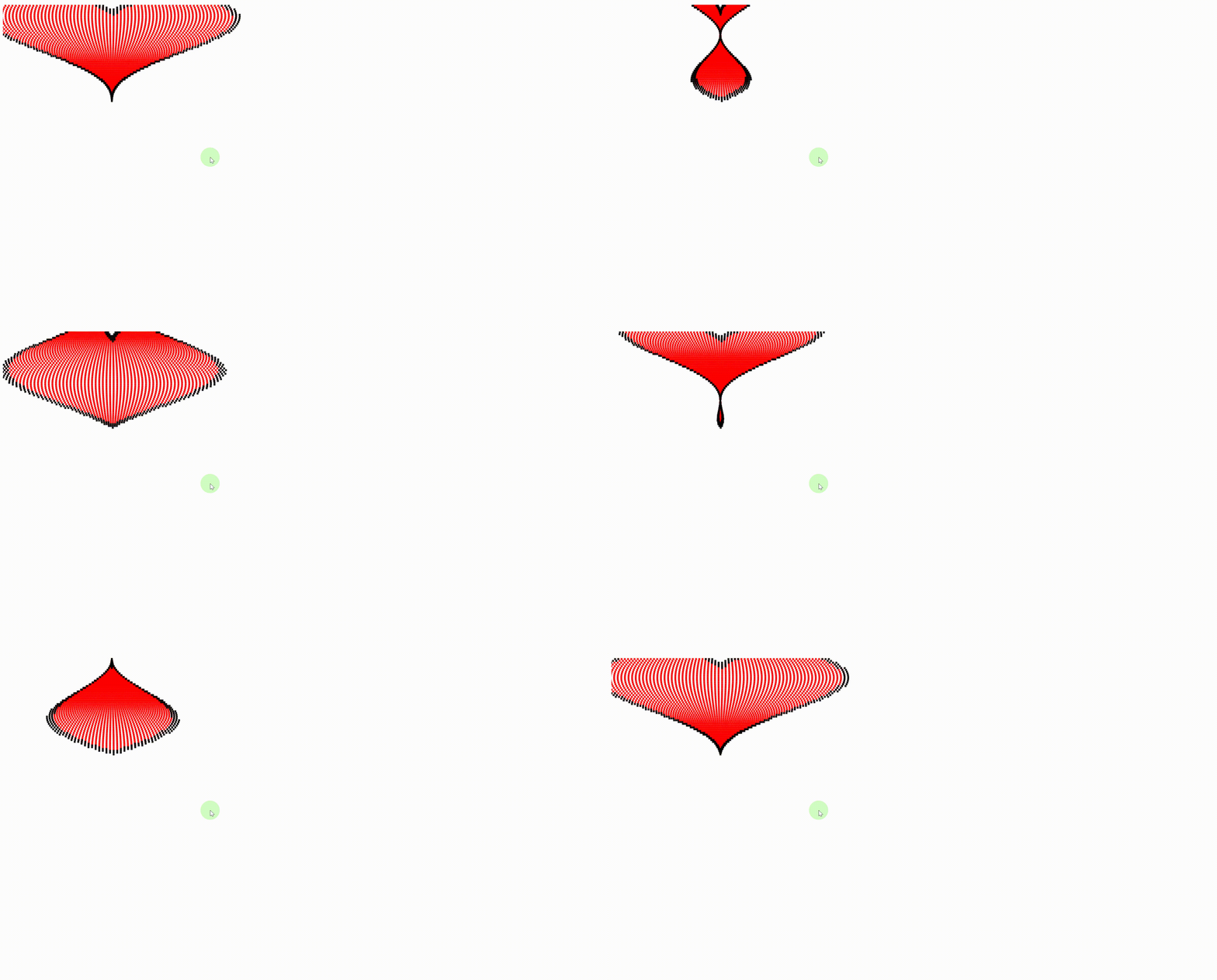
<!DOCTYPE html>
<html lang="en">
<head>
    <meta charset="UTF-8">
    <meta http-equiv="X-UA-Compatible" content="IE=edge">
    <meta name="viewport" content="width=device-width, initial-scale=1.0">
    <title>Document</title>
</head>
<body>
    <canvas id="c"></canvas>
</body>
</html>
<script> var b = document.body, c = document.getElementsByTagName('canvas')[0], a = c.getContext('2d'); document.body.clientWidth; // fix bug in webkit: http://qfox.nl/weblog/218 // ### Pixel Love - a js1k 2012 entry by @aaronsnoswell // This demo is on [github](https://github.com/aaronsnoswell/js1k-2012-love) // You can also browse the annotated source code at [http://aaronsnoswell.github.com/js1k-2012-love/docs/](http://aaronsnoswell.github.com/js1k-2012-love/docs/) // Define some variables: var h = "", // A heart g = 5, // The granularity - determines the size of each 'pixel' l = 10, // The threshold / limit, used for determining where to place pixels outline = [], // Arrays of locations for the outline and fill pixles fill = [], sx = 100, // Where to draw the heart sy = 350, box = [999, 999, 0, 0]; // The bounding box of the heart (computed later) // Set the canvas size c.width = 500; c.height = 400; // A utility function, used for looping over an x and y variable var loopxy = function(w, h, step, callback) {
       for(var x=0; x<w; x+=step) {
       for(var y=0; y<h; y+=step) {
       callback(x, y, step); } } } // Shortcut method for clearing the canvas a.clear = function() {
       a.clearRect(0, 0, c.width, c.height); } // Normalise browser font rendering in the canvas. // See [https://twitter.com/#!/aaronsnoswell/status/165642474109419520](https://twitter.com/#!/aaronsnoswell/status/165642474109419520) a.textBaseline = "bottom"; a.font="300pt arial"; a.lineWidth = g*2; // Draw a filled heart on the canvas a.fillText(h, sx, sy); // Loop over the entire canvas and wherever there are filled pixels, // store that location in the fill array var d = a.getImageData(0, 0, c.width, c.height) loopxy(d.width, d.height, g, function(x, y) {
       if(d.data[(x + y*d.width)*4+3] >= l) fill.push([x, y]); }); // Clear the screen a.clear(); // Draw an outline of a heart on the canvas a.strokeText(h, sx, sy); // Loop over the entire canvas once again. Wherever there are filled // pixels, store that location in the outline array var d = a.getImageData(0, 0, c.width, c.height) loopxy(d.width, d.height, g, function(x, y) {
       if(d.data[(x + y*d.width)*4+3] >= l) {
       outline.push([x, y]); // Compute the bounding box of the heart if(x<box[0]) box[0] = x; if(x>box[2]) box[2] = x; if(y<box[1]) box[1] = y; if(y>box[3]) box[3] = y; } }); // Find the middle x and y locations of the heart box.push((box[0]+box[2])/2); box.push((box[1]+box[3])/2); // Store the current time as ms since epoch var t0 = new Date().getTime(); // Use a recursive named function + setTimeout to ensure each frame has // time to finish before the next one is drawn (function render() {
       window.setTimeout(function() {
       // Time delta and elapsed time var d = new Date().getTime()-t0; t0 += d; // Clear the screen a.clear(); // Draw the red heart a.fillStyle = "#f00"; loopxy(fill.length, 1, 1, function(i) {
       var x = fill[i][0], y = fill[i][1]; // Offset each pixel by a sinusoidal, time based ammount a.fillRect(x-g/2+Math.sin(t0/500+y/80)*(x-box[4])+10, y-g/2+10, g, g); }) // Draw the outline using the same logic as above a.fillStyle = "#000"; loopxy(outline.length, 1, 1, function(i) {
       var x = outline[i][0], y = outline[i][1]; a.fillRect(x-g/2+Math.sin(t0/500+y/80)*(x-box[4])+10, y-g/2+10, g, g); }) // Loop at 30fps render(); }, 1/30); })(); </script>
代码出自菜鸟教程
边栏推荐
- Offer刷题——1
- datagrip 报错 “The specified database userpassword combination is rejected...”的解决方法
- Self-made a remote control software - VeryControl
- 从购买服务器到网站搭建成功保姆级教程~超详细
- LeetCode240+312+394
- JVM: Runtime Data Area - PC Register (Program Counter)
- Fist game copyright-free music download, League of Legends copyright-free music, can be used for video creation, live broadcast
- 基于百度OCR的网站验证码在线识别
- 目标检测概述-上篇
- NIO programming
猜你喜欢

Data organization -- singly linked list of the linear table
Practical training Navicat Chinese and English mode switching

电磁兼容简明教程(6)测试项目

对于升级go1.18的goland问题
Electromagnetic compatibility introductory tutorial (6) test project
数据机构----线性表之单向链表
从底层结构开始学习FPGA(6)----分布式RAM(DRAM,Distributed RAM)

mysql中添加字段的相关问题
![Explosive 30,000 words, the hardest core丨Mysql knowledge system, complete collection of commands [recommended collection]](/img/7f/08b323ffc5b5f8e3354bee6775b994.png)
Explosive 30,000 words, the hardest core丨Mysql knowledge system, complete collection of commands [recommended collection]
滚动条样式修改
随机推荐
爬虫框架 Scrapy 详解
Electromagnetic compatibility introductory tutorial (6) test project
Golang: go static file processing
选择排序—直接选择排序和堆排序
Monitor the width and height of the parent element, adapt to the size of the plug-in
dbeaver连接MySQL数据库及错误Connection refusedconnect处理
05-SDRAM:仲裁
return;代表含义
Bean的生命周期
JVM:运行时数据区-PC寄存器(程序计数器)
MATLAB program design and application of MATLAB 2.5
C语言学习概览(三)
matlab simulink 粒子群优化模糊pid控制的电机泵
my creative day
Vim简介
对于升级go1.18的goland问题
插入排序—直接插入排序和希尔排序
第02章 MySQL的数据目录【1.MySQL架构篇】【MySQL高级】
Why is the lightweight VsCode used more and more?Why eat my C drive 10G?How to Painlessly Clean VsCode Cache?Teach you how to lose weight for C drive
Leetcode第 304 场周赛