当前位置:网站首页>配置我的kitty
配置我的kitty
2022-08-01 07:03:00 【学逗b】
配置我的kitty
1. 安装
sudo pacman -S kitty
2. 默认快捷键
2.1. 滚动(Scroll)

2.2. 标签(Tabs)

2.3. 窗口(Windows)

2.4. 其他(Other)
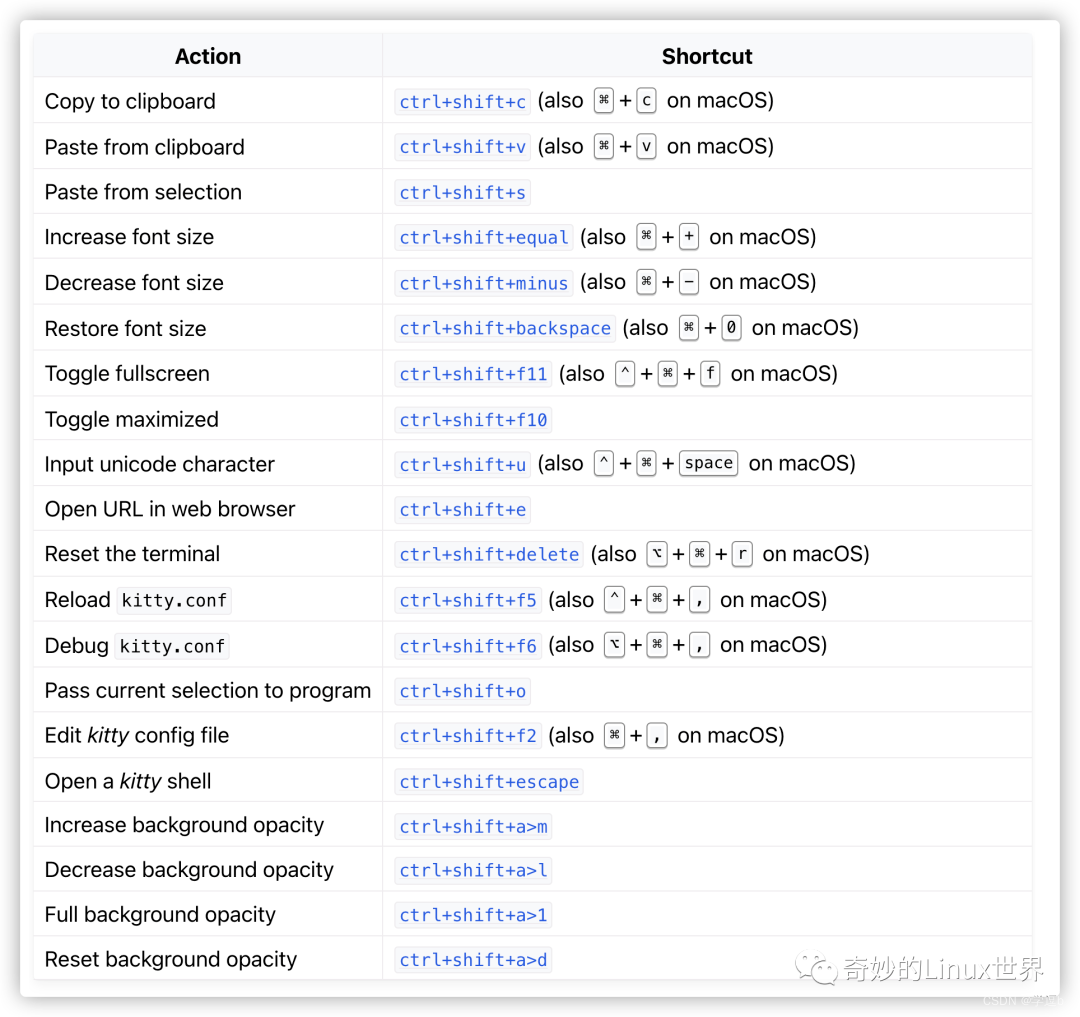
3. 配置文件
kitty 自定义配置文件在 ~/.config/kitty/kitty.conf
复制默认配置:
cp /usr/share/doc/kitty/kitty.conf ~/.config/kitty/kitty.conf
3.1. 使用 ctrl + 鼠标右键打开链接
mouse_map ctrl+left press ungrabbed,grabbed mouse_click_url
3. 参考文章
边栏推荐
- Xiaobai's 0 Basic Tutorial SQL: An Overview of Relational Databases 02
- Dialogue with the father of MySQL: One excellent programmer is worth 5 ordinary programmers
- 点餐系统数据库设计--SQL Server
- 2022.7.26 Mock Competition
- leetcode125 Verify palindrome string
- 我三本学历,五面阿里,被面试官“供”着出来了,拿了33*15的Offer
- Why is the lightweight VsCode used more and more?Why eat my C drive 10G?How to Painlessly Clean VsCode Cache?Teach you how to lose weight for C drive
- 【音视频】srs直播平台搭建
- Matlab simulink particle swarm optimization fuzzy pid control motor pump
- LeetCode240+312+394
猜你喜欢

Dialogue with the father of MySQL: One excellent programmer is worth 5 ordinary programmers

MVVM项目开发(商品管理系统一)

「游戏引擎 浅入浅出」4.1 Unity Shader和OpenGL Shader

Dell PowerEdge Server R450 RAID Configuration Steps

"By sharing" northwestern university life service | | bytes a second interview on three sides by HR

太厉害了,终于有人能把文件上传漏洞讲的明明白白了

LeetCode 0149. 直线上最多的点数

dbeaver连接MySQL数据库及错误Connection refusedconnect处理
【视觉SLAM十四讲】第一章理论详解

Vim简介
随机推荐
NUMPY
基于MATLAB的BP神经网络进行语音特征信号分类
响应式织梦模板园林景观类网站
声音信号处理基频检测和时频分析
Create, modify and delete tables
LeetCode 0150. 逆波兰表达式求值
响应式织梦模板园林花卉类网站
uva10825
2022.7.26 Mock Competition
小程序通过云函数操作数据库【使用get取数据库】
电磁兼容简明教程(6)测试项目
Introduction to the basic principles, implementation and problem solving of crawler
金山打字通 官网 下载
自制一款远程控制软件——VeryControl
LeetCode 0149. 直线上最多的点数
小白的0基础教程SQL: 什么是SQL 01
信息系统项目管理师必背核心考点(五十六)配置控制委员会(CCB)的工作
爬虫基本原理介绍、实现以及问题解决
Solve the problem of page flicker caused by browser scroll bars
Vim简介