当前位置:网站首页>Various error reporting solutions encountered by Kali during Empire installation
Various error reporting solutions encountered by Kali during Empire installation
2022-06-12 01:43:00 【IMZ】
download empire
First of all, we need to go to https://github.com/EmpireProject/Empire take empire Download and unzip
install - initialization
cd Empire/setup
./install.sh
./reset.sh
install flask The module succeeds but still fails flask Module error
function reset.sh The following error occurs during initialization , Tip no flask modular

And then use pip install flask Error is still reported after success , Tip no flask modular

This is because pip Version problem ,empire Support is python2, Therefore, the installed dependent modules should adopt pip2 Installation , Input pip -V View version , Found to be python3.8

install pip2
curl -O https://bootstrap.pypa.io/pip/2.7/get-pip.py
python2 get-pip.py
Check the version again after the installation is successful ,pip The default version is pip2
If you need to specify pip The version of can be used pip2 or pip3

Next you can install flask 了
pip2 install flask

You can see ,flask The module error has been resolved , However, the following errors are reported

This is because of the lack of cryotigraphy modular , There is no problem installing the missing modules , Paste the command directly ,
pip2 install cryptography
pip2 install iptools
pip2 install netifaces
This is to make every module missing clearer , stay empire There is a requirement.txt, It records the required dependent modules , You can use the following command to install ,
Just execute the following command , There's a little bit of clarification here , If installed requirement.txt If there is an error in the module, it can be ignored , Because the purpose of installation is only to make mepire Run up , I found that all the modules in it do not need to be successfully installed
pip2 install -r requirements.txt

For example, the following module , An error is reported during installation , But running empire But the module is not required 
install pydispatcher Module error
Tip the lack of pydispatch modular , install pydispatcher modular
pip2 install pydispatcher
The installation to pydispatcher An error was reported , As shown in the figure below

It should be due to pip2 The version is too low , Use the following command to upgrade
pip2 install --upgrade setuptools
pip2 install pydispatcher

install pydispatcher success
And then there was zlib_wrapper modular , Direct installation
pip2 install zlib_wrapper
install M2Crypto Module error

pip2 install M2Crypto

This error can be solved by referring to the following article , I'm installing python-m2crypto After that
https://www.cnblogs.com/shmily3929/p/8117258.html
apt-get install python-m2crypto

installed python-m2crypto Then re initialize empire No more m2crypto 's report is wrong
Tip no macholib.Mach0 modular , Direct installation macholib that will do
pip2 install macholib

There is no problem with the installation of the following modules , Just install the missing module , Paste the command directly
pip2 install pefile
pip2 install xlrd
pip2 install xlutils
install pycrypto Report errors
Prompt yes Crypto.Cipher modular

install pycrypto There is an error , As shown in the figure below
pip2 install pycrypto

choose pycryptodome Module installation
pip2 install pycryptodome

Successful installation crypto Module error , In the end, there was no problem , Install the last few modules to run empire succeed
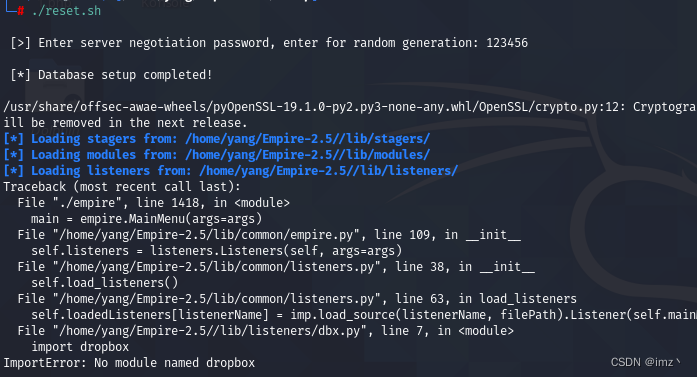
pip2 install dropbox
pip2 install pyminifier
./reset.sh

summary
Basically, errors are reported due to missing dependencies or incompatible versions , besides , Everyone has different versions and module dependencies , So we will definitely encounter errors in other aspects , But the solution and principle are basically the same .
边栏推荐
- Redis startup and shutdown commands
- Design practice of rongyun Im on electron platform
- 【项目实训】微信公众号获取用户openid
- Colorize Voronoi Diagram Template
- 如何为Excel中的单元格自动填充颜色
- 2022年重氮化工艺考试题库模拟考试平台操作
- Introduction to prism framework - Modular introduction
- "Xilin chain" of Southwest Forestry University passed the functional test of Electronic Standards Institute of the Ministry of industry and information technology | FISCO bcos case
- Several visualization methods of point cloud 3D object detection results (second, pointpillars, pointrcnn)
- Huawei intermodal game or application review rejected: the application detected payment servicecatalog:x6
猜你喜欢
![[project training] wechat official account template message push](/img/1f/2fe272e2d2a5e3573299c063e870e5.png)
[project training] wechat official account template message push

A summary of the interface automation test problems most easily encountered

华为联运游戏或应用审核驳回:应用检测到支付serviceCatalog:X6

Matlab foundation 04 - detailed analysis of the use and complex application of colon operator ":"

Software engineering - system flow chart

Ce soir - là, j'ai battu mon collègue...

“還是學一門技術更保險!”杭州校區小哥哥轉行軟件測試,喜提10K+雙休!

Set up NFT blind box mall system | customized development of NFT mall software
Concepts of programs, processes, and threads
Make good use of these 28 tools, and the development efficiency soars
随机推荐
I worked as a software testing engineer in a large factory and wrote "one day's complete workflow"
On the night of the joint commissioning, I beat up my colleagues
The role of MOV ah, 4CH int 21
Research Report on development status and investment suggestions of o-tert-butyl cyclohexyl acetate Market in the world and China 2022-2028
Elementary OJ problem of binary tree
Shadow implementation of unity vertex animation
Set up NFT blind box mall system | customized development of NFT mall software
给你一个项目,你将如何开展性能测试工作?
[project training] wechat official account template message push
redis集群(cluster)+哨兵模式+主从(replicas)
Data in the assembly cannot start with a letter! 0 before the beginning of a letter
感知机从0到1
The road of global evolution of vivo global mall -- multilingual solution
pca从0到1
2022年金属非金属矿山(小型露天采石场)安全管理人员考试模拟100题及模拟考试
Perceptron from 0 to 1
Watermelon video synchronization Tiktok also has benefits ~ the official "China Video Partner Program"
Simplified interpretation of accuracy and recall in AI papers
Advanced data storage
Websocket is closed after 10 seconds of background switching