当前位置:网站首页>Matlab foundation 04 - detailed analysis of the use and complex application of colon operator ":"
Matlab foundation 04 - detailed analysis of the use and complex application of colon operator ":"
2022-06-12 01:08:00 【Franklin】
Preface :
The colon is one of the most useful operators in MATLAB. It can create vectors, subscript arrays, and specify for iterations.
The colon is in Matlab Vector and array subscripts and for Iteration, etc , When making subscript expression , It is rather obscure and difficult to understand. It is necessary to discuss it separately :
1 expression :
x = j:k
x = j:i:k
A(:,n)
A(m,:)
A(:)
A(j:k)
1.1 x = j:k 【 Default interval 1,j For the first dimension ,k For the second dimension 】
creates a unit-spaced vector
xwith elements[j,j+1,j+2,...,j+m]wherem = fix(k-j). Ifjandkare both integers, then this is simply[j,j+1,...,k].Create one with j To j+m Of Unit interval vector , The default increment step for each element is 1.
【 case , The default interval increment step is 1, Now 】
【 example 1】 Create a unit interval vector :
x = 1:10
x = 1×10

     1     2     3     4     5     6     7     8     9    10
>> y=7:14

y =

     7     8     9    10    11    12    13    14
1.2 x = j:i:k Create a vector with a specified interval
x = j:i:kcreates a regularly-spaced vectorxusingias the increment between elements. The vector elements are roughly equal to[j,j+i,j+2*i,...,j+m*i]wherem = fix((k-j)/i). However, ifiis not an integer, then floating point arithmetic plays a role in determining whethercolonincludes the endpointkin the vector, sincekmight not be exactly equal toj+m*i. If you specify nonscalar arrays, then MATLAB interpretsj:i:kasj(1):i(1):k(1).Create a vector of normal intervals , take i Step size added as an element .
【 example 2】 Create a vector with a specified interval : In this example, the step size is 0.1, such 0 After starting the calculation , It happens to have
Create vectors that increment or decrement by a specified value.
Create a vector whose elements increment by 0.1.
>> x = 0:0.1:1

x =

   Column  1  to  6

         0    0.1000    0.2000    0.3000    0.4000    0.5000

   Column  7  to  11

    0.6000    0.7000    0.8000    0.9000    1.0000
With constraints :
Output Arguments
collapse all
x— Regularly-spaced vector
row vectorRegularly-spaced vector, returned as a row vector. If
j > k, thenx = j:kis an empty matrix. More generally, the syntaxx = j:i:kreturns an empty matrix when:
i,j, orkis an empty input
i == 0
i > 0andj > k
i < 0andj < k
1.3 A(:,n), A(m,:), A(:), and A(j:k) common indexing expressions General label expressions for arrays
A(:,n),A(m,:),A(:), andA(j:k)are common indexing expressions for a matrixAthat contain a colon. When you use a colon as a subscript in an indexing expression, such asA(:,n), it acts as shorthand to include all subscripts in a particular array dimension. It is also common to create a vector with a colon for the purposes of indexing, such asA(j:k). Some indexing expressions combine both uses of the colon, as inA(:,j:k).General label expression , A colon is a bit like a wildcard :
Master as one 3by3 Matrix ,
A = magic(3)
A = 3×3

     8     1     6
     3     5     7
     4     9     2
A(:,n)is thenth column of matrixA.【 The first n Column all elements 】A(1,:) ans = 1×3 8 1 6>> A(2,:) ans = 3 5 7
A(m,:)is themth row of matrixA.-【 The first m All elements of the row 】>> A(:,1) ans = 8 3 4>> A(:,2) ans = 1 5 9
A(:,:,p)is thepth page of three-dimensional arrayA.【 One page The data of 】>> B = randn(4,3,2) B(:,:,1) = -0.1924 -1.4224 1.4193 0.8886 0.4882 0.2916 -0.7648 -0.1774 0.1978 -1.4023 -0.1961 1.5877
A(:)reshapes all elements ofAinto a single column vector. This has no effect ifAis already a column vector.【 Merge the columns of a two-dimensional array into 1 Column , Dimensionality has been reduced 】>> A(:) ans = 8 3 4 1 5 9 6 7 2Be careful ,3 The operation of dimension array cannot be done .
A(:,:)reshapes all elements ofAinto a two-dimensional matrix. This has no effect ifAis already a matrix or vector. 【 Make the one-dimensional one again 2 It's not easy 】>> A(:,:) ans = 8 1 6 3 5 7 4 9 2
A(j:k)uses the vectorj:kto index intoAand is therefore equivalent to the vector[A(j), A(j+1), ..., A(k)].From left to right , The order from top to bottom , take A From element j To the elements k, extracted , And compose a vector .
>> A(2:3) ans = 3 4>> A(1:3) ans = 8 3 4
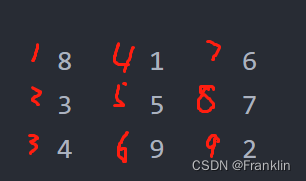
A(:,j:k)includes all subscripts in the first dimension but uses the vectorj:kto index in the second dimension. This returns a matrix with columns[A(:,j), A(:,j+1), ..., A(:,k)].This means combination : Here the parameter of the coordinate is the first dimension of the vector , The parameter on the right is the second dimension of the vector :
So if A=
>> A(:,:) ans = 8 1 6 3 5 7 4 9 2that , 1 To 2 The column selection is
>> A(:,1:2)

ans =

     8     1
     3     5
     4     9
1 To 3 The column selection is :
>> A(:,1:3)

ans =

     8     1     6
     3     5     7
     4     9     2
3 Examples and analysis :
Construct a 4 The magic square of the order :
>> A = magic(4)

A =

    16     2     3    13
     5    11    10     8
     9     7     6    12
     4    14    15     1
Construct another 8 The magic square of the order :
>> B = magic(8)

B =

    64     2     3    61    60     6     7    57
     9    55    54    12    13    51    50    16
    17    47    46    20    21    43    42    24
    40    26    27    37    36    30    31    33
    32    34    35    29    28    38    39    25
    41    23    22    44    45    19    18    48
    49    15    14    52    53    11    10    56
     8    58    59     5     4    62    63     1
3.1 Extract data from a specified row in a specified order :
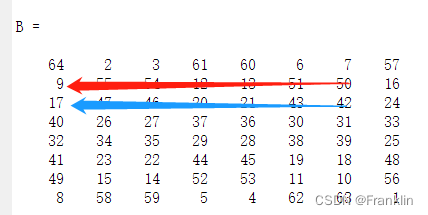
【 example 1】 From magic square B, Of the 2,3 That's ok , From 7 Column to the first 1 Column , In reverse or subtractive order (-1) Extract data
>> B(2:3,7:-1:1)

ans =

    50    51    13    12    54    55     9
    42    43    21    20    46    47    17
【 case , The characterization is as follows 】
【 Example 2 】 magic square A, From 3 To 4 That's ok ,2 To 4 Column , Extract data in positive order , The default is 1, therefore , Don't write ,
>> A(3:4,2:4)

ans =

     7     6    12
14 15 1 
【 example 3】 Reference the last column of elements
>> A(:,end)

ans =

    13
     8
    12
     1
【 Example 4 】 Reference to para 3 That's ok , Derivative number 2 Data
>> B(3,end - 1)

ans =

42 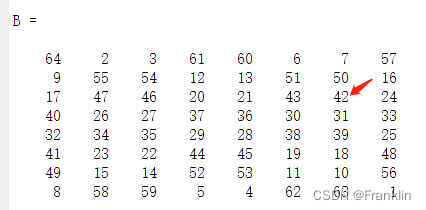
3.2 Complex data reorganization :
Continue to use , The magic square matrix generated in the previous summary is used as an example :
Example 5 , Extract uncertain rows and columns , Can be repeated , And reorganize them .
This case , take B Of the 1,3 Yes , The first 2,3 The columns are organized , Be careful , The first 3 That's ok , And the 2 Column , The first 3 The columns are all taken 2 Time
>> B([1 3 3],[2 2 3 3])

ans =

     2     2     3     3
    47    47    46    46
    47    47    46    46
3.3 Wildcard examples of colons :
example 6, We use it : Do wildcard , Will a 3x3 The matrix of is extended to 3x3x3x2 Four dimensional matrix of
>>  C(:,:,1,2)=[1 2 3;4 5 6;7 8 9]

C(:,:,1,1) =

     0     0     0
     0     0     0
     0     0     0


C(:,:,1,2) =

     1     2     3
     4     5     6
     7     8     9
【 case , The wildcard here occupies the 1,2 Vector dimension , We only give one 3x3 Matrix , Other matrices are automatically assigned to 0, Here we define the dimension 3by1& dimension 4by2 A value of , The system will automatically 3by1 The value of is 0】
>> C(:,:,2,2)=[9 8 1;6 5 4;3 2 1]

C(:,:,1,1) =

     0     0     0
     0     0     0
     0     0     0


C(:,:,2,1) =

     0     0     0
     0     0     0
     0     0     0


C(:,:,1,2) =

     1     2     3
     4     5     6
     7     8     9


C(:,:,2,2) =

     9     8     1
     6     5     4
     3     2     1
【 case , We continue to assign dimensions 3by2& dimension 4by2 Value , The system automatically assigns other values 】
>> C(:,:,3,2)=[5 5 5;5 5 5;5 5 5]

C(:,:,1,1) =

     0     0     0
     0     0     0
     0     0     0


C(:,:,2,1) =

     0     0     0
     0     0     0
     0     0     0


C(:,:,3,1) =

     0     0     0
     0     0     0
     0     0     0


C(:,:,1,2) =

     1     2     3
     4     5     6
     7     8     9


C(:,:,2,2) =

     9     8     1
     6     5     4
     3     2     1


C(:,:,3,2) =

     5     5     5
     5     5     5
     5     5     5
【 Empathy , The whole matrix is constructed 】
2 Reference to relevant names :
2.1 unit-spaced vector 【 Unit interval vector 】
Pay attention to this and Unit vect Not quite the same. , Is the unit interval vector .
Reference resources :
Vector creation, array subscripting, and for-loop iteration - MATLAB colon : (mathworks.com)
matlab Summary of common array operations _ The wind chaser YL The blog of -CSDN Blog _matlab Array
边栏推荐
- Scope and category of C language variables - learning 20
- 如何优化PlantUML流程图(时序图)
- 基于.NetCore开发博客项目 StarBlog - (11) 实现访问统计
- Lambda create stream
- C language pointer - learning 22
- Comparison of OpenCV basic codes of ros2 foxy~galactic~humble
- How much is the child's critical illness insurance coverage appropriate? Which product is better now
- Flowable workflow
- DDD exaggeration, Eric Evans made a bad start
- What is the digital twin of Yixin Huachen and what is its application value?
猜你喜欢

网狐游戏服务器-房间配置向导-组件属性与基本配置赋值

Comparison of OpenCV basic codes of ros2 foxy~galactic~humble

A knowledge map (super dry goods, recommended collection!)

验证码是自动化的天敌?看看阿里P7大神是怎么解决的
System.CommandLine选项Option

大厂测试员年薪30万到月薪8K,吐槽工资太低,反被网友群嘲?

功能测试如何1个月快速进阶自动化测试?明确这2步就问题不大了

Building circuits on glass

Practice of Flink CDC + Hudi massive data entering the lake in SF

Esp8266wifi development board collects temperature and humidity data and uploads them to the Internet of things platform
随机推荐
Lambda创建流
Explain asynchronous tasks in detail: the task of function calculation triggers de duplication
Lambda中间操作distinct
[answer] is ubiquitous language a pseudo innovation?
Tianjin Port coke wharf hand in hand map flapping software to visually unlock the smart coke port
Vscode - the problem of saving a file and automatically formatting the single quotation mark 'into a double quotation mark'
Defect detection, introduction to Halcon case.
Flowable workflow
Lambda intermediate operation limit
jmeter 性能测试用 csv,这个坑有些扯蛋
一文get,最容易碰上的接口自动化测试问题汇总
Esp8266wifi development board collects temperature and humidity data and uploads them to the Internet of things platform
【系统分析师之路】系统分析师历年真题大汇总
[signalr complete series] Implementation of signalr packet communication in net6
In the field of enabling finance, the transformation of state secrets makes security compliance more solid
Win jar package setting boot auto start
One article to show you how to understand the harmonyos application on the shelves
Article 8: Design of multi-functional intelligent trunk following control system | undergraduate graduation project - [reply and Q & a record of design completion]
如何优化PlantUML流程图(时序图)
Lambda中间操作sorted