当前位置:网站首页>Esp8266wifi development board collects temperature and humidity data and uploads them to the Internet of things platform
Esp8266wifi development board collects temperature and humidity data and uploads them to the Internet of things platform
2022-06-12 01:00:00 【ThingsPanel】
This time, I will mainly explain how to use open source WIFI Internet of things development board ESP-12FWIFI collection DHT11 The data of digital temperature and humidity sensor passes through OLED Exhibition , And pass MQTT Use the collected temperature and humidity data JSON Send the format to the open source Internet of things platform ThingsPanel. And pass ThingsPanel The free temperature and humidity plug-in of the open source platform displays relevant data .
One 、 Hardware preparation
The hardware of this time adopts the new technology ESP-12FWIFI The Internet of things development board is implemented as hardware . Design to all hardware as follows :
ESP-12FWIFI Internet of things development board :
OLED display :
DHT11 Temperature and humidity sensor :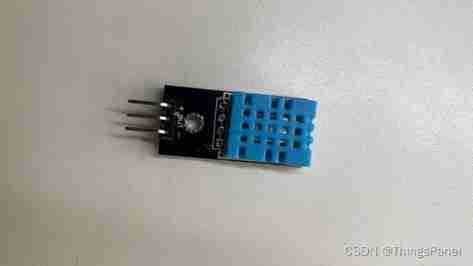
USB cable :
Two 、 Hardware connection
take DHT11 The temperature and humidity sensor is plugged into ESP-12FWIFI Peripheral interface of Internet of things development board , As shown in the figure below :
take OLED The display is plugged into ESP-12FWIFI Internet of things development board 4PIN On port , As shown in the figure below :
Finally, put ESP-12FWIFI The Internet of things development board passes USB Connect the cable to the computer USB On the interface , As shown in the figure below :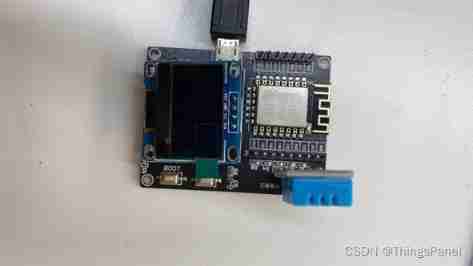
3、 ... and 、 Code
Anxinco WINDOWS Construction and use instructions of development environment , Please refer to the installation instructions downloaded from the official website of Anxin :
http://aiclouds3.0-docs.aithinker.com/#/2.device/configuration_windows
After the development environment is built , Through Anxin, you can WINDOWS development environment AiThinkerIDE Open the sample code provided .
The complete code is self fetched :
link :https://pan.baidu.com/s/11arto289Rckv3zEBQ_zn2Q
Extraction code :f2dv
If you have any questions, please consult bloggers or add groups :QQ260150504
Or forum questions :
http://forum.thingspanel.cn/
Hardware Taobao purchasing address ( Jiyi Internet of things ):
https://item.taobao.com/item.htm?spm=a21dvs.23580594.0.0.3bc13d0dnUfTY4&ft=t&id=668712619774
DHT11 Temperature and humidity acquisition part code :
u8 ICACHE_FLASH_ATTR DHT11_Read_Data_Complete(void)
{

	u8 C_delay_time = 0;	//  Time delay
	//  start-up DHT11 transmission _ success
	//-----------------------------------------------------------
	if(DHT11_Start_Signal_JX() == 0)	// DHT11: Output start signal -> Receive response signal
	{

		DHT11_Data_Array[0] = DHT11_Read_Byte();	//  humidity _ Integers _ part
		DHT11_Data_Array[1] = DHT11_Read_Byte();	//  humidity _ decimal _ part
		DHT11_Data_Array[2] = DHT11_Read_Byte();	//  temperature _ Integers _ part
		DHT11_Data_Array[3] = DHT11_Read_Byte();	//  temperature _ decimal _ part
		DHT11_Data_Array[4] = DHT11_Read_Byte();	//  Check byte
		//  If this is the high level of the last bit of data , Then wait for it to end
		//-----------------------------------------------------------
		while(GPIO_INPUT_GET(GPIO_ID_PIN(5))==1 && C_delay_time<100)
		{

			os_delay_us(1);		// 1us timing
			C_delay_time++;
		}
		C_delay_time = 0 ;		//  Low level timing starts
		//  The low level of the end signal is timed for a long time
		//-------------------------------------------------------
		while(GPIO_INPUT_GET(GPIO_ID_PIN(5))==0 && C_delay_time<100)
		{

			os_delay_us(1);		// 1us timing
			C_delay_time++;
		}
		//-----------------------------------------------------------
		if(C_delay_time >= 100)
			return 1;		//  return 1, Express : The low level of the end signal will last for a long time
		//  data verification
		//-----------------------------------------------
		if(	DHT11_Data_Array[4] ==
			DHT11_Data_Array[0] + DHT11_Data_Array[1] +
			DHT11_Data_Array[2] + DHT11_Data_Array[3] )
		{

			//  Read DHT11 End of data ,ESP8266 To take over DHT11 The signal line
			//-----------------------------------------------------------
			//  Determine whether the temperature is  0℃ above
			//----------------------------------------------
			if((DHT11_Data_Array[3]&0x80) == 0)
			{

				DHT11_Data_Array[5] = 1;		// >=0℃
			}
			else
			{

				DHT11_Data_Array[5] = 0;		// <0℃
				DHT11_Data_Array[3] &= 0x7F;	//  Correct the decimal part of the temperature
			}
			return 0;	//  return 0, Express : Temperature and humidity read successfully
		}
		else return 3;		//  return 3, Express : Check error
	}
	//-----------------------------------------------------
	else return 2;		//  return 2, Express : start-up DHT11 transmission , Failure
}
OLED Display part of the code :
void ICACHE_FLASH_ATTR OS_Timer_1_cb(void)
{

	if(DHT11_Read_Data_Complete() == 0)		//  Read DHT11 Temperature and humidity value
	{

		//  The temperature exceeds 30℃,LED bright
		//----------------------------------------------------
		if(DHT11_Data_Array[5]==1 && DHT11_Data_Array[2]>=30)
			GPIO_OUTPUT_SET(GPIO_ID_PIN(4),0);		// LED bright
		else
			GPIO_OUTPUT_SET(GPIO_ID_PIN(4),1);		// LED destroy
		//  Serial port output temperature and humidity
		//---------------------------------------------------------------------------------
		if(DHT11_Data_Array[5] == 1)			//  temperature  >= 0℃
		{

			os_printf("\r\n humidity  == %d.%d %RH\r\n",DHT11_Data_Array[0],DHT11_Data_Array[1]);
			os_printf("\r\n temperature  == %d.%d ℃\r\n", DHT11_Data_Array[2],DHT11_Data_Array[3]);
		}
		else // if(DHT11_Data_Array[5] == 0) //  temperature  < 0℃
		{

			os_printf("\r\n humidity  == %d.%d %RH\r\n",DHT11_Data_Array[0],DHT11_Data_Array[1]);
			os_printf("\r\n temperature  == -%d.%d ℃\r\n",DHT11_Data_Array[2],DHT11_Data_Array[3]);
		}
		// OLED Display temperature and humidity
		//---------------------------------------------------------------------------------
		DHT11_NUM_Char();	// DHT11 The data value is converted into a string

		OLED_ShowString(0,2,DHT11_Data_Char[0]);	// DHT11_Data_Char[0] == 【 Humidity string 】
		OLED_ShowString(0,6,DHT11_Data_Char[1]);	// DHT11_Data_Char[1] == 【 Temperature string 】
		//sprintf(wifi_send_buf,WIFI_SEND_MESSAGE,DEVID,temp,hum);
// MQTT_OnConnected(&mqttClient, mqttConnectedCb); //  Set up 【MQTT Successfully connected 】 Another way to call a function
	}
}
MQTT Communication upload part code :
void ICACHE_FLASH_ATTR mqtt_timer(void *arg)
{

	char Buf_Shadow_Report_Data[512] = {
    0};		//  Report data cache
    MQTT_Client* client = (MQTT_Client*)arg;
    //  If it is currently [MQTT_DATA] state , Then the survival timing operation
    //--------------------------------------------------------------------------
    if (client->connState == MQTT_DATA)		// MQTT_DATA
    {

//#################################################################################################################################
    	C_Report_DHT11_Data++;
    	if(C_Report_DHT11_Data>=5)		// 5 Report data every second
    	{

    		C_Report_DHT11_Data = 0 ;

		if(DHT11_Read_Data_Complete() == 0)		//  Read DHT11 Temperature and humidity value
		{

    	    			os_sprintf( Buf_Shadow_Report_Data,Format_JSON_TH_ESP8266_JX,TOKEN_DEVID,TOKEN_TYPE,//  format JSON character string
    	    						DHT11_Data_Array[2],DHT11_Data_Array[3],
    								DHT11_Data_Array[0],DHT11_Data_Array[1] );

    	    			os_printf("\r\n------ Shadow_Report_Data:%s -- ",Buf_Shadow_Report_Data);			//  Data reported to the object shadow
    	    			os_printf("Report_Data_Length:%d ------\r\n\r\n",strlen(Buf_Shadow_Report_Data));	//  Length of reported data
    	 // MQTT_Publish(client,"thingspaenl.operation",Buf_Shadow_Report_Data,strlen(Buf_Shadow_Report_Data),0,0);
    	    			MQTT_Publish(client,"thingspaenl.operation4444",Buf_Shadow_Report_Data,strlen(Buf_Shadow_Report_Data),0,0);
    	    			system_os_post(MQTT_TASK_PRIO, 0, (os_param_t)client);	//  Arrange a task
    	    		}
    	    	}
    	    	//#################################################################################################################################

        client->keepAliveTick ++;	//  client (ESP8266) Heartbeat count ++
        //  Judge client (ESP8266) Heartbeat count  ?>  Keep connected 1/2 Time
        //--------------------------------------------------------------------------------------------------------------------------
        if (client->keepAliveTick>(client->mqtt_state.connect_info->keepalive/2))	//【 notes : The official routine is : Determine whether the connection duration is exceeded 】
        {

            client->connState = MQTT_KEEPALIVE_SEND;	// MQTT_KEEPALIVE_SEND

            system_os_post(MQTT_TASK_PRIO,0,(os_param_t)client);//  Arrange a task
        }
    }

    //  Reconnection waiting time : After entering the reconnection request state , Need to wait 5 second , Then reconnect
    //--------------------------------------------------------------------------
    else if (client->connState == TCP_RECONNECT_REQ)	// TCP Reconnection request ( wait for 5 second )
    {

        client->reconnectTick ++;	//  Reconnection timing ++
        if (client->reconnectTick > MQTT_RECONNECT_TIMEOUT)	//  Reconnection request exceeded 5 second
        {

            client->reconnectTick = 0;	//  Reconnection timing  = 0
            client->connState = TCP_RECONNECT;	// TCP Reconnect the
            system_os_post(MQTT_TASK_PRIO, 0, (os_param_t)client);	//  Arrange a task
            //  Reconnect and wait for the timing to end
            //-----------------------------------------------------------------
            if (client->timeoutCb)							//  Callback function not created
                client->timeoutCb((uint32_t*)client);
        }
    }
    // TCP Send successfully / Message sending 5 The second timer is over  =>  End of message sending (sendTimeout=0)
    //----------------------------------------------------------------
    if (client->sendTimeout>0)		//  send out MQTT When the message ,sendTimeout=5
        client->sendTimeout --;		// sendTimeout Decrement per second ( until =0)
}
Four 、OLED Check the temperature and humidity data 
5、 ... and 、ThingsPanel Platform creation business
Demo platform 、 For installation and plug-in development and installation, please refer to the official website tutorial :
http://wiki.thingspanel.cn/index.php?title=%E9%A6%96%E9%A1%B5
After successful login, start to create business , Video tutorial reference :
https://www.bilibili.com/video/BV1bu41117cX?spm_id_from=333.999.0.0
1、 Log in to the home page 
2、 Business - newly added - Enter a name - preservation 

3、 Editing business
Click Edit business 
Enter the asset name 、 Asset alias 、 Choose plug-ins 
边栏推荐
- be based on. NETCORE development blog project starblog - (11) access statistics
- Learn to crawl steadily 07 - detailed explanation of how to use XPath
- VM tools fail in VMware? Install VM tools using Ali image source
- Practice of Flink CDC + Hudi massive data entering the lake in SF
- 中创专利|中国5G标准必要专利达1.8万项,尊重知识产权,共建知识产权强国
- Breadth first search depth first search dynamic programming leetcode topic: delivering information
- [answer] what does UML use to represent hexagonal architecture
- Nat. Comm. | 超算+AI: 为天然产物生物合成路线规划提供导航
- Current situation investigation and demand forecast report of global and Chinese phenolic resin market, 2022 Edition
- websocket服务器实战
猜你喜欢

Intel trimbert: tailor Bert for trade-offs

Crawler case 05 - parsing websites using XPath

Recurrent+Transformer 视频恢复领域的‘德艺双馨’

Practice of Flink CDC + Hudi massive data entering the lake in SF

Comparison of OpenCV basic codes of ros2 foxy~galactic~humble

Characteristics of JS logical operators

在玻璃上构建电路
At the digital data nextionbi online conference, traditional enterprises showed their in-depth understanding of data analysis

Is the o2o platform worth doing in 2022
Some suggestions on writing code to reproduce the paper!
随机推荐
写代码复现论文的几点建议!
Recurrent+Transformer 视频恢复领域的‘德艺双馨’
C language multidimensional array and pointer - learning 24
中创专利|中国5G标准必要专利达1.8万项,尊重知识产权,共建知识产权强国
MS-HGAT: 基于记忆增强序列超图注意力网络的信息扩散预测
Tianjin Port coke wharf hand in hand map flapping software to visually unlock the smart coke port
[case] building a universal data lake for Fuguo fund based on star ring technology data cloud platform TDC
Jeecgboot 3.1.0 release, enterprise low code platform based on code generator
Online Fox game server - room configuration wizard - component attribute and basic configuration assignment
2022-06-11:注意本文件中,graph不是邻接矩阵的含义,而是一个二部图。 在长度为N的邻接矩阵matrix中,所有的点有N个,matrix[i][j]表示点i到点j的距离或者权重, 而在二部
What is bonded warehouse and what is the difference between them
How to optimize the opening speed of website pages to improve the experience?
Lambda中间操作filter
Big sword
详解异步任务:函数计算的任务触发去重
C language structure - learning 27
Nat. Comm. | 超算+AI: 为天然产物生物合成路线规划提供导航
Lambda创建流
Invalid spacing setting before WPS Title segment solution
Characteristics of JS logical operators