当前位置:网站首页>Flowable workflow
Flowable workflow
2022-06-12 00:58:00 【Mengzhu】
1 Quick start case
1.1 maven rely on
    <dependencies>
        <dependency>
            <groupId>org.flowable</groupId>
            <artifactId>flowable-engine</artifactId>
            <version>6.6.0</version>
        </dependency>
        <dependency>
            <groupId>mysql</groupId>
            <artifactId>mysql-connector-java</artifactId>
            <version>8.0.20</version>
        </dependency>
        <dependency>
            <groupId>org.slf4j</groupId>
            <artifactId>slf4j-api</artifactId>
            <version>1.7.30</version>
        </dependency>
        <dependency>
            <groupId>org.slf4j</groupId>
            <artifactId>slf4j-log4j12</artifactId>
            <version>1.7.30</version>
        </dependency>
        <dependency>
            <groupId>junit</groupId>
            <artifactId>junit</artifactId>
            <version>4.13.2</version>
            <scope>test</scope>
        </dependency>
        <dependency>
            <groupId>cn.hutool</groupId>
            <artifactId>hutool-all</artifactId>
            <version>5.7.22</version>
        </dependency>
    </dependencies>
1.2 Basic operation
1.2.1 Coding preparation
Here is an example of the official website leave process 
- We assume that the process starts by providing some information , For example, employee name 、 Number and description of vacation requested . Of course , This can be modeled as a separate first step in the process . however , By taking it as the “ input data ”, Process instances are actually created only when an actual request is made . In another case , Users can change their minds and cancel before submitting , But the process instance is now there . In some cases , This may be valuable information ( for example , The number of times a request to start has not been completed ), It depends on the business objectives .
- The circle on the left is called the start event . It is the starting point for process instances .
- The first rectangle is the user task . This is a step in the process that human users must perform . under these circumstances , The manager needs to approve or reject the request .
- According to the manager's decision , Dedicated gateway ( A diamond with a cross ) The process instance is routed to the approve or reject path .
- If approved , We must register the request in some external system , Then perform the user task for the original employee again , Inform them of the decision . Of course , This can be replaced by email .
- If rejected , Will send an email to the employee , Tell them this .
resources Under the table of contents Create a new one holiday-request.bpmn20.xml file
<?xml version="1.0" encoding="UTF-8"?>
<definitions xmlns="http://www.omg.org/spec/BPMN/20100524/MODEL" xmlns:xsi="http://www.w3.org/2001/XMLSchema-instance" xmlns:xsd="http://www.w3.org/2001/XMLSchema" xmlns:bpmndi="http://www.omg.org/spec/BPMN/20100524/DI" xmlns:omgdc="http://www.omg.org/spec/DD/20100524/DC" xmlns:omgdi="http://www.omg.org/spec/DD/20100524/DI" xmlns:flowable="http://flowable.org/bpmn" typeLanguage="http://www.w3.org/2001/XMLSchema" expressionLanguage="http://www.w3.org/1999/XPath" targetNamespace="http://www.flowable.org/processdef">

  <process id="holidayRequest" name="Holiday Request" isExecutable="true">
    <startEvent id="startEvent"/>
    <sequenceFlow sourceRef="startEvent" targetRef="approveTask"/>
    <userTask id="approveTask" name="Approve or reject request"/>
    <sequenceFlow sourceRef="approveTask" targetRef="decision"/>
    <exclusiveGateway id="decision"/>
    <sequenceFlow sourceRef="decision" targetRef="externalSystemCall">
      <conditionExpression xsi:type="tFormalExpression">
        <![CDATA[ ${approved} ]]>
      </conditionExpression>
    </sequenceFlow>
    <sequenceFlow sourceRef="decision" targetRef="sendRejectionMail">
      <conditionExpression xsi:type="tFormalExpression">
        <![CDATA[ ${!approved} ]]>
      </conditionExpression>
    </sequenceFlow>
    <serviceTask id="externalSystemCall" name="Enter holidays in external system" flowable:class="org.flowable.CallExternalSystemDelegate"/>
    <sequenceFlow sourceRef="externalSystemCall" targetRef="holidayApprovedTask"/>
    <userTask id="holidayApprovedTask" name="Holiday approved"/>
    <sequenceFlow sourceRef="holidayApprovedTask" targetRef="approveEnd"/>
    <serviceTask id="sendRejectionMail" name="Send out rejection email" flowable:class="org.flowable.SendRejectionMail"/>
    <sequenceFlow sourceRef="sendRejectionMail" targetRef="rejectEnd"/>
    <endEvent id="approveEnd"/>
    <endEvent id="rejectEnd"/>
  </process>
</definitions>
1.2.2 initialization DB
    @Before
    public void init() {

        ProcessEngineConfiguration configuration = new StandaloneInMemProcessEngineConfiguration();
        configuration.setJdbcDriver("com.mysql.cj.jdbc.Driver");
        configuration.setJdbcUsername("root");
        configuration.setJdbcPassword("hwl123456");
        configuration.setJdbcUrl("jdbc:mysql://127.0.0.1:3306/flowable?allowMultiQueries=true&useUnicode=true&useSSL=false&characterEncoding=UTF-8&serverTimezone=Asia/Shanghai&autoReconnect=true&nullCatalogMeansCurrent=true");
        configuration.setDatabaseSchemaUpdate(ProcessEngineConfiguration.DB_SCHEMA_UPDATE_TRUE);
        engine = configuration.buildProcessEngine();
    }
After running the script, the related tables will be initialized , A little bit later 
1.2.3 Deployment process
    @Test
    public void testDeploy() {

        RepositoryService repositoryService = engine.getRepositoryService();
        //  Deployment process , After deployment, the  act_re_deployment  and  act_ge_bytearray  Add records to the table
        Deployment deployment = repositoryService.createDeployment()
                .addClasspathResource("holiday-request.bpmn20.xml")
                //  Specify the process name
                .name(" Leave process ")
                .deploy();
        System.out.println(JSONUtil.toJsonPrettyStr(deployment));
    }
see act_re_deployment surface 
see act_ge_bytearray, Record xml Text byte array , adopt deployment_id relation ,
1.2.4 Query process
    @Test
    public void testQuery() {

        RepositoryService repositoryService = engine.getRepositoryService();
        Deployment deployment = repositoryService.createDeploymentQuery()
                .deploymentId("1")
                .singleResult();
        System.out.println(deployment.getName());
    }
Check out the relevant api There are list queries 、 Paging query, etc
1.2.3 Delete process
    @Test
    public void testDelete() {

        //  If the deployed process has been started, it cannot be deleted
        engine.getRepositoryService().deleteDeployment("1");
        //  If the process has been started, the related tasks will be deleted
        engine.getRepositoryService().deleteDeployment("1", true);
    }
1.2.4 Initiate process
modify holiday-request.bpmn20 file , Add an approver 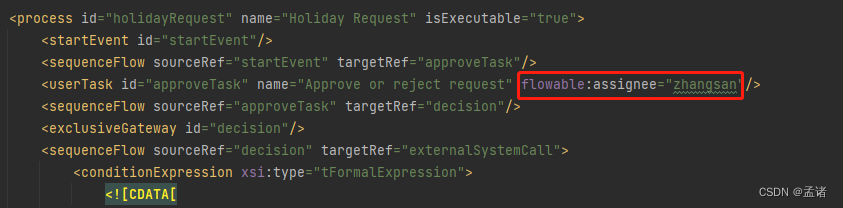
    @Test
    public void testStart() {

        RuntimeService runtimeService = engine.getRuntimeService();
        Map<String, Object> param = new HashMap<>(8);
        param.put("employee", " Zhang San ");
        param.put("days", 3);
        param.put("description", " Ask for leave to go home ");
        //  Start process instance
        ProcessInstance processInstance = runtimeService.startProcessInstanceByKey("holidayRequest", param);
        //  After starting  act_ru_variable  Record parameter information in the table
        System.out.println(processInstance.getName());
    }
Process instance table after process initiation act_hi_procinst
Process task list act_ru_task, adopt proc_inst_id Associated with process instances 
Process execution process act_ru_execution, adopt proc_inst_id Associated with process instances 
Submit the parameter table act_ru_variable, adopt proc_inst_id Associated with process instances , adopt execution_id Associated with the execution process 
1.2.5 Query process tasks
    @Test
    public void testQueryTask() {

        TaskService taskService = engine.getTaskService();
        List<Task> list = taskService.createTaskQuery()
                //  Specify the process type
                .processDefinitionKey("holidayRequest")
                //  Designated handler , Usually used to query my to-do list
                .taskAssignee("zhangsan")
                .list();
        System.out.println(JSONUtil.toJsonPrettyStr(list));
    }
1.2.6 Perform tasks
according to xml File configuration reject process send mail class 
    @Test
    public void testHandleTask() {

        TaskService taskService = engine.getTaskService();
        Map<String, Object> param = new HashMap<>();
        param.put("approved", false);
        //  To complete the task
        taskService.complete("2509", param);
    }
After execution, you will see that the console outputs a reject message
View the process instance table act_hi_procinst
There are process durations 、 Start node 、 The end node
View the process task table act_ru_task 、 Process execution process act_ru_execution And submit the parameter table act_ru_variable Has been emptied
1.2.7 View historical information
After the process is approved , The relevant intermediate data has been cleaned up . If you want to view the process submission record, you need to view the historical information
    @Test
    public void testGetHistory() {

        HistoryService historyService = engine.getHistoryService();
        List<HistoricActivityInstance> list = historyService.createHistoricActivityInstanceQuery().processDefinitionId("holidayRequest:1:3")
                //  Closed process
                .finished()
                //  Sort by end time in reverse order
                .orderByHistoricActivityInstanceEndTime().desc()
                .list();
        for (HistoricActivityInstance instance: list) {

            System.out.println(JSONUtil.toJsonStr(instance));
        }
    }
Historical execution record table act_hi_actinst
History form parameter table act_hi_varinst
边栏推荐
- VM tools fail in VMware? Install VM tools using Ali image source
- 网狐游戏服务器-房间配置向导-组件属性与基本配置赋值
- Scope and category of C language variables - learning 20
- 中创专利|中国5G标准必要专利达1.8万项,尊重知识产权,共建知识产权强国
- Big sword
- Nat. Comm. | supercomputing +ai: providing navigation for natural product biosynthesis route planning
- Current situation investigation and demand forecast report of global and Chinese phenolic resin market, 2022 Edition
- System.CommandLine选项Option
- Lambda中间操作map
- How to optimize the opening speed of website pages to improve the experience?
猜你喜欢

深度学习100例 | 第41天:语音识别 - PyTorch实现

Nat. Comm. | supercomputing +ai: providing navigation for natural product biosynthesis route planning

be based on. NETCORE development blog project starblog - (11) access statistics

VM tools fail in VMware? Install VM tools using Ali image source
![Is interface automation difficult? Take you from 0 to 1 to get started with interface automation test [0 basic can also understand series]](/img/78/f36cdc53b94dc7da576d114a3eb2a6.png)
Is interface automation difficult? Take you from 0 to 1 to get started with interface automation test [0 basic can also understand series]
System. Commandline option

DevOps落地实践点滴和踩坑记录-(1)

Flink CDC + Hudi 海量数据入湖在顺丰的实践

ROS2之OpenCV基础代码对比foxy~galactic~humble

Visitors push e-commerce express without tossing about personal payment codes
随机推荐
Breadth first search depth first search dynamic programming leetcode topic: delivering information
System. Commandline option
DDD exaggeration, Eric Evans made a bad start
Started with trust and loyal to profession | datapipeline received a thank you letter from Shandong city commercial bank Alliance
Lambda intermediate operation sorted
[node] common methods of path module
Redis advanced - correspondence between object and code base
详解异步任务:函数计算的任务触发去重
[answer] in the business sequence diagram of XX shopping mall, is it drawn as a business executor (bank) or a business entity (banking system)
Some suggestions on writing code to reproduce the paper!
Lambda create stream
C language pointer - learning 22
Tencent programmer roast: 1kW real estate +1kw stock +300w cash, ready to retire at the age of 35
Introduction to semantic vector retrieval
Equipment encryption of industrial control security
1、 Getting started with flutter learn to write a simple client
[case] building a universal data lake for Fuguo fund based on star ring technology data cloud platform TDC
Hertzbeat v1.0 beta. 4 release, easy-to-use and friendly monitoring alarm system
Is interface automation difficult? Take you from 0 to 1 to get started with interface automation test [0 basic can also understand series]
How to strengthen the prevention and control of major safety risks for chemical and dangerous goods enterprises in flood season