当前位置:网站首页>The 678th operation
The 678th operation
2022-07-28 20:52:00 【Domineering】
2. Create the following users 、 Groups and group membership :
1. Create a sysmgrs Group
groupadd sysmgrs
2. Create user natasha At the same time specified sysmgrs As natasha Additional groups of
useradd -g sysmgrs natasha
3. Create user harry At the same time specified sysmgrs As harry Additional groups of
useradd -g sysmgrs harry
4. Create user sarah Appoint shell The type is /sbin/false( You do not have access to interactive on the system shell)
It's not sysmgrs Members of
useradd sarah -s /sbin/false
5. Set up natasha 、 harry and sarah All of your passwords are 123
echo “123” | passwd --stdin natasha
ech0 “123”| passwd --sdtin harry
ech0 “123”| passwd --sdtin sarah
6. Create user lockuser, And specify home directory as /home/lock, Then lock the user
useradd -d /home/lock lockuser
passwd -l lovkuser
7. Create user limituser, gid by 1555,userid by 1666, Let its password in 10 Expires in days
groupomd -g 1555 sysmgrs
useradd -g "1555 " -u 1666 -f 10 limituser
8. Unlock lockuser, And set that the password must be changed the next time you log in
passwd -u lockuser
9. Give Way natasha With modification harry Password permissions (sudo)
visudo
Host_Alias RHCSA=lwz
User_Alias USER11=natasha
Cmnd_Alias CHPASS=/usr/bin/passwd harry
USER RCHSA=(root) CHPASS
su -natasha
sudo passwd harry
- Create user testuser And set the password , Change the user name to normaluser
usermod -l normaluser testuser
1. Delete lockuser
user lockuser
4 create a file , And give authority 611( Two ways , A kind of guoa, A kind of nnn)
touch file
ls -l file
chmod g=x file
chmod 0=x file
chmod 611 file
5. Create directory , And give authority 755( Two ways , A kind of guoa, A kind of nnn)
chmod u=rwx file111
chmod g=rx file111
chmod 0=rx file111
chomd 7555 file111
6. create a file , And modify the owner and group of the file to other users
chown other file
chown :other file
7. Set up suid, Set for file suid( Two ways u+s and nnnn) The way
chomd u+s file
chmod 4 file
8. Set up sgid, Set for file sgid( Two ways g+s and nnnn) The way
chmod g+s file
chmod 2 file
9. Set up sbit, Set for directory sbit( Two ways o+t and nnnn) The way
chmod o+t file
chmod 1 file
10. create a file , Query file acl
Set for file acl The user is testuser1 Permission is rwx
Set for file acl Of mask: Permission is r-x
setfacl -m u:testuser1:rwx file
getfacl file1
File settings acl Of mask: Permission bits r-x
setfacl -m m:r-x file1
getfacl file1
1.linux Type of user in
linux Type of user group in
linux Which file stores user information in ? And what do the fields mean
/etc/passwd
Each line defines a user account information , Each line by 7 Fields make up , Use... Between fields “:” Separate , The format is as follows :
Account name : password :UID:GID: The personal data : Home directory :Shell
linux What is the file in which the group information is stored ? And what do the fields mean ?
/etc/shadow
Each line defines a user information , For each field in the row “:” separate , The format is as follows :
Login name : encrypted password : Last modification time : Minimum time interval : Maximum time interval : Warning time : Inactive time : Failure time : sign
The seventh assignment
1. Use rpm install zsh( Ignore dependency installation )
rpm -i --nodeps zsh-5.5.1-9.el8.x86_64.rpm
Check if... Is installed
rpm -qa | grep zsh
zsh-5.5.1-9.el8.x86_64
uninstall zsh rpm -e zsh
Query all installed software rpm -aq
Inquire about date Command package
whereis date
rpm -qf /sur/bin/date
Query not installed zsh File information for
rpm -ql zsh
package zsh is not installed
2.yum Local source configuration
yum Network source configuration
install httpd Software
1 Write configuration
vim /etc/yum.repos.d/base.repo
[BaseOS]
name=rhel-BaseOS
baseurl=file:///mnt/BaseOS
gpgcheck=0
enable=1
[AppStream]
name=rhel-AppStream
baseurl=file:///mnt/AppStream
gpgcheck=0
enable=1 Warehouse
vim /etc/fstab Permanently mount
/dev/sr0 /mnt iso9660 defaults 0 0
mount -a Mount effective
yum install httpd
see vim Which package does the command belong to
[[email protected] ~]# whereis vim
vim: /usr/bin/vim /usr/share/vim /usr/share/man/man1/vim.1.gz
[[email protected] ~]# rpm -qf /usr/bin/vim
vim-enhanced-7.4.629-8.el7_9.x86_64
————————————————
yum uninstall httpd
yum remove httpd
Clean cache
Recreate cache
[[email protected] ~]# yum clean all
[[email protected] ~]# yum makecache
install postgresql Version in the module 13
3. Source code installation : httpd
[[email protected] ~]# yum groups mark install “ development tool ” // You can use yum grouplist see
[[email protected] ~]# groupadd -r apache // establish apache Group
[[email protected] ~]# useradd -r -M -s /sbin/nologin -g apache apache // establish apache user
[[email protected] ~]# yum -y install openssl-devel pcre-devel expat-devel libtool
————————————————
①apr-1.6.5
②apr-util-1.6.1
③httpd-2.4.37
apachectl start
# systemctl stop firewalld
setenforce 0
4. see root User processes with terminals ps -u root
Show processes without terminals “ps -x”
Show all processes “ps -e”
see 1 In minutes CPU Time ago 10 The process of ( Use top command )
ps -aux" Show all processes including other users
The eighth assignment
1. Use fdisk Yes /dev/nvme0n1 Partition the remaining space
fdisk /dev/nvme0n1
2. Add a new disk to use gdisk, Set up gpt Partition table , New partition 
gdisk /dev/nvme0n2
3. Use parted Add a partition to the newly added disk ( Interactive )
parted /dev/nvme0n2
4. Use parted Yes /dev/nvme0n1 New zoning ( imperative )
parted /dev/nvme0n2 mkpart 3rdPT 632M 932M
lsblk
5. Pick any partition , Format and mount ( To mount temporarily )
mkfs -t xfs /dev/nvme0n2p1
mount
cd
mkdir /date
mount /dev/nvme0n2p1 /date
cd /date
touch file{1…3}.txt
ls
ll
6. Pick another partition , Mount )
First, format the file system
mkfs -t xfs /dev/nvme0n2p2
To mount permanently, you need to enter /etc/fstab
vim /etc/fstab
reboot After restarting, you can see that it has been automatically mounted
df -h
边栏推荐
- leetcode:2141. 同时运行 N 台电脑的最长时间【最值考虑二分】
- About the title of linking to other pages
- Dynamic planning: code summary of knapsack problem template
- Cartoon JS shooting game source code
- #yyds干货盘点# 面试必刷TOP101:链表中的节点每k个一组翻转
- Classes and objects (medium)
- UE4 3dui widget translucent rendering blur and ghosting problems
- [C语言刷题篇]链表运用讲解
- “当你不再是程序员,很多事会脱离掌控”—— 对话全球最大独立开源公司SUSE CTO...
- Unity makes prefabricated bodies with one key and modifies prefabricated bodies with one key
猜你喜欢

PXE_ KS unattended system

Want to draw a picture that belongs to you? AI painting, you can also
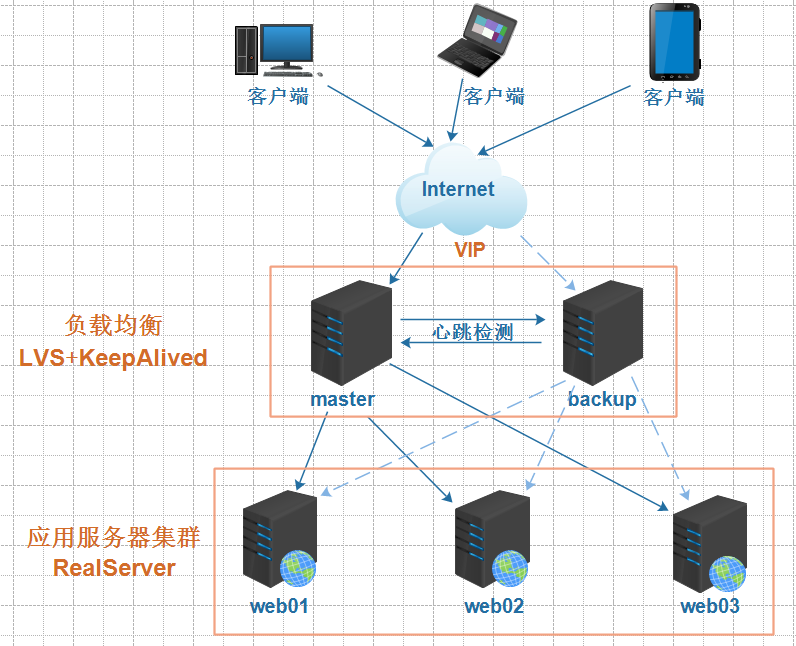
Lvs+keepalived high availability deployment practical application

Teach you unity scene switching progress bar production hand in hand

激光slam:LeGO-LOAM---代码编译安装与gazebo测试

How to balance security and performance in SQL?

Redis 3.0源码分析-数据结构与对象 SDS LIST DICT
![[server data recovery] HP StorageWorks series storage RAID5 two disk failure offline data recovery case](/img/7c/d5643d27c2ca7a7aed4eb02fd81042.jpg)
[server data recovery] HP StorageWorks series storage RAID5 two disk failure offline data recovery case

UE4 3dui widget translucent rendering blur and ghosting problems
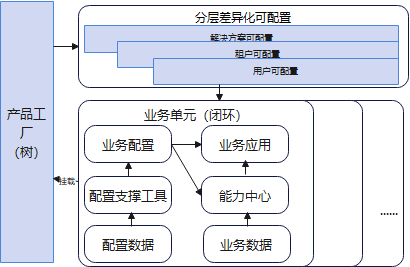
研发效能的思考总结
随机推荐
激光slam:LeGO-LOAM---代码编译安装与gazebo测试
What is data center? What value does the data center bring_ Light spot technology
Redis 3.0源码分析-数据结构与对象 SDS LIST DICT
How do we do full link grayscale on the database?
System. ArgumentException: Object of type ‘System. Int64‘ cannot be converted to type ‘System.Int32‘
EasyNLP中文文图生成模型带你秒变艺术家
"When you are no longer a programmer, many things will get out of control" -- talk to SUSE CTO, the world's largest independent open source company
Sorting out problems in interface endpoint testing practice using Supertest
太空射击第09课:精灵动画
微信小程序的分包加载
SQL audit tool self introduction owls
UE4 3dui widget translucent rendering blur and ghosting problems
Space shooting lesson 09: elf animation
Use of DDR3 (axi4) in Xilinx vivado (5) board test
7/27 training log (bit operation + suffix array)
js可拖拽alert弹窗插件
不懂就问,快速成为容器服务进阶玩家!
太空游戏第12课: 盾牌
Lvs+keepalived high availability deployment practical application
Dynamic planning: code summary of knapsack problem template