当前位置:网站首页>【微信小程序】本地服务页面案例实现
【微信小程序】本地服务页面案例实现
2022-08-02 08:48:00 【苏凉.py】
通过往期的学习,我们现在也可以进行简单的小程序页面的制作了。
本期案例:本地服务页面实现:
效果: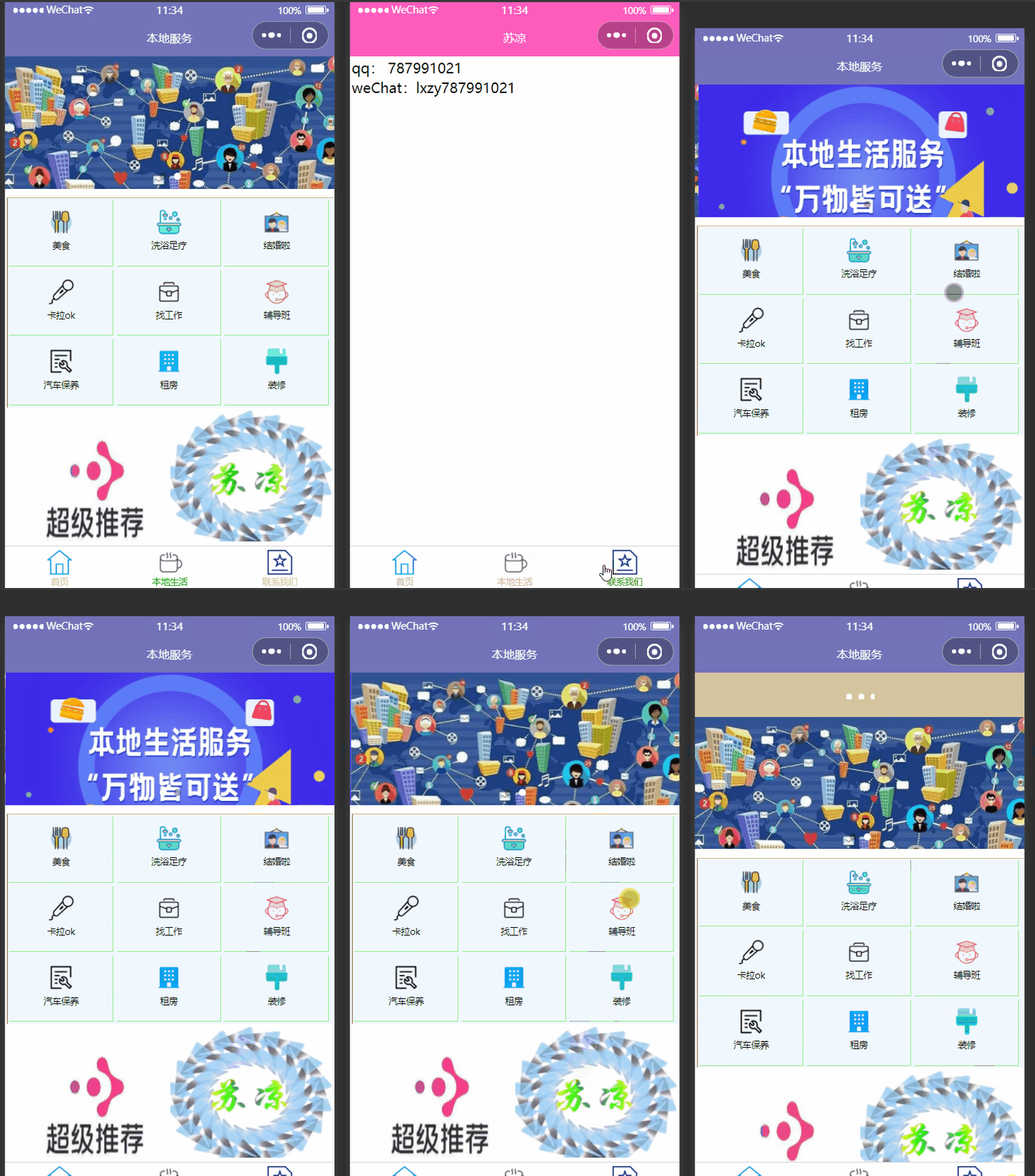
配置窗口
localLife.json:
{

    "usingComponents": {
    },
    "navigationBarTitleText": "本地服务",
    "navigationBarBackgroundColor": "#7373B9"
}
页面文档
localLife.wxml:
<!--pages/localLife/localLife.wxml-->
<!-- <text>pages/localLife/localLife.wxml</text> -->

<!-- 设置轮播图 -->

<swiper indicator-dots="true" indicator-active-color="white" autoplay="true" interval="2000" circular="true">
<swiper-item><image src="https://gimg2.baidu.com/image_search/src=http%3A%2F%2Fpic1.zhimg.com%2Fv2-5edb299393da36aeaca9ab547e872881_1440w.jpg%3Fsource%3D172ae18b&refer=http%3A%2F%2Fpic1.zhimg.com&app=2002&size=f9999,10000&q=a80&n=0&g=0n&fmt=auto?sec=1661670556&t=47d094b7b75f143d5298e64105c8945a" mode="widthFix" ></image></swiper-item>
    <swiper-item>
        <image src="https://gimg2.baidu.com/image_search/src=http%3A%2F%2Fpic3.zhimg.com%2Fv2-3e2fcd13556e324e298e01745968473a_b.jpg&refer=http%3A%2F%2Fpic3.zhimg.com&app=2002&size=f9999,10000&q=a80&n=0&g=0n&fmt=auto?sec=1661670556&t=fdacfc168736e619e2c6e0080b7c7ac1" mode="widthFix"></image>
    </swiper-item>
</swiper>


<!-- 九宫格 -->
<view class="view1">
    <view>
    <image src="/image/美食.png" mode="heightFix"></image>
    <text>美食</text>
    </view>

    <view>
    <image src="/image/洗浴.png"></image>
    <text>洗浴足疗</text>
    </view>
    <view>
    <image src="/image/结婚照.png"></image>
    <text>结婚啦</text>
    </view>
    <view>
    <image src="/image/卡拉OK.png"></image>
    <text>卡拉ok</text>
    </view>
    <view>
    <image src="/image/找工作.png"></image>
    <text>找工作</text>
    </view>
    <view>
    <image src="/image/名师辅导.png"></image>
    <text>辅导班</text>
    </view>
    <view>
    <image src="/image/汽车保养维修申请.png"></image>
    <text>汽车保养</text>
    </view>
    <view>
    <image src="/image/icon/公租房.png"></image>
    <text>租房</text>
    </view>
    <view>
    <image src="/image/装修.png"></image>
    <text>装修</text>
    </view>
</view>

<view class="img_set">
    <image src="/image/商家推荐.png"></image>
    <image src="/image/1581745172948.jpeg"></image>
</view>
页面样式
localLife.wxss:
/* pages/localLife/localLife.wxss */
swiper{

    margin-bottom: 20rpx;
}
swiper-item image{

    width: 100%;
}

.view1{

    display:flex;
    /* width: 33.3%; */
    flex-wrap: wrap;
    background-color: aliceblue;
    border-left: rgb(134, 100, 54) solid 1px;
    border-top: tan solid 1px;
}
.view1 view{

    width: 32%;
    height: 150rpx;
    display: flex;
    flex-direction: column;
    align-items: center;
    /* margin-top: 20rpx; */
    border-right: solid lightgreen 1rpx;
    border-bottom: solid lightgreen 1rpx;
    box-sizing: border-box;
}
.view1 view image{

    margin-top: 20rpx;
    width: 60rpx;
    height: 60rpx;
}

.view1 view text{

     margin-top:10rpx ;
    font-size: 20rpx;
}
.img_set image{

    width: 50%;
    height: 300rpx;
}
全局配置
app.json:
{

  "pages":[
    "pages/localLife/localLife",
    "pages/suliang/suliang",
    "pages/index/index",
    "pages/logs/logs",
    "pages/callOus/callOus"
  ],
  "window":{

    "backgroundTextStyle":"light",
    "navigationBarBackgroundColor":"#fe5cbd",
    "navigationBarTitleText": "苏凉",
    "navigationBarTextStyle":"white",
    "enablePullDownRefresh": true,
    "backgroundColor": "#d5c59f",
    "onReachBottomDistance": 30
  },
  "tabBar": {

      "color": "#d5c59f",
      "list": [
        {

          "pagePath": "pages/index/index",
          "text": "首页",
          "iconPath": "/image/首页.png",
          "selectedIconPath": "/image/首页.png"
      },
        {

            "pagePath": "pages/localLife/localLife",
            "text": "本地生活",
            "iconPath": "/image/本地生活.png",
            "selectedIconPath": "/image/本地生活.png"
        } ,
      {

          "pagePath": "pages/callOus/callOus",
          "text": "联系我们",
          "iconPath": "/image/专题目录.png",
          "selectedIconPath": "/image/专题目录.png"
      }]
  },
  "style": "v2",
  "sitemapLocation": "sitemap.json"
}
边栏推荐
猜你喜欢




随机推荐
PostgreSQL learning summary (11) - PostgreSQL commonly used high-availability cluster solutions
postman使用方法
OneinStack多版本PHP共存
为什么都推荐使用wordpress, 而不是 phpcms 这些国内的CMS呢?
线程池的使用及ThreadPoolExecutor源码分析
Flink 监控指南 被动拉取 Rest API
Technology Cloud Report: To realize the metaverse, NVIDIA starts from building an infrastructure platform
二分类和多分类
The custom table form
如何做好项目管理
【Flink 问题】Flink 如何提交轻量jar包 依赖该如何存放 会遇到哪些问题
Pycharm (1) the basic use of tutorial
How to use postman
USACO美国信息学奥赛竞赛12月份开赛,中国学生备赛指南
膜拜,Alibaba分布式系统开发与核心原理解析手册
spark:页面单跳转换率统计(案例)
向量组的线性相关性
【特别提醒】订阅此专栏的用户请先阅读本文再决定是否需要购买此专栏
JSP页面中page指令contentPage/pageEncoding具有什么功能呢?
PyQt5(一) PyQt5安装及配置,从文件夹读取图片并显示,模拟生成素描图像