当前位置:网站首页>spark:页面单跳转换率统计(案例)
spark:页面单跳转换率统计(案例)
2022-08-02 08:28:00 【一个人的牛牛】
目录
介绍
如果用户在一次Session过程中访问的页面路径为3,9,10,那么页面3跳到页面9叫一次单跳,单跳转化率就是统计页面点击的概率。
如:计算3-9的单跳转化率,先获取符合条件的Session对于页面3的访问次数A,然后获取符合条件的Session中访问页面3又接着访问页面9的次数B,那么 B/A 就是3-9的页面单跳转化率。
根据这个指标可以去尝试分析整个网站,产品,各个页面的表现,及时作出更改。
数据准备
数据说明:

时间_用户ID_sessionID_页面ID_动作时间_搜索_点击(品类ID、产品ID)_下单(品类ID、产品ID)_支付(品类ID、产品ID)_城市ID
可以根据数据格式模拟生成数据,也可以在网站爬!
没有数据可以私聊我。
代码实现
import org.apache.spark.{SparkConf, SparkContext}

object TopThree {
  def main(args: Array[String]): Unit = {

    //TODO 创建环境
    val sparkConf = new SparkConf().setMaster("local[*]").setAppName("TOP")
    val sc = new SparkContext(sparkConf)

    //TODO 单跳转换率
    //读取日志文件
    val rdd = sc.textFile("datas/action.txt")

    val dataRDD = rdd.map(
      action => {
        val datas = action.split("_")
        UserVisitAction(
          datas(0),
          datas(1).toLong,
          datas(2),
          datas(3).toLong,
          datas(4),
          datas(5),
          datas(6).toLong,
          datas(7).toLong,
          datas(8),
          datas(9),
          datas(10),
          datas(11),
          datas(12).toLong
        )
      }
    )
    dataRDD.cache()

    //TODO 计算分母
    val pageCount = dataRDD.map(
      action => {
        (action.page_id, 1L)
      }
    ).reduceByKey(_ + _).collect().toMap
    //println(pageCount)

    //TODO 计算分子
    //根据session分组
    val sessionRDD = dataRDD.groupBy(_.session_id)
    //根据时间排序
    val mapRDD = sessionRDD.mapValues(
      iter => {
        val sortList = iter.toList.sortBy(_.action_time)
        val flowIds = sortList.map(_.page_id)
        val pageflowIds = flowIds.zip(flowIds.tail)
        pageflowIds.map(
          t => {
            (t, 1)
          }
        )
      }
    )
    val flatRDD = mapRDD.map(_._2).flatMap(list => list)
    val datacountRDD = flatRDD.reduceByKey(_ + _)
    //计算:分子/分母
    datacountRDD.foreach{
      case ((pageid1,pageid2),sum) => {
        val lon = pageCount.getOrElse(pageid1, 0L)

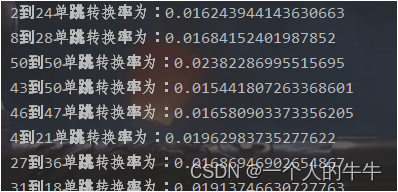
        println(s"${pageid1}到${pageid2}单跳转换率为:" + (sum.toDouble/lon))
      }
    }
    //TODO 关闭环境
    sc.stop()
  }
  //用户访问动作表
  case class UserVisitAction(
                              date: String,//日期
                              user_id: Long,//用户ID
                              session_id: String,//SessionID
                              page_id: Long,//页面ID
                              action_time: String,//动作的时间
                              search_keyword: String,//搜索关键词
                              click_category_id: Long,//商品品类ID
                              click_product_id: Long,//商品ID
                              order_category_ids: String,//订单中所有品类的ID集合
                              order_product_ids: String,//订单中所有商品的ID集合
                              pay_category_ids: String,//支付中所有品类的ID集合
                              pay_product_ids: String,//支付中所有商品的ID集合
                              city_id: Long//城市ID
                            )
}
本文为学习笔记的记录
边栏推荐
- R语言plotly可视化:plotly可视化回归模型实际值和回归预测值的散点图分析回归模型的预测效能、一个好的模型大部分的散点在对角线附近(predicted vs actual)
- PyQt5(一) PyQt5安装及配置,从文件夹读取图片并显示,模拟生成素描图像
- 类和对象【下】
- MySQL Workbench 安装及使用
- 软件测试技术之解析图灵测试离我们还有多远
- [OC学习笔记]ARC与引用计数
- High imitation [Huawei consumer business official website] and wonderful animation analysis: practice embedding JS code in low-code platform
- AI目标分割能力,无需绿幕即可实现快速视频抠图
- Redis分布式锁入门
- tf.where使用
猜你喜欢

UVM信息服务机制
![52. [Bool type input any non-0 value is not 1 version reason]](/img/73/c4e0048c504e0df073a6d07cfec3ab.png)
52. [Bool type input any non-0 value is not 1 version reason]
测试时大量TIME_WAIT

了解下C# 不安全代码
HCIP笔记十六天
Biotinyl Cystamine | CAS: 128915-82-2 | biotin cysteamine

pnpm:简介
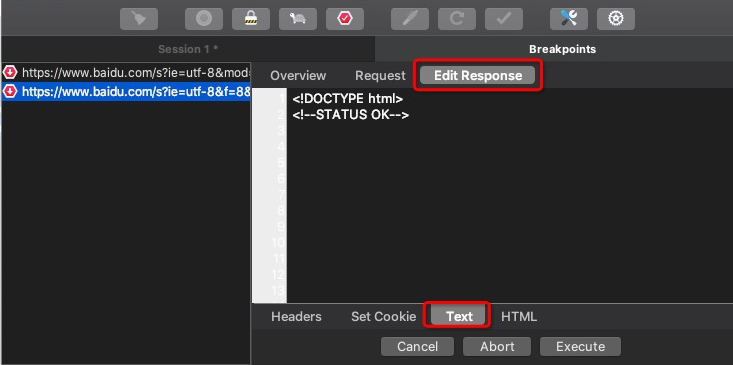
The packet capture tool Charles modifies the Response step
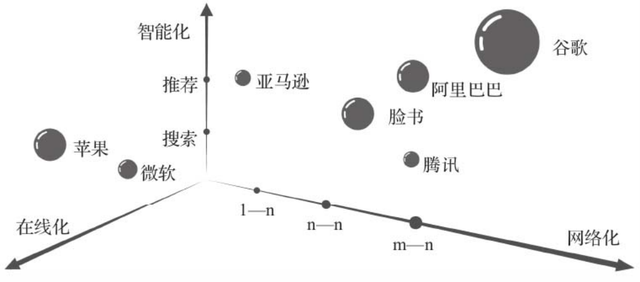
商业智能平台BI 商业智能分析平台 如何选择合适的商业智能平台BI

PyCharm usage tutorial (detailed version - graphic and text combination)
随机推荐
二分类和多分类
【特别提醒】订阅此专栏的用户请先阅读本文再决定是否需要购买此专栏
Jenkins--基础--6.3--Pipeline--语法--脚本式
Postman download localization of installation and use
C语言_指针
主流监控系统工具选型及落地场景参考
JSP页面中page指令有哪些属性及方法可使用呢?
Scala类型转换
WebGPU 导入[1] - 入门常见问题与个人分享
Installation and use of pnpm
商业智能平台BI 商业智能分析平台 如何选择合适的商业智能平台BI
HCIP笔记第十三天
PyQt5 (a) PyQt5 installation and configuration, read from the folder and display images, simulation to generate the sketch image
Biotinyl Cystamine | CAS: 128915-82-2 | biotin cysteamine
Redisson报异常attempt to unlock lock, not locked by current thread by node id解决方案
BGP solves routing black hole through MPLS
redis-desktop-manager下载安装
Wang Xuegang - compiled shipment line file
下一个排列
王学岗-编译出运行的文件