当前位置:网站首页>Unity object path query tool
Unity object path query tool
2022-07-28 20:37:00 【_ Mr orange】
Unity Object path query tool
List of articles
Preface
Hello everyone , I'm an orange , What I bring to you today is Unity Tutorial of scene switching progress bar .
*,*◦*,*◦*,*◦*,-------------------- Gorgeous dividing line --------------------*◦*,*◦*,*◦*,*◦*,*◦
Recently, there are some novice friends , Come and consult oranges , utilize transform.Find perhaps GameObject.Find Inquire about Hierarchy Objects in the window , Empty pointer , The little friends are very confused , It's right , Why did you make a mistake ?
After several inquiries , It turned out to be discovery , Query path , Misspelled a letter , I'm thinking of Have time to write an object path query tool , Easy to use , Also let novice Xiaobai , Avoid low-level mistakes , Improve study or work efficiency .
Tips : The following is the main body of this article , The following cases can be used for reference
One 、 Introduction to the use of tools
stay Unity New China Editor Folder , There may be a little friend's question here ? Why create a new Editor Folder ?
The following is true. Editor Some introductions of folders :
Editor
Edilor The folder can be in the root directory , It can also be in subdirectories , As long as the name is Editor Can . For example, catalog :hox.sooEditor and /Editor It's the same , No matter how many are called Editor Any folder in the library can .Edlior All resource files or script files placed below will not be typed into the release package , And scripts can only be used when editing . Generally, some tool class scripts are placed here , Or some of them for editing DLL. For example, we are now going to make a similar skill editor , So it's better to put the editor's code here , Because we only need the files generated by the editor when we actually run , Without the core code of the editor .
My understanding is that , The scripts in the folder are only in Unity Run... In the editor , Will not be beaten into the bag , Nor can it be used in the bag .
Two 、 Code
1. Copy code
The code is as follows : Remember the script name of the new script Be consistent with mine !
using UnityEditor;
using UnityEngine;

public class ObjPathCopyTool : ScriptableObject
{

    [MenuItem("Custom/ Copy the path of the selected object  %Q")]// Custom shortcut
    static void CopyPath()
    {

        Object[] objs = Selection.objects;
        if (objs.Length < 1)
            return;

        GameObject obj = objs[0] as GameObject;
        if (!obj)
            return;

        string path = obj.name;
        Transform parent = obj.transform.parent;
        while (parent)
        {

            path = string.Format("{0}/{1}", parent.name, path);
            parent = parent.parent;
        }

        Debug.Log(path);
        CopyString(path);
    }

    // Assign a string to the clipboard
    static void CopyString(string str)
    {

        TextEditor te = new TextEditor();
        te.text = str;
        te.SelectAll();
        te.Copy();
    }
}
2. Put the code in Editor Folder

After placing , wait for Unity Loading finished .
This is the time , There will be one more menu bar Custom
3、 ... and 、 Use
stay Hierarchy Window , Choose any object .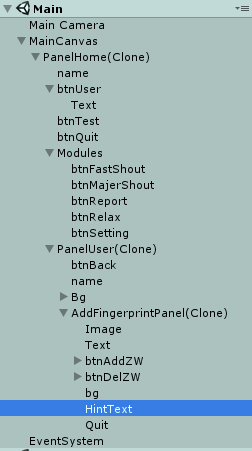
I chose an object with many levels .
Then press Ctrl+Q Or you can go to the menu bar and click Custom The button below is also ok .
The system will automatically print out the path , Then copy the path to find it
If it's too much trouble , You can connect to download https://download.csdn.net/download/weixin_45375968/85168252
Four 、 summary
It's over here , That's all orange will talk about today , This article only briefly introduces Editor What is a folder , Using gadgets , Quickly get Hierarchy The path of the object in the window , Let's find the object name more quickly , So as to improve learning or work efficiency .
5、 ... and 、 Conclusion
Inferior to silicon step , A thousand miles .
Don't product the little stream , Beyond into the sea .
Make a little progress every day Thank you for watching .
Feel helpful to yourself , Welcome to your attention 、 Collection 、 forward ! See you next time
边栏推荐
猜你喜欢

One article makes you understand what typescript is

CM4 development cross compilation tool chain production

太空射击第13课: 爆炸效果

Related concepts of multitasking programming

js飞入js特效弹窗登录框
![[C language] comprehensively analyze the pointer and sort out the pointer knowledge points](/img/71/f4138b68c27d6447fbd5b5e0762929.png)
[C language] comprehensively analyze the pointer and sort out the pointer knowledge points

leetcode:2141. 同时运行 N 台电脑的最长时间【最值考虑二分】

卡通js射击小游戏源码

Raspberry pie CM4 -- using metartc3.0 to integrate ffmpeg to realize webrtc push-pull streaming

Merge sort template
随机推荐
MySQL startup error 1607 unexpected process termination
太空射击第13课: 爆炸效果
Anaconda creation environment
Nocturnal simulator settings agent cannot be saved
Pytorch model parameter assignment - tensor.copy_ () method
Raspberry pie 4B parsing PWM
Leetcode-297 serialization and deserialization of binary tree
js图表散点图例子
弹出模态框
[fasttext -- Summary notes]
LVS load balancing cluster
Explain RESNET residual network in detail
Read JSON configuration file to realize data-driven testing
Extract China map from global.Nc data and calculate regional CO2 value based on acgis
微信公众号授权登录后报redirect_uri参数错误的问题
Raspberry pie creation self start service
C语言数据 3(1)
Shanghai Jiaotong University joined hands with Taobao to set up a media computing laboratory: promoting the development of key technologies such as video super score
数据挖掘(数据预处理篇)--笔记
Related concepts of multitasking programming