当前位置:网站首页>SkiaSharp 之 WPF 自绘 拖曳小球(案例版)
SkiaSharp 之 WPF 自绘 拖曳小球(案例版)
2022-07-28 19:41:00 【蓝创精英团队】
感谢各位大佬和粉丝的厚爱和关心( 催更),我会再接再厉的,其实这也是督促自己的一种方式,非常感谢。
刚写了一篇万字长文,自己也休养生息(低调发育)了一段时间,接下来来几个小案例。
拖曳小球
WPF的拖曳效果,基本配置一下,就可以了,但是自绘的话,就得自己控制,按键点击,按键移动和按键松开的事件,与其配合达到目的。
这个效果实现了,其实也变相的实现了WPF里的拖动效果,这个效果用着还是很方便的。
但是代码,确十分的简单。
Wpf 和 SkiaSharp
新建一个WPF项目,然后,Nuget包即可
要添加Nuget包
Install-Package SkiaSharp.Views.WPF -Version 2.88.0
其中核心逻辑是这部分,会以我设置的60FPS来刷新当前的画板。
skContainer.PaintSurface += SkContainer_PaintSurface;
_ = Task.Run(() =>
{

    while (true)
    {

        try
        {

            Dispatcher.Invoke(() =>
            {

                skContainer.InvalidateVisual();
            });
            _ = SpinWait.SpinUntil(() => false, 1000 / 60);//每秒60帧
        }
        catch
        {

            break;
        }
    }
});
实现代码的 鼠标按下,移动,鼠标松开
先对SkiaSharp对象,增加相关事件
    skContainer.MouseDown += SkContainer_MouseDown;
    skContainer.MouseUp += SkContainer_MouseUp;
    skContainer.MouseMove += SkContainer_MouseMove;
然后增加相关事件处理代码,我这边都统一处理了.
private void SkContainer_MouseDown(object sender, MouseButtonEventArgs e)
{

    var cur = e.GetPosition(sender as IInputElement);
    drawClock.MouseDown(new SKPoint((float)cur.X, (float)cur.Y), true);
}
private void SkContainer_MouseUp(object sender, MouseEventArgs e)
{

    var cur = e.GetPosition(sender as IInputElement);
    drawClock.MouseDown(new SKPoint((float)cur.X, (float)cur.Y), false);
}
private void SkContainer_MouseMove(object sender, MouseEventArgs e)
{

    var cur = e.GetPosition(sender as IInputElement);
    drawClock.MouseMove(new SKPoint((float)cur.X, (float)cur.Y));
}
拖曳核心类
/// <summary>
/// 拖曳
/// </summary>
public class Drag
{

    public SKPoint centerPoint;
    public int Radius = 0;
    private bool Pressed = false;
    private bool CirclePressend = false;
    private SKPoint sKPoint = SKPoint.Empty;
    private SKPoint CirclePoint = SKPoint.Empty;
    private SKCanvas canvas;
    private float dx = 0;
    private float dy = 0;
    /// <summary>
    /// 渲染
    /// </summary>
    public void Render(SKCanvas canvas, SKTypeface Font, int Width, int Height)
    {

        this.canvas = canvas;
        centerPoint = new SKPoint(Width / 2, Height / 2);
        this.Radius = 40;
        canvas.Clear(SKColors.White);
        if (CirclePoint.IsEmpty)
        {

            CirclePoint = new SKPoint(centerPoint.X, centerPoint.Y);
        }
        if (CirclePressend)
        {

            CirclePoint = new SKPoint(sKPoint.X - dx, sKPoint.Y - dy);
            DrawCircle(this.canvas, CirclePoint);
        }
        else
        {

            DrawCircle(this.canvas, CirclePoint);
        }

        using var paint = new SKPaint
        {

            Color = SKColors.Black,
            IsAntialias = true,
            Typeface = Font,
            TextSize = 24
        };
        var msg = $"X:{
       sKPoint.X} Y:{
      sKPoint.Y} Pressed:{
      Pressed} CirclePressend:{
      CirclePressend}";
        canvas.DrawText(msg, 0, 30, paint);
    }
    public void MouseMove(SKPoint sKPoint)
    {

        this.sKPoint = sKPoint;
        if (CirclePressend)//按下,就开始拖动
        {

            CirclePoint = sKPoint;
        }
    }
    public void MouseDown(SKPoint sKPoint, bool Pressed)
    {

        this.sKPoint = sKPoint;
        this.Pressed = Pressed;
        if (this.Pressed)
        {

            this.CirclePressend = CheckPoint(sKPoint, CirclePoint);
            if (this.CirclePressend)
            {

                dx = sKPoint.X - CirclePoint.X;
                dy = sKPoint.Y - CirclePoint.Y;
            }
        }
        else
        {

            this.CirclePressend = false;
        }
    }
    public bool CheckPoint(SKPoint sKPoint, SKPoint CirclePoint)
    {

        var d = Math.Sqrt(Math.Pow(sKPoint.X - CirclePoint.X, 2) + Math.Pow(sKPoint.Y - CirclePoint.Y, 2));
        return this.Radius >= d;
    }
    /// <summary>
    /// 画一个圆
    /// </summary>
    public void DrawCircle(SKCanvas canvas, SKPoint sKPoint)
    {

        using var paint = new SKPaint
        {

            Color = SKColors.Blue,
            Style = SKPaintStyle.Fill,
            IsAntialias = true,
            StrokeWidth = 2
        };
        canvas.DrawCircle(sKPoint.X, sKPoint.Y, Radius, paint);
    }
}
效果如下:
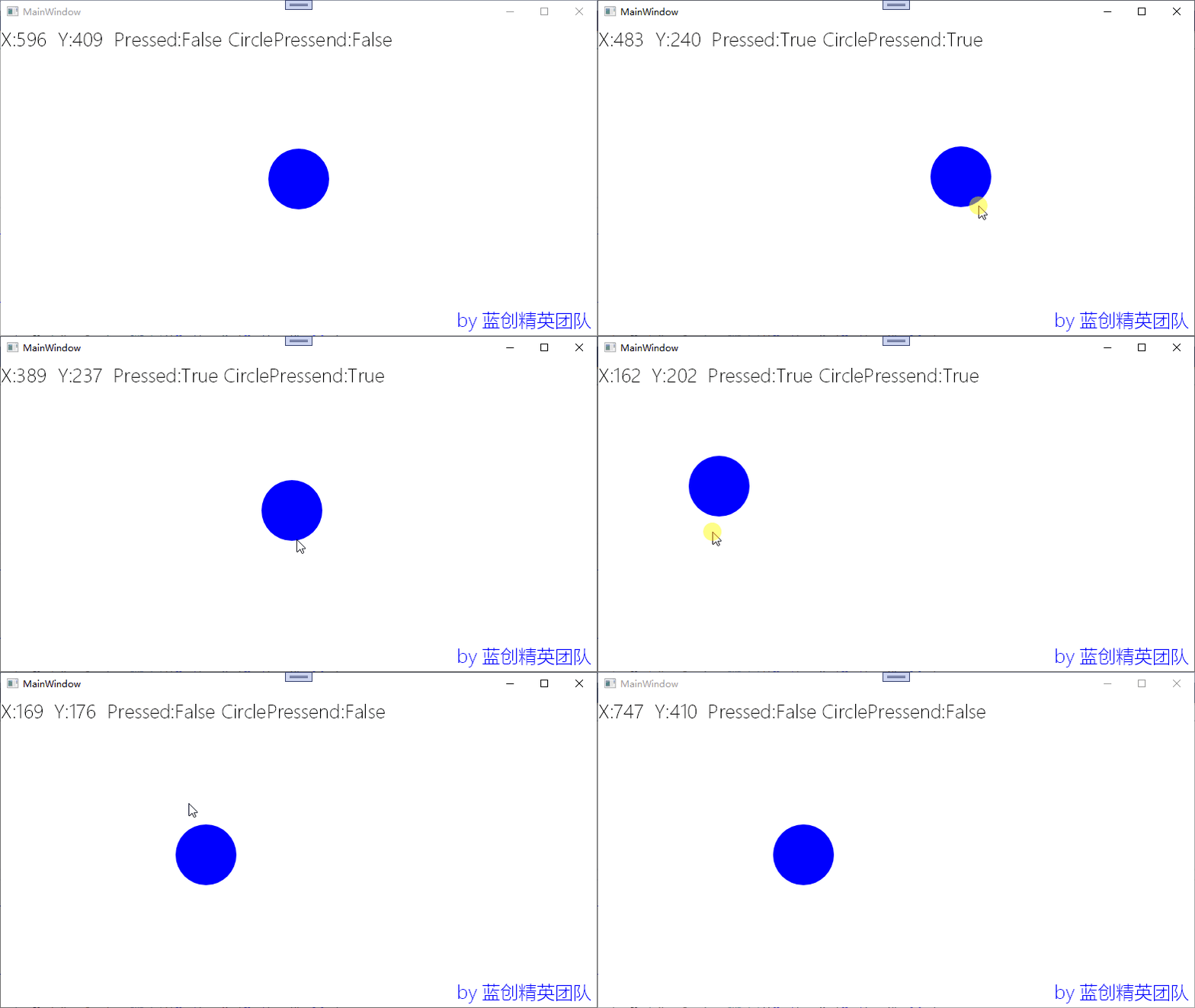
我可以点的球的边边哦,这也是一个小技巧,点到球哪里,停止的时候,鼠标还在那个位置,是不是有点像拖动窗体的感觉了。
总结
以前对拖曳总是很好奇,一直想是如何实现的,现在自己也自己从头到尾的实现了,那么,它就是已知的,这就是可以写出来的进步,每天都应该有一点这样的进步。
代码地址
https://github.com/kesshei/WPFSkiaDragDemo.git
https://gitee.com/kesshei/WPFSkiaDragDemo.git
阅
一键三连呦!,感谢大佬的支持,您的支持就是我的动力!
版权
蓝创精英团队(公众号同名,CSDN同名)
边栏推荐
- 一名在读研究生的自白:我为什么会沉迷于openGauss 社区?
- Ijcai2022 tutorial | dialogue recommendation system
- 在子组件中使用el-date-picker报错
- Mobilevit: challenge the end-to-side overlord of mobilenet
- Dom4J的Bug
- 【TiDB】txt文档导入数据库,这样做真的很高效
- SSM-使用@Async和创建ThreadPoolTaskExecutor线程池
- 又一款装机神器
- Paging function (board)
- Basic operations of unity3d scene production
猜你喜欢

Top level "redis notes", cache avalanche + breakdown + penetration + cluster + distributed lock, Nb

Tested interviewed Zuckerberg: reveal more details of four VR prototypes

Another installation artifact

CVPR 2022 | 网络中批处理归一化估计偏移的深入研究

Confession of a graduate student: why am I addicted to opengauss community?

Deit: attention can also be distilled

【input 身份证号】星号 代替,input 切割成 多个 小格格(类似)

Ctfshow network lost track record (2)

Reading and writing basic data types in protobuf

MySQL sorts out the review content -- with mind map
随机推荐
(PMIC) full and half bridge drive csd95481rwj PDF specification
Mobilevit: challenge the end-to-side overlord of mobilenet
Timing analysis and constraints based on Xilinx
CVPR 2022 | in depth study of batch normalized estimation offset in network
Moco V2: further upgrade of Moco series
Guanghetong & Qualcomm Internet of things technology open day successfully held
Confession of a graduate student: why am I addicted to opengauss community?
Applet container technology improves mobile R & D efficiency by 500%
How to measure software architecture
What functions does MySQL have? Don't look everywhere. Just look at this.
【题目】两数相加
工业通讯领域的总线、协议、规范、接口、数据采集与控制系统
30.学习Highcharts 标签旋转柱形图
4.1 various calling methods of member
九鑫智能正式加入openGauss社区
Reading and writing basic data types in protobuf
上市1个月接连发生两起安全事故,理想L9还理想吗?
Maintenance of delta hot metal detector principle analysis of v5g-jc-r1 laser measurement sensor / detector
牛客打开摄像头几秒后画面消失 | 相机打开画面一闪一闪
【input 身份证号】星号 代替,input 切割成 多个 小格格(类似)