当前位置:网站首页>MySQL quick start instance (no loss)
MySQL quick start instance (no loss)
2022-06-11 16:09:00 【Notes of research bank】
List of articles
- Preface
- Basic query
- The operator
- 9、 Find the student information of the school is Peking University
- 10、 Look for ages greater than 24 Years old user information
- 11、 Find user information for a certain age group
- 12、 Find user information except Fudan University
- 13、 use where Filter null exercises
- 14、 Advanced operator exercises (1)
- 15、 Advanced operator exercises (2)
- 16、Where in and Not in
- 17、 Operators mix
- 18、 View users with Beijing in the school name
- Advanced query
- Multi-table query
- 23、 Answers to user questions of Zhejiang University
- 24、 Count the average number of users who have answered questions in each school
- 25、 Count the average number of questions brushed by users of each difficulty in each school
- 26、 Count the average number of questions brushed by each user
- 27、 Find information about Shandong University or male sex
- 28、 Calculation 25 Number of users aged over and under
- 29、 View user details of different age groups
- 30、 View user details of different age groups
- 31、 Calculate the average next day retention rate of users
- 32、 Count the number of people of each sex
- 33、 Count the number of people of each sex
- 34、 Extract blog URL User name in
- 35、 Find out every school GPA The lowest classmate
Hello, guys , I am brother Zeng, who is still in the process of research , Today, I want to share with you the classic query statements in the database ( The main content is Niuke SQL Introduction )

Preface
A complete SELECT Statements include 6 Sub sentence , In front of them 2 Clauses are indispensable , Other clauses can be omitted .
SELECT  The complete format of the statement is as follows :
SELECT [DISTINCT]  Target column name sequence ----- Columns to view
FROM  Table or view name ------------------ Data sources
[WHERE  Conditional expression ]---------------- Query criteria
[GROUP BY +  Name ] -------------------- Group by
[HAVING +  Group conditional expression ] --------- Grouping conditions
[ORDER BY +  Name  + [ASC|DESC] Sequence ]---- Sort by
Basic query
1、 Query all columns
Check the records of all students
SELECT Student number , full name , Gender , Date of birth , Class number FROM Student list
Equivalent to :SELECT * FROM Student list
Now the operator wants to view all the data in the user information table , Please take out the corresponding results
SELECT * FROM user_profile
2、 Query multiple columns
example 1: Check the student number and name of all students .
SELECT Student number , full name FROM Student list
example 2: Check the student number of all students 、 Course number and grades .
SELECT Student number , Course no. , achievement FROM League tables
Now, the students want to operate the user's equipment id Corresponding age 、 Gender and school data , Please take out the corresponding data
SELECT device_id,gender,age,university FROM user_profile
3、 Query result de duplication
Eliminate records with the same value
example 4. Find out which students have taken the course in the grade sheet , Students' student numbers are required to be listed .
SELECT Student number FROM League tables
There are duplicate lines in the result .
use DISTINCT keyword You can remove duplicate lines from the results .
DISTINCT Keywords in SELECT Behind the word 、 The front of the target column name sequence .
SELECT DISTINCT Student number FROM League tables
Now the operation needs to check which schools users come from , Please take the school's de duplication data from the user information table .
SELECT DISTINCT university FROM user_profile
4、 Query results limit the number of rows returned
Use LIMIT Restrict result set LIMIT Clauses can be used to enforce SELECT Statement returns the specified number of records .
LIMIT Accept one or two numeric parameters . Argument must be an integer constant . If only one parameter is given , It means to return the maximum number of record lines .
If two parameters are given , The first parameter specifies the offset of the first return record line , The second parameter specifies the maximum number of rows to return records .
To retrieve all record lines from an offset to the end of the recordset , The second parameter can be specified as -1. The offset of the initial record line is 0( instead of 1).
>  example 5. Retrieve record lines  6-10
> SELECT * FROM table LIMIT 5,5
>  example 6. Retrieve record lines  11-last
> SELECT *FROM table LIMIT 10,-1
>  example 7. Before retrieval  5  A record line
> SELECT * FROM table LIMIT 5
Now the operation only needs to check the front 2 User details equipment ID data , Please read the user information form user_profile Take out the corresponding results .
SELECT device_id FROM user_profile ORDER BY id LIMIT 2
5 、 Rename the queried column
grammar : Name | expression [ AS ] New column names
or : New column names = Name | expression
Now you need to check 2 User details equipment ID data , And name the column ’user_infors_example’,, Please take out the corresponding information from the user result table .
SELECT device_id AS user_infos_example FROM user_profile LIMIT 2
6 、 Sort after finding
Sort query results
You can sort the query results .
Sort clause is :
ORDER BY < Name > [ASC | DESC ]
[,< Name > … ]
explain : Press < Name > Ascending order (ASC) Or descending (DESC) Sort , It can also be by alias or order Number to sort .
 example 9. Sort the students in ascending order of class number .
SELECT * FROM  Student list  ORDER BY  Class number
 example 10. Check the elective course “M01F011” The student number and grades of the students in No , The query results are arranged in descending order of grades .
SELECT  Student number , achievement  FROM  League tables  WHERE  Course no. ='M01F011' ORDER BY  achievement  DESC
Now you need to check 2 User details equipment ID data , And change the column name to ’user_infors_example’,, Please take out the corresponding information from the user result table .
SELECT device_id,age FROM user_profile ORDER BY age ASC
7、 Sort multiple columns after searching
Now the operator wants to take out the age and... In the user information table gpa data , And first according to gpa Ascending sort , And then in ascending order of age Sort output , Please take out the corresponding data .
SELECT device_id,gpa,age FROM user_profile ORDER BY gpa ASC,age ASC
8、 Sort in descending order after finding
Now the operator wants to retrieve the corresponding data in the user information table , And first according to gpa、 Sort the output in descending order of age , Please take out the corresponding data .
SELECT device_id,gpa,age FROM user_profile ORDER BY gpa DESC,age DESC
The operator
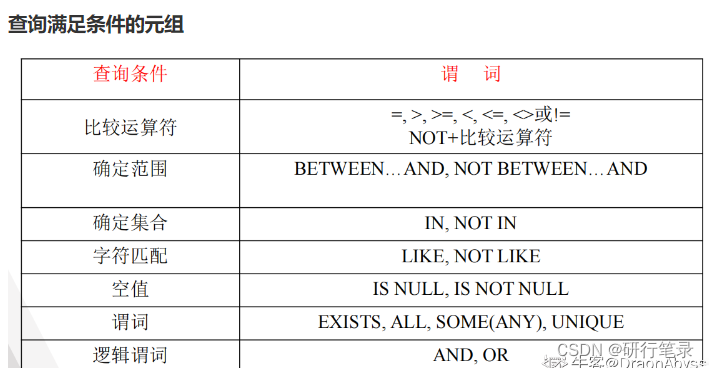
9、 Find the student information of the school is Peking University
example 12. Query all serial numbers yes 1 Class number and class name of No .
SELECT Class number , Class name FROM Class table WHERE Department number = 1
example 13. Check the student number of the student who failed the exam
SELECT DISTINCT Student number FROM League tables WHERE achievement < 60
Now the operator wants to screen out all Peking University Students for user research , Please take the qualified data from the user information table , The result is returned to the device id And school .
SELECT device_id,university FROM user_profile WHERE university= ' Peking University, '
10、 Look for ages greater than 24 Years old user information
Now operations want to target 24 Users over the age of , Please take out the user details that meet the conditions .
SELECT device_id,gender,age,university FROM user_profile WHERE age > 24
11、 Find user information for a certain age group
use BETWEEN…AND and NOT BETWEEN…AND Is a logical operator , It can be used to find tuples whose attribute values are or are not within the specified range , among BETWEEN The lower limit of the specified range at the back ,AND The upper limit of the range specified later .
example 14. Query all serial numbers in 2 and 3 Class number and class name .
SELECT Class number , Class name FROM Class table WHERE Department number BETWEEN 2 AND 3
Equivalent to :
SELECT Class number , Class name FROM Class table WHERE Department number >=2 AND Department number <=3
Now operations want to target 20 Years old and older and 23 Analysis for users aged and under , Please take out the user details that meet the conditions .
SELECT device_id,gender,age FROM user_profile WHERE age BETWEEN 20 AND 23
12、 Find user information except Fudan University
Determine set
Used to find tuples whose attribute values belong to the specified set .The format is : Name [NOT] IN( Constant 1, Constant 2,… Constant n)
IN: When the value in the column is the same as IN When the value of a constant in is equal , The result is True, Indicates that this record is a record that meets the query criteria . NOT
IN: When the value in the column is equal to a constant value , The result is False, Indicates that this record does not meet the query criteria .example 17. Query all class names as “ Electronic information engineering technology ”、“ Electronic sound image ” or “ Electronic assembly technology ” Class number and class name
SELECT Class number , Class name FROM Class table WHERE Class name IN (' Electronic information engineering technology ' , ' Electronic sound image ‘, ' Electronic assembly technology ')
example 18. Querying the class name is neither “ Electronic information engineering technology ”、 Neither “ Electronic sound image ” and “ Electronic assembly technology ” Class number and class name .
SELECT Class number , Class name FROM Class table WHERE Class name NOT IN (' Electronic information engineering technology ' , ' Electronic sound image ‘, ' Electronic assembly technology ')
Now the operator wants to view the details of all users except Fudan University , Please take out the corresponding data
SELECT device_id,gender,age,university FROM user_profile
WHERE university NOT IN (' Fudan University ')
13、 use where Filter null exercises
Null value (NULL) Represent uncertain values in the database . for example , When a student has not taken an exam after taking an elective course , These students have a course selection record , But no test results , Therefore, the test score is null .
Determine whether a value is NULL value , Ordinary comparison operators cannot be used . It is judged that the sentence format with empty value is : Name IS NULL It is judged that the format of the statement whose value is not empty is : Name IS NOT NULL
example 19. Query the student number and corresponding course number of the students who have not yet taken the exam .
SELECT  Student number , Course no.  FROM  League tables
WHERE  achievement  IS NULL
example 20. Query the student number and course number of all the students who have taken the exam .
SELECT Student number , Course no. FROM achievement WHERE achievement IS NOT NULL
Now the operator wants to analyze the age distribution of users , When analyzing, you want to eliminate users who don't get their age , Please take out the detailed data of all users whose age value is not blank .
SELECT device_id,gender,age,university FROM user_profile WHERE age IS NOT NULL
14、 Advanced operator exercises (1)
Multiple criteria query stay WHERE You can use logical operators in clauses AND and OR To form a multi condition query . Use AND The syntax format of the predicate is as follows :
Boolean expression 1 AND Boolean expression 2 AND … AND Boolean expression n Only if all Boolean expressions are true , The result of the whole expression is true , As long as there is a Boolean
The result of the expression is false , The result of the whole expression is false .Use OR The syntax format of the predicate is as follows .
Boolean expression 1 OR Boolean expression 2 OR … OR Boolean expression n
example 21. Query all serial numbers greater than 1 And the class name is “ Electronics ” The first class number and class name .
SELECT  Class number , Class name  FROM  Class table
WHERE  Department number >1 AND  Class name  LIKE ' Electronics %’
example 22. Inquire about 11212P and 11214D The student numbers of all the boys in the class 、 full name 、 Gender and class number .
SELECT  Student number , full name , Gender , Class number  FROM  Student list
WHERE ( Class number = ‘ 11212P ’ OR  Class number = ‘ 11214D ’) AND  Gender =‘ male ’
Now operators want to find men and GPA stay 3.5 The above-mentioned users conduct research , Please take out the relevant data .
SELECT device_id,gender,age,university,gpa FROM user_profile WHERE gender = 'male' AND gpa > 3.5
15、 Advanced operator exercises (2)
Now I want to find a school for Peking University or GPA stay 3.7 The above-mentioned users conduct research , Please take out the relevant data
SELECT device_id,gender,age,university,gpa FROM user_profile WHERE university=' Peking University, ' OR gpa > 3.7
16、Where in and Not in
Now I want to find a school for Peking University 、 Students from Fudan University and Shanda University conducted research , Please take out the relevant data .
SELECT device_id,gender,age,university,gpa FROM user_profile
WHERE university  IN (' Peking University, ' , ' Fudan University ', ' Shandong University ')
17、 Operators mix
Now I want to find gpa stay 3.5 More than Shandong University Users or gpa stay 3.8 The above Fudan University students conducted user research , Please take out the corresponding data
SELECT device_id,gender,age,university,gpa FROM user_profile
WHERE (university=' Shandong University 'AND gpa > 3.5) OR (university=' Fudan University ' AND gpa > 3.8)
18、 View users with Beijing in the school name
Character matching
The general form is :
Name [NOT ] LIKEThe matching string can contain the following four wildcards :
_: Matches any character ;
%: matching 0 Characters or more ;
[ ]: matching [ ] Any character in ( If the characters to be compared are continuous , You can use hyphens “-” surface reach );
[^ ]: Mismatch [ ] Any character in .
example 23. Query the last name in the student table ‘ Zhang ’ Details of students .
SELECT * FROM Student list WHERE full name LIKE ‘ Zhang %’
example 24. Check the last name “ Zhang ” And the name is 3 The student's name of two words .
SELECT * FROM Student list WHERE full name LIKE ' Zhang __’ SELECT * FROM Student list WHERE rtrim( full name ) LIKE ' Zhang __'
example 25. Query the last name in the student table ‘ Zhang ’、 surname ‘ Li ’ And last name ‘ Liu ’ The situation of students .
SELECT * FROM Student list WHERE full name LIKE '[ Zhang Li Liu ]%’
example 26. Look up the... Of the names in the student table 2 The word is “ Small ” or “ Big ” The name and student number of the student .
SELECT full name , Student number FROM Student list WHERE full name LIKE '_[ Small and big ]%'
example 27. Query all non surnames in the student table “ Liu ” Of the students .
SELECT full name FROM Student WHERE full name NOT LIKE ' Liu %’
example 28. The last digit of the student number queried from the student table is not 2、3、5 Student information .
SELECT * FROM Student list WHERE Student number LIKE '%[^235]'
Advanced query
Aggregate data using aggregate functions
SQL The provided statistical functions are :
COUNT(【Shift+8】): The number of tuples in the statistical table ;
COUNT([DISTINCT] < Name >): Count the number of values in this column ;
SUM( < Name > ): Calculate the sum of column values ;
AVG( < Name > ): Calculate the average of column values ;
MAX( < Name > ): Find the maximum value of the column ;
MIN( < Name > ): Find the minimum value of column value .
Divide the above functions by COUNT(【Shift+8】) Outside , Other functions are ignored in the calculation NULL value .
19、 lookup GPA Maximum value
example 29. Count the total number of students .
SELECT COUNT(*) FROM Student list
example 30. Count the number of students who have taken courses .
SELECT COUNT (DISTINCT Student number ) FROM League tables
example 31. The calculation student number is “11214D24” The sum of the students' total test scores .
SELECT SUM( achievement ) FROM League tables WHERE Student number = ‘11214D24 '
example 32. Calculation “M01F011” The average score of the students in the course .
SELECT AVG( achievement ) FROM League tables WHERE Course no. = ‘M01F011 ‘
example 33. Check the elective course “M01F011” The highest and lowest scores of the course .
SELECT MAX( achievement )  The highest , MIN( achievement )  Lowest score  FROM  League tables
WHERE  Course no.  = ‘M01F011 '
Want to operate, want to know Fudan University Students gpa What is the maximum value , Please take out the corresponding data
SELECT MAX(gpa)gpa FROM user_profile WHERE university = ' Fudan University '
20、 Calculate the number of boys and the average GPA
ROUND() function
ROUND Function to round a numeric field to a specified number of decimal places .
SQL ROUND() grammar
SELECT ROUND(column_name,decimals) FROM table_name column_name Field to round
decimals The number of decimal places to return
Now the operator wants to see how many male users there are and their average gpa How much is the , To assist in the design of related activities , Please take out the corresponding data .
SELECT COUNT(gender)male_num,ROUND(AVG(gpa),1) AS avg_gpa FROM user_profile WHERE gender='male'
21、 Group calculation exercises
Group the query results
effect : You can control the level of calculation : For the whole table or for a group .
Purpose : Refine the object of the calculation function .
The general form of grouping statements :
[GROUP BY ]
[HAVING ]
GROUP BY The column by which the clause is grouped must be a column name that exists in the table , Out of commission AS The alias of the result set column assigned by the .
with GROUP BY Clause SELECT The query list of the statement can only be grouped by columns or statistical functions , Because each group only returns one row of results after grouping .
example 34. Count the number of students selected for each course , List the course number and number of people .
SELECT  Course no. , COUNT( Course no. ) AS  The number of students who choose courses
FROM  League tables
GROUP BY  Course no.
This statement first groups the query results by the value of the course number , All tuples with the same course number value are grouped together , Then use for each group COUNT Function to calculate , Find the number of students in each group .
example 35. Query the number of courses and average score of each student .
SELECT  Student number ,
COUNT(*)  The number of elective courses ,
AVG( achievement )  Average score
FROM  League tables
GROUP BY  Student number
Now the operation wants to run every school The number of active users and posts of different genders has increased Line analysis , Please calculate the number of users of each gender in each school 、30 Average active days and average number of posts in a day .
SELECT gender,university,COUNT(*)user_num,AVG(active_days_within_30)avg_active_days,
AVG(question_cnt)avg_quesition_cnt
FROM user_profile
GROUP BY gender,university
21、 Group filter exercises
Use HAVING
HAVING Clause is used to filter the grouped results , Its function is a bit like WHERE Clause , But it's for groups, not individual records .
stay HAVING Clause can use statistical functions , But in WHERE Clause cannot . HAVING Usually with GROUP BY Clauses are used together .
example 36. Query the number of students in the student table is greater than or equal to 3 Shift number and number of people .
SELECT  Class number , COUNT(*)  The number of
FROM  Student list
GROUP BY  Class number
HAVING COUNT(*) >= 3
example 37. Query average score is greater than or equal to 80 Student's student number 、 Number of courses selected and average grade .
SELECT  Student number , COUNT(*)  The number of elective courses ,
AVG( achievement )  Average score  FROM  League tables
GROUP BY  Student number
HAVING AVG( achievement ) >= 80
Now the operator wants to check the average posting and reply of each school user , Look for low activity schools for key operations , Please take out the average number of posts below 5 Your school or average number of replies is less than 20 In the school .
select university, round(avg(question_cnt),3) as avg_question_cnt,
round(avg(answer_cnt),3) as avg_answer_cnt from user_profile
group by university
Having avg_question_cnt <5 or avg_answer_cnt <20
22、 Group sorting exercises
Compare with the question , It's just that there are more conditions for ascending sorting
Now the operator wants to view users from different universities Average posting status , And expect the results to follow the average posting situation Ascending order , Please take out the corresponding data .
select university , avg(question_cnt) as avg_quesition_cnt
from user_profile
group by university
order by avg_quesition_cnt asc;
Multi-table query
23、 Answers to user questions of Zhejiang University
Connect according to two tables , Get the user's answer 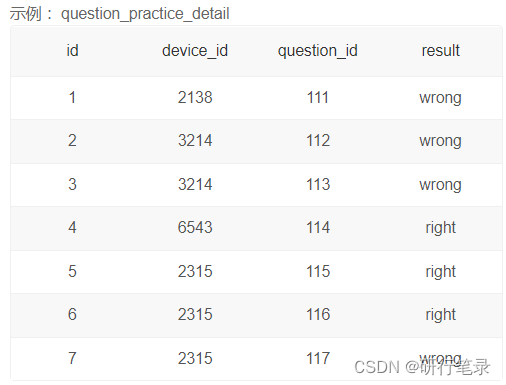

Multi-table query - Multiple table joins
If a query involves two or more tables at the same time , It is called join query .
Join query is the most important query in relational database .
Connection query includes inner connection 、 External connection and cross connection, etc .
The conditions used to join two tables in a join query are called join conditions or join predicates .
The general format is :
 Inner join Syntax :
SELECT …
FROM  Table name
[INNER] JOIN  Connected table
ON  Connection condition
example 39. Query the details of each student and his class .
SELECT * FROM  Student list
INNER JOIN  Class table  ON  Student list . Class number = Class table . Class number
 There are duplicate columns in the result : Class number .
example 40. Remove example 39 Duplicate columns in .
SELECT  Student number ,  full name , Class table . Class number ,  Class name  FROM  Student list  JOIN  Class table
ON  Student list . Class number = Class table . Class number
example 41. Inquire about the class situation of the students who are studying again , Ask to list the students' names 、 The course number and grade of the course taken .
SELECT  full name ,  Course no. ,  achievement
FROM  Student list  JOIN  League tables
ON  Student list . Student number  =  League tables . Student number
WHERE  state  = ' Rebuild '
Table alias
You can provide aliases for tables , The format is as follows :
< Source table name > [ AS ] < Table alias >
Use an alias 41 It can be written as follows :
SELECT  full name ,  Course no. ,  achievement
FROM  Student list  S JOIN  League tables  g
ON S. Student number  = g. Student number
WHERE  state  = ‘ Rebuild ’
notes : If you specify an alias for the table , All other places in the query statement that use the table name should use aliases
Now the operator wants to view the detailed answers to all user questions from Zhejiang University , Please take out the corresponding data
select q.device_id, question_id, result
from question_practice_detail q join user_profile u
on q.device_id = u.device_id
where university = ' Zhejiang University ';
24、 Count the average number of users who have answered questions in each school

This question needs attention user_profile Of answer_cnt Is the interference item , Only required device_id and university Information about .
Because there are multiple pieces of information about the same device , So the average result is question_practice_detail Chung Tung university Of device_id Quantity and device_id Type quotient .
The operation wants to find schools with less enthusiasm to answer questions for key operation , Please take out the average number of questions answered by users in each school .
select university , count(q.device_id) / count(distinct q.device_id) as avg_answer_cnt
from user_profile u join question_practice_detail q
on u.device_id = q.device_id
group by u.university;
25、 Count the average number of questions brushed by users of each difficulty in each school
The operator wants to calculate the number of different schools that participated in the answer 、 The average number of questions answered by users with different difficulties , Please write SQL Take out the corresponding data


Ideas :
Three tables of required information distribution , Therefore, three meter connection is required
Group by school , The difficulty can be in turn
The average calculation still needs to consider the different logins of the same device , need DISTICT To distinguish divisors , And the dividend doesn't have to DISTINCT Distinguish
Problem solving :
select university, d.difficult_level, count(q.device_id)/count(distinct q.device_id)
as avg_answer_cnt
from user_profile u
join question_practice_detail  q on u.device_id = q.device_id
join question_detail d on q.question_id = d.question_id
group by university, difficult_level;

26、 Count the average number of questions brushed by each user
similar SQL introduction 25, But it is limited to Shandong University ,
Can be found in GROUP BY Before to add WHERE Realization
Or in the GROUP BY After add HAVING Realization 【 meanwhile GROUP BY Need to increase the university】
The operator wants to check the average number of questions answered by users of Shandong University under different difficulties , Please take out the corresponding data
select university, d.difficult_level, count(q.device_id)/count(distinct q.device_id)
as avg_answer_cnt
from user_profile u
join question_practice_detail  q on u.device_id = q.device_id
join question_detail d on q.question_id = d.question_id
where university = ' Shandong University '
group by university, difficult_level;

============================================
select university, d.difficult_level, count(q.device_id)/count(distinct q.device_id)
as avg_answer_cnt
from user_profile u
join question_practice_detail  q on u.device_id = q.device_id
join question_detail d on q.question_id = d.question_id
group by university, difficult_level
having university = ' Shandong University ';
27、 Find information about Shandong University or male sex
UNION( and )
Use UNION You can combine multiple query result sets into one result set . caption The number and order of columns in all query statements must be the same .
The data types of corresponding columns in all query statements must be compatible .
ORDER BY Statement should be placed after the last query statement .

Now the operator wants to view the users whose school is Shandong University or whose gender is male device_id、gender、age and gpa data , Please take out the corresponding results , The result is no weight loss .
select device_id, gender, age, gpa from user_profile
where university = ' Shandong University '
union all
select device_id, gender, age, gpa from user_profile
where gender = 'male';
28、 Calculation 25 Number of users aged over and under
CASE function
Is a multi branch function , One of several possible result expressions can be returned according to the value of the condition list .
Can be used wherever expressions are allowed , But it cannot be executed as a statement alone .
It is divided into : Simple CASE function Search for CASE function
>  Simple  CASE function
CASE  Test expression
WHEN  Simple expressions 1 THEN  The result expression 1
WHEN  Simple expressions 2 THEN  The result expression 2 …
WHEN  Simple expressions n THEN  The result expression n
[ ELSE  The result expression n+1 ]
END
 Search for CASE function
CASE
WHEN  Boolean expression 1 THEN  The result expression 1
WHEN  Boolean expression 2 THEN  The result expression 2 …
WHEN  Boolean expression n THEN  The result expression n
[ ELSE  The result expression n+1 ]
END

subject : Now the operation wants to divide users into 25 Under and 25 Two age groups aged and over , View the number of users in these two age groups
select case when age <25 or age is null then '25 Under the age of '
when age >=25 then '25 Years old and over '
end age_cut, count(*)number
from user_profile
group by age_cut
29、 View user details of different age groups
subject : Now the operation wants to divide users into 20 Under the age of ,20-24 year ,25 Three age groups aged and over , View the details of users of different ages , Please take out the corresponding data .( notes : If age is blank, please return other .)

select
    device_id,
    gender,
    case
        when age>=25 then '25 Years old and over '
        when age>=20 then '20-24 year '
        when age<20 then '20 Under the age of '
        else ' other '
    end as age_cut
from user_profile
30、 View user details of different age groups
Date function
DAYOFWEEK(date)
Return date date Week index of (1= Sunday ,2= Monday , ……7= Saturday ). These index values correspond to ODBC standard .
select DAYOFWEEK('1998-02-03')
-> 3
WEEKDAY(date)
return date Week index of (0= Monday ,1= Tuesday , ……6= Sunday ).
mysql> select WEEKDAY('1997-10-04 22:23:00');
-> 5
DAYOFMONTH(date)
return date In the month of , stay 1 To 31 Within the scope of .
mysql> select DAYOFMONTH(‘1998-02-03’);
-> 3
DAYOFYEAR(date)
return date The number of days in a year , stay 1 To 366 Within the scope of .
mysql> select DAYOFYEAR('1998-02-03');
-> 34
MONTH(date)
return date Month of , Range 1 To 12.
mysql> select MONTH('1998-02-03');
-> 2
DAYNAME(date)
return date The name of the week .
mysql> select DAYNAME("1998-02-05");
-> 'Thursday'
MONTHNAME(date)
return date The name of the month of .
mysql> select MONTHNAME("1998-02-05");
-> 'February'
QUARTER(date)
return date The quarter of the year , Range 1 To 4.
mysql> select QUARTER('98-04-01');
-> 2
WEEK(date)
For places where Sunday is the first day of the week , There's a single parameter , return date Weeks of , The scope is 0 To 52.
mysql> select WEEK('1998-02-20');
-> 7
WEEK(date,first)
2 Parameter form WEEK() Allows you to specify whether the week begins on Sunday or Monday .
If the second parameter is 0, Week begins on Sunday ,
If the second parameter is 1, From Monday on .
mysql> select WEEK('1998-02-20',0);
-> 7
mysql> select WEEK('1998-02-20',1);
-> 8
YEAR(date)
return date A year of , The scope is 1000 To 9999.
mysql> select YEAR('98-02-03');
-> 1998
HOUR(time)
return time Hours of , The scope is 0 To 23.
mysql> select HOUR('10:05:03');
-> 10
MINUTE(time)
return time Minutes of , The scope is 0 To 59.
mysql> select MINUTE('98-02-03 10:05:03');
-> 5
SECOND(time)
Come back time The number of seconds , The scope is 0 To 59.
mysql> select SECOND(‘10:05:03’);
-> 3
PERIOD_ADD(P,N)
increase N Months to stage P( In form YYMM or YYYYMM). In form YYYYMM Return value . Pay attention to the phase parameters P It's not a date value .
mysql> select PERIOD_ADD(9801,2);
-> 199803
PERIOD_DIFF(P1,P2)
Back in time P1 and P2 Between months ,P1 and P2 It should be in the form of YYMM or YYYYMM. Be careful , Period parameter P1 and P2 It's not a date value .
mysql> select PERIOD_DIFF(9802,199703);
-> 11
Now the operator wants to calculate 2021 year 8 Number of user practice questions per day per month , Please take out the corresponding data .
select
    day(date) as day, count(question_id) as question_cnt
from question_practice_detail
where month(date)= 8 and year(date) = 2021
group by date
31、 Calculate the average next day retention rate of users
External connection : Only the data in one table must meet the connection conditions , The data in another table may not meet the connection conditions .
The syntax format of the outer connection is :
SELECT … FROM surface 1 LEFT | RIGHT [OUTER]
JOIN surface 2 ON < Connection condition >
left join: Contains all rows of the left table , The corresponding right table row may be empty
right join: Contains all rows of the right table , The corresponding left table row may be empty
full join: Only the rows that match the left and right tables and are not empty
Now the operator wants to check the average probability that users will brush questions again the next day after one day . Please take out the corresponding data .
SELECT count(distinct q2.device_id,q2.date)/count(distinct q1.device_id,q1.date) as avg_ret
FROM question_practice_detail as q1 left outer join question_practice_detail as q2
on q1.device_id=q2.device_id and datediff(q2.date,q1.date)=1;
32、 Count the number of people of each sex
You can use substring_index Function can intercept the source string according to a specific string .
substring_index(FIELD, sep, n) Fields can be FIELD according to sep Separate :
(1). When n Greater than 0 Take the second n Separators (n from 1 Start ) Everything on the left ;
(2). When n Less than 0 Time is the penultimate n Separators (n from -1 Start ) Everything on the right ;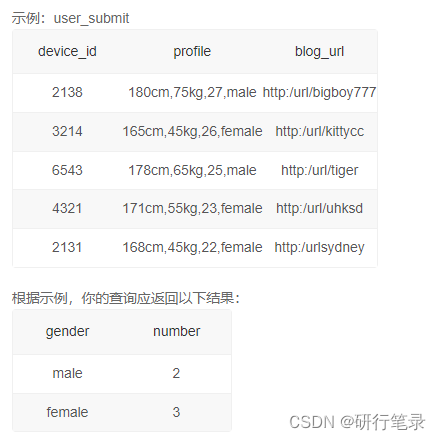
select
    substring_index(profile, ',', -1) as gender,
    count(device_id) as number
from user_submit
group by gender;
33、 Count the number of people of each sex
subject : Now the operator has held a competition , Received some applications , Table data record form is as follows , Now the operator wants to count the number of participants of users of each age , Please take out the corresponding results
select
    substring_index(substring_index(profile, ',', 3),',', -1) as age,
    count(device_id) as number
from user_submit
group by age
34、 Extract blog URL User name in
select
– Substitution method replace(string, ‘ Replaced part ’,‘ The result of replacement ’)
– device_id, replace(blog_url,‘http:/url/’,‘’) as user_name
– Interception method substr(string, start_point, length Optional parameters )
– device_id, substr(blog_url,11,length(blog_url)-10) as user_nam
– Deletion method trim(‘ Deleted fields ’ from Name )
– device_id, trim(‘http:/url/’ from blog_url) as user_name
– Field cutting method substring_index(string, ‘ Cutting marks ’, Number of positions ( Minus sign : Start from the back ))
device_id, substring_index(blog_url,‘/’,-1) as user_name
from user_submit;
For users who apply to participate in the competition ,blog_url Field url The string after the character is the user name of the user's personal blog , Now the operator wants to extract the user field of the user's personal blog as a new field , Please take out the required data .
select device_id,
        substring_index(blog_url,"/", -1) as user_name
from user_submit
35、 Find out every school GPA The lowest classmate
Window function syntax
< Window function > over (partition by < Column name for grouping >
                order by < Column name for sorting >)
< Window function > The location of , You can put the following two functions :
Special window functions , such as rank, dense_rank, row_number etc.
rank If there is a row with parallel ranking , Will occupy the next place 1 1 3
dense_rank If there is a row with parallel ranking , Don't occupy the next place 1 1 2
row_number If there is a row with parallel ranking , And we don't consider the situation of parallel ranking 1 2 3
Aggregate functions , Such as sum. avg, count, max, min etc.
Record for yourself 、 And all the data on its own records
Now I want to find every school gpa The lowest classmate to do research , Please take out the minimum for each school gpa

SELECT device_id, university,gpa FROM
(SELECT device_id, university,gpa,
RANK() over (PARTITION BY university ORDER BY gpa) rk FROM user_profile) up
WHERE up.rk=1;
If it helps you , I hope I can give you a great compliment , Thank you !
边栏推荐
- Database design recommendations
- GO语言-Slice切片
- Laravel 2020-01-01t00:00:00.000000z date conversion
- 收藏 |彻底搞懂感受野的含义与计算
- Go language slice
- Nat Common | le Modèle linguistique peut apprendre des distributions moléculaires complexes
- GO语言数组和切片的区别
- With a lamp inserted in the nostril, the IQ has risen and become popular in Silicon Valley. 30000 yuan is enough
- Project workspace creation steps - Zezhong ar automated test tool
- 1267_FreeRTOS启动第一个任务接口prvPortStartFirstTask实现分析
猜你喜欢
MySQL快速入门实例篇(入内不亏)

Aaai2022 latest "time series data processing" report, 127 pages of PPT describing time series data processing and medical application progress

用户界面之工具栏详解-AutoRunner自动化测试工具

3000 words to teach you how to use mot
![[Yugong series] June 2022 Net architecture class 079 cluster principle of distributed middleware schedulemaster](/img/bc/694f8baec114cc3f6e35c4c76c29f0.png)
[Yugong series] June 2022 Net architecture class 079 cluster principle of distributed middleware schedulemaster

收藏 | 可解释机器学习发展和常见方法!

Code farming essential SQL tuning (Part 1)

想学好ArrayList,看完这篇就够了

(湖南科技大学oj作业)问题 G: 串的模式匹配

laravel 2020-01-01T00:00:00.000000Z 日期转化
随机推荐
问题 AC: 中国象棋中的跳马问题
[Yugong series] June 2022 Net architecture class 078 worker cluster of distributed middleware schedulemaster
Easy to use GS_ Dump and GS_ Dumpall command export data
干掉 Swagger UI,这款神器更好用、更高效!
CLP information - No. 1 central document on Strengthening Rural Revitalization financial services
Nat Common | le Modèle linguistique peut apprendre des distributions moléculaires complexes
Basic SQL statement - delete / update
Opengauss database JDBC environment connection configuration (eclipse)
Laravel 8 uses passport for auth authentication and token issuance
用户界面之工具栏详解-AutoRunner自动化测试工具
What happened to the frequent disconnection of the computer at home
With a lamp inserted in the nostril, the IQ has risen and become popular in Silicon Valley. 30000 yuan is enough
AI function of cutting-edge technology exploration: slow SQL discovery
Db4ai: database driven AI
GO语言数组和切片的区别
Collect | thoroughly understand the meaning and calculation of receptive field
Deep separable convolution
Collection | can explain the development and common methods of machine learning!
面试高频算法题---最长回文子串
Using cloud DB to build app quick start -server