当前位置:网站首页>[pyGame] when the "coolest snake in history" arrives, fun will play it (no money for fun)
[pyGame] when the "coolest snake in history" arrives, fun will play it (no money for fun)
2022-06-10 23:59:00 【Programmer pear】
Preface
author :“ Programmer pear ”
** The article brief introduction **: This article mainly uses pygame Do a snake game .
** Article source code access **: In order to thank everyone who pays attention to me, the project source code of each article is distributed free of charge
Enjoy drops
Welcome friends give the thumbs-up 、 Collection 、 Leaving a message.

Text
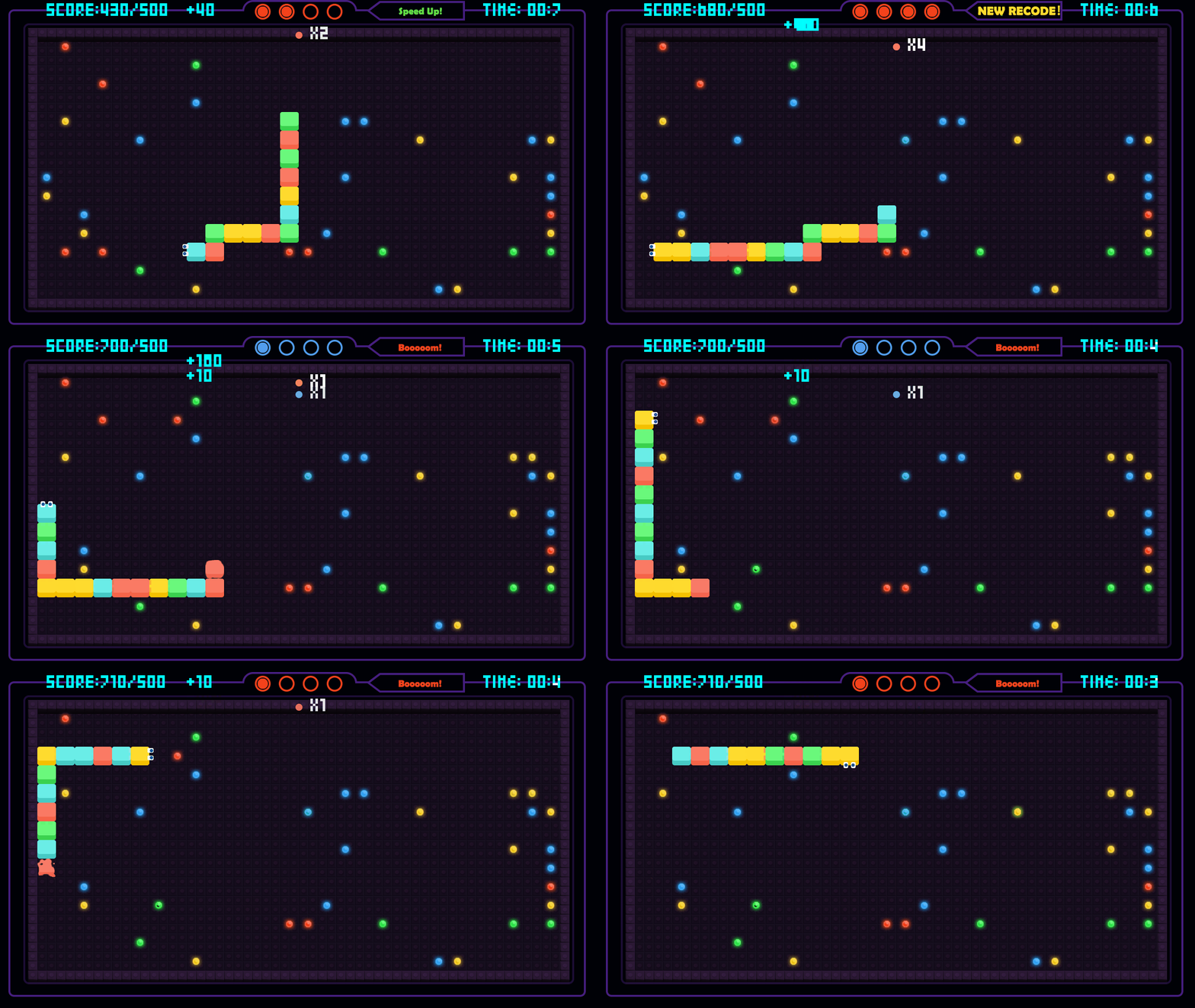
Today I wrote a little game for you —— Classic game 《 snake 》 Gorgeous upgrade to 《 Snake eating battle 》, A new way to play is waiting for you
To challenge ! This is a super fun snake battle leisure competitive game , Not only compete for hand speed , More test your strategy ! Greedy snake
In the world of war , Everyone turns into a little snake at the beginning , Become longer and longer through continuous efforts , Finally grow into a greedy list
The greedy snake at the top of the list .

How to play the game : The collision ends when it reaches the boundary , If you eat the corresponding beans, you will get extra points , Before the end of time, the higher the score, the higher the ranking !
1) Effect display
2) Code display
import random
import pygame
import sys
from pygame.locals import *
# The screen size
Window_Width = 800
Window_Height = 500
# refresh frequency
Display_Clock = 17
# The size of a snake
Cell_Size = 20
assert Window_Width % Cell_Size == 0
assert Window_Height % Cell_Size == 0
Cell_W = int(Window_Width/Cell_Size)
Cell_H = int(Window_Height/Cell_Size)
# The background color
Background_Color = (0, 0, 0)
# Close game interface
def close_game():
pygame.quit()
sys.exit()
# Detect player's buttons
def Check_PressKey():
if len(pygame.event.get(QUIT)) > 0:
close_game()
KeyUp_Events = pygame.event.get(KEYUP)
if len(KeyUp_Events) == 0:
return None
elif KeyUp_Events[0].key == K_ESCAPE:
close_game()
return KeyUp_Events[0].key
# Show current score
def Show_Score(score):
score_Content = Main_Font.render(' score :%s' % (score), True, (255, 255, 255))
score_Rect = score_Content.get_rect()
score_Rect.topleft = (Window_Width-120, 10)
Main_Display.blit(score_Content, score_Rect)
# Get fruit position
def Get_Apple_Location(snake_Coords):
flag = True
while flag:
apple_location = {'x': random.randint(0, Cell_W-1), 'y': random.randint(0, Cell_H-1)}
if apple_location not in snake_Coords:
flag = False
return apple_location
# Show fruit
def Show_Apple(coord):
x = coord['x'] * Cell_Size
y = coord['y'] * Cell_Size
apple_Rect = pygame.Rect(x, y, Cell_Size, Cell_Size)
pygame.draw.rect(Main_Display, (255, 0, 0), apple_Rect)
# Show Snake
def Show_Snake(coords):
x = coords[0]['x'] * Cell_Size
y = coords[0]['y'] * Cell_Size
Snake_head_Rect = pygame.Rect(x, y, Cell_Size, Cell_Size)
pygame.draw.rect(Main_Display, (0, 80, 255), Snake_head_Rect)
Snake_head_Inner_Rect = pygame.Rect(x+4, y+4, Cell_Size-8, Cell_Size-8)
pygame.draw.rect(Main_Display, (0, 80, 255), Snake_head_Inner_Rect)
for coord in coords[1:]:
x = coord['x'] * Cell_Size
y = coord['y'] * Cell_Size
Snake_part_Rect = pygame.Rect(x, y, Cell_Size, Cell_Size)
pygame.draw.rect(Main_Display, (0, 155, 0), Snake_part_Rect)
Snake_part_Inner_Rect = pygame.Rect(x+4, y+4, Cell_Size-8, Cell_Size-8)
pygame.draw.rect(Main_Display, (0, 255, 0), Snake_part_Inner_Rect)
# Draw grid
def draw_Grid():
# vertical direction
for x in range(0, Window_Width, Cell_Size):
pygame.draw.line(Main_Display, (40, 40, 40), (x, 0), (x, Window_Height))
# horizontal direction
for y in range(0, Window_Height, Cell_Size):
pygame.draw.line(Main_Display, (40, 40, 40), (0, y), (Window_Width, y))
# Show start screen
def Show_Start_Interface():
title_Font = pygame.font.Font('simkai.ttf', 100)
title_content = title_Font.render(' snake ', True, (255, 255, 255), (0, 0, 160))
angle = 0
while True:
Main_Display.fill(Background_Color)
rotated_title = pygame.transform.rotate(title_content, angle)
rotated_title_Rect = rotated_title.get_rect()
rotated_title_Rect.center = (Window_Width/2, Window_Height/2)
Main_Display.blit(rotated_title, rotated_title_Rect)
pressKey_content = Main_Font.render(' Press any key to start the game !', True, (255, 255, 255))
pressKey_Rect = pressKey_content.get_rect()
pressKey_Rect.topleft = (Window_Width-200, Window_Height-30)
Main_Display.blit(pressKey_content, pressKey_Rect)
if Check_PressKey():
# Clear event queue
pygame.event.get()
return
pygame.display.update()
Snake_Clock.tick(Display_Clock)
angle -= 5
# Show end screen
def Show_End_Interface():
title_Font = pygame.font.Font('simkai.ttf', 100)
title_game = title_Font.render('Game', True, (233, 150, 122))
title_over = title_Font.render('Over', True, (233, 150, 122))
game_Rect = title_game.get_rect()
over_Rect = title_over.get_rect()
game_Rect.midtop = (Window_Width/2, 70)
over_Rect.midtop = (Window_Width/2, game_Rect.height+70+25)
Main_Display.blit(title_game, game_Rect)
Main_Display.blit(title_over, over_Rect)
pressKey_content = Main_Font.render(' Press any key to start the game !', True, (255, 255, 255))
pressKey_Rect = pressKey_content.get_rect()
pressKey_Rect.topleft = (Window_Width-200, Window_Height-30)
Main_Display.blit(pressKey_content, pressKey_Rect)
pygame.display.update()
pygame.time.wait(500)
# Clear event queue
Check_PressKey()
while True:
if Check_PressKey():
pygame.event.get()
return
# Run the game
def Run_Game():
# Snake birthplace
start_x = random.randint(5, Cell_W-6)
start_y = random.randint(5, Cell_H-6)
snake_Coords = [{'x': start_x, 'y': start_y},
{'x': start_x-1, 'y': start_y},
{'x': start_x-2, 'y': start_y}]
direction = 'right'
apple_location = Get_Apple_Location(snake_Coords)
while True:
for event in pygame.event.get():
if event.type == QUIT:
close_game()
elif event.type == KEYDOWN:
if (event.key == K_LEFT) and (direction != 'right'):
direction = 'left'
elif (event.key == K_RIGHT) and (direction != 'left'):
direction = 'right'
elif (event.key == K_UP) and (direction != 'down'):
direction = 'up'
elif (event.key == K_DOWN) and (direction != 'up'):
direction = 'down'
elif event.key == K_ESCAPE:
close_game()
# Touch the wall or yourself and the game is over
if (snake_Coords[Head_index]['x'] == -1) or (snake_Coords[Head_index]['x'] == Cell_W) or \
(snake_Coords[Head_index]['y'] == -1) or (snake_Coords[Head_index]['y'] == Cell_H):
return
if snake_Coords[Head_index] in snake_Coords[1:]:
return
if (snake_Coords[Head_index]['x'] == apple_location['x']) and (snake_Coords[Head_index]['y'] == apple_location['y']):
apple_location = Get_Apple_Location(snake_Coords)
else:
del snake_Coords[-1]
if direction == 'up':
newHead = {'x': snake_Coords[Head_index]['x'],
'y': snake_Coords[Head_index]['y']-1}
elif direction == 'down':
newHead = {'x': snake_Coords[Head_index]['x'],
'y': snake_Coords[Head_index]['y']+1}
elif direction == 'left':
newHead = {'x': snake_Coords[Head_index]['x']-1,
'y': snake_Coords[Head_index]['y']}
elif direction == 'right':
newHead = {'x': snake_Coords[Head_index]['x']+1,
'y': snake_Coords[Head_index]['y']}
snake_Coords.insert(0, newHead)
Main_Display.fill(Background_Color)
draw_Grid()
Show_Snake(snake_Coords)
Show_Apple(apple_location)
Show_Score(len(snake_Coords)-3)
pygame.display.update()
Snake_Clock.tick(Display_Clock)
# The main function
def main():
global Main_Display, Main_Font, Snake_Clock
pygame.init()
Snake_Clock = pygame.time.Clock()
Main_Display = pygame.display.set_mode((Window_Width, Window_Height))
Main_Font = pygame.font.Font('simkai.ttf', 18)
pygame.display.set_caption(' Snake eating battle ——By Gu Muzi acridine ')
Show_Start_Interface()
while True:
Run_Game()
Show_End_Interface()
if __name__ == '__main__':
main()
summary
Okay , That's all for today's code , Another day full of positive energy ! Let's see you next time !
Note: Xiaobian can get more wonderful content ! Remember to click on the portal
Remember Sanlian ! If you need packaged source code + Free sharing of materials !! Portal

边栏推荐
猜你喜欢

SystemVerilog (x) - user defined type
LabVIEW获取Clamp函数找到的所有点的信息

LabVIEW在波形图或波形图表上显示时间和日期

LabVIEW使用MathScript Node或MATLAB脚本时出现错误1046

【自动回复or提醒小助手】妈妈再也不用担心我漏掉消息了(10行代码系列)

Ilruntime hotfix framework installation and breakpoint debugging

VS的常用设置

Fiddler filtering sessions

【Opencv实战】这个印章“神器”够牛,节省了时间提高了效率,厉害~(附完整源码)
Difference between oscilloscope and spectrum analyzer
随机推荐
示波器和频谱分析仪的区别
快速排序
【Pygame小遊戲】別找了,休閑遊戲專題來了丨泡泡龍小程序——休閑遊戲研發推薦
【无标题】
LabVIEW displays the time and date on the waveform chart or waveform chart
【Pygame小游戏】趣味益智游戏 :打地鼠,看一下能打多少只呢?(附源码)
LabVIEW determines the position of the control in the display coordinate system
【Pygame小游戏】别找了,休闲游戏专题来了丨泡泡龙小程序——休闲游戏研发推荐
【Turtle表白合集】“海底月是天上月,眼前人是心上人。”余生多喜乐,长平安~(附3款源码)
[pyGame games] don't look for it. Here comes the leisure game topic - bubble dragon widget - recommendation for leisure game research and development
Analysis of Genesis public chain
BGP - route map extension (explanation + configuration)
vtk. VTP download in JS
How to remove the blank at the top of listview
【 pygame Games 】 don't find, Leisure Games Theme come 丨 Bubble Dragon applet - - Leisure Games Development recommendation
ILRuntime热更框架 安装以及断点调试
Error 1046 when LabVIEW uses MathScript node or matlab script
Leetcode 501: mode dans l'arbre de recherche binaire
curl导入postman报错小记
LabVIEW中创建毫秒时间标识