当前位置:网站首页>[pyGame games] don't look for it. Here comes the leisure game topic - bubble dragon widget - recommendation for leisure game research and development
[pyGame games] don't look for it. Here comes the leisure game topic - bubble dragon widget - recommendation for leisure game research and development
2022-06-10 23:54:00 【Programmer pear】
Preface
author :“ Programmer pear ”
** The article brief introduction **: This article is mainly based on pyagme Write a casual game .
** Article source code access **: In order to thank everyone who pays attention to me, the project source code of each article is distributed free of charge
Enjoy drops
Welcome friends give the thumbs-up 、 Collection 、 Leaving a message.

Text
《 Bubble music 》 It is a game suitable for all age players , Using a very classic “ Bubble dragon ” The way to eliminate bubbles , The game didn't
There are too many innovative ways to play , Easy to use . When we are alone and no one is chatting, we can use it to pass the time . Come on, come on , Follow
Start playing games with Xiaobian ~

One 、 Effect display
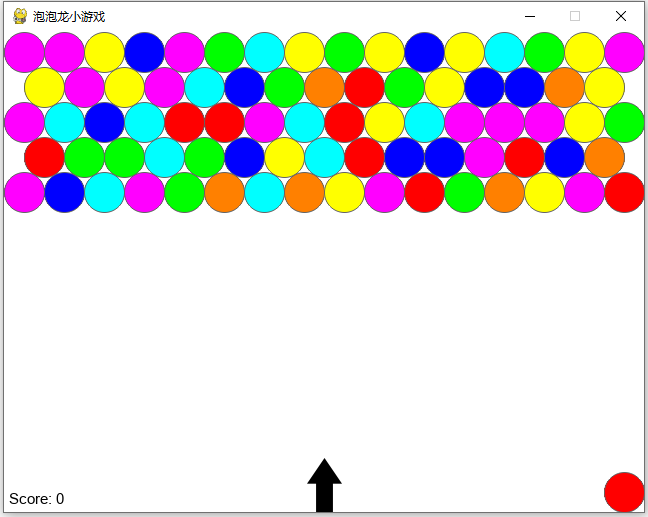
Game running interface

Three of the same color can be eliminated
Two 、 Code implementation
import math, pygame, sys, os, copy, time, random
import pygame.gfxdraw
from pygame.locals import *
FPS = 120
WINDOWWIDTH = 640
WINDOWHEIGHT = 480
TEXTHEIGHT = 20
BUBBLERADIUS = 20
BUBBLEWIDTH = BUBBLERADIUS * 2
BUBBLELAYERS = 5
BUBBLEYADJUST = 5
STARTX = WINDOWWIDTH / 2
STARTY = WINDOWHEIGHT - 27
ARRAYWIDTH = 16
ARRAYHEIGHT = 14
RIGHT = 'right'
LEFT = 'left'
BLANK = '.'
## COLORS ##
# R G B
GRAY = (100, 100, 100)
NAVYBLUE = ( 60, 60, 100)
WHITE = (255, 255, 255)
RED = (255, 0, 0)
GREEN = ( 0, 255, 0)
BLUE = ( 0, 0, 255)
YELLOW = (255, 255, 0)
ORANGE = (255, 128, 0)
PURPLE = (255, 0, 255)
CYAN = ( 0, 255, 255)
BLACK = ( 0, 0, 0)
COMBLUE = (233, 232, 255)
BGCOLOR = WHITE
COLORLIST = [RED, GREEN, BLUE, YELLOW, ORANGE, PURPLE, CYAN]
class Bubble(pygame.sprite.Sprite):
def __init__(self, color, row=0, column=0):
pygame.sprite.Sprite.__init__(self)
self.rect = pygame.Rect(0, 0, 30, 30)
self.rect.centerx = STARTX
self.rect.centery = STARTY
self.speed = 10
self.color = color
self.radius = BUBBLERADIUS
self.angle = 0
self.row = row
self.column = column
def update(self):
if self.angle == 90:
xmove = 0
ymove = self.speed * -1
elif self.angle < 90:
xmove = self.xcalculate(self.angle)
ymove = self.ycalculate(self.angle)
elif self.angle > 90:
xmove = self.xcalculate(180 - self.angle) * -1
ymove = self.ycalculate(180 - self.angle)
self.rect.x += xmove
self.rect.y += ymove
def draw(self):
pygame.gfxdraw.filled_circle(DISPLAYSURF, self.rect.centerx, self.rect.centery, self.radius, self.color)
pygame.gfxdraw.aacircle(DISPLAYSURF, self.rect.centerx, self.rect.centery, self.radius, GRAY)
def xcalculate(self, angle):
radians = math.radians(angle)
xmove = math.cos(radians)*(self.speed)
return xmove
def ycalculate(self, angle):
radians = math.radians(angle)
ymove = math.sin(radians)*(self.speed) * -1
return ymove
class Arrow(pygame.sprite.Sprite):
def __init__(self):
pygame.sprite.Sprite.__init__(self)
self.angle = 90
arrowImage = pygame.image.load('Arrow.png')
arrowImage.convert_alpha()
arrowRect = arrowImage.get_rect()
self.image = arrowImage
self.transformImage = self.image
self.rect = arrowRect
self.rect.centerx = STARTX
self.rect.centery = STARTY
def update(self, direction):
if direction == LEFT and self.angle < 180:
self.angle += 2
elif direction == RIGHT and self.angle > 0:
self.angle -= 2
self.transformImage = pygame.transform.rotate(self.image, self.angle)
self.rect = self.transformImage.get_rect()
self.rect.centerx = STARTX
self.rect.centery = STARTY
def draw(self):
DISPLAYSURF.blit(self.transformImage, self.rect)
class Score(object):
def __init__(self):
self.total = 0
self.font = pygame.font.SysFont('Helvetica', 15)
self.render = self.font.render('Score: ' + str(self.total), True, BLACK, WHITE)
self.rect = self.render.get_rect()
self.rect.left = 5
self.rect.bottom = WINDOWHEIGHT - 5
def update(self, deleteList):
self.total += ((len(deleteList)) * 10)
self.render = self.font.render('Score: ' + str(self.total), True, BLACK, WHITE)
def draw(self):
DISPLAYSURF.blit(self.render, self.rect)
def main():
global FPSCLOCK, DISPLAYSURF, DISPLAYRECT, MAINFONT
pygame.init()
FPSCLOCK = pygame.time.Clock()
pygame.display.set_caption(' Bubble dragon games ')
MAINFONT = pygame.font.SysFont('Helvetica', TEXTHEIGHT)
DISPLAYSURF, DISPLAYRECT = makeDisplay()
while True:
score, winorlose = runGame()
endScreen(score, winorlose)
def runGame():
musicList =['bgmusic.ogg', 'Utopian_Theme.ogg', 'Goofy_Theme.ogg']
pygame.mixer.music.load(musicList[0])
pygame.mixer.music.play()
track = 0
gameColorList = copy.deepcopy(COLORLIST)
direction = None
launchBubble = False
newBubble = None
arrow = Arrow()
bubbleArray = makeBlankBoard()
setBubbles(bubbleArray, gameColorList)
nextBubble = Bubble(gameColorList[0])
nextBubble.rect.right = WINDOWWIDTH - 5
nextBubble.rect.bottom = WINDOWHEIGHT - 5
score = Score()
while True:
DISPLAYSURF.fill(BGCOLOR)
for event in pygame.event.get():
if event.type == QUIT:
terminate()
elif event.type == KEYDOWN:
if (event.key == K_LEFT):
direction = LEFT
elif (event.key == K_RIGHT):
direction = RIGHT
elif event.type == KEYUP:
direction = None
if event.key == K_SPACE:
launchBubble = True
elif event.key == K_ESCAPE:
terminate()
if launchBubble == True:
if newBubble == None:
newBubble = Bubble(nextBubble.color)
newBubble.angle = arrow.angle
newBubble.update()
newBubble.draw()
if newBubble.rect.right >= WINDOWWIDTH - 5:
newBubble.angle = 180 - newBubble.angle
elif newBubble.rect.left <= 5:
newBubble.angle = 180 - newBubble.angle
launchBubble, newBubble, score = stopBubble(bubbleArray, newBubble, launchBubble, score)
finalBubbleList = []
for row in range(len(bubbleArray)):
for column in range(len(bubbleArray[0])):
if bubbleArray[row][column] != BLANK:
finalBubbleList.append(bubbleArray[row][column])
if bubbleArray[row][column].rect.bottom > (WINDOWHEIGHT - arrow.rect.height - 10):
return score.total, 'lose'
if len(finalBubbleList) < 1:
return score.total, 'win'
gameColorList = updateColorList(bubbleArray)
random.shuffle(gameColorList)
if launchBubble == False:
nextBubble = Bubble(gameColorList[0])
nextBubble.rect.right = WINDOWWIDTH - 5
nextBubble.rect.bottom = WINDOWHEIGHT - 5
nextBubble.draw()
if launchBubble == True:
coverNextBubble()
arrow.update(direction)
arrow.draw()
setArrayPos(bubbleArray)
drawBubbleArray(bubbleArray)
score.draw()
if pygame.mixer.music.get_busy() == False:
if track == len(musicList) - 1:
track = 0
else:
track += 1
pygame.mixer.music.load(musicList[track])
pygame.mixer.music.play()
pygame.display.update()
FPSCLOCK.tick(FPS)
def makeBlankBoard():
array = []
for row in range(ARRAYHEIGHT):
column = []
for i in range(ARRAYWIDTH):
column.append(BLANK)
array.append(column)
return array
def setBubbles(array, gameColorList):
for row in range(BUBBLELAYERS):
for column in range(len(array[row])):
random.shuffle(gameColorList)
newBubble = Bubble(gameColorList[0], row, column)
array[row][column] = newBubble
setArrayPos(array)
def setArrayPos(array):
for row in range(ARRAYHEIGHT):
for column in range(len(array[row])):
if array[row][column] != BLANK:
array[row][column].rect.x = (BUBBLEWIDTH * column) + 5
array[row][column].rect.y = (BUBBLEWIDTH * row) + 5
for row in range(1, ARRAYHEIGHT, 2):
for column in range(len(array[row])):
if array[row][column] != BLANK:
array[row][column].rect.x += BUBBLERADIUS
for row in range(1, ARRAYHEIGHT):
for column in range(len(array[row])):
if array[row][column] != BLANK:
array[row][column].rect.y -= (BUBBLEYADJUST * row)
deleteExtraBubbles(array)
def deleteExtraBubbles(array):
for row in range(ARRAYHEIGHT):
for column in range(len(array[row])):
if array[row][column] != BLANK:
if array[row][column].rect.right > WINDOWWIDTH:
array[row][column] = BLANK
def updateColorList(bubbleArray):
newColorList = []
for row in range(len(bubbleArray)):
for column in range(len(bubbleArray[0])):
if bubbleArray[row][column] != BLANK:
newColorList.append(bubbleArray[row][column].color)
colorSet = set(newColorList)
if len(colorSet) < 1:
colorList = []
colorList.append(WHITE)
return colorList
else:
return list(colorSet)
def checkForFloaters(bubbleArray):
bubbleList = [column for column in range(len(bubbleArray[0]))
if bubbleArray[0][column] != BLANK]
newBubbleList = []
for i in range(len(bubbleList)):
if i == 0:
newBubbleList.append(bubbleList[i])
elif bubbleList[i] > bubbleList[i - 1] + 1:
newBubbleList.append(bubbleList[i])
copyOfBoard = copy.deepcopy(bubbleArray)
for row in range(len(bubbleArray)):
for column in range(len(bubbleArray[0])):
bubbleArray[row][column] = BLANK
for column in newBubbleList:
popFloaters(bubbleArray, copyOfBoard, column)
def popFloaters(bubbleArray, copyOfBoard, column, row=0):
if (row < 0 or row > (len(bubbleArray)-1)
or column < 0 or column > (len(bubbleArray[0])-1)):
return
elif copyOfBoard[row][column] == BLANK:
return
elif bubbleArray[row][column] == copyOfBoard[row][column]:
return
bubbleArray[row][column] = copyOfBoard[row][column]
if row == 0:
popFloaters(bubbleArray, copyOfBoard, column + 1, row )
popFloaters(bubbleArray, copyOfBoard, column - 1, row )
popFloaters(bubbleArray, copyOfBoard, column, row + 1)
popFloaters(bubbleArray, copyOfBoard, column - 1, row + 1)
elif row % 2 == 0:
popFloaters(bubbleArray, copyOfBoard, column + 1, row )
popFloaters(bubbleArray, copyOfBoard, column - 1, row )
popFloaters(bubbleArray, copyOfBoard, column, row + 1)
popFloaters(bubbleArray, copyOfBoard, column - 1, row + 1)
popFloaters(bubbleArray, copyOfBoard, column, row - 1)
popFloaters(bubbleArray, copyOfBoard, column - 1, row - 1)
else:
popFloaters(bubbleArray, copyOfBoard, column + 1, row )
popFloaters(bubbleArray, copyOfBoard, column - 1, row )
popFloaters(bubbleArray, copyOfBoard, column, row + 1)
popFloaters(bubbleArray, copyOfBoard, column + 1, row + 1)
popFloaters(bubbleArray, copyOfBoard, column, row - 1)
popFloaters(bubbleArray, copyOfBoard, column + 1, row - 1)
def stopBubble(bubbleArray, newBubble, launchBubble, score):
deleteList = []
popSound = pygame.mixer.Sound('popcork.ogg')
for row in range(len(bubbleArray)):
for column in range(len(bubbleArray[row])):
if (bubbleArray[row][column] != BLANK and newBubble != None):
if (pygame.sprite.collide_rect(newBubble, bubbleArray[row][column])) or newBubble.rect.top < 0:
if newBubble.rect.top < 0:
newRow, newColumn = addBubbleToTop(bubbleArray, newBubble)
elif newBubble.rect.centery >= bubbleArray[row][column].rect.centery:
if newBubble.rect.centerx >= bubbleArray[row][column].rect.centerx:
if row == 0 or (row) % 2 == 0:
newRow = row + 1
newColumn = column
if bubbleArray[newRow][newColumn] != BLANK:
newRow = newRow - 1
bubbleArray[newRow][newColumn] = copy.copy(newBubble)
bubbleArray[newRow][newColumn].row = newRow
bubbleArray[newRow][newColumn].column = newColumn
else:
newRow = row + 1
newColumn = column + 1
if bubbleArray[newRow][newColumn] != BLANK:
newRow = newRow - 1
bubbleArray[newRow][newColumn] = copy.copy(newBubble)
bubbleArray[newRow][newColumn].row = newRow
bubbleArray[newRow][newColumn].column = newColumn
elif newBubble.rect.centerx < bubbleArray[row][column].rect.centerx:
if row == 0 or row % 2 == 0:
newRow = row + 1
newColumn = column - 1
if newColumn < 0:
newColumn = 0
if bubbleArray[newRow][newColumn] != BLANK:
newRow = newRow - 1
bubbleArray[newRow][newColumn] = copy.copy(newBubble)
bubbleArray[newRow][newColumn].row = newRow
bubbleArray[newRow][newColumn].column = newColumn
else:
newRow = row + 1
newColumn = column
if bubbleArray[newRow][newColumn] != BLANK:
newRow = newRow - 1
bubbleArray[newRow][newColumn] = copy.copy(newBubble)
bubbleArray[newRow][newColumn].row = newRow
bubbleArray[newRow][newColumn].column = newColumn
elif newBubble.rect.centery < bubbleArray[row][column].rect.centery:
if newBubble.rect.centerx >= bubbleArray[row][column].rect.centerx:
if row == 0 or row % 2 == 0:
newRow = row - 1
newColumn = column
if bubbleArray[newRow][newColumn] != BLANK:
newRow = newRow + 1
bubbleArray[newRow][newColumn] = copy.copy(newBubble)
bubbleArray[newRow][newColumn].row = newRow
bubbleArray[newRow][newColumn].column = newColumn
else:
newRow = row - 1
newColumn = column + 1
if bubbleArray[newRow][newColumn] != BLANK:
newRow = newRow + 1
bubbleArray[newRow][newColumn] = copy.copy(newBubble)
bubbleArray[newRow][newColumn].row = newRow
bubbleArray[newRow][newColumn].column = newColumn
elif newBubble.rect.centerx <= bubbleArray[row][column].rect.centerx:
if row == 0 or row % 2 == 0:
newRow = row - 1
newColumn = column - 1
if bubbleArray[newRow][newColumn] != BLANK:
newRow = newRow + 1
bubbleArray[newRow][newColumn] = copy.copy(newBubble)
bubbleArray[newRow][newColumn].row = newRow
bubbleArray[newRow][newColumn].column = newColumn
else:
newRow = row - 1
newColumn = column
if bubbleArray[newRow][newColumn] != BLANK:
newRow = newRow + 1
bubbleArray[newRow][newColumn] = copy.copy(newBubble)
bubbleArray[newRow][newColumn].row = newRow
bubbleArray[newRow][newColumn].column = newColumn
popBubbles(bubbleArray, newRow, newColumn, newBubble.color, deleteList)
if len(deleteList) >= 3:
for pos in deleteList:
popSound.play()
row = pos[0]
column = pos[1]
bubbleArray[row][column] = BLANK
checkForFloaters(bubbleArray)
score.update(deleteList)
launchBubble = False
newBubble = None
return launchBubble, newBubble, score
def addBubbleToTop(bubbleArray, bubble):
posx = bubble.rect.centerx
leftSidex = posx - BUBBLERADIUS
columnDivision = math.modf(float(leftSidex) / float(BUBBLEWIDTH))
column = int(columnDivision[1])
if columnDivision[0] < 0.5:
bubbleArray[0][column] = copy.copy(bubble)
else:
column += 1
bubbleArray[0][column] = copy.copy(bubble)
row = 0
return row, column
def popBubbles(bubbleArray, row, column, color, deleteList):
if row < 0 or column < 0 or row > (len(bubbleArray)-1) or column > (len(bubbleArray[0])-1):
return
elif bubbleArray[row][column] == BLANK:
return
elif bubbleArray[row][column].color != color:
return
for bubble in deleteList:
if bubbleArray[bubble[0]][bubble[1]] == bubbleArray[row][column]:
return
deleteList.append((row, column))
if row == 0:
popBubbles(bubbleArray, row, column - 1, color, deleteList)
popBubbles(bubbleArray, row, column + 1, color, deleteList)
popBubbles(bubbleArray, row + 1, column, color, deleteList)
popBubbles(bubbleArray, row + 1, column - 1, color, deleteList)
elif row % 2 == 0:
popBubbles(bubbleArray, row + 1, column, color, deleteList)
popBubbles(bubbleArray, row + 1, column - 1, color, deleteList)
popBubbles(bubbleArray, row - 1, column, color, deleteList)
popBubbles(bubbleArray, row - 1, column - 1, color, deleteList)
popBubbles(bubbleArray, row, column + 1, color, deleteList)
popBubbles(bubbleArray, row, column - 1, color, deleteList)
else:
popBubbles(bubbleArray, row - 1, column, color, deleteList)
popBubbles(bubbleArray, row - 1, column + 1, color, deleteList)
popBubbles(bubbleArray, row + 1, column, color, deleteList)
popBubbles(bubbleArray, row + 1, column + 1, color, deleteList)
popBubbles(bubbleArray, row, column + 1, color, deleteList)
popBubbles(bubbleArray, row, column - 1, color, deleteList)
def drawBubbleArray(array):
for row in range(ARRAYHEIGHT):
for column in range(len(array[row])):
if array[row][column] != BLANK:
array[row][column].draw()
def makeDisplay():
DISPLAYSURF = pygame.display.set_mode((WINDOWWIDTH, WINDOWHEIGHT))
DISPLAYRECT = DISPLAYSURF.get_rect()
DISPLAYSURF.fill(BGCOLOR)
DISPLAYSURF.convert()
pygame.display.update()
return DISPLAYSURF, DISPLAYRECT
def terminate():
pygame.quit()
sys.exit()
def coverNextBubble():
whiteRect = pygame.Rect(0, 0, BUBBLEWIDTH, BUBBLEWIDTH)
whiteRect.bottom = WINDOWHEIGHT
whiteRect.right = WINDOWWIDTH
pygame.draw.rect(DISPLAYSURF, BGCOLOR, whiteRect)
def endScreen(score, winorlose):
endFont = pygame.font.SysFont('Helvetica', 20)
endMessage1 = endFont.render('You ' + winorlose + '! Your Score is ' + str(score) + '. Press Enter to Play Again.', True, BLACK, BGCOLOR)
endMessage1Rect = endMessage1.get_rect()
endMessage1Rect.center = DISPLAYRECT.center
DISPLAYSURF.fill(BGCOLOR)
DISPLAYSURF.blit(endMessage1, endMessage1Rect)
pygame.display.update()
while True:
for event in pygame.event.get():
if event.type == QUIT:
terminate()
elif event.type == KEYUP:
if event.key == K_RETURN:
return
elif event.key == K_ESCAPE:
terminate()
if __name__ == '__main__':
main() summary
Follow Xiaobian for more wonderful content ! Remember to click on the portal
Remember Sanlian ! If you need packaged source code + Free sharing of materials !! Portal

边栏推荐
猜你喜欢

苹果CMS采集站源码-搭建教程-附带源码-全新源码-开发文档

Solve access denied for user 'root' @ 'localhost' (using password: yes)

30 | how to reset the consumer group displacement?

判等问题:如何确定程序的判断是正确的?

Error 1046 when LabVIEW uses MathScript node or matlab script
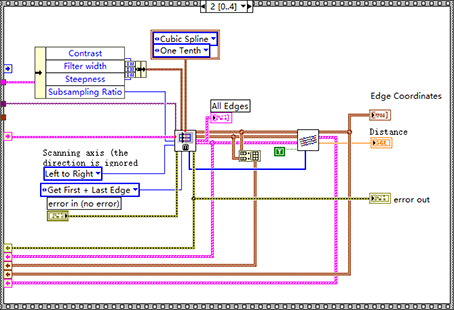
LabVIEW获取Clamp函数找到的所有点的信息
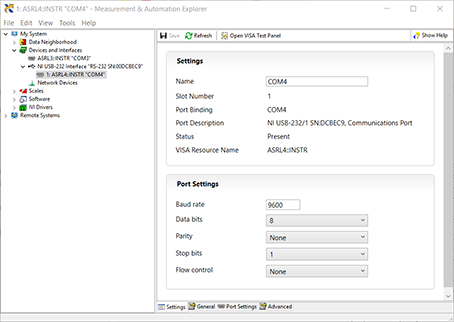
The serial port in the visa test panel under LabVIEW or max does not work

黑马头条丨腾讯薪酬制度改革引争议;英特尔全国扩招女工程师;黑马100%就业真的吗......
![[untitled]](/img/7e/aab9560ef5a1b93f737a82561ec114.png)
[untitled]

ILRuntime热更框架 安装以及断点调试
随机推荐
IGBT and third generation semiconductor SiC double pulse test scheme
Analysis of Genesis public chain
【Opencv实战】这个印章“神器”够牛,节省了时间提高了效率,厉害~(附完整源码)
LabVIEW错误“内存已满 - 应用程序停止在节点”
Vs tomato assistant add header comments and usage
LabVIEW中创建毫秒时间标识
Easyrecovery15 simple and convenient data recovery tool
黑马头条丨腾讯薪酬制度改革引争议;英特尔全国扩招女工程师;黑马100%就业真的吗......
细数十大信息安全原则
ILRuntime热更框架 安装以及断点调试
LabVIEW open other exe programs
Prefer "big and small weeks", only write 200 lines of code every day, and the monthly salary of 8k-17k people will rise again
LabVIEW change the shape or color of point ROI overlay
Why many new websites are not included by search engines
OSS stores and exports related content
LeetCode 501 :二叉搜索樹中的眾數
What is the workflow of dry goods MapReduce?
LabVIEW 禁止其他可多核心处理的应用程序在所有核心上执行
Redis installation and common problem solving based on centeros7 (explanation with pictures)
Excel essential toolbox 17.0 Free Edition