当前位置:网站首页>SAP UI5 FileUploader 的隐藏 iframe 设计明细
SAP UI5 FileUploader 的隐藏 iframe 设计明细
2022-07-27 15:06:00 【汪子熙】
其实现代码位置如下:
	/** * Helper to retrieve the I18N texts for a button * @private */
	FileUploader.prototype.getBrowseText = function() {


		// as the text is the same for all FileUploaders, get it only once
		if (!FileUploader.prototype._sBrowseText) {

			var rb = sap.ui.getCore().getLibraryResourceBundle("sap.ui.unified");
			FileUploader.prototype._sBrowseText = rb.getText("FILEUPLOAD_BROWSE");
		}

		return FileUploader.prototype._sBrowseText ? FileUploader.prototype._sBrowseText : "Browse...";

	};
从上图可以看出,SAP UI5 框架从一个 library 文件里,根据 key FILEUPLOAD_BROWSE 读取其对应值,结果为 Browse... 这个字符串。

上图 1854 行的三元表达式,代表的逻辑是,如果从 library 文件里根据 key FILEUPLOAD_BROWSE 读取失败,则返回硬编码的默认值 Browse...

SAP UI5 FileUploader 控件所属的 sap.ui.unified 整个库的资源文件位置:https://sapui5.hana.ondemand.com/resources/sap/ui/unified/messagebundle_en_US.properties
关于 SAP UI5 全球化,多语言和翻译的支持,请参阅 Jerry 的教程:SAP UI5 应用开发教程之八 - 多语言的支持
在 FileUploader 的 onAfterRendering 钩子里,执行 prepareFileUploadAndIFrame:

首先为 file upload 做准备:
不要把这个 this.oFileUpload 同之前的 this.oFilePath 相混淆。

这个 aFileUpload 是存储最后渲染出原生 HTML 源代码的场所。
最后生成的源代码:

'<input ', 'type="file" ', 'aria-hidden="true" ', 'name="myFileUpload" ', 'id="__xmlview0--fileUploader-fu" ', 'tabindex="-1" ', 'size="1" ', 'title="Upload your file to the local server" ', '>'
this.oFileUpload = jQuery(aFileUpload.join("")).prependTo(this.$().find(".sapUiFupInputMask")).get(0);
上面代码通过 jQuery 代码查找的 css 类:sapUiFupInputMask,在 elements 面板里位置如下:
最后 this.oFileUpload 指向 jQuery 通过 css 选择器返回的 dom 实例:

也就是这个 input 字段:
<input type="file" aria-hidden="true" name="myFileUpload" id="__xmlview0--fileUploader-fu" tabindex="-1" size="1" title="Upload your file to the local server">
创建隐藏的 iframe,并且插入到 static area 里:

给这个隐藏的 iframe 注册 load 事件:

点击 Browse... 按钮之后,会弹出选择本地文件的对话框:
然后触发 handlechange,使用 var uploadForm = this.getDomRef("fu_form"); 拿到 form 实例:
通过事件对象的 target.files 字段,拿到用户选择好的本地文件。
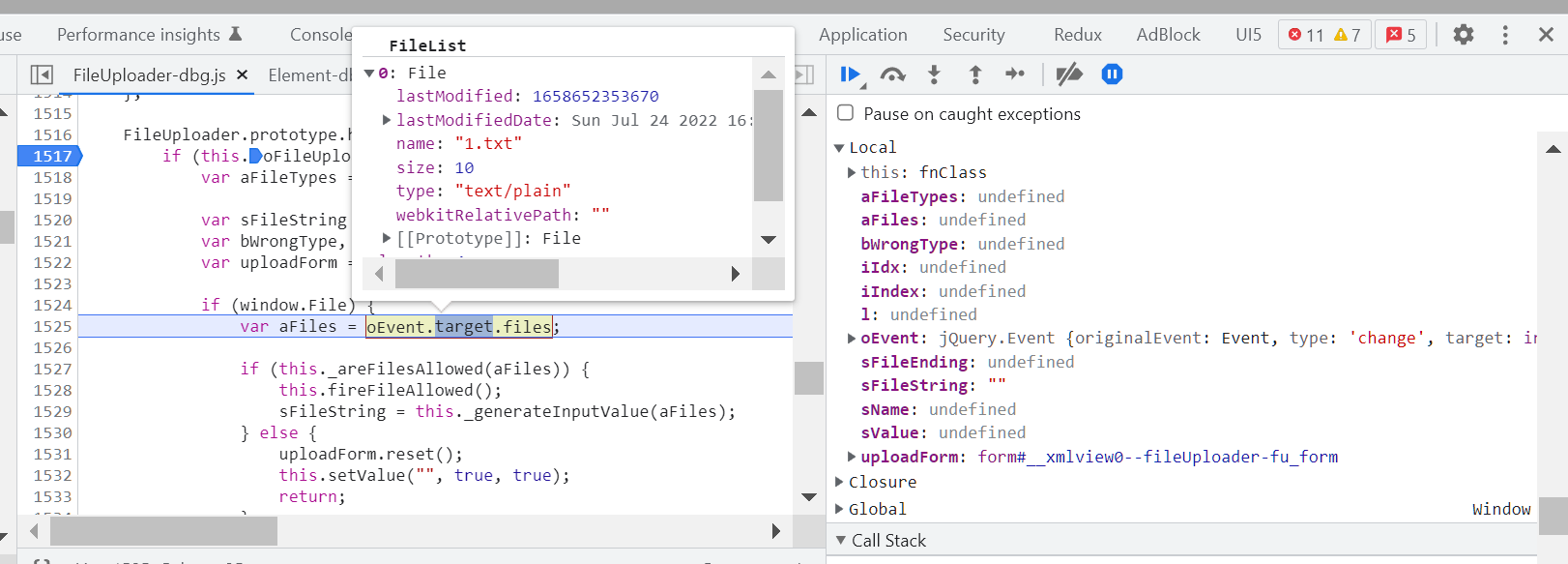
抛出一个 change 事件:
边栏推荐
猜你喜欢

三表联查2

Shell programming specifications and variables
The difference between MVC and MVP and MVVM

Layoff quarrel, musk: I'm too hard; Mercilessly open source a public opinion acquisition project; Feature engineering is as simple as parameter adjustment?! Nerf boss shouted that he couldn't move; Cu

选 择 结 构

Understand the basic properties of BOM and DOM

如何通过C#/VB.NET从PDF中提取表格

File类字节输入、输出流

Natural sorting: comparable interface, customized sorting: the difference between comparator interface
Select structure

随机推荐
This large model sparse training method with high accuracy and low resource consumption has been found by Alibaba cloud scientists! Has been included in IJCAI
C语言之文件操作
Get the array list of the previous n days and the previous and subsequent days of the current time, and cycle through each day
Cryptography series: certificate format representation of PKI X.509
Dynamic memory allocation in C language
How to modify the decoding clock [chapter]
String numeric type converted to thousands
如何通过C#/VB.NET从PDF中提取表格
Storage of data in C language
分享一个网上搜不到的「Redis」实现「聊天回合制」的方案
URL return nil and urlhash processing
UML图介绍
New attributes of ES6 array
随机数公式Random
C语言之结构体及位段
C语言之分支循环语句
The difference between MVC and MVP and MVVM
App Crash收集和分析
day07 作业
C语言之指针进阶